
1. Introduction
The Generic L9 Motorcycle 2K WiFi Body Camera is a versatile recording device designed for both sports enthusiasts and law enforcement professionals. It features 2K Ultra HD video recording, a 150° wide-angle lens, night vision capabilities, and WiFi connectivity for remote operation. Its robust, weatherproof design ensures reliable performance in various outdoor conditions.
2. Package Contents
Please verify that all items listed below are included in your package:
- Sport Camera (L9 Body Camera)
- Bracket(s) (various types for mounting)
- Charging Cable
- SD Card (32GB)
- Instruction Manual

Image: All items included in the L9 Body Camera package. This includes the camera unit, two different mounting brackets, a USB charging cable, and a 32GB SD card.
3. Product Overview
Familiarize yourself with the camera's components and controls.
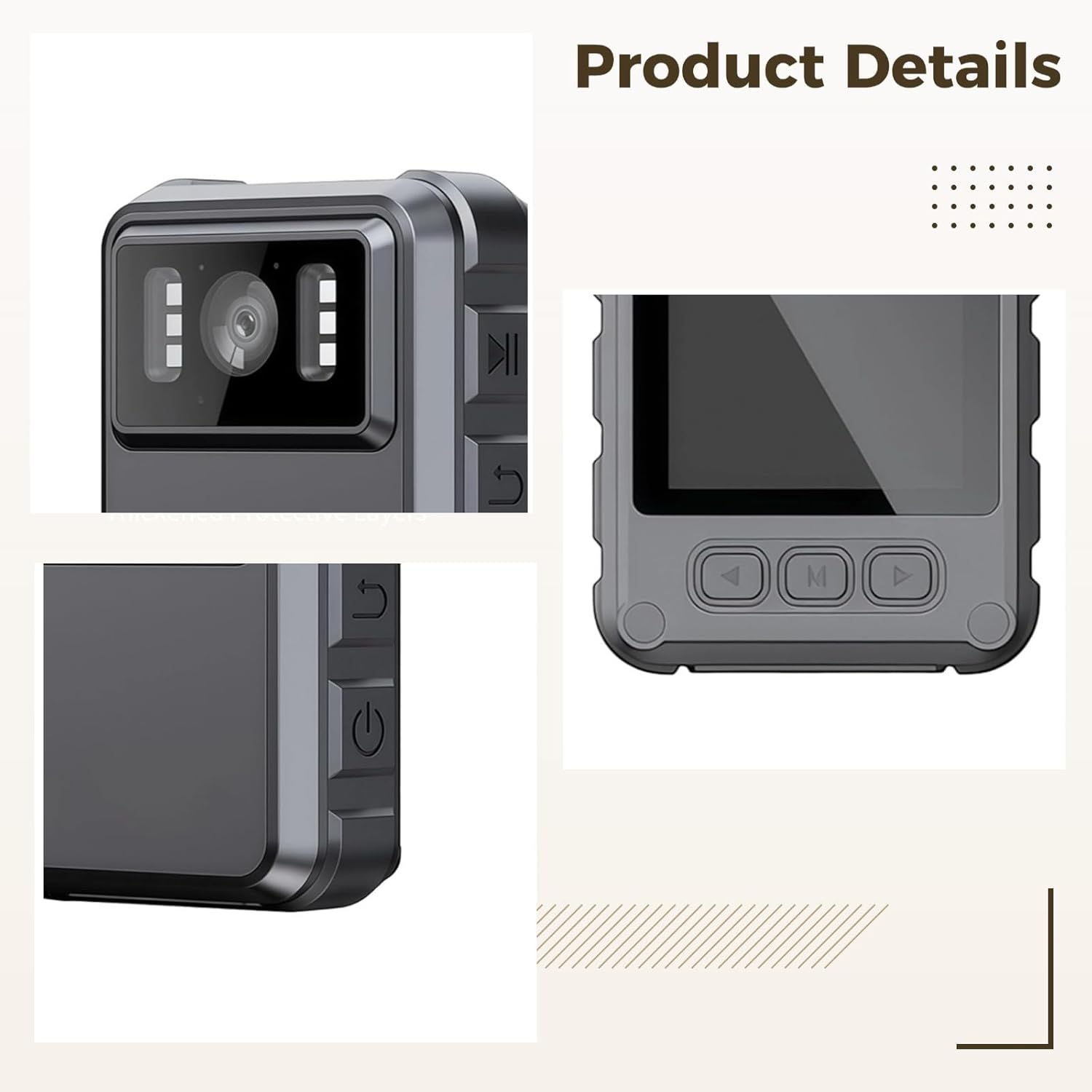
Image: Close-up view of the L9 Body Camera, highlighting the front camera lens, surrounding infrared lights for night vision, and various control buttons located on the side of the device.
Key Features:
- Video Clarity: Records in 2K Ultra HD (3840 x 2160) for crystal-clear footage.
- Expansive View: 150° super-wide lens captures a broad field of view.
- Wireless Control: WiFi enabled for remote operation and live streaming to a device.
- Night Recording: Six infrared lights provide superior night vision in low light.
- Weatherproof Build: IP65 waterproof and dustproof rating for outdoor use.
- Battery: 1800mAh capacity for extended recording.
- Storage: Includes a 32GB SD card.
4. Setup
4.1 Charging the Battery
- Connect the provided charging cable to the camera's charging port.
- Connect the other end of the cable to a USB power adapter (not included) or a computer's USB port.
- The charging indicator light will illuminate. It will change color or turn off once fully charged.
- A full charge typically takes approximately 3-4 hours.
4.2 Inserting the SD Card
- Locate the SD card slot on the camera.
- Gently insert the 32GB SD card with the gold contacts facing the correct direction (refer to the diagram on the camera if available) until it clicks into place.
- To remove, push the card in slightly until it springs out.
- Note: Ensure the camera is powered off before inserting or removing the SD card to prevent data corruption.
4.3 Mounting the Camera
The camera comes with adjustable brackets for various mounting options, such as on a motorcycle, bicycle, or as a body camera.
- Select the appropriate bracket for your intended use.
- Attach the camera securely to the bracket.
- Mount the bracket to your desired location, ensuring a stable and clear view.

Image: The L9 Body Camera securely mounted on the handlebars of a racing bicycle, demonstrating its use during an outdoor activity.
5. Operating Instructions
5.1 Powering On/Off
- To Power On: Press and hold the Power button (usually marked with a power symbol) for a few seconds until the indicator light illuminates and the camera starts.
- To Power Off: Press and hold the Power button again until the indicator light turns off and the camera shuts down.
5.2 Video Recording
- Once powered on, the camera may automatically begin recording or enter standby mode.
- Press the Record button (often marked with a red dot or camera icon) to start recording. The indicator light will typically flash to show recording is in progress.
- Press the Record button again to stop recording. The indicator light will return to a steady state (standby).
- The camera records in 2K Ultra HD (3840 x 2160) resolution.
5.3 Night Vision Mode
The L9 camera is equipped with six infrared lights for enhanced night vision.
- Night vision mode may activate automatically in low-light conditions.
- Refer to the camera's on-screen menu or specific button (if available) to manually toggle night vision on or off.
- Ensure the infrared lights are not obstructed for optimal performance.
5.4 Audio Recording
The camera records audio along with video. Ensure the microphone is not covered for clear sound capture.
5.5 WiFi Connectivity and Remote Operation
- Download the dedicated mobile application for the L9 Body Camera (check the manual or product packaging for app name/QR code).
- Turn on the camera's WiFi function (usually via a dedicated button or menu option).
- On your smartphone or tablet, connect to the camera's WiFi network (SSID and password will be displayed on the camera screen or in the manual).
- Open the mobile application to view live footage, control recording, and adjust settings remotely.
6. Maintenance
6.1 Cleaning
- Wipe the camera body with a soft, damp cloth. Do not use harsh chemicals or abrasive cleaners.
- For the lens, use a specialized lens cleaning cloth and solution to avoid scratches.
6.2 Storage
- Store the camera in a cool, dry place away from direct sunlight and extreme temperatures.
- If storing for extended periods, ensure the battery is partially charged (around 50%) to prolong its lifespan.
6.3 Weather Resistance
The L9 camera has an IP65 rating, meaning it is protected against dust ingress and low-pressure water jets from any direction. While it is weatherproof, avoid submerging the camera in water.
7. Troubleshooting
| Problem | Possible Cause | Solution |
|---|---|---|
| Camera does not power on. | Battery is depleted. | Charge the camera fully. |
| Recording stops unexpectedly. | SD card is full or corrupted. | Delete old files, format the SD card, or replace it. Ensure the card is properly inserted. |
| Poor video quality. | Lens is dirty; low light conditions; incorrect settings. | Clean the lens. Ensure night vision is active in low light. Check video resolution settings. |
| WiFi connection issues. | Incorrect password; camera WiFi not enabled; app issues. | Verify WiFi password. Ensure camera WiFi is on. Restart camera and mobile device. Reinstall app if necessary. |
8. Specifications
| Feature | Detail |
|---|---|
| Model | L9 |
| Video Resolution | 2K Ultra HD (3840 x 2160) |
| Lens Angle | 150° Wide Angle |
| Battery Capacity | 1800mAh |
| Connectivity | WiFi |
| Night Vision | Yes, with six infrared lights |
| Waterproof Rating | IP65 (dustproof and protected against low-pressure water jets) |
| Storage | 32GB SD Card included |
| Material | ABS |
| Product Dimensions | 3.15 in x 2.36 in x 1.18 in (8 cm x 6 cm x 3 cm) |

Image: A visual representation of the L9 Body Camera with its key dimensions labeled: 3.15 inches (height), 2.36 inches (width), and 1.18 inches (depth).
9. Warranty and Support
For warranty information or technical support, please refer to the contact details provided with your purchase documentation or visit the manufacturer's official website. Keep your proof of purchase for warranty claims.


