
1. Introduction
Thank you for choosing the TAGVIT Digital Torque Wrench TA-DN1. This precision instrument is designed for accurate torque measurement and application in various tasks, including automotive repair, bicycle maintenance, and industrial assembly. This manual provides essential information for the safe and effective use, maintenance, and troubleshooting of your digital torque wrench.
2. Safety Information
Please read and understand all safety instructions before operating this tool. Failure to follow these instructions may result in injury or damage to the tool or workpiece.
- Always wear appropriate personal protective equipment, such as safety glasses.
- Ensure the workpiece is securely fastened before applying torque.
- Do not exceed the maximum torque capacity of the wrench (99.57 Ft-lbs for this model).
- Keep the tool clean and dry. Do not expose it to extreme temperatures or corrosive environments.
- Do not use the wrench as a pry bar or hammer.
- Store the wrench in a safe place, away from children and unauthorized users.
3. Product Overview
The TAGVIT Digital Torque Wrench TA-DN1 features a large color screen, multiple measurement modes, and a rechargeable battery for enhanced precision and convenience.
Key Features:
- High Precision Measurement: Advanced strain gauge sensor ensures ±2% accuracy.
- 2-Inch Large Color Screen: Vibrant LCD displays real-time torque values and alerts.
- Multiple Measurement Modes: Supports kg-m, Nm, in-lb, and ft-lb.
- Audible and Vibration Alerts: Prevents over-tightening.
- USB-C Rechargeable Battery: 1500mAh lithium battery provides 12+ hours of continuous use.
- Smart Memory Function: Stores 500+ torque profiles.
- Rugged Design: Tested to MIL-STD-810G military standards for impact resistance and IP65 waterproof rating.
Components:
Familiarize yourself with the main components of your digital torque wrench.
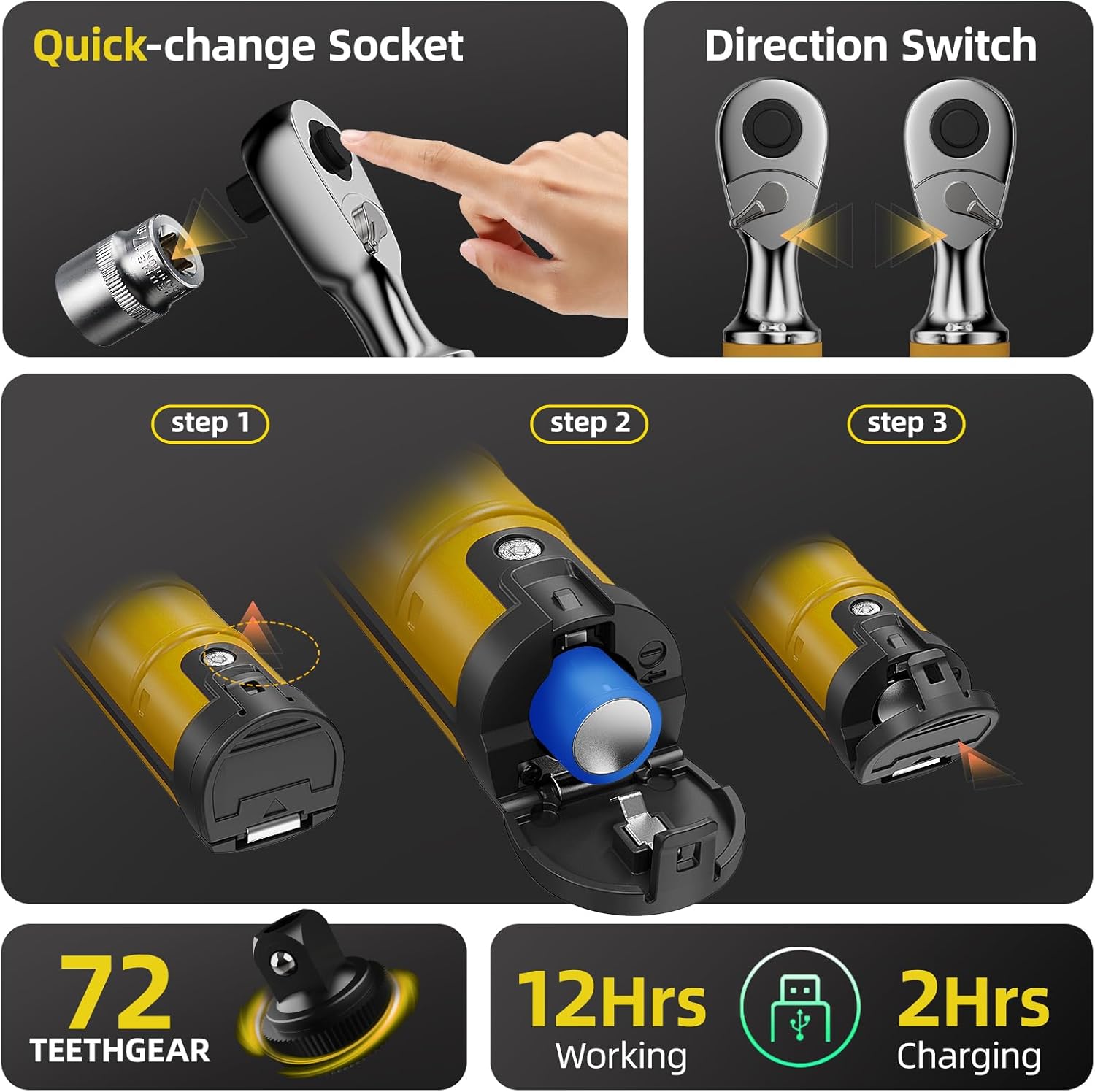
Image 3.1: Overview of wrench features including quick-change socket, direction switch, and battery charging steps.
- Quick-change Socket Drive: For easy attachment and removal of sockets.
- Direction Switch: Allows for clockwise and counter-clockwise operation.
- Digital Display: Shows torque values, units, and mode.
- Control Buttons: For setting modes, units, and target torque.
- Battery Compartment/Charging Port: Houses the rechargeable battery and USB-C port.
4. Setup
4.1 Initial Charging
Before first use, fully charge the wrench's internal battery.
- Locate the USB-C charging port, typically under a protective cover.
- Connect the provided USB-C cable to the wrench and a suitable USB power adapter (not included).
- The charging indicator on the display will show charging status. A full charge takes approximately 2 hours and provides over 12 hours of working time.
Image 4.1: Visual guide for the 3-step battery charging process.
4.2 Attaching Sockets
The wrench features a quick-change socket drive for easy attachment.
- Select the appropriate 1/2-inch drive socket for your application.
- Align the socket with the drive head and push firmly until it clicks into place.
- To remove, press the quick-release button (if present) and pull the socket off.
5. Operation
5.1 Power On/Off
- To power on, press and hold the power button (usually labeled 'M' or a power symbol) for a few seconds.
- To power off, press and hold the power button again. The wrench may also have an auto-off feature after a period of inactivity.
5.2 Unit Selection
The wrench supports four measurement units: kg-m, Nm, in-lb, and ft-lb.
- Press the 'U' button (Unit button) to cycle through the available units until your desired unit is displayed.
5.3 Setting Target Torque
To set a specific target torque value:
- Ensure the wrench is in the desired operating mode (see Section 5.4).
- Use the Up (▲) and Down (▼) arrow buttons to adjust the target torque value. Pressing and holding will increase/decrease the value faster.
- The display will show the set target torque.
5.4 Operating Modes: Track and Peak
The wrench offers two primary operating modes: Track Mode and Peak Mode.
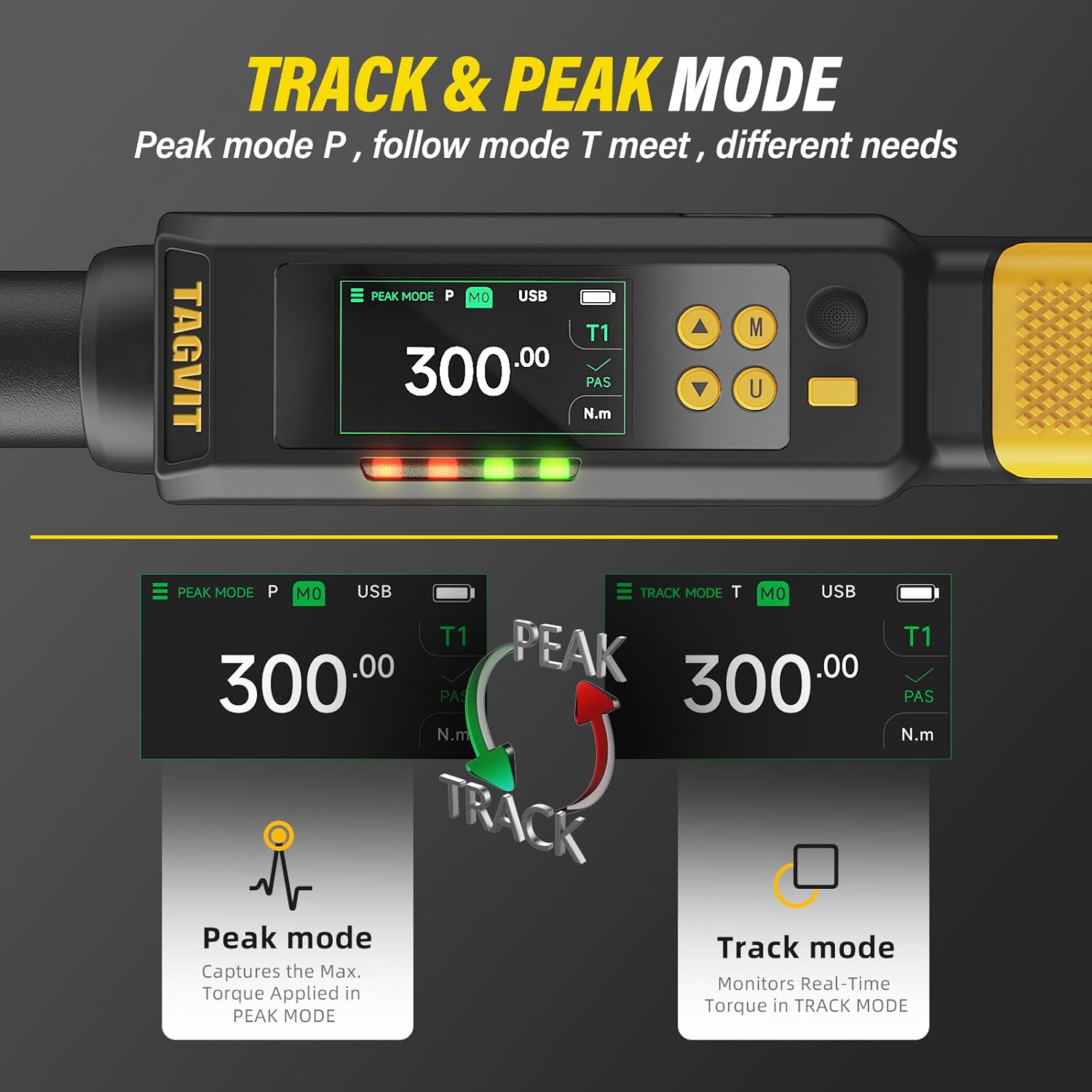
Image 5.1: Comparison of Peak Mode (P) and Track Mode (T) display.
- Track Mode (T): Monitors and displays real-time torque as it is applied. This is useful for observing torque changes during tightening.
- Peak Mode (P): Captures and displays the maximum torque value applied during a tightening sequence. This is ideal for ensuring a specific torque has been reached.
- Press the 'M' button (Mode button) to switch between Track Mode and Peak Mode.
5.5 LED Indicator & Buzzer Alarm
The wrench provides visual and audible alerts to help achieve target torque accurately.

Image 5.2: LED and buzzer alerts indicating proximity to target torque.
- Green Light (85% - 90% of Target Torque): The LED indicator will illuminate green, and an intermittent beeping sound will occur, signaling proximity to the target torque.
- Red Light (100% of Target Torque): The LED indicator will turn red, and a persistent beeping sound will occur, indicating that the target torque has been reached. Stop applying force immediately.
6. Data Memory
The TAGVIT Digital Torque Wrench can store over 500 torque profiles, allowing for detailed record-keeping and review of past operations.

Image 6.1: Display showing stored data values and pass/fail results.
- After each successful torque application in Peak Mode, the result is automatically saved.
- To access stored data, navigate through the menu using the 'M' button or specific data review buttons (refer to on-screen prompts).
- Each record typically includes the torque value, unit, and a pass/fail (NG) indicator based on the set tolerance.
7. Maintenance
7.1 Cleaning
- Wipe the wrench clean with a soft, dry cloth after each use.
- Do not use abrasive cleaners or solvents, as they may damage the display or housing.
7.2 Storage
- Store the wrench in its protective case in a dry, cool place, away from direct sunlight and extreme temperatures.
- For long-term storage, ensure the battery is partially charged (around 50%) to prolong its lifespan. Recharge every 3-6 months if not in use.
7.3 Calibration
While the wrench is factory calibrated and designed for long-term accuracy, periodic calibration by a certified service center is recommended for critical applications, typically annually or after significant impact.

Image 7.1: Example of a calibration certificate, highlighting adherence to ISO standards.
8. Troubleshooting
If you encounter issues with your TAGVIT Digital Torque Wrench, refer to the following common problems and solutions:
| Problem | Possible Cause | Solution |
|---|---|---|
| Wrench does not power on. | Battery is depleted. | Charge the battery using the provided USB-C cable. |
| Inaccurate torque readings. | Incorrect unit selected; Wrench needs calibration; Improper use. | Verify unit setting; Consider professional calibration; Ensure proper technique (smooth, steady pull). |
| Display is dim or unreadable. | Low battery; Extreme temperature. | Charge the battery; Move to an environment within the operating temperature range (-20°C to 60°C). |
| No audible or vibration alert. | Alerts disabled; Malfunction. | Check settings to ensure alerts are enabled; If issue persists, contact support. |
9. Specifications
- Model Number: TA-DN1
- Drive Size: 1/2-Inch
- Torque Range: 5-99.57 Ft-lbs (6.78-135 Nm)
- Accuracy: ±2%
- Measurement Units: kg-m, Nm, in-lb, ft-lb
- Battery: 1500mAh USB-C Rechargeable Lithium Battery
- Battery Life: 12+ hours continuous use (2 hours charging time)
- Data Memory: 500+ records
- Operating Temperature: -20°C to 60°C
- Protection Rating: IP65 (Dust and water resistant)
- Durability Standard: MIL-STD-810G (Impact resistance)
10. Warranty and Support
TAGVIT stands behind the quality of its products.
10.1 Lifetime Warranty
This product is covered by a Lifetime Warranty against manufacturing defects. In the event of a defect, TAGVIT offers free replacements and 24/7 support.
10.2 Customer Support
For technical assistance, warranty claims, or any questions regarding your TAGVIT Digital Torque Wrench, please contact our customer support team:
- Email: support@tagvit.com
- Website: www.tagvit.com/support