
1. Product Overview
The CHADWICK 501A Vehicle Immobilizer System is a relay-shaped anti-theft device designed to prevent unauthorized vehicle operation. It functions by controlling the vehicle's oil circuit, effectively immobilizing the engine when the authorized remote control is not detected. This system is designed for 12V gasoline vehicles only and offers both automatic and manual operating modes.
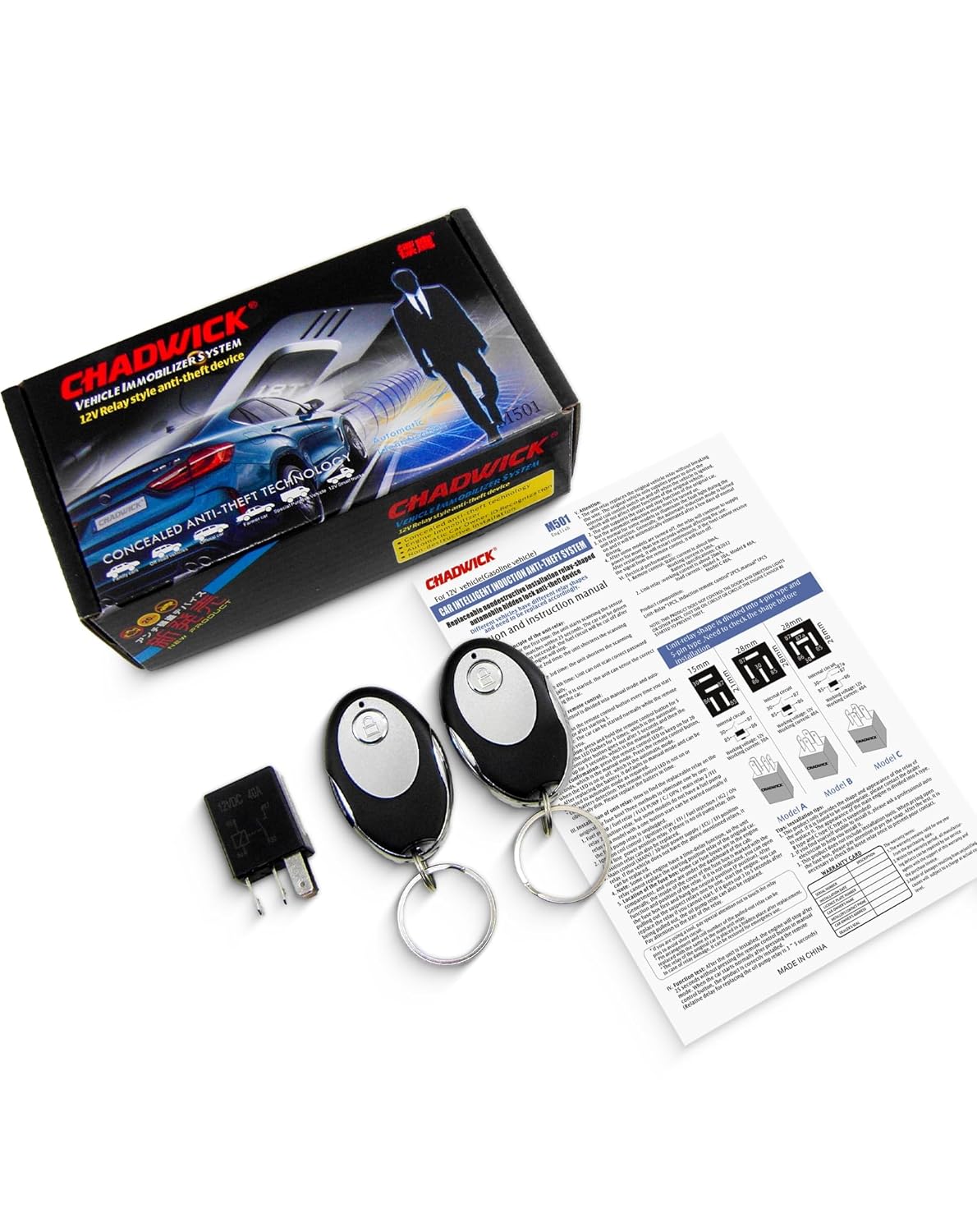
Image 1.1: The CHADWICK 501A Vehicle Immobilizer System, including the relay unit, two remote controls, and the instruction manual.
2. Safety Information
- Compatibility: This device is only suitable for 12V gasoline vehicles. Do not attempt to install it in diesel vehicles or vehicles with different voltage systems.
- Professional Installation Recommended: While designed for easy installation, it is recommended that installation be performed by a qualified automotive technician to ensure proper function and avoid damage to your vehicle's electrical system.
- Functionality: This product controls only the oil circuit to prevent engine start. It does not control doors, direction lights, windows, or other vehicle components.
- Emergency Preparedness: Always keep your original vehicle relay in the glove compartment. In case of device malfunction or remote control battery depletion, you can replace the immobilizer with the original relay to operate your vehicle.
3. Setup and Installation
3.1 Package Contents
- Relay-Shaped Immobilizer Unit (1)
- Remote Control (2)
- Instruction Manual (1)

Image 3.1: The package includes one immobilizer unit, two remote controls, and the user manual.
3.2 Pre-Installation Check: Identify Your Relay Type
Before installation, it is crucial to identify the correct relay model (Type A or Type B) that matches your vehicle's existing relay. Incorrect relay selection will prevent proper function and may damage the device or vehicle.

Image 3.2: Visual comparison of Model A and Model B relays. Relays are typically located in fuse boxes on the left side of the steering wheel or in the front of the car.
3.3 Installation Steps
- Locate the Fuel Pump Relay: Identify your vehicle's fuel pump relay. This is typically found in the fuse box under the hood or inside the cabin (e.g., near the steering wheel). Consult your vehicle's service manual for the exact location.
- Remove Original Relay: Carefully pull out the original fuel pump relay.
- Insert Immobilizer Unit: Insert the CHADWICK 501A immobilizer unit into the vacant relay socket. Ensure it is firmly seated. The installation is designed to be non-destructive, requiring no wire cutting or modification.
- Test Functionality: Proceed to the 'Operating Instructions' section to test the system.

Image 3.3: The immobilizer unit is designed to directly replace the original car relay for easy installation.
4. Operating Instructions
The CHADWICK 501A system offers both automatic and manual operating modes.
4.1 Automatic Mode (Proximity Sensing)
In automatic mode, the system detects the presence of the remote control. The engine's oil circuit will be enabled or disabled based on your proximity to the vehicle.
- Approaching the Vehicle: When the owner, carrying the remote control, approaches the vehicle (sensing distance approximately 15 meters), the system automatically disarms, opening the engine oil circuit. This allows the vehicle to start normally.
- Leaving the Vehicle: When the owner, carrying the remote control, leaves the vehicle, the system automatically arms, disconnecting the engine oil circuit. This prevents the engine from starting.

Image 4.1: Automatic disarming when owner approaches.

Image 4.2: Automatic defense when owner leaves.
4.2 Manual Mode
In manual mode, the system requires interaction with the remote control to enable the engine. If the remote control button is not pressed after starting the engine, the engine will stop after approximately 25 seconds. To start the car normally, ensure the remote control button is pressed.
4.3 Remote Control
The system includes two remote controls. These remotes use a CR2032 battery and do not require charging. They are used for sensing signals and switching between operating modes.

Image 4.3: Remote control dimensions are approximately 5.4 x 3.3 x 1.3 cm.
5. Maintenance
5.1 Remote Control Battery Replacement
The remote controls are powered by a CR2032 coin cell battery. If the remote's range decreases or it becomes unresponsive, replace the battery. To replace:
- Carefully open the remote control casing.
- Remove the old CR2032 battery.
- Insert a new CR2032 battery, ensuring correct polarity.
- Close the remote control casing securely.
5.2 General Care
Keep the immobilizer unit and remote controls dry and away from extreme temperatures. Avoid dropping the remote controls or exposing them to strong impacts.
6. Troubleshooting
- Engine does not start:
- Ensure the remote control is within sensing range (approx. 15 meters) if in automatic mode.
- If in manual mode, confirm you have pressed the remote control button before attempting to start.
- Check the remote control battery. Replace if necessary.
- Verify that the correct relay type (Model A or Model B) was installed for your vehicle.
- Engine stops after 25 seconds: This is normal behavior if the remote control button is not pressed in manual mode after starting the engine. Ensure the remote is active or switch to automatic mode if desired.
- Reduced remote control range: Replace the CR2032 battery in the remote control.
- System not functioning as expected: Double-check that the immobilizer unit is fully seated in the relay socket. If issues persist, temporarily reinstall the original relay to confirm vehicle functionality, then contact customer support.
7. Specifications
| Feature | Detail |
|---|---|
| Product Dimensions | 1 x 1 x 1 inches (approx. 2.54 x 2.54 x 2.54 cm) |
| Item Model Number | 501A |
| Batteries Required | 1 CR2032 (included for remote control) |
| Brand | CHADWICK |
| Compatible Devices | 12V Gasoline Cars |
| Maximum Sensing Range | 15 Meters |
| Remote Control Included | Yes (2 units) |
| Manufacturer | CHADWICK |
8. Warranty and Support
For warranty information or technical support, please refer to the contact details provided with your purchase or visit the official CHADWICK brand store. Keep your purchase receipt as proof of purchase.
CHADWICK Brand Store: Visit CHADWICK Store on Amazon