1. Introduction
Thank you for choosing the VEVOR 4000W Pure Sine Wave Power Inverter. This device converts 12V DC power from your battery into 120V AC household power, enabling you to operate various electronic devices and appliances. Designed for reliability and efficiency, it is ideal for RVs, trucks, outdoor activities, and mobile offices. Please read this manual thoroughly before use to ensure safe and optimal performance.
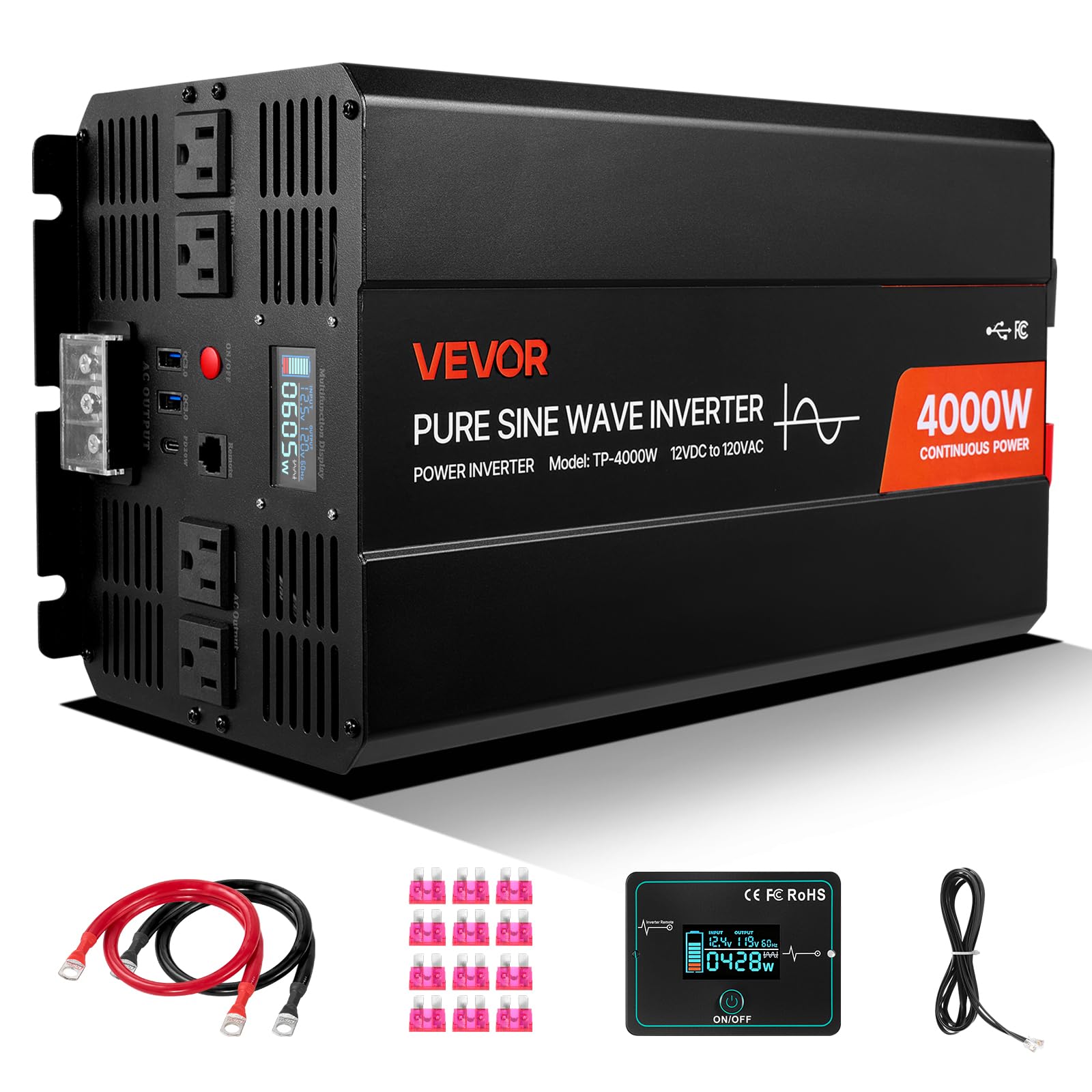
Figure 1: VEVOR 4000W Pure Sine Wave Power Inverter. This image shows the overall design of the inverter, highlighting its compact form factor and robust construction.
2. Safety Information
WARNING: Failure to follow these safety instructions may result in serious injury or property damage.
- High Voltage: The inverter produces 120V AC, which can be lethal. Treat all connections with extreme caution.
- Proper Ventilation: Ensure the inverter is installed in a well-ventilated area. Do not block ventilation openings.
- Avoid Moisture: Do not expose the inverter to rain, water, or excessive humidity.
- Flammable Materials: Do not operate the inverter near flammable liquids, gases, or other combustible materials.
- Battery Safety: Connect the inverter only to 12V DC batteries. Ensure correct polarity (+ to + and - to -). Battery acid is corrosive; wear protective gear.
- Grounding: The inverter must be properly grounded.
- Children: Keep the inverter out of reach of children.
- Qualified Personnel: Installation and servicing should be performed by qualified personnel.
3. Product Features
The VEVOR 4000W Pure Sine Wave Power Inverter is equipped with advanced features for reliable power conversion:
- Seven Output Ports: Includes 2 USB ports, 4 AC outlets, and 1 Type-C port for versatile device charging and power.
- Pure Sine Wave Output: Provides clean and stable power, suitable for all electronics, including sensitive devices and high-power appliances like refrigerators and air conditioners.
- Flexible Remote Control: A 9.8 ft (3 m) cable remote allows convenient operation from a distance.
- Multiple Protections: Features over-voltage, under-voltage, overload, over-temperature, short circuit, and reverse polarity protection for enhanced safety.
- LCD Display: Real-time display of power usage, input voltage, output power, and error codes for easy monitoring.
- Intelligent Cooling Fan: Automatically activates above 113°F (45°C) to maintain optimal operating temperature and extend inverter life.
- Wide Battery Compatibility: Compatible with GEL, SLA, LI, FLD, AGM, CLA, and USER battery types.

Figure 2: VEVOR 4000W Power Inverter with multiple output ports (2x USB, 4x AC, 1x Type-C) and compatible battery types (GEL, SLA, LI, FLD, AGM, CLA, USER). This image illustrates the various connectivity options and battery types supported by the inverter.

Figure 3: Diagram illustrating the difference between Pure Sine Wave and Modified Sine Wave output, highlighting the VEVOR inverter's pure sine wave for sensitive electronics. This graphic explains why pure sine wave is superior for powering a wide range of devices.

Figure 4: Examples of devices compatible with the VEVOR 4000W Power Inverter, including phones, laptops, air conditioners, and coffee makers, with their typical wattage. This image demonstrates the wide range of applications for the inverter.
4. Setup Instructions
4.1 Unpacking and Inspection
- Carefully remove the inverter and all accessories from the packaging.
- Inspect the unit for any signs of damage during transit. If damaged, do not operate and contact customer support.
- Ensure all listed accessories are present: user manual, fuses, battery cables, and remote control.
4.2 Mounting and Ventilation
- Mount the inverter in a dry, cool, and well-ventilated area.
- Avoid direct sunlight, heat sources, and moisture.
- Ensure there is at least 6 inches (15 cm) of clear space around all sides of the inverter for proper airflow.
- Do not mount the inverter in the same compartment as batteries, as batteries can emit explosive gases.
4.3 Battery Connection
IMPORTANT: Always connect the inverter to a 12V DC battery system. Ensure the battery is fully charged or has sufficient capacity for your intended load.
- Turn off the inverter and ensure no loads are connected.
- Connect the red battery cable to the positive (+) terminal of the inverter and then to the positive (+) terminal of the 12V battery.
- Connect the black battery cable to the negative (-) terminal of the inverter and then to the negative (-) terminal of the 12V battery.
- Ensure all connections are tight and secure to prevent loose connections, which can cause overheating.
- Connect the inverter's grounding terminal to a proper earth ground (e.g., vehicle chassis or ground rod).
4.4 Remote Control Connection
Plug the remote control cable into the designated remote port on the inverter. The remote allows you to power the inverter on/off from a convenient location.
5. Operating Instructions
5.1 Powering On/Off
- After connecting the battery, press and hold the power button on the inverter or the remote control for a few seconds until the LCD display illuminates.
- To turn off, press and hold the power button again until the display turns off.
5.2 Using Output Ports
- AC Outlets: Plug your 120V AC appliances into the standard AC outlets. Ensure the total wattage of connected devices does not exceed the inverter's continuous power rating (4000W).
- USB Ports: Connect your USB-powered devices for charging. The inverter provides fast charging capabilities (e.g., 20W).
- Type-C Port: Connect your Type-C compatible devices for fast charging (e.g., 18W).

Figure 5: Illustration of the fast-charging capabilities of the USB (20W) and Type-C (18W) ports on the VEVOR 4000W Power Inverter, showing charging times for an iPhone. This image highlights the efficiency of the charging ports.
5.3 LCD Display
The LCD display provides real-time information about the inverter's operation:
- Input Voltage: Shows the current DC voltage from your battery.
- Output Power: Displays the current AC power being drawn by connected devices.
- Error Codes: In case of a fault, the display will show an error code to help with troubleshooting. Refer to the troubleshooting section for details.
6. Maintenance
6.1 Cleaning
- Regularly clean the exterior of the inverter with a dry, soft cloth.
- Ensure ventilation openings are free from dust and debris to maintain proper airflow. Do not use liquids or abrasive cleaners.
6.2 Connection Checks
- Periodically check all battery and output connections to ensure they are tight and secure. Loose connections can cause voltage drops and overheating.
- Inspect battery cables for any signs of wear or damage. Replace if necessary.
6.3 Cooling System

Figure 6: Image demonstrating the intelligent cooling fan system of the VEVOR 4000W Power Inverter, which activates automatically when the internal temperature exceeds 113°F (45°C). This graphic illustrates the fan's operational thresholds.
The inverter features an intelligent cooling fan that activates automatically. Ensure the fan is not obstructed and operates freely when the inverter is under load or reaches a certain temperature.
7. Troubleshooting
This section provides solutions to common issues you might encounter with your VEVOR 4000W Power Inverter.
| Problem | Possible Cause | Solution |
|---|---|---|
| Inverter does not turn on. | Loose battery connections, low battery voltage, blown fuse. | Check battery cable connections. Ensure battery voltage is above 11V. Check and replace internal fuses if necessary (consult a professional). |
| No AC output. | Overload, over-temperature, low battery voltage, faulty appliance. | Reduce connected load. Allow inverter to cool down. Recharge battery. Test appliance with another power source. |
| Overload alarm/shutdown. | Connected load exceeds inverter's capacity. | Disconnect some appliances to reduce the total load. Restart the inverter. |
| Over-temperature alarm/shutdown. | Poor ventilation, high ambient temperature, excessive load. | Ensure proper ventilation around the inverter. Reduce load. Allow inverter to cool down. |
| Low battery voltage alarm/shutdown. | Battery is discharged. | Recharge the battery. Disconnect non-essential loads. |
8. Specifications
| Feature | Specification |
|---|---|
| Model Name | Pure Sine Wave Inverter 4000W (TP-4000W) |
| Rated Output Power | 4000W |
| Peak Power | 8000W (for a short duration) |
| Input Voltage | 12V DC |
| Output Voltage / Frequency | 120V AC, 60Hz |
| Output Waveform | Pure Sine Wave |
| Number of AC Outlets | 4 |
| USB Ports | 2 (20W each) |
| Type-C Port | 1 (18W) |
| Main Material | Aluminum Alloy |
| Product Dimensions (L x W x H) | 15.35 in x 6.50 in x 8.07 in (390 mm x 165 mm x 205 mm) |
| Net Weight | 15.65 lbs (7.1 kg) |
| Recommended Uses | Camping, Car, Home, Office, Recreational Vehicle |
| Included Accessories | User Manual, 12x Fuses, 2x 60 cm Battery Cables, 1x Remote Control, 1x 3 m Remote Cable |

Figure 7: Detailed dimensions of the VEVOR 4000W Power Inverter (15.35in x 6.50in x 8.07in) and a list of included accessories: user manual, fuses, battery cables, and remote control. This image provides a visual reference for the inverter's size and package contents.
9. Warranty and Support
VEVOR products are designed for durability and performance. For warranty information, technical support, or service inquiries, please refer to the warranty card included with your product or visit the official VEVOR website. Please have your model number (TP-4000W) and purchase date available when contacting support.


