
1. Introduction
This manual provides essential information for the safe and effective use of your ZHRCLY GMCC Compressor Accessory, specifically model DZ75V1A AC115V. Please read this manual thoroughly before installation, operation, or maintenance to ensure proper function and longevity of the product. This accessory is designed for use with various GMCC MOTOR compressor models, including DZ75V1F, DZ75V1A, DZ75X1D, DZ75X1E, DZ75V1Y, DZ75X1A, DZ75V1Z, DZ90V1M, DZ90V1C, DZ90V1Q, DZ90V1Z, and DZ90X1B.
2. Safety Information
Always observe the following safety precautions to prevent injury or damage to the product:
- Electrical Safety: Ensure the power source matches the product's voltage requirements (AC115V for this model). Disconnect power before installation or maintenance. Only qualified personnel should perform electrical connections.
- Handling: Handle the compressor accessory with care. Avoid dropping or subjecting it to severe impacts.
- Ventilation: Ensure adequate ventilation around the compressor system to prevent overheating.
- Environment: Do not expose the product to extreme temperatures, moisture, or corrosive environments.
- Modifications: Do not attempt to modify the product. Unauthorized modifications can lead to malfunction and void any potential warranty.
3. Product Overview
The ZHRCLY GMCC Compressor Accessory is a component designed to support the functionality of various GMCC MOTOR compressors. It is built for durability and reliable performance within compatible systems.
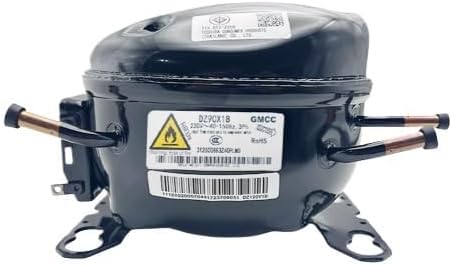
Image 1: ZHRCLY GMCC Compressor Accessory. This image displays a black compressor unit, featuring a warning label with a flame symbol and the model number DZ90X1B, indicating its compatibility with various GMCC compressor models.
4. Setup
Proper setup is crucial for the optimal performance of your compressor accessory. Follow these general guidelines:
- Unpacking: Carefully remove the accessory from its packaging. Inspect for any visible damage during transit.
- Compatibility Check: Verify that the accessory model (DZ75V1A AC115V) is compatible with your specific GMCC compressor model and power requirements.
- Mounting: Securely mount the accessory in the designated location according to your compressor system's design. Ensure all mounting points are fastened correctly.
- Electrical Connection: Connect the accessory to the appropriate power supply (AC115V) and to the compressor's control system. Ensure all connections are tight and insulated to prevent short circuits. Refer to your main compressor's wiring diagram for specific connection points.
- System Integration: Integrate the accessory into the overall system. This may involve connecting refrigerant lines or other control signals, depending on the accessory's function.
5. Operating Instructions
Once installed, the compressor accessory operates in conjunction with your main GMCC compressor unit. Specific operational details will depend on the accessory's function within the compressor system.
- Initial Power-Up: After installation, carefully power on the entire compressor system. Monitor for any unusual noises, vibrations, or error indicators.
- System Checks: Perform initial system checks as recommended by your main compressor's manual to ensure the accessory is functioning correctly.
- Monitoring: Regularly monitor the performance of your compressor system. Any significant changes in operation may indicate an issue with the accessory or the main compressor.
6. Maintenance
Regular maintenance helps ensure the longevity and efficiency of your compressor accessory.
- Cleaning: Keep the accessory clean and free from dust, dirt, and debris. Use a soft, dry cloth for cleaning. Do not use harsh chemicals or abrasive materials.
- Connection Checks: Periodically inspect all electrical and mechanical connections for tightness and signs of wear or corrosion. Tighten any loose connections.
- Visual Inspection: Regularly inspect the accessory for any physical damage, cracks, or unusual conditions.
- Professional Service: For complex maintenance or repairs, it is recommended to consult a qualified technician.
7. Troubleshooting
If you encounter issues with your compressor accessory, refer to the following common troubleshooting steps:
| Problem | Possible Cause | Solution |
|---|---|---|
| Accessory not functioning | No power; Loose connections; Incompatible model | Check power supply; Verify all connections are secure; Confirm model compatibility. |
| Unusual noise/vibration | Loose mounting; Internal component issue | Ensure accessory is securely mounted; If noise persists, contact support. |
| Overheating | Poor ventilation; Excessive load | Ensure adequate airflow around the unit; Reduce system load if possible. |
If the problem persists after attempting these solutions, please contact the merchant or a qualified service technician.
8. Specifications
Key specifications for the ZHRCLY GMCC Compressor Accessory (Model DZ75V1A AC115V):
| Feature | Detail |
|---|---|
| Brand | ZHRCLY |
| Model Number | DZ75V1A AC115V |
| Power Source | AC |
| Special Feature | AC & DC Adaptable |
| Item Weight | 6.6 pounds |
| Package Dimensions | 1 x 1 x 1 inches |
| Manufacturer | Original factory |
9. Warranty and Support
For any questions, technical assistance, or warranty inquiries regarding your ZHRCLY GMCC Compressor Accessory, please contact the merchant from whom you purchased the product. They can provide specific details on warranty coverage and support options.
Protection plans may be available for purchase separately to extend coverage beyond any standard manufacturer's warranty. Please refer to your purchase documentation for details on such plans.