
1. Introduction
This manual provides detailed instructions for the installation, operation, and maintenance of your EXTRASTAR 106cm Ceiling Fan with Light and Retractable Blades. Please read this manual thoroughly before installation and use, and retain it for future reference.
The EXTRASTAR ceiling fan combines a modern LED light with a powerful yet silent fan. Its revolutionary design features retractable blades that hide when the fan is off, transforming it into a minimalist LED lamp. When activated, the blades deploy to provide a refreshing breeze. This 2-in-1 solution is ideal for modernizing living rooms or bedrooms, especially in spaces with limited room.
2. Safety Information
- Ensure the power supply is disconnected before installation, cleaning, or maintenance.
- Installation must be performed by a qualified electrician in accordance with local wiring regulations.
- The ceiling fan must be mounted on a structure capable of supporting its weight.
- Ensure there is adequate clearance between the fan blades and any obstacles.
- Do not insert objects into the fan blades while the fan is operating.
- This product is designed for indoor use only.
- IMPORTANT: This model does NOT require or include a separate control unit. The remote control receiver is integrated into the LED light.
3. Package Contents
Please check that all components are present and undamaged:
- Ceiling Fan Unit with Integrated LED Light
- Remote Control
- Mounting Hardware (screws, anchors, etc.)
- User Manual
4. Specifications
| Feature | Specification |
|---|---|
| Brand | EXTRASTAR |
| Model Number | IT-OMFSD-2003 |
| Color | White |
| Style | Modern |
| Item Dimensions (L x W x H) | 107L x 107W x 45H cm (unfolded) |
| Product Weight | 1.5 Kilograms |
| Voltage | 220 Volts |
| Wattage | 30 watts (Light) |
| Luminous Flux | 5600 lm (Max) |
| Color Temperature | 3000K (Warm), 4200K (Neutral), 6500K (Cold) |
| Number of Fan Speeds | 6 |
| Control Method | Remote Control |
| Certification Standards | CE, RoHS |
| EU Energy Efficiency Label | F (View EPREL) |
5. Setup and Installation
Before beginning installation, ensure you have all necessary tools and that the power supply to the installation area is turned off at the circuit breaker.
5.1 Product Dimensions and Room Suitability
The fan has a diameter of 107cm when blades are extended and 48cm when folded. The height is 45cm when extended and 7cm when folded. It is suitable for rooms between 12-22 square meters.

Image: The ceiling fan showing its dimensions. When in operation with blades extended, it measures 107cm in diameter and 45cm in height. When folded, it measures 48cm in diameter and 7cm in height. It is recommended for rooms sized 12-22 square meters.
5.2 Mounting the Fan
- Prepare the Ceiling: Ensure the ceiling junction box is securely mounted and can support the fan's weight.
- Attach Mounting Bracket: Secure the mounting bracket to the ceiling junction box using the provided screws and washers.
- Wiring: Connect the fan's electrical wires to the household wiring according to the wiring diagram in the full instruction manual. Ensure all connections are secure.
- Hang the Fan: Carefully lift the fan assembly and hang it onto the mounting bracket.
- Secure the Canopy: Slide the canopy up to the ceiling and secure it with the provided screws.
6. Operating Instructions
The EXTRASTAR ceiling fan is controlled via the included remote control.
6.1 Remote Control Functions

Image: A hand holding the remote control for the ceiling fan, with the fan illuminated in a bedroom setting. The remote allows control of light modes, fan speeds, and timer functions.
- Power On/Off: Press the power button to turn the fan and light on or off.
- Fan Speed Control: Use the speed buttons (1-6) to adjust the fan's rotation speed.
- Light On/Off: Separate button for light control.
- Color Temperature Adjustment: Cycle through warm (3000K), neutral (4200K), and cold (6500K) light.
- Dimming: Adjust the brightness of the light.
- Timer Function: Set the fan to automatically turn off after 2 or 4 hours.
- Summer/Winter Mode: Change the direction of blade rotation.
- Night Mode: Activates a low-brightness, warm light setting for comfortable sleep.
6.2 Light Functions (3-in-1 LED)
The integrated LED light offers three color temperatures to suit different moods and activities:
- Warm Light (3000K): Ideal for relaxation and creating a cozy atmosphere.
- Neutral Light (4200K): Suitable for general illumination and daily activities.
- Cold Light (6500K): Best for tasks requiring focus and bright illumination.

Image: The ceiling fan shown with three different light settings: Warm light (3000K), Natural light (4200K), and Cold light (6500K), demonstrating the adjustable color temperatures.
6.3 Fan Speed Adjustment (6 Speeds)
The fan features 6 adjustable speeds to customize airflow for greater comfort:
- Grades 1-2 (Low): Comfortable style, gentle breeze for quiet environments like sleeping.
- Grades 3-4 (Medium): Natural style, moderate airflow for daily activities.
- Grades 5-6 (High): Thermal sensation, strong airflow for maximum cooling.

Image: The ceiling fan illustrating its 6 adjustable speeds, categorized into Low (Grades 1-2) for comfort, Medium (Grades 3-4) for natural airflow, and High (Grades 5-6) for strong thermal sensation.
6.4 Efficient All-Season Climate Control (Reversible Motor)
The fan's motor is reversible, allowing for efficient climate control throughout the year:
- Summer Mode (Counter-clockwise rotation): Pushes cool air downwards, creating a refreshing breeze.
- Winter Mode (Clockwise rotation): Redistributes warm air accumulated near the ceiling downwards, helping to maintain a uniform temperature and reduce heating costs.

Image: The ceiling fan demonstrating its reversible motor function. In summer mode, it creates a downward airflow for cooling. In winter mode, it creates an upward airflow to circulate warm air.
6.5 Silent Operation and Timer
The fan operates quietly, with a noise level of approximately 38dB, making it suitable for bedrooms and quiet environments. The programmable timer allows you to set the fan to turn off automatically after 2 or 4 hours, promoting energy saving and convenience.

Image: An illustration highlighting the fan's silent operation at 38dB, compared to other common noise levels. It also shows timer settings for 2 or 4 hours.
7. Maintenance
Regular maintenance ensures optimal performance and longevity of your ceiling fan.
- Cleaning: Dust the fan blades and light fixture regularly with a soft, dry cloth. For stubborn dirt, use a slightly damp cloth and mild detergent, then wipe dry immediately. Do not use abrasive cleaners or solvents.
- Blade Inspection: Periodically check the retractable blades for any signs of damage or obstruction.
- Tighten Screws: Over time, some screws may loosen. Periodically check and tighten all screws on the mounting bracket and fan assembly.
- Light Source: The LED light source is integrated. If it fails, contact customer support for assistance.
8. Troubleshooting
If you encounter any issues, refer to the following troubleshooting guide before contacting customer support.
| Problem | Possible Cause | Solution |
|---|---|---|
| Fan does not start | No power supply; Remote control battery low; Incorrect wiring. | Check circuit breaker; Replace remote control batteries; Verify wiring connections. |
| Light does not turn on | No power supply; Remote control battery low; LED failure. | Check circuit breaker; Replace remote control batteries; Contact customer support if LED is faulty. |
| Fan makes excessive noise | Loose screws; Blades unbalanced; Obstruction. | Tighten all screws; Ensure blades are clean and balanced; Remove any obstructions. |
| Remote control not working | Batteries depleted; Remote out of range; Interference. | Replace batteries; Ensure remote is within 6m range; Reduce interference from other devices. |
9. Warranty and Support
This EXTRASTAR product comes with a 2-year manufacturer's warranty from the date of purchase. This warranty covers defects in materials and workmanship under normal use.
For warranty claims, technical support, or any questions regarding your product, please contact EXTRASTAR customer service through your retailer or the official EXTRASTAR website.
9.1 Energy Efficiency Information
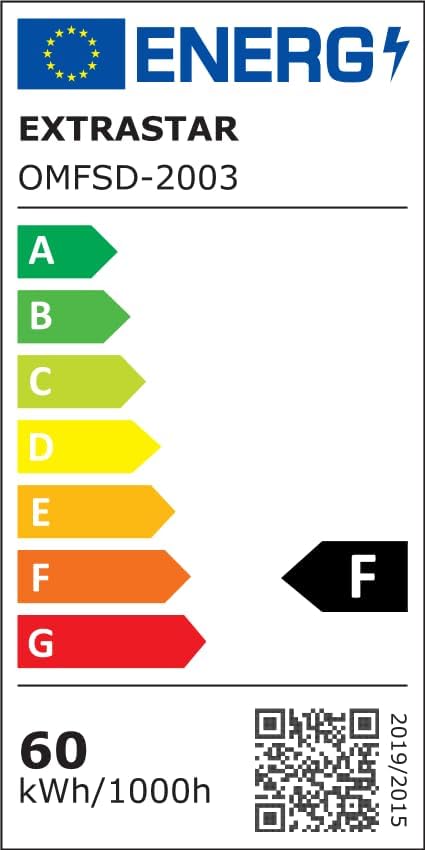
Image: The EU Energy Efficiency Label for the EXTRASTAR OMFSD-2003, indicating an efficiency class of F and energy consumption of 60 kWh/1000h. A QR code is also visible for more information.
For detailed energy efficiency information, please refer to the official EPREL database: