
1. Introduction
This manual provides essential information for the safe and efficient installation, operation, and maintenance of the ZHRCLY GMCC MOTOR Compressor, model PZ35F1A AC115V. Please read this manual thoroughly before attempting any procedures to ensure proper handling and to prevent damage or injury.
2. Safety Information
Warning: Failure to follow these safety instructions may result in electric shock, fire, serious injury, or death.
- Always disconnect power before servicing the compressor or any associated equipment.
- Installation and maintenance should only be performed by qualified personnel.
- Ensure proper grounding of the electrical system.
- Wear appropriate personal protective equipment (PPE) such as safety glasses and gloves.
- Handle refrigerants with care and in accordance with local regulations.
- Do not operate the compressor if it is damaged or malfunctioning.
3. Product Overview
The GMCC MOTOR Compressor PZ35F1A AC115V is designed for refrigeration applications. It is a hermetic compressor, meaning its motor and compressor are enclosed in a sealed shell, preventing refrigerant leakage and contamination.
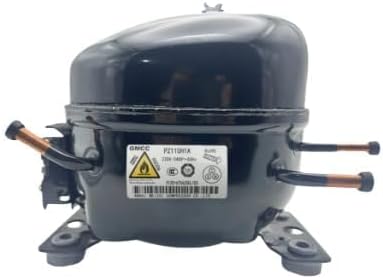
Figure 1: A black GMCC MOTOR compressor, model PZ35F1A, with copper tubing connections visible on the sides and a label showing specifications. This image illustrates the general appearance of the compressor unit.
This model operates on an AC 115V power supply and is known for its compact design and reliable performance in suitable refrigeration systems.
4. Setup
4.1 Unpacking
- Carefully remove the compressor from its packaging.
- Inspect the unit for any visible damage incurred during transit. Do not install if damage is present.
- Retain packaging materials for potential future transport or return.
4.2 Mounting
- Mount the compressor on a stable, level surface capable of supporting its weight and absorbing vibrations.
- Use appropriate mounting hardware and vibration isolators to minimize noise and stress on the system.
- Ensure adequate ventilation around the compressor for proper heat dissipation.
4.3 Electrical Connection
- Verify that the power supply matches the compressor's requirements (AC 115V).
- Connect the compressor to a dedicated circuit with appropriate overcurrent protection.
- Follow all local electrical codes and wiring diagrams provided with your refrigeration system.
- Ensure all connections are secure and properly insulated.
4.4 Refrigerant Line Connection
- Connect the suction and discharge lines to the compressor using proper brazing techniques.
- Ensure connections are leak-free. Perform a leak test after all connections are made.
- Evacuate the refrigeration system to remove non-condensable gases and moisture before charging with refrigerant.
5. Operating Instructions
5.1 Initial Start-up
- After completing all installation steps and leak testing, slowly introduce the correct type and amount of refrigerant into the system.
- Restore power to the compressor.
- Monitor system pressures and temperatures to ensure proper operation.
5.2 Normal Operation
- The compressor will cycle on and off as dictated by the system's thermostat or control unit to maintain the desired temperature.
- Listen for unusual noises or vibrations, which may indicate a problem.
5.3 Shutdown
- For temporary shutdown, simply turn off the refrigeration system's power switch.
- For extended shutdown or maintenance, disconnect the main power supply to the compressor.
6. Maintenance
Regular maintenance is crucial for the longevity and efficiency of your compressor.
- Regular Checks: Periodically inspect the compressor for signs of leaks, corrosion, or physical damage.
- Cleaning: Keep the compressor and surrounding area clean and free of dust and debris to ensure proper heat exchange.
- Electrical Connections: Annually check electrical connections for tightness and signs of overheating.
- Refrigerant Levels: Ensure the refrigeration system has the correct refrigerant charge. Low or high charge can stress the compressor.
- Oil Level (if applicable): For hermetic compressors, oil is typically sealed. If the system requires external oil checks, consult your refrigeration system's manual.
7. Troubleshooting
This section outlines common issues and potential solutions. For complex problems, consult a qualified technician.
| Problem | Possible Cause | Solution |
|---|---|---|
| Compressor not starting | No power; faulty thermostat; faulty start relay/capacitor; motor overload. | Check power supply; test/replace thermostat; test/replace relay/capacitor; check for tripped overload. |
| Compressor runs continuously | Low refrigerant charge; dirty condenser coils; faulty thermostat; oversized load. | Check for leaks and recharge; clean condenser; test/replace thermostat; ensure proper system sizing. |
| Unusual noise or vibration | Loose mounting; internal mechanical issue; refrigerant slugging. | Tighten mounting bolts; consult technician for internal issues; check refrigerant charge and expansion device. |
| Insufficient cooling | Low refrigerant; dirty coils; restricted airflow; faulty compressor. | Check refrigerant; clean coils; ensure proper airflow; replace compressor if faulty. |
8. Specifications
| Feature | Detail |
|---|---|
| Brand | ZHRCLY |
| Model Name | PZ35F1A |
| Item Model Number | PZ35F1A AC115V |
| Power Source | AC |
| Voltage | 115V |
| Special Feature | AC & DC Adaptable (refer to system compatibility) |
| Item Weight | 6.6 pounds |
| Package Dimensions (Approx.) | 1 x 1 x 1 inches |
| Manufacturer | Original factory |
| Batteries Required | No |
9. Warranty and Support
For warranty information and technical support, please contact your original point of purchase or the manufacturer, ZHRCLY. Ensure you have your product model number (PZ35F1A AC115V) and purchase details available when seeking assistance.