
1. Introduction
Thank you for choosing the Ounamio Universal Travel Adapter Y311. This compact and versatile power adapter is designed to meet your charging needs across more than 200 countries and regions worldwide. With its multiple ports and safety features, it is an essential companion for your international travels.
2. Product Overview
The Ounamio Universal Travel Adapter Y311 is an ultra-slim, mini power adapter equipped with a range of features to ensure convenient and safe charging for your devices globally.
Key Features:
- Worldwide Compatibility: Supports Type A, C, G, and I plugs, covering over 200 countries including the US, Canada, Europe, UK, Australia, China, and Japan.
- 25W PD Fast Charging: Features two USB-C ports (up to 25W Power Delivery) and one USB-A port (18W high-speed output) for rapid charging of smartphones, tablets, power banks, and cameras.
- Multi-Port Design: Includes 1 AC outlet, 1 USB-A port, and 2 USB-C ports, allowing simultaneous charging of up to 4 devices.
- Ultra-Compact & Portable: Designed to be significantly smaller and lighter than standard adapters, saving space in your luggage.
- Reliable Safety: Built with fire-resistant materials and integrated protections against over-voltage, over-current, short circuits, and features smart temperature control.

Image: The Ounamio Universal Travel Adapter displaying its compatibility with AU, US, UK, and EU plug types, highlighting its 'All-in-One' design for global travel.

Image: The adapter connected to a wall outlet, simultaneously charging a laptop, smartwatch, earbuds, and smartphone, demonstrating its multiple port functionality.
3. Setup and Getting Started
The Ounamio Universal Travel Adapter features a convenient slide-and-push design for easy plug selection and retraction.
Selecting the Correct Plug:
- Identify the required plug type for your destination (e.g., US, UK, EU, AU).
- Locate the corresponding slider on the side of the adapter.
- Push the slider forward to extend the desired plug pins. Ensure the pins are fully extended and locked into position before use.
- To retract a plug, push the slider back until the pins are fully recessed.
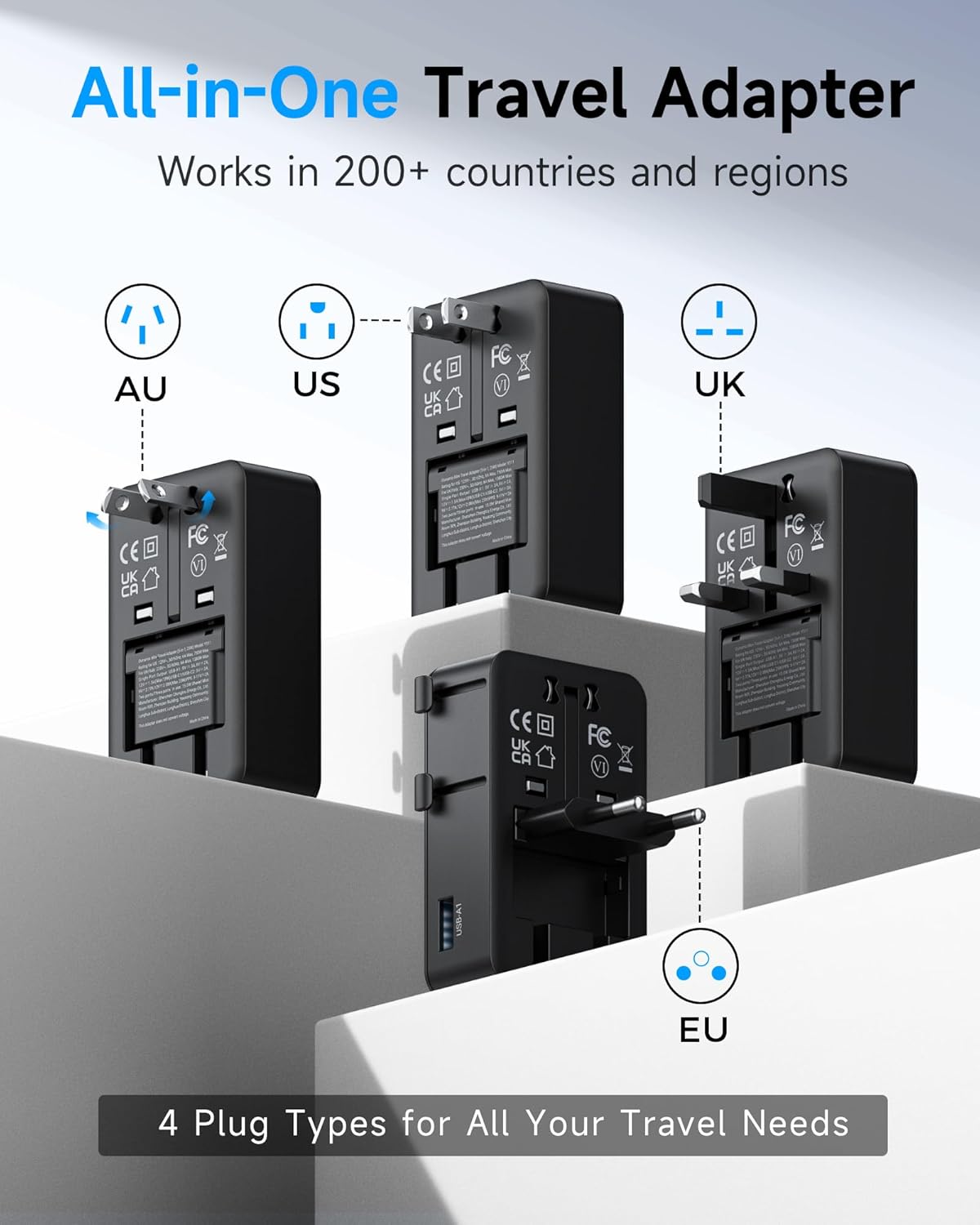
Image: A detailed view of the adapter's side, illustrating the sliders labeled for different regions (US/AU, UK, EU) and how to extend the appropriate plug pins.
Unboxing and Features Overview:
Video: A seller demonstrating the unboxing and key features of the Ounamio Universal Travel Adapter, including its compact size and various plug types.
4. Operating Instructions
Once the correct plug is extended, insert the adapter into the wall outlet. You can then connect your devices to the available ports.
Connecting Devices:
- AC Outlet: Plug your device's AC power cord into the universal AC socket on the front of the adapter.
- USB-A Port: Connect your USB-A charging cable to the USB-A port on the side.
- USB-C Ports: Connect your USB-C charging cables to either of the two USB-C ports on the bottom. These ports support 25W Power Delivery for fast charging compatible devices.

Image: The adapter plugged into a wall, with a laptop, smartwatch, and smartphone connected via its various USB and AC ports, illustrating simultaneous charging.
Important Voltage Notice:
This international travel adapter is NOT a voltage converter.
Ensure your device supports 100V to 250V dual voltage. If you plan to use high-power appliances like hair dryers, straighteners, or curling irons, verify they are dual voltage compatible before plugging them into the adapter. Using a single-voltage device with an incompatible voltage supply can cause damage to the device and the adapter.

Image: A visual reminder that the travel adapter is not a voltage converter, emphasizing the need for devices to support dual voltage.
5. Safety Information and Precautions
Your safety is paramount. The Ounamio Universal Travel Adapter is built with multiple safety features.
Built-in Protections:
- Over-voltage Protection
- Over-current Protection
- Short-circuit Protection
- Over-power Protection
- Smart Temperature Control
- Fire Resistance
If an AC device exceeds 6A, the adapter will automatically disconnect. Ensure it complies with the adapter's power limits before reconnecting after 10 seconds.
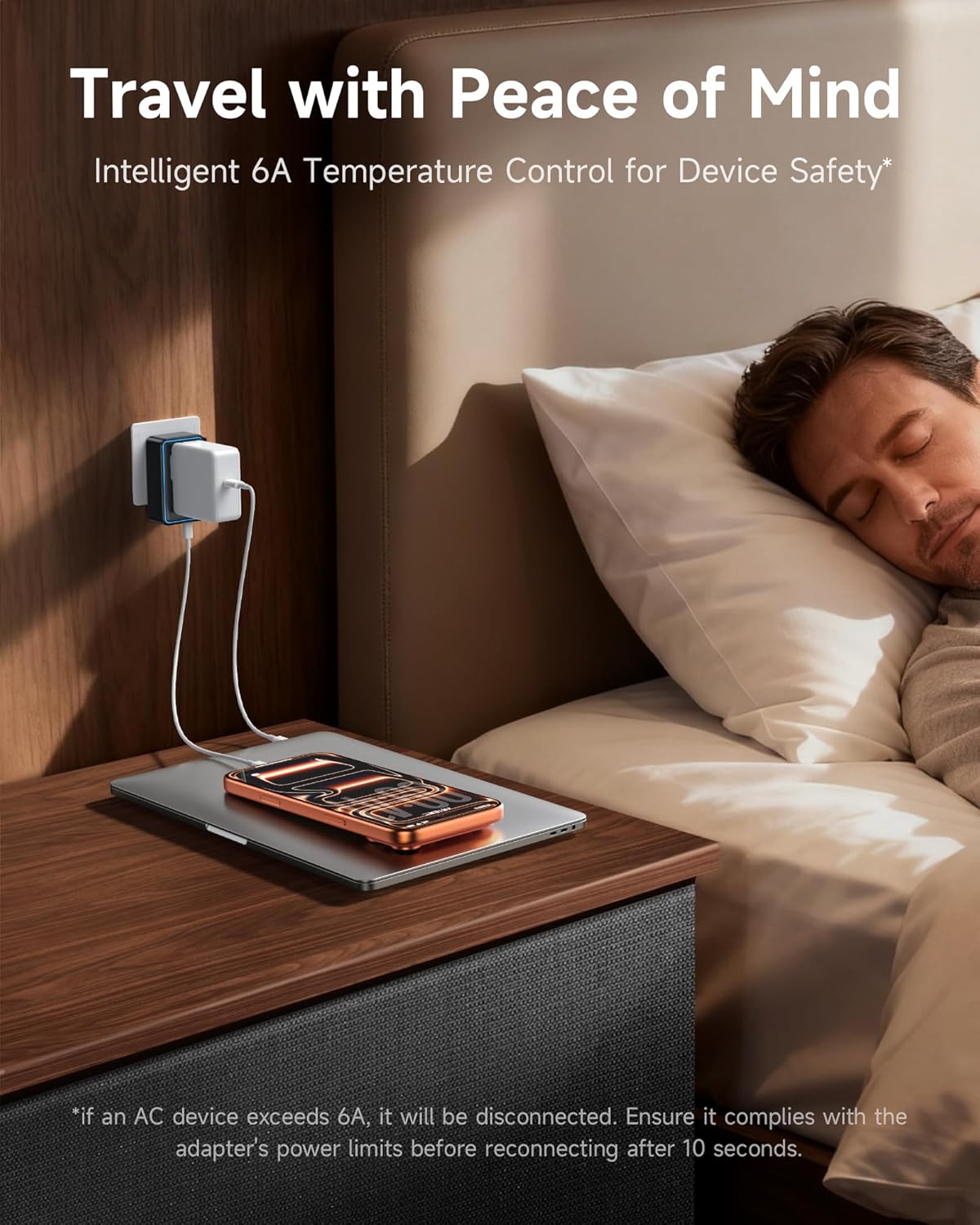
Image: The adapter in use, plugged into a wall socket next to a bed, with a smartphone charging, illustrating safe and convenient overnight charging.
6. Maintenance
To ensure the longevity and optimal performance of your Ounamio Universal Travel Adapter, follow these simple maintenance guidelines:
- Keep the adapter dry and away from moisture.
- Clean the adapter with a soft, dry cloth. Do not use liquid cleaners or aerosols.
- Avoid dropping or subjecting the adapter to strong impacts.
- Store in a cool, dry place when not in use.
7. Troubleshooting
If you encounter any issues with your Ounamio Universal Travel Adapter, please refer to the following common solutions:
- Device Not Charging:
- Ensure the adapter is securely plugged into the wall outlet.
- Verify that the correct plug type for the region is fully extended and locked.
- Check if your device's charging cable is properly connected to the adapter's port.
- Confirm your device is dual voltage compatible (100V-250V) if using the AC outlet.
- Test with a different device or cable to rule out a faulty accessory.
- Adapter Overheating:
- Disconnect all devices and allow the adapter to cool down.
- Ensure the total wattage of connected devices does not exceed the adapter's maximum capacity (e.g., 2500W at 250V AC).
- Avoid using the adapter in enclosed spaces with poor ventilation.
- Plug Pins Not Extending/Retracting:
- Ensure no other plug pins are partially extended, which might prevent others from moving.
- Apply firm but gentle pressure to the slider. Do not force the mechanism.
If the issue persists, please contact customer support.
8. Specifications
| Attribute | Detail |
|---|---|
| Brand | Ounamio |
| Model Number | Y311 |
| Dimensions (L x W x H) | 1.97 x 3.25 x 1.06 inches |
| Output Voltage (AC) | 100V - 250V (Not a voltage converter) |
| Plug Formats | Type A (US), Type C (EU), Type G (UK), Type I (AU/AS) |
| Number of Outlets | 5 (1 AC, 1 USB-A, 2 USB-C) |
| USB-C Output | Up to 25W Power Delivery (PD) |
| USB-A Output | 18W |
| Max AC Power | 2500W at 250V AC (Not recommended for devices exceeding 1250W) |
9. Warranty and Support
The Ounamio Universal Travel Adapter Y311 comes with an 18-month warranty from the date of purchase. This warranty covers manufacturing defects and ensures reliable performance under normal use.
For warranty claims, technical support, or any inquiries, please contact our responsive customer support team through the retailer's platform or via the contact information provided on our official website.
Please retain your proof of purchase for warranty validation.