1. Introduction
This manual provides essential information for the safe and effective operation, maintenance, and troubleshooting of your Generic 3450-20 M12 12V 1/4" Hex Subcompact Brushless Cordless Impact Driver. Please read this manual thoroughly before using the tool and retain it for future reference.
The 3450-20 is designed for fastening applications, offering a compact and lightweight solution for tight spaces. It features a brushless motor for efficient performance and an internal metal gearcase for durability.
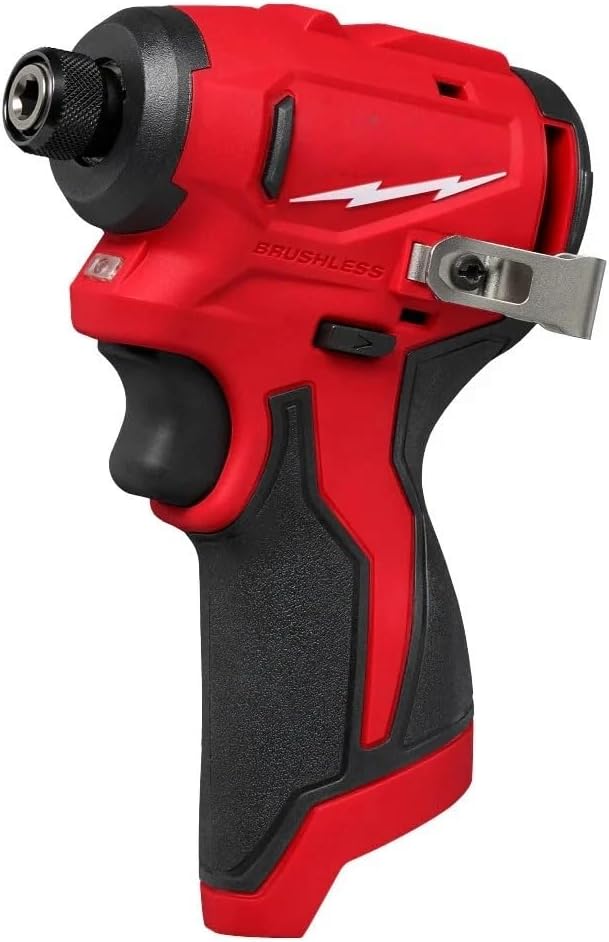
Image Description: A side view of the red and black Generic 3450-20 M12 12V 1/4" Hex Subcompact Brushless Cordless Impact Driver, showcasing its compact design and ergonomic grip.
2. Safety Information
Always follow basic safety precautions to reduce the risk of fire, electric shock, and personal injury when operating power tools.
- Wear appropriate personal protective equipment (PPE) such as safety glasses, hearing protection, and gloves.
- Ensure the work area is well-lit and free from obstructions.
- Keep children and bystanders away while operating the tool.
- Do not operate power tools in explosive atmospheres, such as in the presence of flammable liquids, gases, or dust.
- Use the correct tool for your application. Do not force the tool.
- Disconnect the battery pack before making any adjustments, changing accessories, or storing the tool.
3. Product Overview
The Generic 3450-20 M12 Impact Driver is designed for optimal performance in various fastening tasks. Key features include:
- Subcompact Design: Measures 4.3 inches in length and 2.0 inches in width for access in tight spaces.
- Lightweight: Weighs only 1.7 lbs with a battery pack (battery not included).
- Brushless Motor: Provides up to 1,100 in-lbs of torque and 3,000 RPM.
- 1/4" Hex Collet: For quick and secure bit changes.
- Internal Metal Gearcase: Enhances durability.
- LED Light: Illuminates the work area.
- Variable Speed Trigger: Allows for precise control.
- Belt Clip: For convenient portability.

Image Description: An annotated diagram of the Generic 3450-20 M12 Impact Driver, highlighting its key components. Labels include "Internal Metal Gearcase," "1/4\" Hex Collet," "LED Light," "Variable Speed Trigger," "Premium Rubber Overmold," "Battery Gauge," "Brushless Motor," and "Belt Clip." The diagram also indicates the tool's length as 4.3 inches.
4. Setup
4.1. Battery Installation (Battery Not Included)
- Ensure the impact driver is turned off.
- Align the battery pack with the tool's battery port.
- Slide the battery pack into the tool until it clicks securely into place.
- To remove, press the battery release button and slide the battery pack out.
4.2. Bit Installation
- Pull the 1/4" hex collet forward to open the chuck.
- Insert the desired 1/4" hex shank accessory (e.g., screwdriver bit, drill bit) into the chuck.
- Release the collet. The accessory should be securely locked in place. Pull on the accessory to ensure it is properly seated.
- To remove, pull the collet forward and pull out the accessory.
5. Operating Instructions
5.1. Powering On/Off
- To turn the tool on, press the variable speed trigger. The LED light will illuminate the work area.
- To turn the tool off, release the variable speed trigger.
5.2. Speed Control
The tool features a variable speed trigger. Pressing the trigger further increases the speed and impact rate. Releasing the trigger reduces the speed.
5.3. Forward/Reverse Rotation
A forward/reverse selector switch is located above the trigger. Push the switch to the left for forward rotation (tightening) and to the right for reverse rotation (loosening). Ensure the tool is completely stopped before changing the direction of rotation.

Image Description: A person's hand holding the red and black impact driver, fastening a screw into a wooden frame within a confined space. This demonstrates the tool's subcompact design and ability to access tight areas.

Image Description: A person wearing work gloves is using the impact driver to fasten a component in an overhead electrical box. This illustrates the tool's lightweight design, making it suitable for overhead tasks.
6. Maintenance
Regular maintenance ensures optimal performance and extends the life of your tool.
6.1. Cleaning
- Always disconnect the battery pack before cleaning.
- Use a soft, damp cloth to clean the exterior of the tool. Do not use harsh chemicals or abrasive cleaners.
- Keep the ventilation openings clear of dust and debris to prevent overheating. Use compressed air if necessary.
6.2. Storage
- Store the tool in a dry, secure location out of reach of children.
- Remove the battery pack from the tool before storing for extended periods.
7. Troubleshooting
| Problem | Possible Cause | Solution |
|---|---|---|
| Tool does not start | Battery pack not installed correctly or discharged. | Ensure battery pack is fully inserted. Charge or replace battery pack. |
| Reduced power/speed | Low battery charge. Overload condition. | Charge battery pack. Reduce load on the tool. |
| Bit not holding securely | Collet not fully engaged. Incorrect bit type. | Ensure collet is pulled forward, insert bit, then release. Use only 1/4" hex shank bits. |
| Tool overheating | Continuous heavy use. Blocked ventilation. | Allow tool to cool down. Clear ventilation openings. |
8. Specifications
| Feature | Detail |
|---|---|
| Model Number | 3450-20 |
| Power Source | Battery Powered (M12 12V) |
| Chuck Type | 1/4" Hex |
| Peak Torque | 1,100 in-lbs |
| Maximum RPM | 3,000 RPM |
| Impacts Per Minute (IPM) | 4,100 IPM |
| Length | 4.3 inches |
| Width | 2.0 inches |
| Weight (Tool-Only) | 1.3 lbs |
| Weight (with battery) | 1.7 lbs |

Image Description: A visual representation of the key specifications for the 3450-20 Impact Driver, including Peak Torque (1,100 in-lbs), RPM (0-3,000), IPM (0-4,100), Chuck (1/4" Hex), Length (4.3"), Width (2.0"), and Weight (Tool-Only: 1.3 lbs).
9. Warranty and Support
For information regarding warranty coverage or technical support, please refer to the documentation provided with your purchase or contact the retailer. Additional protection plans may be available for purchase separately to extend coverage beyond the standard manufacturer's warranty.
For specific inquiries, please contact your point of purchase or the manufacturer's customer service department.


