
1. Overview
Product Description
The BENYAR BY-5225 is a men's chronograph watch designed for precision and durability. It features a reliable Japanese Quartz movement (Caliber PE905) for accurate timekeeping with minimal maintenance. The watch is housed in a solid stainless steel case with a matching bracelet, built to withstand daily wear. With a balanced 40mm case diameter and 11mm thickness, it offers a comfortable fit for all-day use.
Key Features
- Japanese Quartz Movement (Caliber PE905)
- Chronograph Functionality
- Sun & Moon Display
- Date Window
- 30M Water Resistance
- Stainless Steel Case and Bracelet
- Luminous Hands
Watch Components
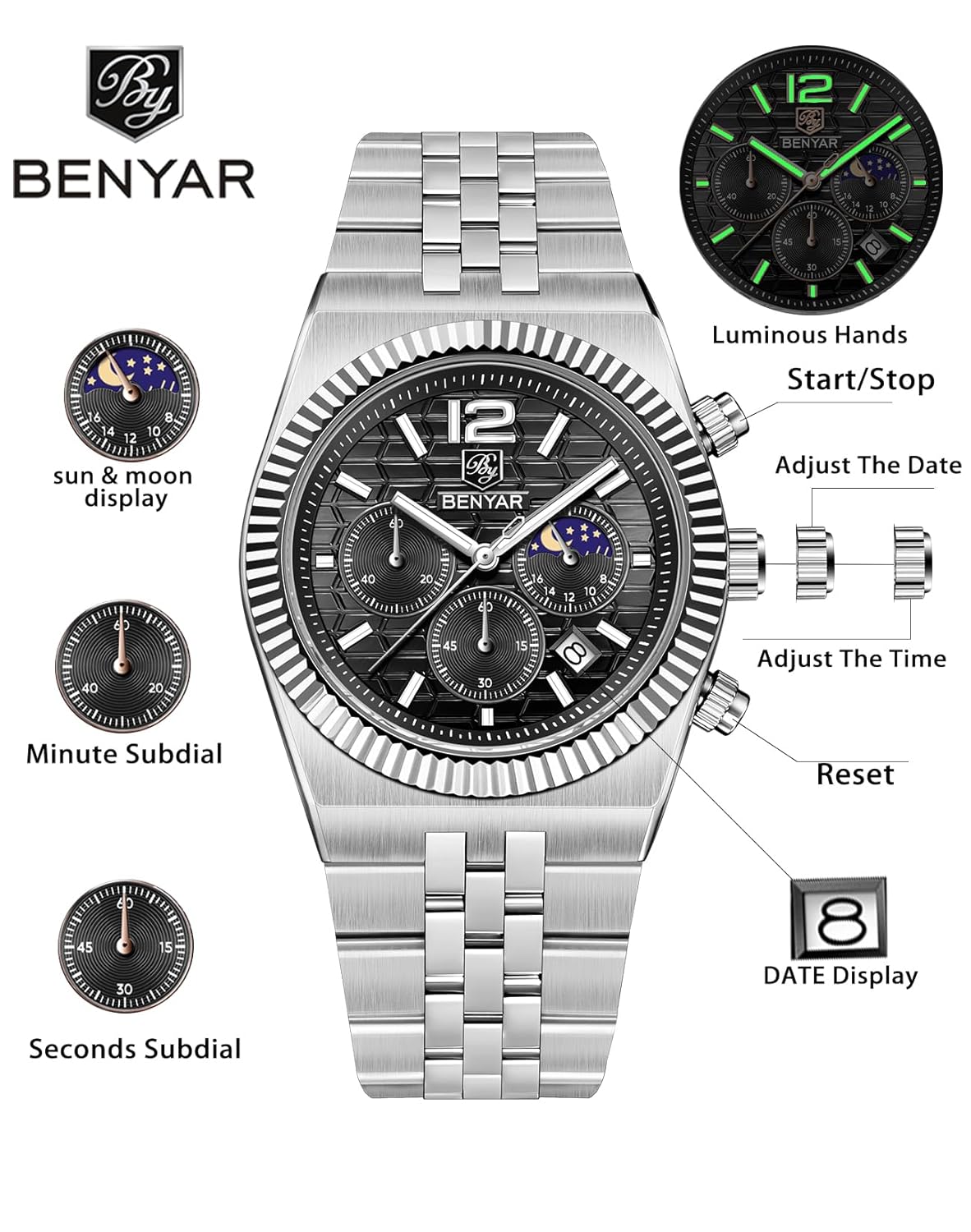
This diagram illustrates the key components and functions of the BENYAR BY-5225 chronograph watch, including the main crown for time and date adjustments, pushers for chronograph operation, and the sun & moon display.
Refer to the diagram above for identification of the following components:
- A. Time Adjustment Crown: Used to set the time, date, and sun & moon display.
- B. Start/Stop Pusher: Activates and pauses the chronograph function.
- C. Reset Pusher: Resets the chronograph to zero.
- D. Date Display Window: Shows the current date.
- E. Sun & Moon Display: Indicates AM/PM.
- F. Minute Subdial: Measures elapsed minutes for the chronograph.
- G. Seconds Subdial: Measures elapsed seconds for the chronograph.
- H. Luminous Hands: Main hour and minute hands with luminescent coating for visibility in low light.

A detailed view of the watch dial, highlighting the chronograph sub-dials, the date window at 4 o'clock, and the sun & moon indicator at 12 o'clock. The textured black dial and silver accents are clearly visible.
2. Setup
Initial Setup
Before wearing your watch, ensure it is properly set to the current time and date.
Setting the Time
- Pull the Time Adjustment Crown (A) out to position 2.
- Rotate the crown clockwise or counter-clockwise to move the hour and minute hands to the correct time. Pay attention to the Sun & Moon display (E) to ensure AM/PM is correctly set.
- Once the time is set, push the crown back into position 0.
Setting the Date
- Pull the Time Adjustment Crown (A) out to position 1.
- Rotate the crown clockwise to advance the date in the Date Display Window (D) to the correct day. Avoid setting the date between 9 PM and 3 AM, as this is when the date change mechanism is engaged and could be damaged. If the current time falls within this period, first set the time outside this range, then set the date, and finally reset the time.
- Once the date is set, push the crown back into position 0.
Setting the Sun & Moon Display
The Sun & Moon display (E) is synchronized with the hour hand. When setting the time, ensure the display shows the sun for daytime hours and the moon for nighttime hours. This display cannot be set independently.
Adjusting the Bracelet
The stainless steel bracelet can be adjusted for a comfortable fit. This typically involves removing or adding links. It is recommended to have this adjustment performed by a professional watchmaker or jeweler to prevent damage to the bracelet or clasp.
3. Operating Instructions
Using the Chronograph
The chronograph function allows you to measure elapsed time independently of the main time display.
- Start: Press the Start/Stop Pusher (B) to begin timing. The seconds subdial (G) and minute subdial (F) will start moving.
- Stop: Press the Start/Stop Pusher (B) again to pause the timing. The sub-dials will stop, showing the elapsed time.
- Reset: After stopping the chronograph, press the Reset Pusher (C) to return both sub-dials to their zero positions. The chronograph must be stopped before it can be reset.
Water Resistance
This watch is rated for 30 meters (3 ATM / 3 Bar) of water resistance. This means it is suitable for everyday use and can withstand splashes, rain, or brief immersion in water. It is not suitable for swimming, showering, diving, or any water sports where it might be subjected to high water pressure or prolonged immersion. Always ensure the crown is fully pushed in before any contact with water.
4. Maintenance
Cleaning Your Watch
- Wipe the watch case and bracelet regularly with a soft, dry cloth to remove dust and fingerprints.
- For stainless steel, a slightly damp cloth can be used, followed by a dry cloth. Avoid harsh chemicals or abrasive materials.
- If the watch has been exposed to saltwater, rinse it gently with fresh water and dry thoroughly.
Battery Replacement
The watch is powered by a quartz battery. When the battery runs low, the watch may stop or the second hand may skip. Battery replacement should be performed by a qualified watch technician to ensure the watch's water resistance is maintained and to prevent damage to the movement.
Storage
When not wearing your watch, store it in a cool, dry place away from direct sunlight, extreme temperatures, and strong magnetic fields. The original watch box is ideal for storage.
5. Troubleshooting
| Problem | Possible Cause | Solution |
|---|---|---|
| Watch has stopped or runs intermittently. | Low battery. | Replace the battery by a professional watch technician. |
| Time or date is incorrect. | Crown not fully pushed in, or incorrect setting. | Refer to 'Setting the Time' and 'Setting the Date' sections. Ensure crown is fully pushed in. |
| Chronograph hands do not reset to zero. | Chronograph was not stopped before resetting. | Stop the chronograph by pressing pusher (B), then press pusher (C) to reset. If issue persists, a service may be required. |
| Condensation inside the watch. | Exposure to extreme temperature changes or compromised water resistance. | Seek immediate professional service to prevent damage to the movement. |
6. Specifications

This image provides a detailed overview of the BENYAR BY-5225 watch's physical specifications, such as its dimensions, materials used for the case and bracelet, movement type, and water resistance rating.
| Feature | Detail |
|---|---|
| Model Number | BY-5225 |
| Movement Type | Japanese Quartz (Caliber PE905) |
| Display Type | Analog |
| Case Material | Stainless Steel |
| Case Diameter | 40 Millimetres |
| Case Thickness | 11 Millimetres |
| Band Material | Stainless Steel |
| Band Width | 25 Millimetres |
| Band Length | 188 Millimetres (Max Perimeter) |
| Dial Colour | Black |
| Water Resistance Depth | 30 Metres (3 ATM / 3 Bar) |
| Item Weight | 218 g |
| Clasp Type | Push Button Foldover Clasp With Safety |
7. Warranty Information
This BENYAR watch is covered by a limited warranty against manufacturing defects. The specific terms and duration of the warranty may vary by region and retailer. Please retain your proof of purchase for warranty claims. The warranty typically does not cover damage resulting from improper use, accidents, unauthorized repairs, or normal wear and tear.
8. Customer Support
For any questions, service requests, or technical assistance regarding your BENYAR BY-5225 watch, please contact the retailer where you purchased the product. You may also refer to the official BENYAR website for further support information, if available.


