
1. Introduction
Thank you for choosing the Sharmeal Jump Starter with Air Compressor. This device is designed to provide reliable jump-starting for vehicles and convenient tire inflation. Please read this manual thoroughly before use to ensure safe and optimal operation.
2. What's in the Box

The package includes the following items:
- 1 x Portable Jump Starter with Air Compressor
- 1 x Safety Jump Cables
- 1 x Air Pump Hose
- 3 x Gas Nozzles (various types for inflation)
- 1 x Type-C Charging Cable
- 1 x User Manual
- 1 x Packing Box
This image displays all components included in the Sharmeal Jump Starter package, neatly arranged next to the main unit and its packaging.
3. Specifications
| Feature | Specification |
|---|---|
| Brand | Sharmeal |
| Model Number | GL902 |
| Peak Output Current | 6000 Amps |
| Battery Cell Composition | Lithium Ion |
| Battery Capacity | 8000 Milliamp Hours |
| Air Compressor Pressure | Up to 150 PSI |
| Product Dimensions (D x W x H) | 1.1" x 7" x 3" |
| Item Weight | 5.76 Pounds |
| Vehicle Service Type | All Gas/10.0L Diesel engines, 12V vehicles |
4. Safety Information
Your safety is paramount. This jump starter incorporates multiple safety protections. Always follow these guidelines to prevent injury or damage.
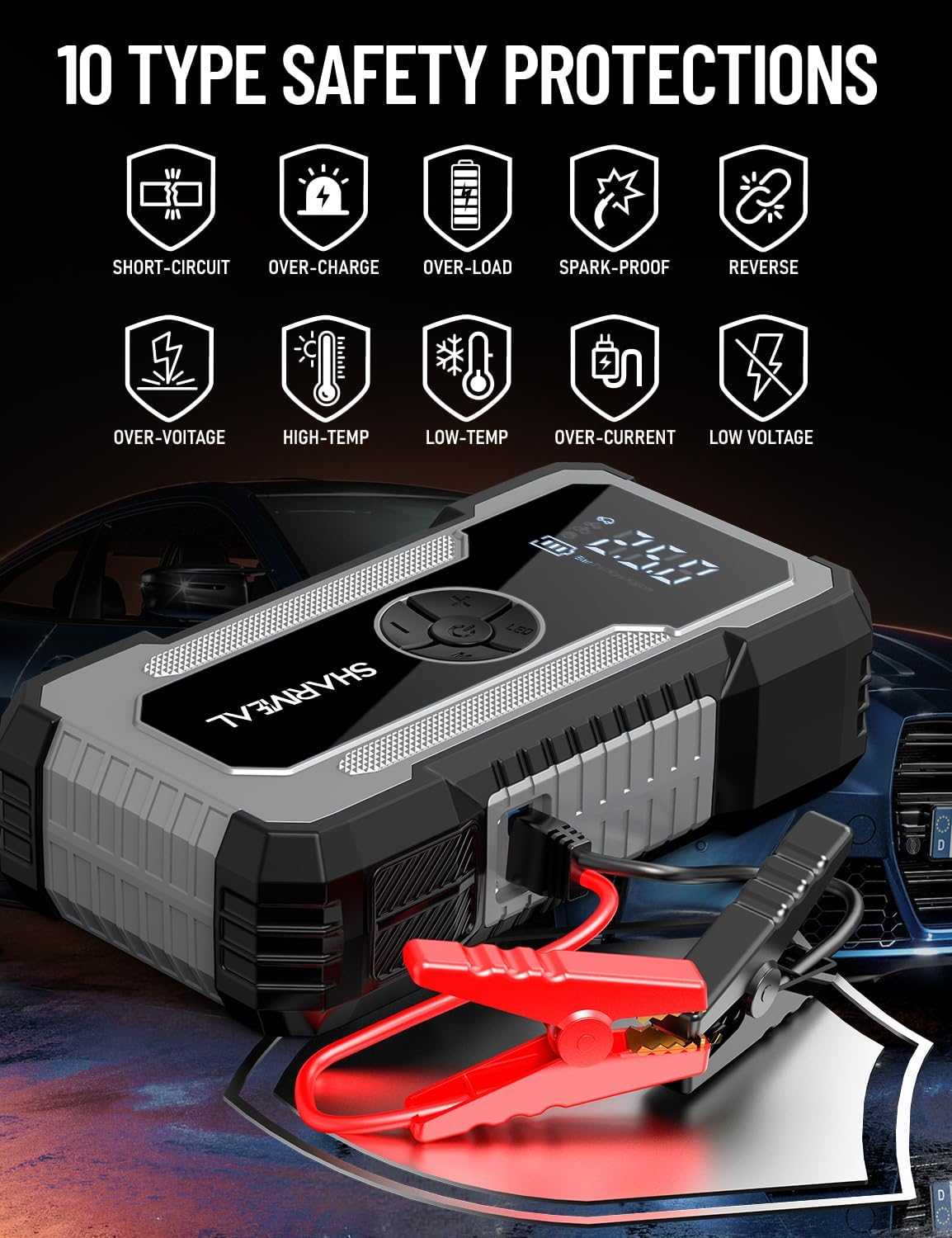
This image illustrates the ten types of safety protections integrated into the device, including short-circuit, over-charge, over-load, spark-proof, reverse connection, over-voltage, high-temperature, low-temperature, over-current, and low voltage protection.
- Reverse Connection Protection: Prevents damage if clamps are connected incorrectly.
- Overcurrent Protection: Safeguards against excessive current flow.
- Overvoltage Protection: Protects the device and vehicle from voltage spikes.
- Overload Protection: Prevents damage from exceeding the device's capacity.
- Overcharge/Discharge Protection: Extends battery life by preventing overcharging or deep discharging.
- Spark-Free Operation: Ensures safe connection without sparks.
- Keep out of reach of children.
- Do not disassemble the unit.
- Do not expose to extreme temperatures or moisture.
5. Setup and Initial Charging
5.1 Initial Charging
Before first use, fully charge the jump starter. Connect the provided Type-C charging cable to the jump starter's input port and a suitable USB power adapter (not included). The digital display will indicate the charging status. A full charge is recommended for optimal performance.
5.2 Checking Battery Level
The digital display shows the current battery level. Ensure the jump starter has sufficient charge before attempting to jump-start a vehicle or inflate tires.
6. Operating Instructions
6.1 Jump Starting a Vehicle
Follow these steps carefully to jump-start a dead car battery:
- Step 1: Insert Jumper Cable. Insert the blue end of the smart jumper cable into the jump starter's 12V output port. Ensure a firm connection.
- Step 2: Connect Clamps. Connect the red clamp to the positive (+) terminal of the car battery and the black clamp to the negative (-) terminal. The smart cable's indicator light will show a successful connection (usually a solid green light).
- Step 3: Start Engine. Return to your vehicle and start the engine. If the car does not start immediately, wait 30 seconds and try again. Do not crank for more than 3 seconds per attempt.
- Step 4: Remove Clamps. Once the car starts, immediately remove the jumper clamps from the car battery, then disconnect the jumper cable from the jump starter.

This image visually guides the user through the four steps of jump-starting a vehicle: inserting the cable, connecting clamps, starting the engine, and removing clamps.
6.2 Using the Air Compressor for Tire Inflation
The integrated air compressor can inflate tires and other inflatables up to 150 PSI.
- Step 1: Assemble the Tube. Screw the air pump hose onto the air outlet port of the jump starter.
- Step 2: Connect Air Nozzle. Connect the appropriate gas nozzle to the air pump hose and then securely attach it to the tire valve or inflatable item.
- Step 3: Set Pressure. Use the '+' and '-' buttons on the device to adjust the desired inflation pressure. The digital display will show the preset value.
- Step 4: Start Inflation. Long press the power button (usually indicated by a 'U' or power symbol) to start inflating. The compressor will automatically stop once the preset pressure is reached.

This image demonstrates the four steps for using the air compressor: assembling the hose, connecting to the tire, setting the desired pressure, and starting inflation.
6.3 Using the LED Light
The device features an 800 lumens bright LED light with three modes:
- Flashlight: For general illumination.
- SOS Mode: Emits an SOS signal for emergencies.
- Strobe Mode: Provides a flashing light for signaling or warning.
Press the light button to cycle through the modes.
6.4 Using as a Portable Power Bank
The jump starter can also function as a portable power bank to charge your electronic devices. Connect your phone, tablet, or other USB-powered devices to the USB output port using a compatible charging cable.
7. Maintenance
- Charging: Recharge the unit every 3-6 months, even if not used, to maintain battery health.
- Cleaning: Wipe the unit with a dry, soft cloth. Do not use harsh chemicals or abrasives.
- Storage: Store the jump starter in a cool, dry place away from direct sunlight and extreme temperatures.
- Cable Care: Inspect jumper cables and air hose for damage before each use. Replace if worn or damaged.
8. Troubleshooting
| Problem | Possible Cause | Solution |
|---|---|---|
| Jump starter not turning on | Low battery or unit is off. | Charge the unit fully. Press the power button to turn it on. |
| Vehicle not starting after jump attempt | Incorrect clamp connection, severely dead battery, or other vehicle issues. | Ensure clamps are connected correctly (red to +, black to -). Wait 30 seconds between attempts. If still no start, the vehicle may have other problems requiring professional assistance. |
| Air compressor not inflating | Hose not connected properly, incorrect pressure setting, or low jump starter battery. | Check all connections. Ensure desired pressure is set. Charge the jump starter. |
| Smart cable indicator light not green | Reverse polarity, short circuit, or low voltage. | Check clamp connections for correct polarity. Ensure the jump starter is adequately charged. |
9. Warranty and Support
Sharmeal products are designed for reliability and performance. For warranty information, technical support, or service inquiries, please refer to the contact information provided on the product packaging or visit the official Sharmeal website. Keep your purchase receipt as proof of purchase.
For further assistance, you may contact Sharmeal customer service through their official channels.