1. Introduction
This user manual provides essential information for the safe and effective use of the Generic CN3085 5V 500mA Lithium Battery Charging Module. This module is designed for charging single-cell lithium-ion batteries with a constant current/constant voltage (CC/CV) charging algorithm. It is suitable for DIY electronics projects requiring a compact and efficient battery charging solution.
2. Safety Information
Please read and understand all safety instructions before operating this module. Failure to follow these instructions may result in electric shock, fire, or damage to the product or connected devices.
- Ensure correct polarity when connecting the battery and power supply. Incorrect connections can damage the module and battery.
- Do not exceed the specified input voltage (DC 5V) or output current (500mA).
- Operate the module in a dry environment, away from moisture and conductive materials.
- Keep out of reach of children.
- Always disconnect power before making or changing connections.
- This module is intended for use with single-cell lithium-ion batteries only. Do not use with other battery chemistries.
3. Product Overview
The CN3085 charging module is a compact board featuring a CN3085 chip, designed for efficient and safe charging of 3.7V lithium batteries. It includes input terminals (VIN) for power supply and output terminals (BAT+) for battery connection.
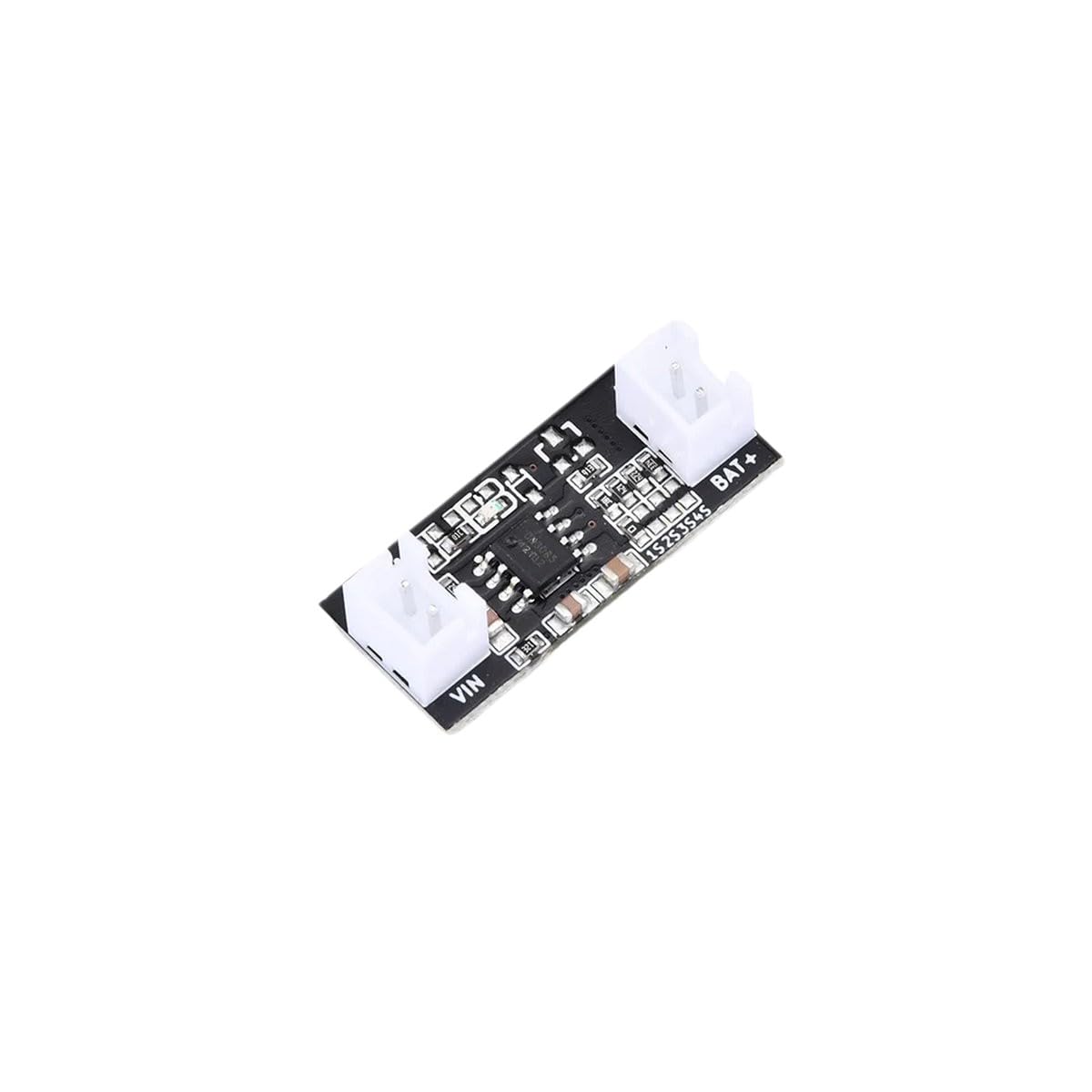
Figure 3.1: Generic CN3085 Lithium Battery Charging Module. This image shows the compact circuit board with input (VIN) and battery (BAT+) terminals clearly visible, along with the CN3085 integrated circuit.
The module typically includes indicator LEDs (not always present or visible in all versions) to show charging status (e.g., charging, charged). Its small form factor makes it ideal for integration into various portable devices and DIY projects.
4. Specifications
| Feature | Value |
|---|---|
| Input Voltage | DC 5V |
| Charging Current | 500mA (Max) |
| Charging Chip | CN3085 |
| Battery Type | Single-cell Lithium-ion (3.7V nominal) |
| Charging Method | Constant Current / Constant Voltage (CC/CV) |
| Operating Temperature | Standard |
5. Setup and Connection
Follow these steps to correctly set up and connect your CN3085 charging module:
- Identify Terminals: Locate the VIN (Voltage Input) and BAT+ (Battery Positive) terminals on the module. The VIN terminals are for the 5V power supply, and the BAT+ terminals are for connecting the lithium battery.
- Connect Battery: Connect the positive terminal of your single-cell lithium-ion battery to the BAT+ terminal on the module. Connect the negative terminal of the battery to the corresponding negative terminal on the module (usually marked as GND or -). Ensure correct polarity.
- Connect Power Supply: Connect a stable DC 5V power supply to the VIN terminals. Connect the positive lead of the 5V supply to the VIN+ terminal and the negative lead to the VIN- (GND) terminal. A standard USB power adapter or a 5V regulated power supply can be used.
- Verify Connections: Double-check all connections for correct polarity and secure contact before applying power.

Figure 5.1: Example of various electronic components. While not the specific module, this illustrates the type of components often used in DIY electronics, emphasizing the need for careful handling and connection.
6. Operating Instructions
Once the module is correctly wired, follow these steps to begin charging:
- Apply Power: Connect the 5V power supply to the module.
- Observe Indicator (if present): If your module has an LED indicator, it will typically illuminate to show the charging status. A common setup is:
- Red LED (or similar): Indicates charging in progress.
- Blue/Green LED (or similar): Indicates charging is complete.
- Charging Process: The CN3085 chip automatically manages the charging process, switching from constant current to constant voltage mode as the battery charges. It will terminate charging when the battery reaches its full voltage (typically 4.2V for Li-ion) and the current drops below a certain threshold.
- Disconnect: Once charging is complete (indicated by the LED, if available), you can disconnect the power supply and the battery.
7. Maintenance
The CN3085 charging module requires minimal maintenance. Adhere to the following guidelines to ensure its longevity and reliable operation:
- Keep the module clean and free from dust and debris. Use a soft, dry brush or compressed air for cleaning.
- Avoid exposing the module to extreme temperatures, humidity, or corrosive environments.
- Regularly inspect connections for any signs of corrosion or loose wiring.
- Store the module in a static-safe environment when not in use.
8. Troubleshooting
If you encounter issues with your CN3085 charging module, refer to the following troubleshooting tips:
| Problem | Possible Cause | Solution |
|---|---|---|
| Module not charging / No indicator light |
|
|
| Module gets excessively hot |
|
|
| Battery not charging to full capacity |
|
|
9. Warranty and Support
This product is backed by a commitment to quality and customer satisfaction. While specific warranty terms may vary, we strive to provide reliable electronic components.
- Money-Back Guarantee: We offer a money-back guarantee, reflecting our confidence in the product's quality.
- Customer Support: For any questions, concerns, or technical assistance, please contact our customer support team. We are available to provide knowledgeable assistance and ensure your satisfaction.
Please refer to your purchase documentation or the seller's platform for specific return and support procedures.
