
1. Introduction
Thank you for purchasing the CollaredEagle Twin Size Bed Frame. This bed frame features a sturdy metal construction, an upholstered headboard with integrated storage shelves, a convenient charging station, and customizable LED lighting. This manual provides detailed instructions for assembly, operation, maintenance, and troubleshooting to ensure optimal use of your new bed frame.
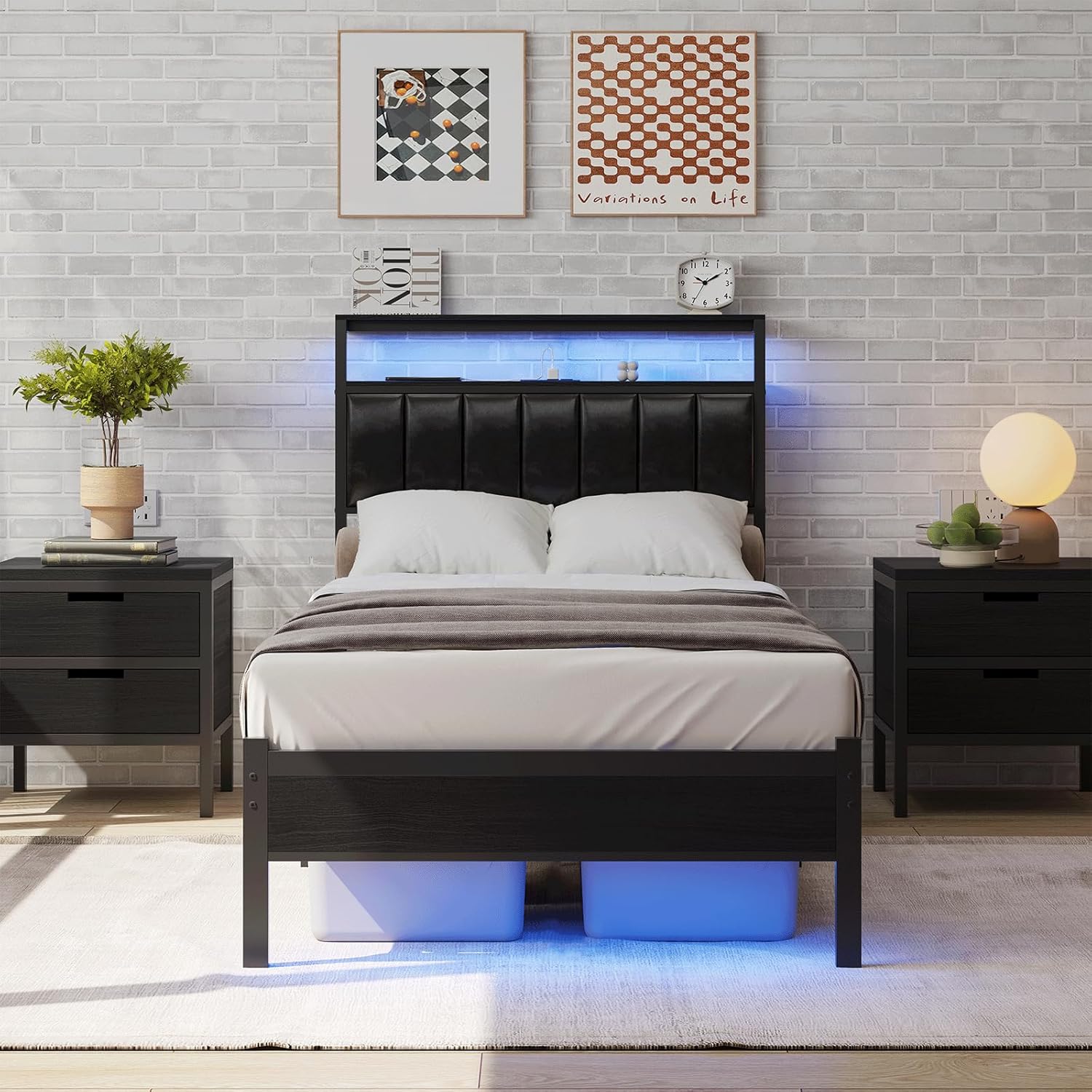
Image 1.1: Fully assembled CollaredEagle Twin Size Bed Frame in a bedroom setting.
2. Safety Information
- Weight Capacity: Do not load the bed frame with more than 1200 pounds (544 kg). Exceeding this limit may compromise the structural integrity and safety of the frame.
- Assembly: Ensure all bolts and fasteners are securely tightened before use. Periodically check and re-tighten as necessary.
- Electrical Components: The charging station and LED lights are designed for indoor use only. Do not expose to moisture. Disconnect from power before cleaning or if any damage is suspected.
- Children: Keep small parts away from children during assembly.
- Placement: Place the bed frame on a level surface to prevent instability.
3. Package Contents
Before beginning assembly, verify that all components are present and undamaged. If any parts are missing or damaged, contact customer support.
- Headboard with integrated charging station and LED lights
- Side rails (2)
- Footboard
- Metal slats (multiple pieces)
- Center support legs (multiple pieces)
- Assembly hardware (bolts, washers, nuts, Allen wrench)
- LED light remote control
- Instruction Manual
4. Setup and Assembly Instructions
Assembly is designed to be straightforward with labeled parts and quick lock-on installation. It is recommended to assemble the bed frame with two people.
- Unpack Components: Carefully remove all parts from the packaging. Lay them out on a clean, soft surface to prevent scratches. Identify each part using the labels and the provided parts list.
- Attach Side Rails to Headboard: Connect the side rails to the headboard using the designated bolts and an Allen wrench. Do not fully tighten bolts until all major components are connected.
- Attach Side Rails to Footboard: Connect the other end of the side rails to the footboard. Ensure proper alignment.
- Install Center Support Legs: Attach the center support legs to the designated crossbars or frame sections. These provide crucial support for the mattress.
- Place Metal Slats: Position the metal slats across the bed frame. Many designs feature a quick lock-on system. Ensure each slat is securely seated.
- Final Tightening: Once all components are in place and aligned, fully tighten all bolts and fasteners.
- Connect Power: Plug the power cord for the charging station and LED lights into a standard wall outlet.

Image 4.1: Product dimensions for assembly reference.

Image 4.2: Detailed view of headboard features and frame construction.
5. Operating Instructions
5.1. LED Lights
The integrated LED lights offer various customization options for ambiance.
- Power On/Off: Use the remote control or the dedicated button on the headboard to turn the LED lights on or off.
- Color Selection: The lights support over 60,000 colors. Use the remote control or the mobile application (if applicable) to select your desired color.
- Brightness Adjustment: Adjust the brightness levels using the remote control.
- Music Sync: Activate the music sync feature via the remote or app. The lights will respond to ambient sounds or music.
- Timing Function: Set a timer for the lights to automatically turn off after a specified duration.
- App Control: Download the compatible mobile application (refer to packaging or product information for app details) for advanced control features.

Image 5.1: Overview of LED light features and control options.
5.2. Charging Station
The integrated charging station provides convenient power access for your devices.
- AC Outlets: Two 125V/12A AC outlets are available for standard electrical devices.
- USB Ports: One 5V/2A USB port is provided for charging compatible devices.
- Type-C Port: One 2.5V/2.1A Type-C port is available for modern devices.
- Usage: Simply plug your device's charging cable into the appropriate port. Ensure the bed frame is connected to a power source.

Image 5.2: Detail of the charging station ports.
6. Maintenance
- Cleaning the Frame: Wipe the metal frame with a soft, damp cloth. Avoid abrasive cleaners or harsh chemicals that could damage the finish.
- Cleaning the Upholstery: For the upholstered headboard, use a soft brush or vacuum cleaner with an upholstery attachment to remove dust. For spills, blot immediately with a clean, dry cloth. For stubborn stains, consult a professional upholstery cleaner.
- Electrical Components: Ensure the charging station and LED lights are unplugged before cleaning. Wipe with a dry cloth only.
- Regular Checks: Periodically inspect all bolts and connections to ensure they remain tight. Re-tighten if necessary to maintain stability and prevent squeaking.
7. Troubleshooting
| Problem | Possible Cause | Solution |
|---|---|---|
| Bed frame is squeaking. | Loose bolts or connections. | Check and tighten all assembly bolts and fasteners. Ensure all slats are properly seated. |
| LED lights are not working. | Power cord unplugged, remote battery low, or connection issue. | Ensure the power cord is securely plugged into a working outlet. Replace remote control batteries. Check LED strip connections. |
| Charging station is not providing power. | Power cord unplugged, or device not compatible. | Verify the bed frame is plugged into a live power outlet. Ensure your device is compatible with the USB/Type-C ports or AC outlets. |
| Headboard LED strip not adhering properly. | Adhesive weakening over time or improper initial application. | Clean the surface where the LED strip is applied. Re-secure with stronger adhesive tape if necessary. |
8. Specifications
| Feature | Detail |
|---|---|
| Model Number | BF041-BK-T |
| Size | Twin |
| Product Dimensions (L x W x H) | 77.55" x 44.09" x 38.18" |
| Color | Black Soft Backrest |
| Material | Metal (Frame), Wood (Headboard structure), Upholstered (Headboard) |
| Weight Capacity | Up to 1200 lbs |
| Special Features | Charging Station (2 AC outlets, 1 Type-C, 1 USB), LED Lighting (RGB, Music Sync, Timing), Slatted, Squeak Resistant, Upholstered Headboard, 2-Tier Storage Shelves |
| Assembly Required | Yes |
| Item Weight | 36 pounds |
| Under-Bed Storage Clearance | Approximately 11.81 inches |

Image 8.1: Under-bed storage clearance.
9. Warranty and Support
For warranty information or technical support, please contact CollaredEagle customer service. Keep your purchase receipt and model number (BF041-BK-T) handy for faster service.
Manufacturer: CollaredEagle
Contact Information: Refer to the product packaging or the official CollaredEagle website for the most current customer support contact details.