
Product Overview
This manual provides detailed instructions for the assembly, operation, and maintenance of your CSZZD Twin Loft Bed. This versatile loft bed features a U-shaped desk, integrated storage, LED lighting, and a built-in charging station, designed to optimize space in smaller living areas.

The CSZZD Twin Loft Bed with U-Shaped Desk, showing its overall structure and integrated features in a modern room.
Important Safety Information
Read all instructions carefully before assembly and use. Keep this manual for future reference.
- Always assemble the bed according to the provided instructions.
- Do not exceed the weight limit.
- Keep the guardrails in place at all times.
- This product is not intended for children under 6 years old.
- Ensure all connections are secure before use.
- Periodically check and tighten all bolts and fasteners.
Assembly Instructions
The CSZZD Twin Loft Bed requires assembly. It is recommended to have two people for assembly. All necessary tools and hardware are included.
Before You Begin
- Unpack all components and verify against the parts list included with your product.
- Clear a spacious area for assembly.
- Keep children and pets away from the assembly area.
Assembly Steps
Follow the detailed step-by-step instructions provided in the separate assembly guide included with your product. Ensure each part is correctly oriented and securely fastened.

Detailed dimensions of the CSZZD Twin Loft Bed, including height, length, and width measurements for the bed, desk, and storage components.

Illustration of the bed frame components, providing a visual aid for assembly.
Operating Instructions
LED Lighting System
Your loft bed is equipped with a smart RGB LED light strip.
- Power On/Off: Connect the LED strip to a power source. Use the dedicated app or remote control (if included) to turn the lights on or off.
- Color Selection: The app offers over 60,000 colors. Select your desired color from the color palette within the app.
- Modes: Choose from 29 flashing modes, music mode, or mic mode via the app to create different atmospheres.
- Brightness Adjustment: Adjust the brightness level using the app or remote control.

The CSZZD Twin Loft Bed illuminated with blue LED lights, demonstrating the ambient lighting feature and app control options.
Built-in Charging Station
The U-shaped desk includes a built-in charging station for your electronic devices.
- AC Outlets: Two 125V/12A AC outlets are available for laptops, monitors, or other appliances.
- USB Port: One 5V/2.1A USB port is provided for charging smartphones and other USB-powered devices.
- Type-C Port: One 5V/2.1A Type-C port is available for compatible devices.
- Usage: Simply plug your devices into the appropriate ports. Ensure the bed's main power cord is connected to a wall outlet.
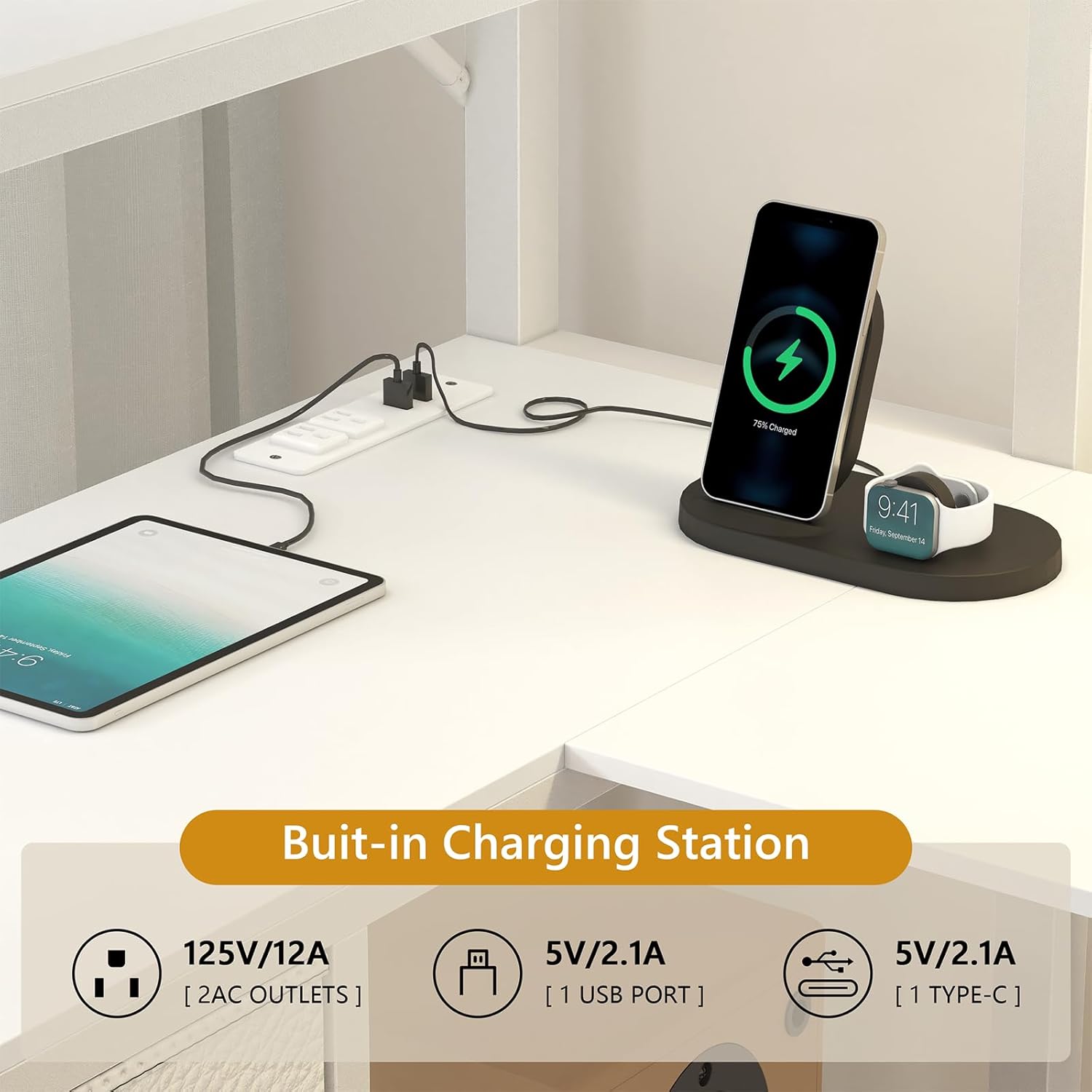
Close-up view of the built-in charging station on the U-shaped desk, showing two AC outlets, one USB port, and one Type-C port.
Care and Maintenance
General Care
- Cleaning: Wipe surfaces with a soft, damp cloth. Avoid harsh chemicals or abrasive cleaners.
- Dusting: Regularly dust the metal frame and wooden components.
- Fasteners: Periodically check all bolts, screws, and fasteners to ensure they are tight. Re-tighten if necessary to maintain stability.
- LED Lights: Keep the LED strip clean and free from dust. Do not attempt to repair the LED strip yourself; contact support if issues arise.
- Charging Station: Keep the charging ports free of dust and debris. Do not spill liquids on the charging station.
Upholstered Headboard Care
- Spot Cleaning: For minor spills, blot immediately with a clean, dry cloth.
- Deep Cleaning: For more stubborn stains, use a mild fabric cleaner according to the product's instructions. Test on an inconspicuous area first.
Troubleshooting Guide
This section addresses common issues you might encounter with your loft bed.
Assembly Issues
- Missing Parts: If any parts are missing, refer to the parts list in your assembly guide and contact customer support for replacements.
- Difficulty Aligning Holes: Ensure all parts are correctly oriented as per the assembly instructions. Sometimes, loosening adjacent bolts slightly can help with alignment before re-tightening.
- Wobbling: Ensure all bolts and fasteners are fully tightened. Uneven flooring can also cause wobbling; consider using furniture pads or shims to level the bed.
LED Lights Not Working
- Power Connection: Verify the LED strip is securely plugged into a working power outlet.
- App/Remote: Ensure the app is correctly paired or the remote control has working batteries and is within range.
- Damage: Inspect the LED strip for any visible damage. If damaged, contact customer support.
Charging Station Not Functioning
- Power Connection: Confirm the bed's main power cord is securely plugged into a functional wall outlet.
- Device Compatibility: Ensure your device is compatible with the USB or Type-C port (e.g., correct cable, device not requiring higher wattage than provided).
- Overload: Avoid plugging in too many high-power devices simultaneously, which could trip a circuit.
Product Specifications
| Feature | Detail |
|---|---|
| Brand | CSZZD |
| Model | Twin Loft Bed with U-Shaped Desk |
| Size | Twin |
| Color | White |
| Material | Metal, Wood |
| Frame Material | Metal |
| Dimensions (L x W x H) | 89.8"L x 40.6"W x 74.8"H |
| Item Weight | 132 Pounds |
| Special Features | Charging Station, LED Lighting, No Box Spring Needed, Space Saving, Storage Drawer |
| Included Components | Drawer |
| Charging Station | 2 AC Outlets (125V/12A), 1 USB Port (5V/2.1A), 1 Type-C Port (5V/2.1A) |
| LED Lights | RGB, App/Remote Control, 60,000+ Colors, 29 Modes |
| Assembly Required | Yes |
| Age Range | Teen |

Visual comparison highlighting the spacious U-shaped desk design of the CSZZD loft bed, emphasizing its functional layout.
Warranty Information
This CSZZD product comes with a Limited Warranty. For specific details regarding coverage duration and terms, please refer to the warranty card included with your purchase or contact customer support.
Protection Plans (Optional)
Extended protection plans may be available for purchase separately. These plans offer additional coverage beyond the standard manufacturer's warranty.
- 2-Year Protection Plan
- 3-Year Protection Plan
- Complete Protect (monthly billing)
For more information on protection plans, please consult the provider's documentation.
Customer Support
If you have any questions, require assistance with assembly, or encounter any issues not covered in this manual, please contact CSZZD customer support.
Please have your product model number (Twin Loft Bed with U-Shaped Desk) and purchase date ready when contacting support.