
1. Introduction and Overview
Thank you for choosing the FUNPOLA LED 3D Wood Puzzle Owl Post Office. This DIY miniature kit is designed to provide an engaging building experience, resulting in a dynamic model with mechanical gears, LED lights, and music. It features a richly detailed interior, including an owl clerk, a mail counter, and organized postal shelves. Once assembled and activated, the owl's wings gently flap, the conveyor belt rotates, and the parcel door opens to release a surprise gift.
This model is suitable for adults and teens aged 14 and above, offering approximately 6-8 hours of assembly time. It serves as both a rewarding project and a captivating display piece.
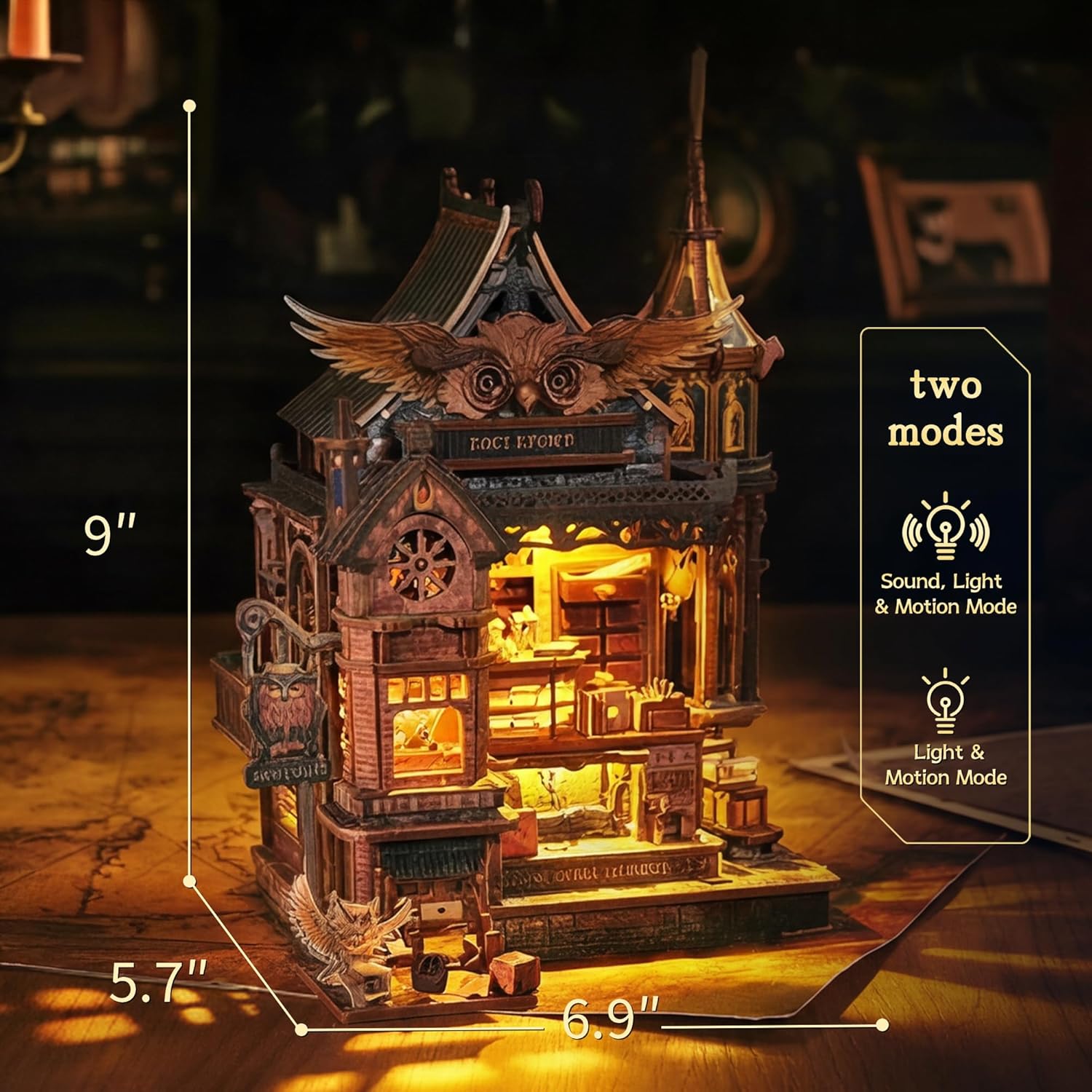
Figure 1: Assembled Owl Post Office model with lights on, showcasing its detailed design and overall dimensions.
2. Setup and Assembly
The Owl Post Office is a DIY kit requiring assembly. Follow the included 3D step-by-step instructions carefully. Precision is key for proper functionality of the mechanical components.
2.1 Unpacking and Preparation
- Carefully unpack all components. Verify that all 462 precision-cut wooden pieces and other included components (puzzle sheets, electrical parts) are present.
- Organize pieces by number or type to streamline the assembly process.
- Ensure you have a clean, well-lit workspace.
2.2 Assembly Process
Refer to the detailed 3D color manual provided with your kit for step-by-step guidance. The assembly typically takes 6-8 hours.
- Follow the numerical sequence in the manual.
- Gently detach pieces from their sheets. Avoid forcing them to prevent damage.
- Pay close attention to the orientation of each piece as indicated in the diagrams.
- For mechanical parts, ensure smooth movement during assembly. Do not overtighten or glue moving parts unless specified.

Figure 2: Illustration of the assembly process, showing hands working with puzzle pieces and the instruction manual.
2.3 Battery Installation
The model requires 3 AAA batteries (not included) for its light and sound functions. The battery case is designed for easy access.
- Locate the battery compartment, typically at the base of the model.
- Open the compartment cover.
- Insert 3 fresh AAA batteries, ensuring correct polarity (+/-).
- Close the battery compartment cover securely.
3. Operating Instructions
The Owl Post Office features a dual-mode light and sound system controlled by a built-in touch switch.
3.1 Activating the Model
- Locate the touch switch on the model (refer to the manual for exact placement).
- Mode 1 (Gentle Lighting and Motion): Tap the switch once. The model's lights will illuminate, and the mechanical parts (owl wings, conveyor belt, parcel door) will activate without music.
- Mode 2 (Music, Warm Lights, and All Moving Parts): Tap the switch twice. The model will play music, illuminate with warm lights, and all mechanical parts will operate.
- To turn off the model, tap the switch until all functions cease.

Figure 3: Close-up view of the dynamic elements, such as the flapping owl wings and the moving conveyor belt.

Figure 4: Interior details of the Owl Post Office, showing the post office counter and parcel pickup window.
4. Maintenance
Proper care will ensure the longevity and continued enjoyment of your Owl Post Office model.
- Cleaning: Use a soft, dry cloth or a soft brush to gently remove dust from the model. Avoid using liquid cleaners or abrasive materials.
- Storage: Store the model in a dry environment, away from direct sunlight and extreme temperatures, to prevent warping or fading of the wooden components.
- Battery Replacement: If the lights dim or the mechanical functions become sluggish, replace the AAA batteries. Always replace all three batteries at once with new ones.
- Mechanical Parts: If any mechanical gears or moving parts become stiff, ensure they are free of dust or debris. Do not apply lubricants unless specifically recommended by the manufacturer.
5. Troubleshooting
If you encounter issues with your Owl Post Office model, refer to the following common troubleshooting steps:
| Problem | Possible Cause | Solution |
|---|---|---|
| Lights do not turn on or are dim. | Dead or incorrectly installed batteries. Loose electrical connection. | Check battery polarity and ensure they are fresh. Verify all electrical connections are secure as per the manual. |
| Mechanical parts (wings, conveyor) do not move or move intermittently. | Low batteries. Obstruction in gears. Incorrect assembly of moving parts. | Replace batteries. Inspect for any debris blocking the gears. Review the assembly steps for mechanical components in the manual. |
| Music or sound does not play. | Low batteries. Speaker connection issue. | Ensure batteries are fresh. Check the speaker connection if accessible and specified in the manual. |
| Pieces do not fit together properly. | Incorrect piece orientation. Excess material. | Double-check the manual for correct piece orientation. Gently sand any rough edges if necessary, but avoid removing too much material. |
If issues persist after following these steps, please contact FUNPOLA customer support.
6. Specifications
| Feature | Detail |
|---|---|
| Brand | FUNPOLA |
| Model Number | JK-OwlPost |
| Material Type | Engineered Wood |
| Number of Pieces | 462 |
| Assembly Time | 6-8 Hours (approx.) |
| Recommended Age | 14+ |
| Power Source | Battery (3x AAA, not included) |
| Operation Mode | Manual (touch switch for light/sound/motion) |
| Item Dimensions (L x W) | 6.9"L x 5.7"W (Note: Full dimensions are 9.45 x 6.69 x 0.04 inches for the package, actual model dimensions may vary slightly) |
| Educational Objective | Problem Solving Skill, Hand-Eye Coordination, Patience Skill, Spatial Awareness, Creative Thinking |
7. Official Product Video
Watch the official product video for a visual guide on the assembly process and to see the dynamic features of the Owl Post Office in action.
Video 1: Official product video demonstrating the assembly process and dynamic features of the FUNPOLA LED 3D Wood Puzzle Owl Post Office.
8. Warranty and Support
FUNPOLA is committed to customer satisfaction. If you encounter any product issues, including missing parts or functional problems, please contact our dedicated support team.
- Contact Support: Refer to the contact information provided in your product packaging or visit the official FUNPOLA Store on Amazon for assistance.
- Warranty: Specific warranty details may be included with your purchase. Please retain your proof of purchase for any warranty claims.