1. Introduction
Thank you for choosing the Sparklingtrack 250W LED Wall Washer Moving Head Light Bar. This professional stage lighting fixture is designed to provide dynamic and vibrant lighting effects for various events and venues. Featuring 10x 25W RGBW LED lamp beads, DMX control, sound activation, and master-slave operation, this light bar offers versatile performance and robust construction. Please read this manual thoroughly before operation to ensure safe and correct usage.
2. Safety Information
- Always connect the unit to a grounded power outlet.
- Ensure the power supply voltage matches the unit's requirements (AC110V-240V 50/60HZ).
- Do not open the housing; there are no user-serviceable parts inside. Refer all servicing to qualified personnel.
- Avoid direct eye exposure to the light source, as it can cause eye damage.
- Ensure proper ventilation around the unit to prevent overheating. Do not block ventilation openings.
- Keep the unit away from flammable materials, liquids, and excessive moisture.
- This product has an IP20 protection level, meaning it prevents intrusion of solid objects larger than 12.5 mm. It is not waterproof and should not be exposed to water or high humidity.
- Operating environment temperature: -20℃ to 40℃.
3. Package Contents
Verify that all items listed below are included and in good condition upon unpacking:
- RGBW LED Wall Washer Light x 1
- Power cord x 1
- Instruction manual x 1

Image: Packing list showing the LED wall washer light, power cord, and instruction manual.
4. Product Overview
The Sparklingtrack 250W LED Wall Washer Light Bar features a robust aluminum and plastic construction, designed for durability. It incorporates 10 individual 25W RGBW LED lamp beads, offering a wide range of color mixing capabilities. The light bar includes a control panel with a 4-digit digital display for easy mode selection and parameter adjustment. Connectivity options include DMX IN/OUT and power link for daisy-chaining multiple units.
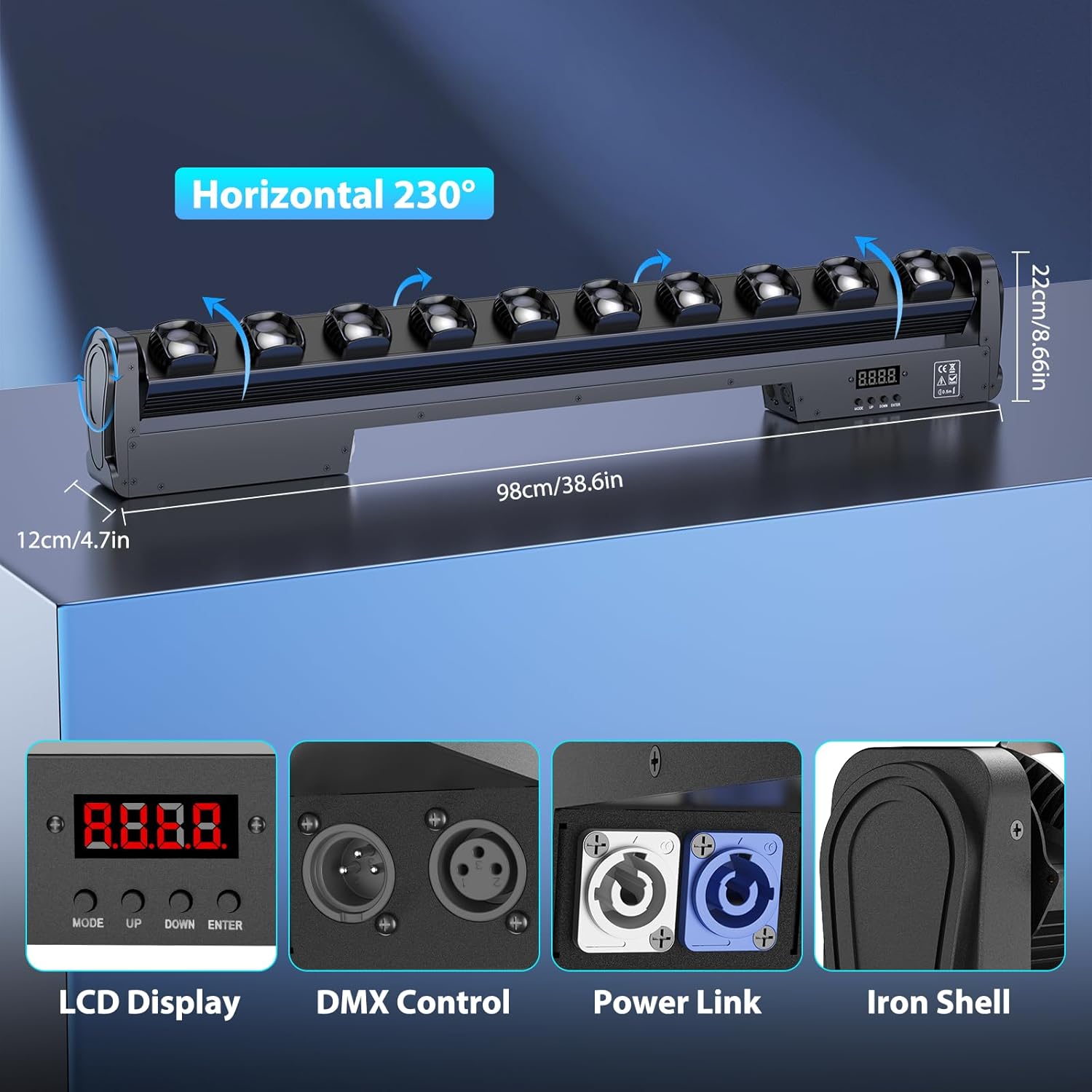
Image: Rear view of the light bar highlighting the LCD display, DMX control ports, power link, and iron shell construction.

Image: Detailed view of the control panel with MODE, UP, DOWN, ENTER buttons, and DMX/Power Link connectors.
5. Setup
5.1 Placement
Place the light bar on a stable, flat surface or mount it securely using appropriate clamps and safety cables (not included). Ensure there is sufficient space for ventilation and for the Y-axis movement of the light heads.
5.2 Power Connection
Connect the provided power cord to the unit's power input and then to a suitable AC110V-240V 50/60HZ grounded power outlet. The unit will power on automatically.
5.3 DMX Connection (Optional)
For DMX control, connect a DMX cable from your DMX controller's output to the DMX IN port of the first light bar. To daisy-chain multiple units, connect a DMX cable from the DMX OUT port of the first unit to the DMX IN port of the next unit, and so on. Ensure the last unit in the chain has a DMX terminator connected to its DMX OUT port.
6. Operating Modes
The light bar offers multiple operating modes, selectable via the control panel's 4-digit digital display and buttons (MODE, UP, DOWN, ENTER).
6.1 Control Panel Operation
- MODE: Press to cycle through different operating modes (Auto, Sound, Master-Slave, DMX).
- UP/DOWN: Use to navigate through options or adjust parameter values within a selected mode.
- ENTER: Confirm selection or save changes.
6.2 Auto Mode (Self-Propelled)
In Auto mode, the light bar will cycle through pre-programmed lighting sequences and color changes automatically. This mode is ideal for quick setup without external control.
6.3 Sound Activated Mode
When Sound Activated mode is selected, the light bar's effects will react to ambient sound and music. The internal microphone detects sound, triggering dynamic light patterns and color changes synchronized with the beat.

Image: The light bar displaying various colors and patterns, illustrating its sound-activated mode.
6.4 Master-Slave Mode
Connect multiple light bars using DMX cables. Set one unit as the Master and the others as Slaves. The Slave units will mirror the Master unit's operations, creating synchronized lighting effects across all connected fixtures.
6.5 DMX Control Mode
For advanced control, use a DMX512 controller. The light bar supports 7, 13, or 43 DMX channels, allowing precise control over individual LED segments, colors (RGBW), dimming, strobe speed, and Y-axis movement. Refer to the DMX channel chart (usually provided separately or in the full manual) for specific channel assignments.
Video: Demonstration of the 250W DJ Lights Bar Moving Head DMX Light Bar in action, showcasing various DMX-controlled effects and movements.
Video: A short preview demonstrating the 250W Moving Head Light DJ Lights, highlighting its dynamic beam effects.
6.6 Key Features and Adjustments
- Color Mixing: Utilizes RGBW (Red, Green, Blue, White) LEDs to create a wide spectrum of colors, including pure amber, purple, and cyan.
- Dimming: 0-100% linear dimming for smooth intensity control.
- Strobe: Adjustable strobe speed from 1-16Hz.
- Y-axis Movement: The moving head light Y-axis can rotate up to 120°, allowing for broad beam coverage.
- Beam Angle: Features a 2° light output angle for focused and impactful beams.

Image: The light bar displaying a range of RGBW color combinations, demonstrating its color mixing capabilities.

Image: Visual representation of the 2° beam angle, showing focused light beams.
7. Maintenance
Regular maintenance ensures the longevity and optimal performance of your light bar.
- Cleaning: Periodically clean the lenses and exterior housing with a soft, lint-free cloth. Do not use abrasive cleaners or solvents.
- Inspection: Regularly check power cables, DMX cables, and mounting hardware for any signs of wear or damage. Replace damaged components immediately.
- Storage: When not in use, store the unit in a dry, dust-free environment, preferably in its original packaging or a protective case.
8. Troubleshooting
| Problem | Possible Cause | Solution |
|---|---|---|
| No power | Power cable not connected or faulty; power outlet issue. | Check power cable connection. Test the outlet with another device. Replace faulty cable if necessary. |
| No DMX control | Incorrect DMX mode; faulty DMX cable; incorrect DMX address; missing terminator. | Ensure unit is in DMX mode. Check DMX cable connections. Verify DMX address settings. Use a DMX terminator on the last unit. |
| Lights not responding to sound | Not in Sound Activated mode; low sound sensitivity. | Select Sound Activated mode. Increase sound sensitivity if adjustable (refer to full manual). Ensure sufficient sound input. |
| Overheating | Blocked ventilation; prolonged use in high ambient temperature. | Ensure ventilation openings are clear. Operate within specified temperature range. Allow unit to cool down. |
9. Specifications
| Feature | Detail |
|---|---|
| Model Number | ZQ06079 |
| Power Source | Corded Electric |
| Input Voltage | AC110V-240V 50/60HZ |
| Wattage | 250 Watts |
| Light Source Type | Light Emitting Diode (LED) |
| Number of Light Sources | 10 |
| LED Type | 4-in-1 RGBW 25W LEDs |
| Light Output Angle | 2° |
| Y-axis Rotation Angle | 120° |
| Dimming | 0-100% Linear |
| Strobe Speed | 1-16Hz |
| Control Channels | 7/13/43CH |
| Control Protocol | DMX512, RDM |
| Operating Modes | Auto, Sound Control, Master-Slave, DMX |
| Display | 4-digit Digital Display |
| Material | Aluminum + Plastic |
| Finish Type | Painted |
| Color | Black |
| Protection Level | IP20 |
| Product Dimensions | 40"L x 5.5"W x 4.5"H (approx. 101.6cm L x 13.97cm W x 11.43cm H) |
| Item Weight | 14 pounds (approx. 6.35 kg) |
| LED Average Life | 50000h |
10. Warranty and Support
For warranty information, technical support, or service inquiries, please refer to the contact details provided with your purchase or visit the official Sparklingtrack website. Keep your purchase receipt as proof of purchase for any warranty claims.

