
Introduction
This manual provides instructions for the safe and effective use of your YUQBLITTY Cordless Red Light Therapy Pad. This device is designed to deliver red light and near-infrared light therapy to the neck, shoulders, and other body areas for relaxation and comfort.
Important Safety Information
WARNING: This is an electric heating pad. Do not leave unattended while in use. Use the automatic shut-off feature to prevent overheating and potential burn hazards.
- Consult a healthcare professional before use if you have any medical conditions, are pregnant, or are taking medications.
- Do not use on broken, irritated, or sensitive skin.
- Keep out of reach of children.
- Do not immerse the device in water or other liquids.
- Do not use if the device or power cord is damaged.
- Statements regarding dietary supplements have not been evaluated by the FDA and are not intended to diagnose, treat, cure, or prevent any disease or health condition.
Product Overview
The YUQBLITTY Cordless Red Light Therapy Pad combines 660nm red light and 850nm near-infrared light to target various tissue depths. It features a cordless design, a touch-screen controller, and an automatic shut-off timer for convenience and safety.

Figure 1: YUQBLITTY Cordless Red Light Therapy Pad. This image shows the overall design of the therapy pad, highlighting its ergonomic shape for neck and shoulder use.
Key Features:
- Dual Wavelength Therapy: Utilizes 660nm red light (visible) for superficial skin layers and 850nm near-infrared light (invisible) for deeper tissue penetration.
- 10Hz Pulse Technology: Enhances penetration to stimulate cells and is ideal for deep tissue treatment.
- Cordless Operation: Equipped with a 3000mAh battery for portable use.
- Smart Touch-Screen Control: Intuitive interface for easy operation.
- Automatic Timer: Features 10-minute and 20-minute automatic shut-off settings.
- Versatile Design: Adjustable fasteners for a secure fit on the neck, shoulders, and other body parts.

Figure 2: Dual Wavelength Light Penetration. This diagram illustrates how 660nm red light penetrates the epidermis and dermis, while 850nm infrared light reaches deeper into the hypodermis and muscle tissue.
Setup
1. Charging the Device:
- Locate the charging port on the controller.
- Connect the provided USB charging cable to the device and a suitable USB power adapter (not included).
- The indicator light on the controller will show charging status. Charge the device fully before first use.

Figure 3: Rechargeable Controller. This image displays the cordless controller with its touch-screen interface and charging port, emphasizing its portability and ease of use.
2. Wearing the Therapy Pad:
- Position the therapy pad comfortably around your neck and shoulders, ensuring the light-emitting side faces your skin.
- Use the adjustable fasteners to secure the pad for a snug but comfortable fit. The pad should not feel too tight or restrict movement.
Operation
1. Power On/Off:
- Press and hold the Power button on the touch-screen controller to turn the device on.
- Press and hold the Power button again to turn the device off.
2. Selecting Light Modes:
- The device offers multiple light modes (e.g., 4 constant lights, 10Hz pulse).
- Tap the "Lights Modes" icon on the touch screen to cycle through the available modes. Refer to the display for the current mode selection (e.g., 01, 02, 03, 04, 05).
- The 10Hz pulse mode is designed for enhanced penetration and deep tissue treatment.

Figure 4: Therapy Modes. This image illustrates the two main therapy modes: 4 Constant lights for general use and 10Hz Pulse for deeper tissue stimulation.
3. Setting the Timer:
- The device has pre-set timers for 10 or 20 minutes.
- Tap the "Timer Setting" icon on the touch screen to select your desired treatment duration.
- The device will automatically shut off once the selected time has elapsed.
4. Screen Lock:
- To prevent accidental changes during use, tap the "Screen Lock" icon to lock the touch screen.
- Tap it again to unlock.
Usage Guidelines
- Recommended Use: Set your preferred time using the timer and avoid continuous use. Typical sessions are 10-20 minutes.
- Target Areas: The pad is designed for the neck, shoulders, and upper back. It can also be used on other body parts as needed.
- Frequency: Use as directed by a healthcare professional or as comfortable for your needs.

Figure 5: Targeted Relief. This image shows the therapy pad being used on the neck and shoulders, with illustrations indicating relief for neck pain, shoulder pain, and upper back pain.

Figure 6: Usage Flexibility. This image demonstrates the portability of the device, showing individuals using it in an office setting, while traveling, and at home.
Maintenance
Cleaning:
- Ensure the device is turned off and unplugged before cleaning.
- Wipe the surface of the pad with a soft, damp cloth. Do not use abrasive cleaners or immerse the device in water.
- Allow the device to air dry completely before storing or next use.
Storage:
- Store the device in a cool, dry place, away from direct sunlight and extreme temperatures.
- Keep the device in its original packaging or a protective case to prevent damage.
Troubleshooting
| Problem | Possible Cause | Solution |
|---|---|---|
| Device does not turn on. | Battery is low or depleted. | Charge the device fully using the provided USB cable. |
| Lights are not visible. | Near-infrared lights (850nm) are invisible to the naked eye. | This is normal. The 660nm red lights should be visible. If no lights are visible, ensure the device is on and charged. |
| Device shuts off unexpectedly. | Timer has expired or battery is low. | Check the timer setting. If not timer-related, recharge the device. |
| Controller screen is unresponsive. | Screen lock is active. | Tap the "Screen Lock" icon to unlock the screen. |
Specifications
- Model: B0FXLH8ZVT
- Brand: YUQBLITTY
- Wavelengths: 660nm (Red Light), 850nm (Near-Infrared Light)
- Special Features: Automatic Shut Off, Cordless, Timer, 10Hz Pulse
- Material: Neoprene
- Battery: 1 Lithium Ion battery (included), 3000mAh
- Package Dimensions: 10.2 x 7.6 x 2 inches
- Weight: 1.5 Pounds
- Manufacturer: Dongguan MiQiang Technology Co., Ltd
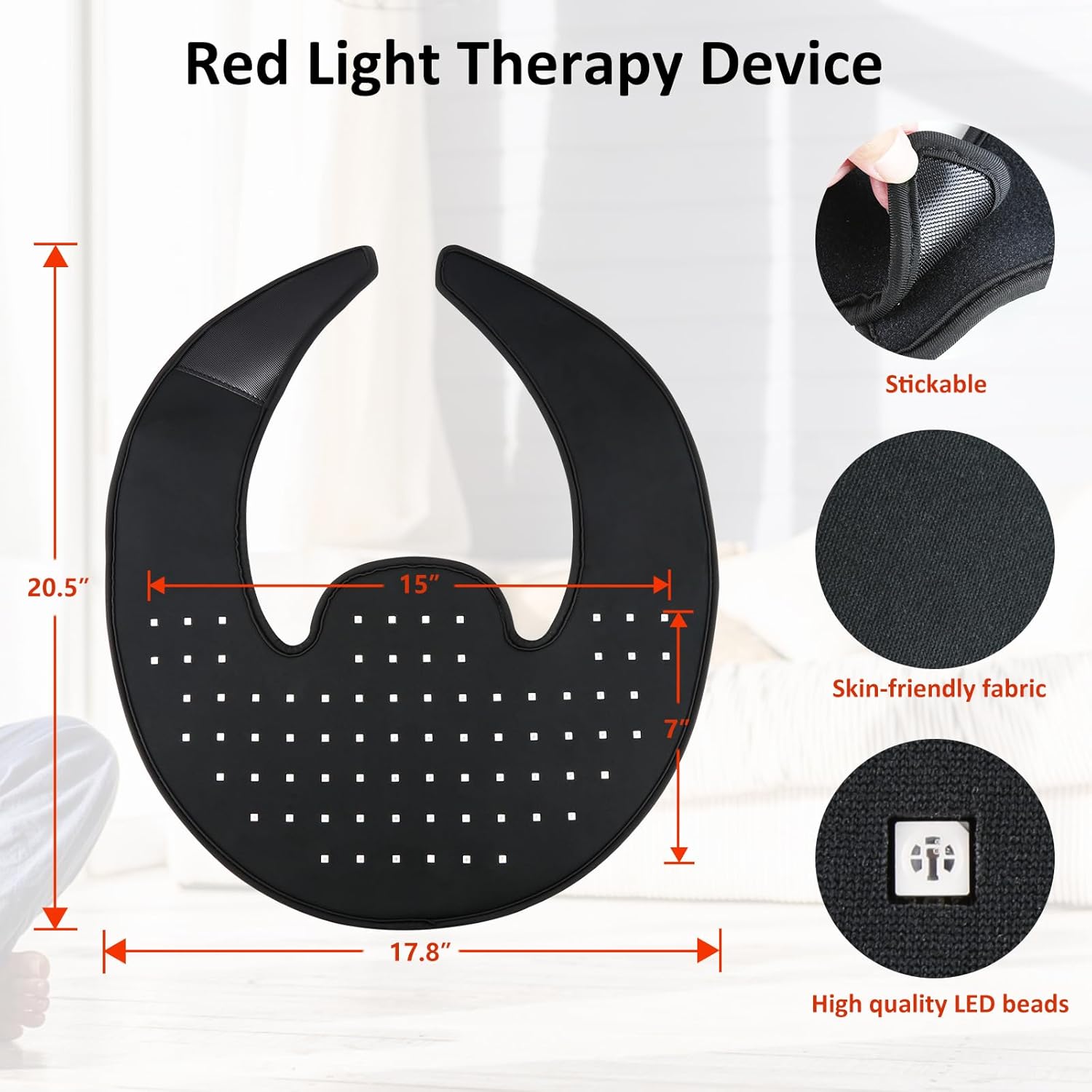
Figure 7: Device Specifications. This image provides a visual representation of the product's dimensions and highlights key material features like "Stickable," "Skin-friendly fabric," and "High quality LED beads."
Warranty and Support
For warranty information or technical support, please refer to the contact details provided with your purchase or visit the official YUQBLITTY website. Keep your proof of purchase for warranty claims.