1. Introduction
This manual provides detailed instructions for the assembly, operation, and maintenance of your UPOSOJA 63-inch Executive Desk with Mobile File Cabinet. Please read all instructions carefully before assembly and use to ensure proper function and safety.
2. Safety Information
Always assemble the desk on a stable, level surface. Use appropriate tools and follow the instructions carefully. Once assembled, ensure the desk is properly anchored to the wall or floor to prevent tipping. Do not overload the desk, especially with heavy items on the edges. When using the power outlets, ensure all devices are unplugged before moving the desk. Keep the desk and outlets away from water and other potential hazards.
3. Product Features
- Business Workstation Set: The versatile two-piece office desk set includes a spacious 63-inch computer desk and a 32-inch rolling file cabinet that can be combined to create an L-shaped workspace or used separately.
- Built-in Power Outlet: The L-shaped executive desk is equipped with 4 plug outlets and 2 USB ports to provide power for up to 6 devices simultaneously.
- Amazing Storage Capabilities: The mobile file cabinet (31.5" x 15.7") features a reversible storage shelf and a wide file drawer designed for hanging A4/letter/legal size files.
- Spacious Work Surface: The large desk features an extra-large desktop measuring 63" W and 31" D, providing ample space for multiple monitors and office supplies. The 30" height offers comfortable legroom.
- Sturdy & Durable Design: Constructed with a stable, thick metal frame and a waterproof, wear-resistant textured desktop.
Video: Overview of the UPOSOJA Executive Desk and Mobile File Cabinet, showcasing its features and dimensions.
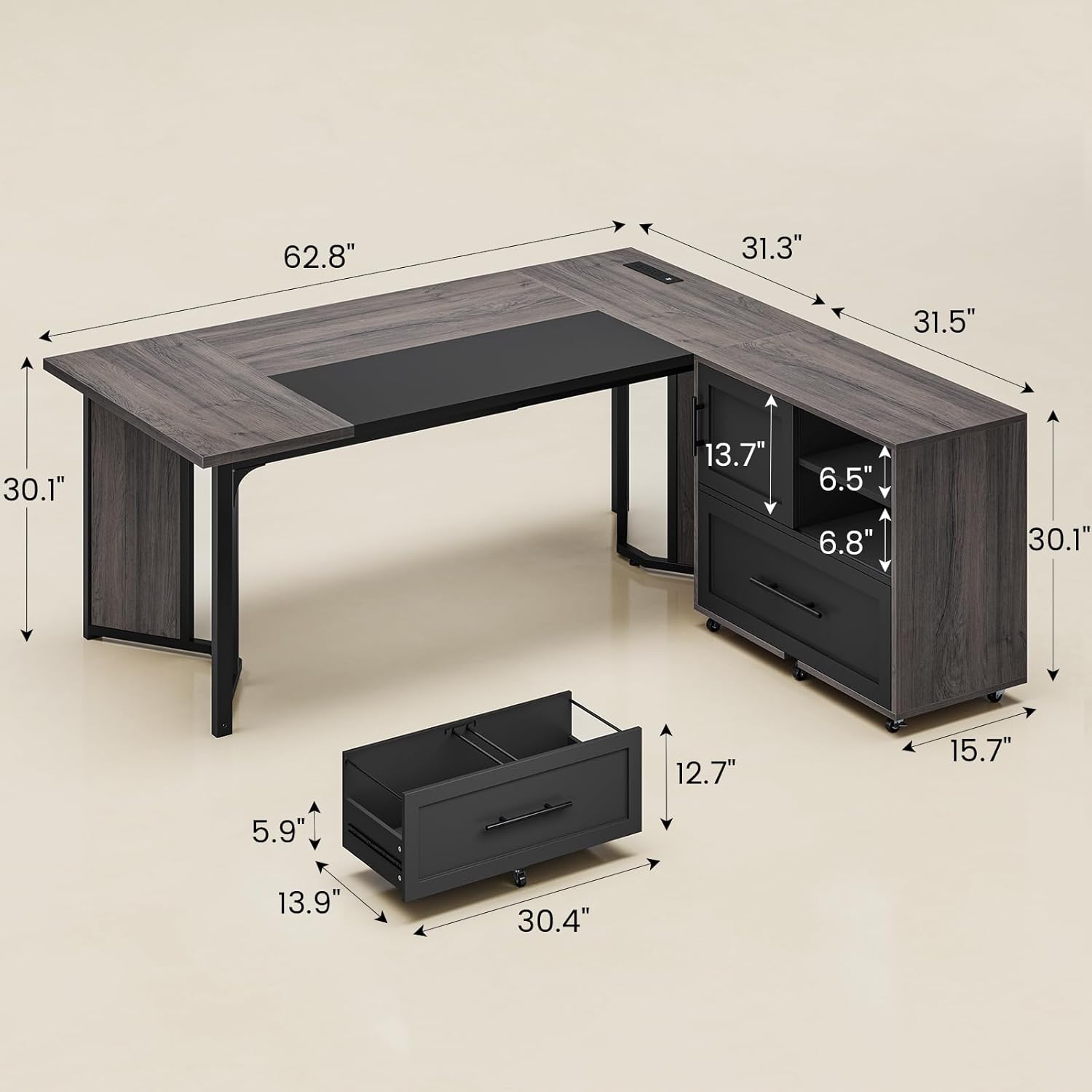
Image: Detailed dimensions of the 63-inch Executive Desk and the mobile file cabinet, illustrating the overall size and individual component measurements.

Image: Close-up view of the built-in charging station integrated into the desk, featuring 4 AC outlets and 2 USB ports for convenient device charging.

Image: The lateral file cabinet drawer shown with hanging files, demonstrating its capacity for A4, letter, and legal size documents.

Image: The mobile file cabinet featuring a reversible storage shelf and a sliding door, offering flexible storage options for office supplies.

Image: Illustration highlighting the generous legroom beneath the desk, indicating dimensions of 62.8 inches in width and 30.1 inches in depth.
4. Package Contents
Please refer to the packing list included with your product for a complete and accurate list of all components and hardware. Ensure all parts are present before beginning assembly.
5. Assembly Instructions
The writing table desk is accompanied by detailed instructions and numbered accessories. Follow the step-by-step guide provided in the packaging for proper assembly. It is recommended to assemble the desk with two people.
6. Operating Instructions
6.1. Built-in Power Outlets
- Locate the built-in power strip on the desk surface.
- Plug your electronic devices into the 4 AC outlets or 2 USB ports.
- Ensure the desk's power cord is securely plugged into a wall outlet.
- Avoid overloading the outlets.
6.2. Mobile File Cabinet
- The file cabinet is equipped with rolling casters for easy mobility. Lock the casters when the cabinet is in its desired position to prevent movement.
- To use the file drawer, pull the handle to open. It supports A4, letter, and legal size hanging files.
- The upper storage area features a sliding door and a reversible shelf. Adjust the shelf position or slide the door to access or conceal items as needed.
7. Maintenance and Care
- Cleaning: Wipe the desk surface and frame with a soft, damp cloth. Avoid harsh chemicals or abrasive cleaners.
- Spills: The desktop is waterproof. Wipe up spills immediately to prevent any potential damage.
- Inspection: Periodically check all screws and fasteners to ensure they are tight. Retighten if necessary.
- Power Outlets: Keep the power outlets clean and free from dust. Do not insert foreign objects into the outlets.
8. Troubleshooting
- Wobbly Desk: Ensure all assembly screws are tightened. Check that the desk is on a level surface.
- Power Outlets Not Working: Verify the desk's main power cord is securely plugged into a functional wall outlet. Check if the circuit breaker has tripped.
- Drawer Sticking: Ensure the drawer slides are clean and free of obstructions. Check if the drawer is properly aligned on its tracks.
- Missing Parts: If any parts are missing upon arrival, please contact customer support immediately.
9. Specifications
| Brand | UPOSOJA |
| Model Number | Executive Desk |
| Shape | L-Shape |
| Product Dimensions | 31.3"D x 63"W x 30"H |
| Color | Grey |
| Style | Modern |
| Base Material | Metal |
| Top Material Type | Engineered Wood |
| Special Feature | Built-In USB Outlet |
| Number of Drawers | 1 |
| Item Weight | 159 Pounds |
| Storage Options | Mobile File Cabinet, Storage Shelves |
10. Warranty and Support
For warranty information and customer support, please refer to the documentation included with your purchase or contact UPOSOJA customer service directly. If you have any questions, whether before or after sales, we will respond to you within 24 hours.