
1. Introduction
Thank you for choosing the LANMEL Socket Fan Light. This product combines a ceiling fan and an LED light into a single unit, designed for easy installation into standard E26/E27 light sockets. It offers adjustable lighting, multiple fan speeds, and convenient control via a remote or a mobile application. Please read this manual thoroughly before installation and operation to ensure safe and optimal performance.
2. Safety Instructions
- Ensure the power is turned off at the main circuit breaker before installation or maintenance.
- This product is designed for indoor use only. Avoid exposure to water or high humidity.
- Do not attempt to disassemble or modify the unit. Unauthorized modifications may void the warranty and pose safety risks.
- Ensure the light socket is securely mounted and capable of supporting the weight of the fan light.
- Keep fingers and other objects away from the fan blades during operation.
- Use only the provided remote control or official mobile application for operation.
3. Package Contents
Verify that all components are present in the package:
- LANMEL Socket Fan Light Unit
- Remote Control (batteries not included)
- Socket Extender
- User Manual
4. Product Overview
The LANMEL Socket Fan Light integrates a multi-speed fan with an adjustable LED light. It is designed for simple screw-in installation into standard E26/E27 light sockets, making it suitable for various indoor spaces such as bedrooms, kitchens, and garages.

Figure 4.1: LANMEL Socket Fan Light in use, demonstrating app control.

Figure 4.2: Product dimensions and socket extender.
5. Setup and Installation
The LANMEL Socket Fan Light is designed for quick and easy installation without the need for complex wiring or tools.
- Power Off: Before beginning, ensure the power to the light socket is turned off at the circuit breaker.
- Assemble Fan Blades: Attach the fan blades to the main unit if they are not pre-assembled. Ensure they are securely fastened.
- Install Socket Extender (Optional): If your existing light socket is recessed or too close to the ceiling, screw the provided socket extender into the E26/E27 socket first.
- Screw in Fan Light: Carefully screw the LANMEL Socket Fan Light directly into the E26/E27 light socket, or into the socket extender if used. Ensure it is tightened securely but do not overtighten.
- Restore Power: Turn the power back on at the circuit breaker.
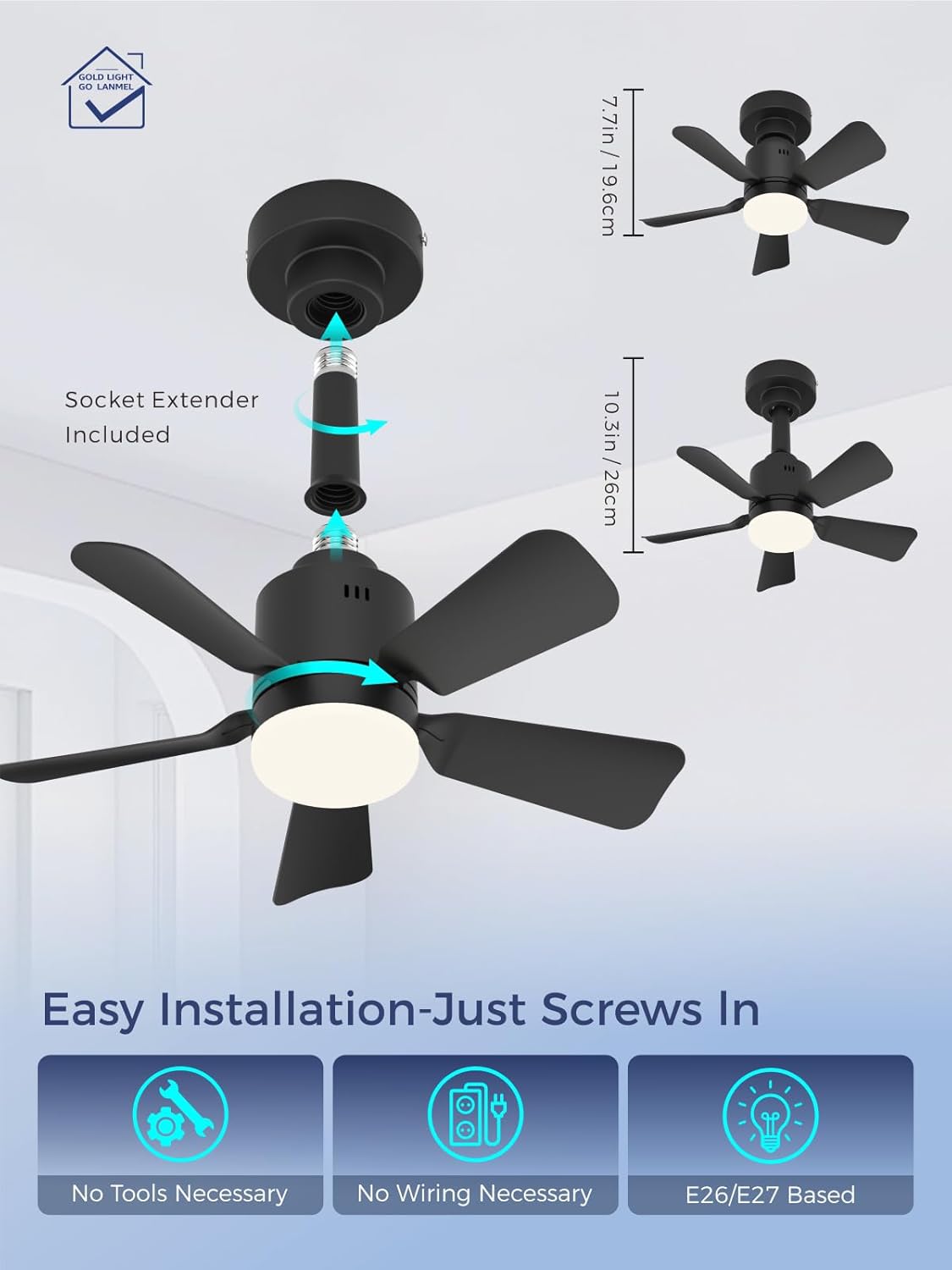
Figure 5.1: Easy installation process.
6. Operating Instructions
The LANMEL Socket Fan Light can be controlled using the included remote control or a dedicated mobile application.
6.1 Remote Control Operation
Insert two AAA batteries (not included) into the remote control. Point the remote towards the fan light for optimal response.

Figure 6.1: Remote Control Functions.
- Power Button: Turns the light and/or fan on/off.
- Light On/Off: Controls the LED light independently.
- Brightness Adjustment: Increase (+) or Decrease (-) light brightness (10%-100%).
- Color Temperature Adjustment: Cycle through 3000K (Warm White), 4500K (Natural White), and 6500K (Cool White).
- Fan Speed Selection: Choose from Low, Medium, or High fan speeds.
- Timer Function: Set the fan and/or light to turn off automatically after 1, 2, 3, or 4 hours.
- Memory Function: The unit remembers your last light brightness and color temperature settings.
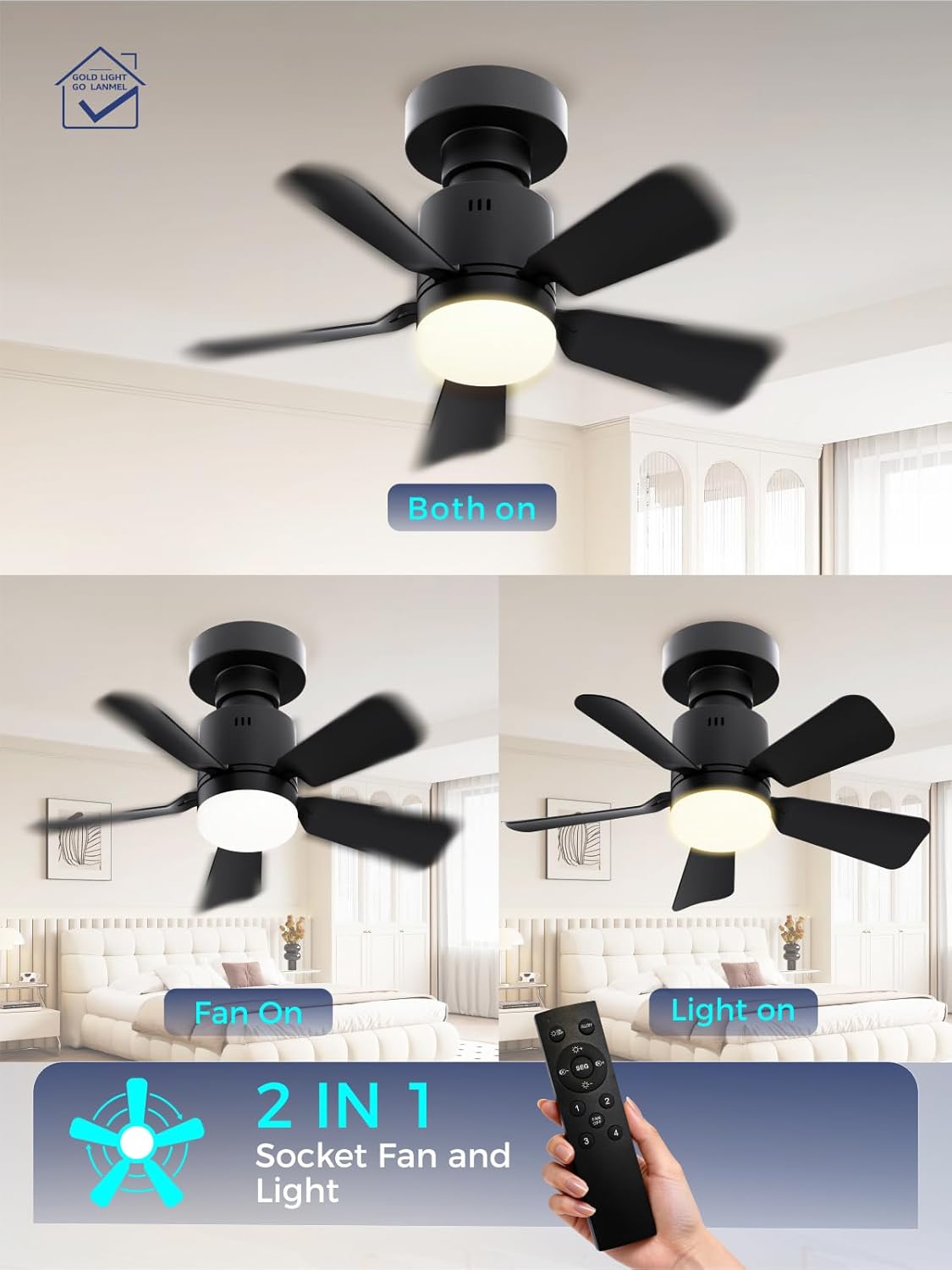
Figure 6.2: Independent operation of fan and light.

Figure 6.3: Adjustable 3 Color Temperatures.

Figure 6.4: Three adjustable wind speeds.
6.2 App Control Operation
Download the official LANMEL app from your smartphone's app store. Follow the in-app instructions to pair your device with the Socket Fan Light. The app provides comprehensive control over all functions, including fan speed, light brightness, color temperature, and timer settings.

Figure 6.5: App Control Interface.
7. Maintenance
Regular maintenance ensures the longevity and optimal performance of your LANMEL Socket Fan Light.
- Cleaning: Before cleaning, ensure the power is off at the circuit breaker. Unscrew the fan light from the socket. Use a soft, dry cloth to wipe down the fan blades and light housing. Do not use abrasive cleaners or immerse the unit in water.
- Blade Inspection: Periodically check the fan blades for any damage or accumulation of dust that might affect balance or airflow.
- Socket Connection: Ensure the fan light remains securely screwed into the socket. If it feels loose, turn off power and re-tighten.
8. Troubleshooting
If you encounter issues with your LANMEL Socket Fan Light, refer to the following common problems and solutions:
| Problem | Possible Cause | Solution |
|---|---|---|
| Fan or Light does not turn on. | No power to the socket; loose connection; remote control batteries dead. | Check circuit breaker. Ensure fan light is securely screwed into the socket. Replace remote control batteries. |
| Fan operates, but light does not. | Light function turned off; light setting too dim. | Press the light on/off button on the remote/app. Increase brightness setting. |
| Light operates, but fan does not. | Fan function turned off; fan speed set to zero. | Press the fan on/off button on the remote/app. Select a fan speed. |
| Remote control not responding. | Dead batteries; obstruction; remote not paired. | Replace batteries. Ensure no obstructions between remote and fan light. Refer to remote pairing instructions in the app or product documentation if applicable. |
| Fan wobbles or makes unusual noise. | Loose installation; damaged blades; debris. | Turn off power, re-tighten the fan light in the socket. Inspect blades for damage or debris and clean if necessary. |
If the problem persists after attempting these solutions, please contact LANMEL customer service for further assistance.
9. Specifications
| Feature | Specification |
|---|---|
| Brand | LANMEL |
| Model | Socket Fan Light |
| Color | Black |
| Material | High-impact ABS Plastic |
| Style | Modern |
| Light Fixture Form | Ceiling Fan Light |
| Room Type | Bedroom, Dining Room, Home Office, Kitchen, Living Room |
| Power Source | AC/DC |
| Special Features | 3 speeds fan, 6 blades silent ceiling fan, App Operable, Dimmable light, Remote control |
| Voltage | 110 Volts |
| Mounting Type | Ceiling Mount (E26/E27 Socket) |
| Recommended Uses | Indoor |
| Package Dimensions | 10 x 5 x 5 inches |
| Item Weight | 1.5 pounds |
10. Warranty and Support
LANMEL provides customer service for this product. If you encounter any problems or have questions regarding your Socket Fan Light, please refer to this user manual or contact LANMEL customer service directly through the Amazon platform where the product was purchased. Please provide your order number and a detailed description of the issue for prompt assistance.
For the most up-to-date warranty information, please refer to the product listing on Amazon or contact LANMEL customer support.