
1. Introduction
This manual provides essential instructions for the installation, operation, and maintenance of the Generic P150-2874V6.0 LCD 3-in-1 Smart Network TV Motherboard. This motherboard is designed to integrate display, smart network, and TV tuner functionalities into a single unit, suitable for compatible LCD televisions. Please read this manual thoroughly before proceeding with installation or operation to ensure proper function and safety.
The P150-2874V6.0 is a versatile component intended for experienced technicians or individuals with advanced knowledge of television repair and electronics. Incorrect installation or handling can lead to damage to the motherboard or the television set.
2. Safety Information
WARNING: Risk of Electric Shock. Do not open the television casing unless you are a qualified technician.
- Always disconnect the television from the power outlet before installing or removing the motherboard.
- Wear anti-static gloves and use an anti-static mat when handling the motherboard to prevent electrostatic discharge (ESD) damage.
- Ensure all connections are secure and correctly oriented before reapplying power.
- Do not expose the motherboard to moisture or extreme temperatures.
- Keep out of reach of children.
3. Package Contents
Verify that all items are present and undamaged upon opening the package.
- 1 x Generic P150-2874V6.0 LCD 3-in-1 Smart Network TV Motherboard
- (Optional) Screws for mounting
- (Optional) Connection cables (e.g., LVDS cable, backlight cable)
If any components are missing or damaged, please contact your supplier immediately.
4. Setup and Installation
This section outlines the general steps for installing the P150-2874V6.0 motherboard. Specific steps may vary depending on your television model.
- Preparation:
- Disconnect the TV from the power supply.
- Place the TV face down on a soft, clean surface to protect the screen.
- Remove the back cover of the TV, typically by unscrewing several screws.
- Locate the existing motherboard.
- Removing the Old Motherboard:
- Carefully disconnect all cables connected to the old motherboard (e.g., power, LVDS, backlight, speaker, IR sensor, control panel). Note their positions or take photos for reference.
- Unscrew the mounting screws holding the old motherboard in place.
- Gently lift and remove the old motherboard.
- Installing the New Motherboard:
- Align the P150-2874V6.0 motherboard with the mounting holes in the TV chassis.
- Secure the motherboard with the appropriate screws. Do not overtighten.
- Reconnect all cables to their corresponding ports on the new motherboard. Ensure correct orientation and secure connections. Pay special attention to the LVDS cable (display data) and backlight cable (display illumination).
- Double-check all connections before proceeding.
- Initial Power-Up and Configuration:
- Before replacing the back cover, temporarily connect the TV to power.
- Power on the TV. The screen should display a boot logo or initial setup screen.
- Access the service menu (consult your TV's specific service manual or online resources for key combinations) to configure panel parameters, resolution, and other settings specific to your TV panel. This step is crucial for proper display.
- If the display is incorrect or absent, power off immediately and recheck all connections and panel settings.
- Once configured, disconnect power and replace the TV back cover.
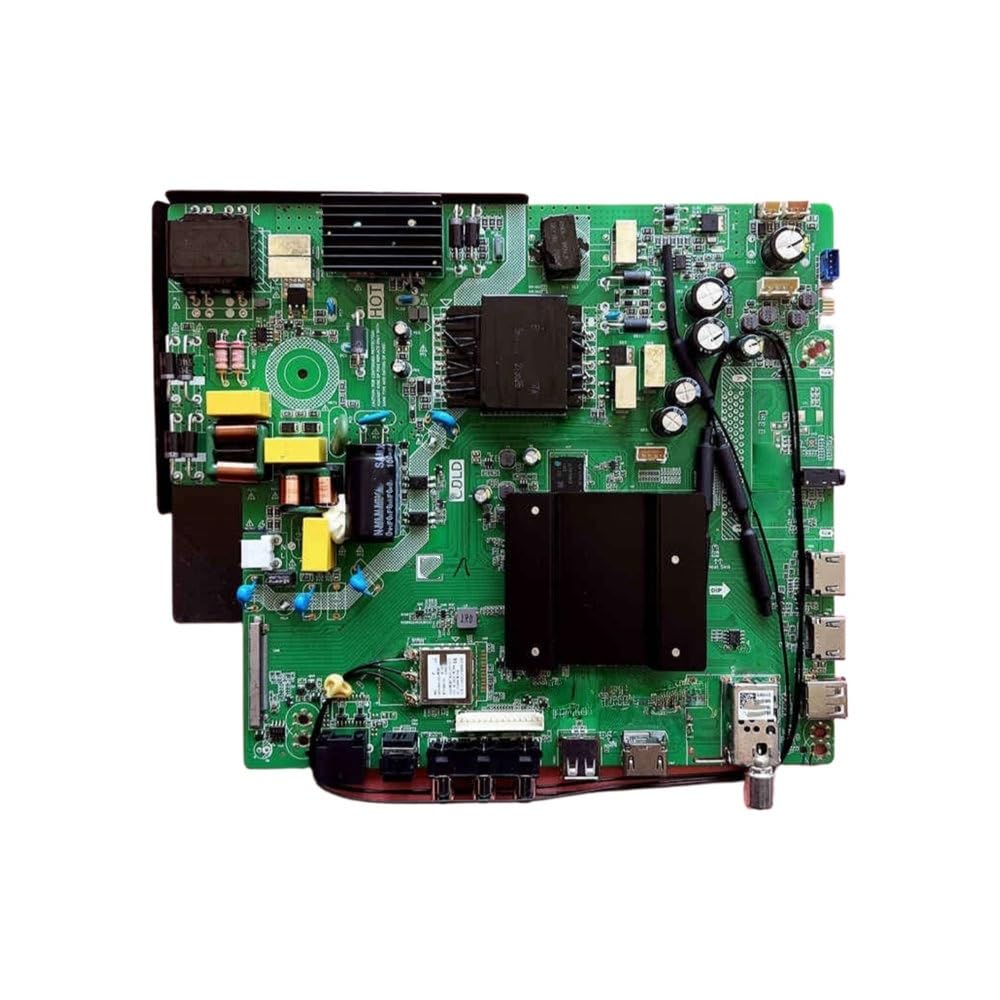
Image 1: Generic P150-2874V6.0 LCD 3-in-1 Smart Network TV Motherboard. This image shows the top view of the motherboard with various ports and components visible, including connectors for power, LVDS, and other peripherals.
5. Operating Instructions
Once installed and configured, the P150-2874V6.0 motherboard functions as the core of your smart network TV. Operation will primarily be through your TV's remote control and on-screen display (OSD) menu.
- Power On/Off: Use the TV's remote control or physical power button.
- Input Selection: Use the "Input" or "Source" button on your remote to switch between HDMI, AV, USB, and TV tuner inputs.
- Network Connection: Access the TV's settings menu to connect to a Wi-Fi network or an Ethernet cable for smart TV functionalities.
- Channel Scan: If using the integrated TV tuner, perform an automatic channel scan through the TV's menu to find available broadcast channels.
- Smart Features: Navigate the smart TV interface to access streaming apps, web browser, and other network-dependent features.
Refer to your television's user manual for detailed instructions on navigating the specific smart TV interface and features provided by this motherboard.
6. Maintenance
The P150-2874V6.0 motherboard requires minimal maintenance. Proper care ensures longevity and stable performance.
- Cleaning: Ensure the TV's ventilation openings are clear of dust and debris to prevent overheating. If cleaning inside the TV, always disconnect power and use compressed air or a soft, dry brush. Do not use liquid cleaners directly on the motherboard.
- Software Updates: Periodically check for firmware updates for your TV's smart system. These updates can improve performance, add features, and fix bugs. Follow the TV's on-screen instructions for updates.
- Environmental Conditions: Operate the TV in a well-ventilated area, away from direct sunlight, excessive heat, and humidity.
7. Troubleshooting
If you encounter issues, refer to the following common troubleshooting steps. For complex problems, consult a qualified technician.
| Problem | Possible Cause | Solution |
|---|---|---|
| No Power | Loose power cable, faulty power supply unit (PSU), motherboard issue. | Check power cable connection. Verify PSU functionality. Recheck motherboard power connections. |
| No Display / Garbled Image | Loose LVDS cable, incorrect panel settings in service menu, faulty panel. | Ensure LVDS cable is securely connected. Access service menu to verify panel settings (resolution, bit depth). |
| No Sound | Loose speaker cables, incorrect audio settings, faulty speakers. | Check speaker cable connections. Adjust audio settings in TV menu. |
| Network Connection Issues | Incorrect Wi-Fi password, router issues, network settings. | Verify Wi-Fi password. Restart router. Check TV network settings. |
| Remote Control Not Responding | Dead batteries, IR sensor blocked, faulty remote or IR sensor. | Replace remote batteries. Clear any obstructions to the IR sensor. |
8. Specifications
Key technical specifications for the P150-2874V6.0 LCD 3-in-1 Smart Network TV Motherboard:
- Model: P150-2874V6.0
- Type: LCD 3-in-1 Smart Network TV Motherboard
- Functionality: Integrated display driver, smart network capabilities (Wi-Fi/Ethernet), TV tuner.
- Compatibility: Designed for various LCD TV panels (requires specific panel configuration via service menu).
- Input Voltage: (Typically 12V or 24V, specific to TV model - consult TV's power supply specifications)
- Connectivity: HDMI, USB, AV, RF (Antenna), Ethernet, Wi-Fi.
- Manufacturer: Generic
- ASIN: B0FXH87PT5
- Item Model Number: 6524285438906
9. Warranty and Support
This product is typically covered by a limited warranty provided by the seller or manufacturer. Please refer to your purchase documentation for specific warranty terms and conditions, including duration and coverage.
For technical support, installation assistance, or warranty claims, please contact the retailer or the manufacturer directly. Provide your product model number (P150-2874V6.0) and purchase details when seeking support.
Contact Information:
- Seller: soure (as per Amazon listing)
- Manufacturer: Generic
- For general inquiries, refer to the Amazon product page: https://www.amazon.com/dp/B0FXH87PT5