
Introduction
Welcome to the FOSSIBOT F106 PRO Rugged Cell Phone user manual. This guide provides essential information for setting up, operating, maintaining, and troubleshooting your device. The FOSSIBOT F106 PRO is designed for durability and performance in challenging environments, featuring a large battery, advanced camera system, and robust construction.

Image: The FOSSIBOT F106 PRO rugged smartphone, showcasing its durable design.
Package Contents
Verify that all items are present in your product package:
- 1 x FOSSIBOT F106 PRO Rugged Smartphone
- 1 x USB Type-C Cable (3A)
- 1 x Power Adapter (20V1.5A)
- 1 x SIM Card Pin
- 1 x User Manual & Warranty Card
Video: An unboxing of the FOSSIBOT F106 PRO, showing the phone, charging accessories, SIM ejector tool, and user manual included in the package.
Setup
1. SIM Card and Storage Card Installation
The FOSSIBOT F106 PRO supports dual Nano SIM cards or one Nano SIM card and one TF (microSD) card for expandable storage.
- Locate the SIM card tray on the side of the phone.
- Insert the provided SIM card pin into the small hole next to the tray to eject it.
- Carefully place your Nano SIM card(s) and/or TF card into the designated slots on the tray. Ensure correct orientation.
- Gently push the tray back into the phone until it is flush with the device body.

Image: A hand inserting a dual Nano SIM card tray into the FOSSIBOT F106 PRO. The tray can hold two Nano SIM cards or one Nano SIM and one TF card.
2. Initial Power On
To power on your device, press and hold the Power button located on the side of the phone until the FOSSIBOT logo appears on the screen.
Follow the on-screen instructions to complete the initial setup, including language selection, network connection, and account setup.
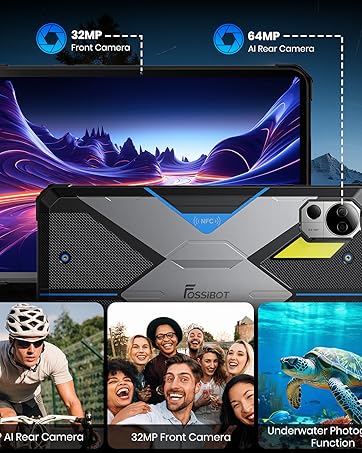
Image: The FOSSIBOT F106 PRO displaying the Android 14 operating system interface with various app icons.
Operating Your Device
1. Basic Navigation
The FOSSIBOT F106 PRO runs on Android 14, offering a user-friendly interface.
- Touchscreen Gestures: Use taps, swipes, and pinches to navigate menus, open apps, and interact with content.
- Power Button: Press to wake/sleep the screen. Press and hold to power off or restart the device.
- Volume Buttons: Adjust media volume, call volume, and notification volume.
- Custom Key: The F106 PRO features a customizable side key. This key can be configured for various functions such as SOS, flashlight, screenshot, game mode, voice recording, or underwater camera. Refer to the phone settings to customize its function.
2. Camera Functions
The F106 PRO is equipped with a versatile camera system:
- Rear Camera: 48MP main camera for high-resolution photos.
- Night Vision Camera: 20MP IR night vision camera for capturing images and videos in low-light or dark environments.
- Front Camera: 16MP front camera for selfies and video calls.
To use the camera, open the Camera application. Select between photo, video, and night vision modes. Tap the screen to focus and press the shutter button to capture.

Image: The rear camera module of the FOSSIBOT F106 PRO, highlighting the 48MP main camera, 20MP night vision camera, and LED flash.

Image: Examples of images captured using the 20MP IR night vision camera in dark environments, demonstrating its capability to capture clear photos in low light.
3. Camp Light
The integrated 512-lumen camp light provides powerful illumination with multiple modes:
- 1/4 Light
- 1/2 Light
- Full Light
- SOS (Emergency signal)
- Explosion Flash
Activate and cycle through the modes via the custom key or a dedicated app.

Image: The FOSSIBOT F106 PRO with its 512-lumen camp light illuminated, providing bright light in an outdoor camping setting.
4. Loud Speaker
The F106 PRO features a 110dB loud speaker for clear audio output in noisy environments.
Adjust the volume using the side volume buttons.

Image: A close-up of the FOSSIBOT F106 PRO's rear speaker grille, indicating its 110dB loud speaker capability.
5. GPS Navigation
The device supports multiple global navigation satellite systems (GNSS) including GPS, GLONASS, Galileo, BEIDOU, and QZSS, ensuring reliable positioning in remote areas.
Use pre-installed or downloaded navigation applications for route guidance.

Image: A person using the FOSSIBOT F106 PRO for GPS navigation in an outdoor, rugged environment, illustrating its multi-GNSS support.
6. NFC Functionality
The F106 PRO supports Near Field Communication (NFC) for convenient mobile payments, data transfer, and quick pairing with compatible devices.
Ensure NFC is enabled in your phone settings to use this feature.

Image: A hand holding the FOSSIBOT F106 PRO near a payment terminal, demonstrating the use of NFC for contactless transactions.
Key Features
1. Battery
The FOSSIBOT F106 PRO is equipped with a 12000mAh battery, providing extended usage times:
- Standby Time: Over 842 hours
- Talk Time: Over 60 hours
- HD Video Playback: Over 45 hours
- Music Playback: Over 58 hours
- Camp Light Usage: Over 10.5 hours
The device supports 30W fast charging via its USB Type-C port.

Image: An internal view of the FOSSIBOT F106 PRO highlighting its 12000mAh battery and indicating 30W fast charging capability.
2. Storage and Performance
The F106 PRO offers 15GB RAM (8GB physical + 7GB virtual) and 256GB internal storage, expandable up to 512GB with a TF card.
An octa-core MediaTek Helio G85 processor ensures smooth multitasking and app performance.

Image: A diagram illustrating the FOSSIBOT F106 PRO's 15GB RAM (8GB + 7GB virtual), 256GB ROM (expandable to 512GB), and Octa-core 2.0GHz MediaTek Helio G85 processor.
3. Rugged Design
The F106 PRO is built to withstand harsh environments, certified with IP68/IP69K and MIL-STD-810H standards.
- Waterproof: Submersible in water.
- Dustproof: Fully protected against dust ingress.
- Shockproof: Designed to resist drops from up to 1.5 meters. Features strengthened corners for enhanced durability.

Image: The FOSSIBOT F106 PRO being submerged in water, covered in dust, and dropped, demonstrating its IP68/IP69K and MIL-STD-810H certifications for water, dust, and shock resistance.
Maintenance
1. General Care
- Keep the device clean and free from dust and debris.
- Avoid exposing the phone to extreme temperatures for prolonged periods.
- Ensure all port covers are securely closed when the phone is exposed to water or dust.
2. Cleaning
- Use a soft, lint-free cloth to clean the screen and body.
- For stubborn dirt, slightly dampen the cloth with water. Avoid harsh chemicals.
Troubleshooting
1. Device Not Powering On
- Ensure the battery is charged. Connect the phone to the charger and wait a few minutes before attempting to power on again.
- Press and hold the Power button for at least 10-15 seconds to perform a forced restart.
2. Poor Network Connectivity
- Check if your SIM card is correctly inserted.
- Verify that your mobile data or Wi-Fi is enabled.
- Ensure you are within network coverage.
- Restart the device.
3. Apps Crashing or Freezing
- Close and reopen the app.
- Clear the app's cache and data in the phone settings.
- Ensure the app is updated to the latest version.
- Restart the phone.
Specifications
Key technical specifications of the FOSSIBOT F106 PRO:
| Feature | Specification |
|---|---|
| Brand | FOSSIBOT |
| Model Name | F106Pro |
| Operating System | Android 14 |
| RAM | 15 GB (8GB physical + 7GB virtual) |
| Internal Storage | 256 GB |
| Expandable Storage | Up to 512 GB (TF Card) |
| Processor | MediaTek Helio G85 Octa-core |
| Screen Size | 6.58 inches |
| Resolution | 2400 x 1080 pixels |
| Refresh Rate | 120 Hz |
| Rear Camera | 48 MP |
| Night Vision Camera | 20 MP |
| Front Camera | 16 MP |
| Battery Capacity | 12000 mAh |
| Charging | 30W Fast Charging, USB Type-C |
| Durability | IP68/IP69K, MIL-STD-810H (Waterproof, Dustproof, Shockproof) |
| Connectivity | 4G, Dual SIM, Wi-Fi, Bluetooth, NFC |
| Navigation | GPS, GLONASS, Galileo, BEIDOU, QZSS |
| Special Features | 512-Lumen Camp Light, 110dB Loud Speaker, Face Recognition, Fingerprint Unlock, Custom Key |
Warranty and Support
1. Warranty Information
The FOSSIBOT F106 PRO comes with a 2-year warranty. Please refer to the included Warranty Card for detailed terms and conditions.
2. Customer Support
For technical assistance or support, please contact FOSSIBOT customer service. 24/7 online after-sales support is available.
Visit the official FOSSIBOT website for contact information and additional resources: www.fossibot.com