
1. Introduction
Thank you for choosing the SANOTO BY16 Instant Translator Earbuds. These earbuds combine real-time translation, hands-free calling, high-quality audio, and smart touch controls to facilitate communication across language barriers. This manual provides detailed instructions for setup, operation, and maintenance to ensure optimal performance.
2. Product Overview
2.1 Key Features
- 4-in-1 Smart AI Translator Earbuds: Real-time translation, hands-free calls, exceptional speakers, and smart touch controls.
- 168 Language Support: Overcome communication barriers with real-time bilingual translation.
- Multiple Translation Modes: Simultaneous interpretation, hands-free mode, image translation (text scanning), video translation, and real-time translation.
- High-Fidelity Sound & ENC Noise Cancellation: Equipped with a 13mm professional diaphragm for effective distortion reduction, 3D sound effects, deep bass, and powerful ENC microphones for clear calls.
- Extended Battery Life: 6-8 hours of continuous playback on a single charge, extended to 45 hours total with the elegant charging case.
- Easy to Use: Simple setup via a dedicated app and Bluetooth connection.
2.2 Package Contents
- SANOTO BY16 Instant Translator Earbuds
- Charging Case
- User Manual
- Charging Cable
2.3 Product Components
The SANOTO BY16 earbuds consist of two wireless earbuds and a charging case with an integrated display.

Image: SANOTO BY16 Earbuds and Charging Case with Display. The image shows the two earbuds placed inside their charging case, which features a small screen displaying various icons. This illustrates the main components of the product.
3. Setup Guide
Follow these steps to set up your SANOTO BY16 Instant Translator Earbuds for first-time use:
- Download the App: Scan the QR code provided in the user manual or search for "NebulaBuds" in your device's App Store (iOS) or Play Store (Android) to download the dedicated application.
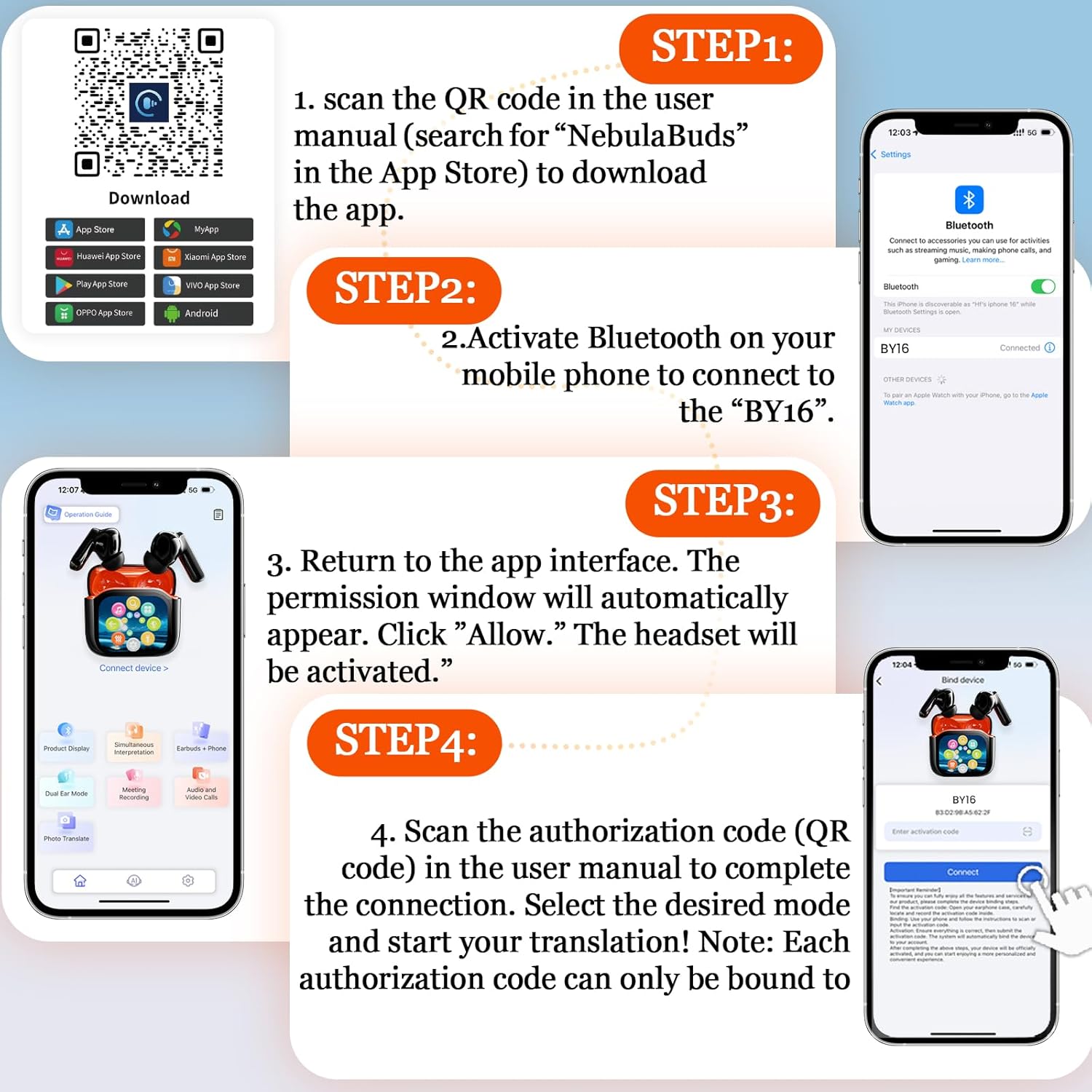
Image: App Download and Setup Steps for SANOTO BY16 Earbuds. This image illustrates the four main steps for setting up the earbuds: scanning a QR code to download the app, activating Bluetooth, granting app permissions, and scanning an authorization code for connection. A relevant link for app download is NebulaBuds App Download.
- Activate Bluetooth: On your smartphone, go to Bluetooth settings and activate Bluetooth.
- Connect Earbuds: Search for "BY16" in the list of available Bluetooth devices and select it to pair.
- Open the App: Launch the NebulaBuds application. A permission window will automatically appear. Click "Allow" to activate the headset's features.
- Authorization: Scan the authorization code (QR code) found in the user manual within the app to complete the connection. Note that each authorization code can only be bound to one device.
- Select Mode: Once connected, select your desired translation or audio mode within the app.
4. Operating Instructions
4.1 Translation Modes
The SANOTO BY16 earbuds offer various intelligent translation modes to suit different scenarios:
- Simultaneous Interpretation: For real-time, continuous translation during conversations.
- Hands-Free Mode: Allows for translation without holding your phone.
- Image Translation: Scan text from images for translation.
- Video Translation: Translate spoken content from videos.
- Real-time Translation: Direct translation for face-to-face communication.

Image: Face-to-Face Two-Way Translation with SANOTO BY16 Earbuds. This image shows two individuals communicating with the help of the earbuds, demonstrating the real-time, two-way translation feature on a smartphone screen.

Image: Real-time Translation Example with English and German. A person is shown studying, with a visual representation of English text being translated into German, highlighting the real-time translation capability.
4.2 Touch Controls
The earbuds feature intuitive touch controls for managing calls, music, and translation functions:

Image: SANOTO BY16 Earbuds Touch Control Functions. This diagram illustrates various touch gestures on the earbuds and their corresponding actions, such as volume control, answering calls, skipping tracks, and activating translation modes.
- Volume Up: Tap the screen (via app).
- Volume Down: Tap the screen (via app).
- Previous Track: Triple-click the left earbud.
- Next Track: Triple-click the right earbud.
- Answer Call: Click either earbud.
- Play/Pause: Double-click either earbud.
- Reject Call / End Call: Long press L or R for 1.5 seconds.
- Activate Translation Mode: Long press L or R for 1.5 seconds (specific function may vary by app setting).
5. Charging
To charge your SANOTO BY16 earbuds and charging case:
- Place the earbuds into the charging case. Ensure they are correctly seated.
- Connect the charging case to a power source using the provided charging cable.
- The charging case display will indicate the charging status.
- A full charge for the earbuds provides 6-8 hours of continuous use.
- The charging case extends the total battery life to approximately 45 hours.
- The charging time for the earbuds is approximately 2 hours.

Image: SANOTO BY16 Earbuds Battery Life and Charging Information. This image highlights key performance metrics: 10m effective Bluetooth range, 2 hours charging time, and 6-8 hours of single earbud use time.
6. Maintenance
Proper maintenance ensures the longevity and optimal performance of your earbuds:
- Cleaning: Regularly clean the earbuds and charging case with a soft, dry cloth. Avoid using abrasive materials or harsh chemicals.
- Storage: Store the earbuds in their charging case when not in use to protect them from dust and damage.
- Water Resistance: The earbuds are waterproof. However, avoid prolonged submersion or exposure to high-pressure water jets. Ensure they are dry before placing them back in the charging case or charging.
- Temperature: Avoid exposing the earbuds to extreme temperatures (hot or cold) or direct sunlight for extended periods.
7. Troubleshooting
If you encounter issues with your SANOTO BY16 earbuds, try the following solutions:
| Problem | Solution |
|---|---|
| Earbuds not pairing/connecting to phone. |
|
| Translation not working or inaccurate. |
|
| Poor sound quality or noise. |
|
| Earbuds not charging. |
|
8. Specifications
| Feature | Detail |
|---|---|
| Model Name | BY16 |
| Brand | SANOTO |
| Connectivity Technology | Wireless (Bluetooth 5.4) |
| Ear Placement | In-Ear |
| Form Factor | True Wireless |
| Noise Cancellation | Active Noise Cancellation (ENC) |
| Impedance | 14.2 Ohms |
| Control Method | Application, Touch |
| Compatible Devices | Computer, Phone, Tablet |
| Water Resistance Level | Waterproof |
| Material | Acrylonitrile Butadiene Styrene (ABS) |
| Single Earbud Use Time | 6-8 hours |
| Total Battery Life (with case) | Up to 45 hours |
| Charging Time | Approx. 2 hours (earbuds) |
| Included Components | User Manual |
| Special Features | Noise Cancellation, Quality Speakers, Touch Control |
9. Warranty & Support
9.1 Manufacturer's Warranty
The SANOTO BY16 Instant Translator Earbuds come with a 2-year manufacturer's warranty. This warranty covers defects in materials and workmanship under normal use. Please retain your proof of purchase for warranty claims.
9.2 Customer Support
For further assistance, technical support, or warranty inquiries, please refer to the contact information provided on the SANOTO official website or within the NebulaBuds application. You can also visit the SANOTO Brand Store on Amazon for more product information.