
Introduction
This user manual provides comprehensive instructions for the installation, operation, and maintenance of your Aiker ACM M05 Motorcycle Multimedia Center. Designed for motorcycles and scooters, this device combines advanced technology with practical features, including a digital display, Bluetooth connectivity, and an integrated anti-theft system. Please read this manual carefully before using the product to ensure proper function and safety.
Safety Information
- Always ensure the device is securely mounted before riding.
- Do not attempt to operate complex functions while driving. Focus on the road.
- The device is water-resistant, but avoid prolonged exposure to heavy rain or submersion.
- Ensure all cables are properly connected and secured to prevent interference with motorcycle controls.
- Consult a professional for electrical installation if you are unsure.
Package Contents
Verify that all items listed below are present in your package:
- ACM M05 Multimedia Center Unit
- Handlebar Mounting Bracket
- Connection Cables
- User Manual (this document)

Image: The ACM M05 Multimedia Center unit and its handlebar mounting bracket, displayed with the product packaging.
Setup and Installation
Follow these steps to install the ACM M05 Multimedia Center on your motorcycle:
- Attach the Mounting Bracket: Secure the handlebar mounting bracket to a suitable position on your motorcycle's handlebar. Ensure it is tightened firmly to prevent movement during operation. The bracket features an anti-theft design for added security.
- Mount the Multimedia Unit: Slide the ACM M05 Multimedia Center onto the mounting bracket until it clicks securely into place. Adjust the viewing angle as needed.
- Connect Power and Audio Cables: Connect the provided power cables to your motorcycle's 12V DC power source. Ensure correct polarity. Connect any audio output cables if you are integrating with an external audio system.
- Secure Cables: Route and secure all cables away from moving parts and heat sources using cable ties or clips.
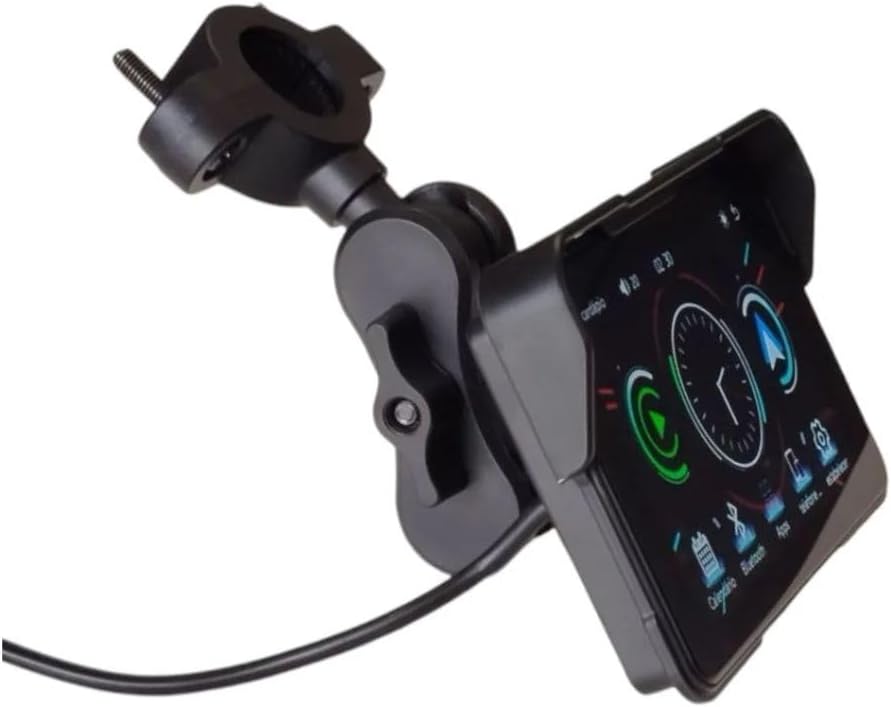
Image: Side view of the ACM M05 Multimedia Center showing its robust mounting bracket attached to a handlebar.

Image: The ACM M05 Multimedia Center with its power connection cable, indicating readiness for electrical hookup.
Operating Instructions
Powering On/Off
- Power On: Turn on your motorcycle's ignition. The multimedia center should power on automatically.
- Power Off: Turn off your motorcycle's ignition. The multimedia center will power off.
Digital Display and Interface
The ACM M05 features an intuitive digital display with clear icons and a user-friendly interface. Navigate through menus by touching the screen.
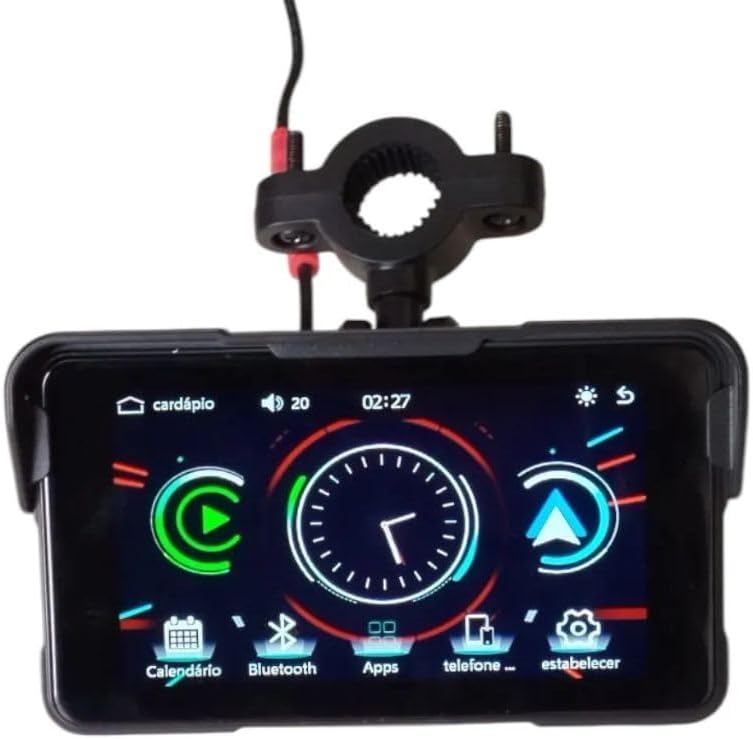
Image: Front view of the ACM M05 Multimedia Center's digital display, showing the main interface with icons for calendar, Bluetooth, apps, phone, and settings.
- Home Screen: Displays clock, calendar, and quick access icons for key functions.
- Navigation: Swipe left or right to access additional screens or menus. Tap icons to open applications or settings.
Bluetooth Connectivity
- Enable Bluetooth: From the home screen, tap the "Bluetooth" icon.
- Pairing Mode: The device will automatically enter pairing mode. On your mobile phone or other Bluetooth device, search for "ACM M05" and select it to pair.
- Audio Streaming: Once paired, you can stream audio from your phone to the multimedia center.
- Call Answering: Answer or make calls safely through the multimedia center's interface.
Media Playback (TF Card)
- Insert a TF card (microSD) containing audio files into the designated slot.
- Access the "Media" or "Music" application from the home screen to browse and play your files.
Anti-Theft System
The integrated anti-theft system provides an additional layer of security. Refer to the on-screen prompts or specific settings within the device for activation and management of this feature.
Maintenance
- Cleaning: Use a soft, damp cloth to clean the display and exterior. Avoid abrasive cleaners or solvents.
- Inspection: Periodically check the mounting bracket and cable connections for tightness and wear.
- Software Updates: Check the manufacturer's website or device settings for available software updates to ensure optimal performance and new features.
Troubleshooting
| Problem | Possible Cause | Solution |
|---|---|---|
| Device does not power on. | No power connection; Blown fuse; Ignition off. | Check power cables and connections. Verify motorcycle ignition is on. Check vehicle's fuse box. |
| Bluetooth not connecting. | Bluetooth off on device/phone; Device not in pairing mode; Interference. | Ensure Bluetooth is enabled on both devices. Put the multimedia center in pairing mode. Move closer to the device. Restart both devices. |
| No audio output. | Volume too low; Incorrect audio source selected; Loose audio cables. | Increase volume. Select the correct audio source (e.g., Bluetooth, TF card). Check audio cable connections. |
| Touch screen unresponsive. | Temporary software glitch; Screen dirty. | Restart the device by cycling the motorcycle ignition. Clean the screen with a soft cloth. |
Specifications
- Brand: Aiker
- Model: ACM M05
- Compatible Devices: Motorcycles, Scooters
- Special Features: Anti-theft, Built-in Bluetooth, App Control, Digital Display, Water Resistant
- Controller Type: Touch Screen
- Connectivity Technology: Bluetooth, USB
- Audio Output Mode: Stereo
- Power: 12 watts
- Power Source Type: DC
- Battery Operated: No
- Color: Black
- Product Weight: 350 g
- Product Dimensions: 4.5 x 12 x 3.5 cm (1.77 x 4.72 x 1.38 inches)
Warranty and Support
Manufacturer's Warranty: This product comes with a 2-year manufacturer's warranty against defects in materials and workmanship from the date of purchase.
For technical support, warranty claims, or further assistance, please contact your retailer or the manufacturer directly. Keep your proof of purchase for warranty validation.