1. Introduction
This manual provides detailed instructions for the assembly, operation, and maintenance of your Generic Racing Car Model 8740. This model is a meticulously crafted sports vehicle toy, featuring a sleek white and black design with red accents. It is designed for display and interactive play, offering an authentic racing car experience through its detailed construction and remote control capabilities.

Figure 1.1: Assembled Racing Car Model 8740.
2. Safety Information
Please read and understand all safety warnings before assembly and operation to prevent injury or damage.
- Choking Hazard: This kit contains small parts and is not suitable for children under 3 years of age. Keep all small components away from young children.
- Adult Supervision: The toy should always be used under direct adult supervision, especially during assembly and initial operation.
- Battery Safety: If using batteries for the remote control (not included), ensure correct polarity and do not mix old and new batteries or different types of batteries. Remove batteries if the toy is not used for an extended period.
- Intended Use: This model is designed for display and light interactive play. It is not intended for riding or heavy impact.
3. Package Contents
Verify that all components are present before beginning assembly. The package for Model 8740 typically includes:
- Building blocks for Racing Car Model 8740 (approximately 310 pieces)
- 2.4 GHz Remote Control unit
- Instruction Manual (this document)
- Sticker sheet for decorative accents (if applicable)

Figure 3.1: Packaging and included components overview.
4. Setup and Assembly
Follow these steps carefully to assemble your Racing Car Model 8740. Refer to the included pictorial guide (if separate) for detailed visual instructions.
4.1. Assembly of the Racing Car Model
- Unpack Components: Carefully open the packaging and lay out all building blocks and parts on a clean, flat surface.
- Sort Parts: Group similar parts together to facilitate easier assembly.
- Follow Step-by-Step Guide: Begin assembly according to the numbered steps provided in the separate pictorial instruction booklet. Pay close attention to the orientation and connection points of each piece.
- Secure Connections: Ensure all blocks are firmly connected to prevent parts from detaching during play.
- Apply Stickers: Once the model is fully assembled, apply any included decorative stickers according to the design guide for enhanced aesthetics.
4.2. Remote Control Preparation
- Install Batteries: Open the battery compartment on the back of the 2.4 GHz Remote Control unit. Insert the required batteries (typically AA or AAA, not included) ensuring correct polarity (+/-). Close the compartment securely.
- Power On: Locate the power switch on the remote control and turn it to the "ON" position. An indicator light should illuminate.
5. Operating Instructions
Once assembled and the remote control is prepared, you can operate your Racing Car Model 8740.
5.1. Pairing the Remote Control
- Power On Car: Locate the power switch on the Racing Car Model 8740 (usually on the underside or rear) and turn it to the "ON" position.
- Pairing: The car and remote control should automatically pair. If not, refer to the specific pairing instructions in the pictorial guide, which may involve holding a button on the remote or car. A successful pairing is usually indicated by a solid light on both devices.
5.2. Driving the Model
- Forward/Backward: Use the left joystick or designated button on the remote control to move the car forward or backward.
- Steering: Use the right joystick or designated buttons to steer the car left or right.
- Range: Operate the car within the effective range of the 2.4 GHz remote control for optimal performance. Obstacles may reduce range.
- Surface: For best results, operate the car on smooth, flat surfaces.
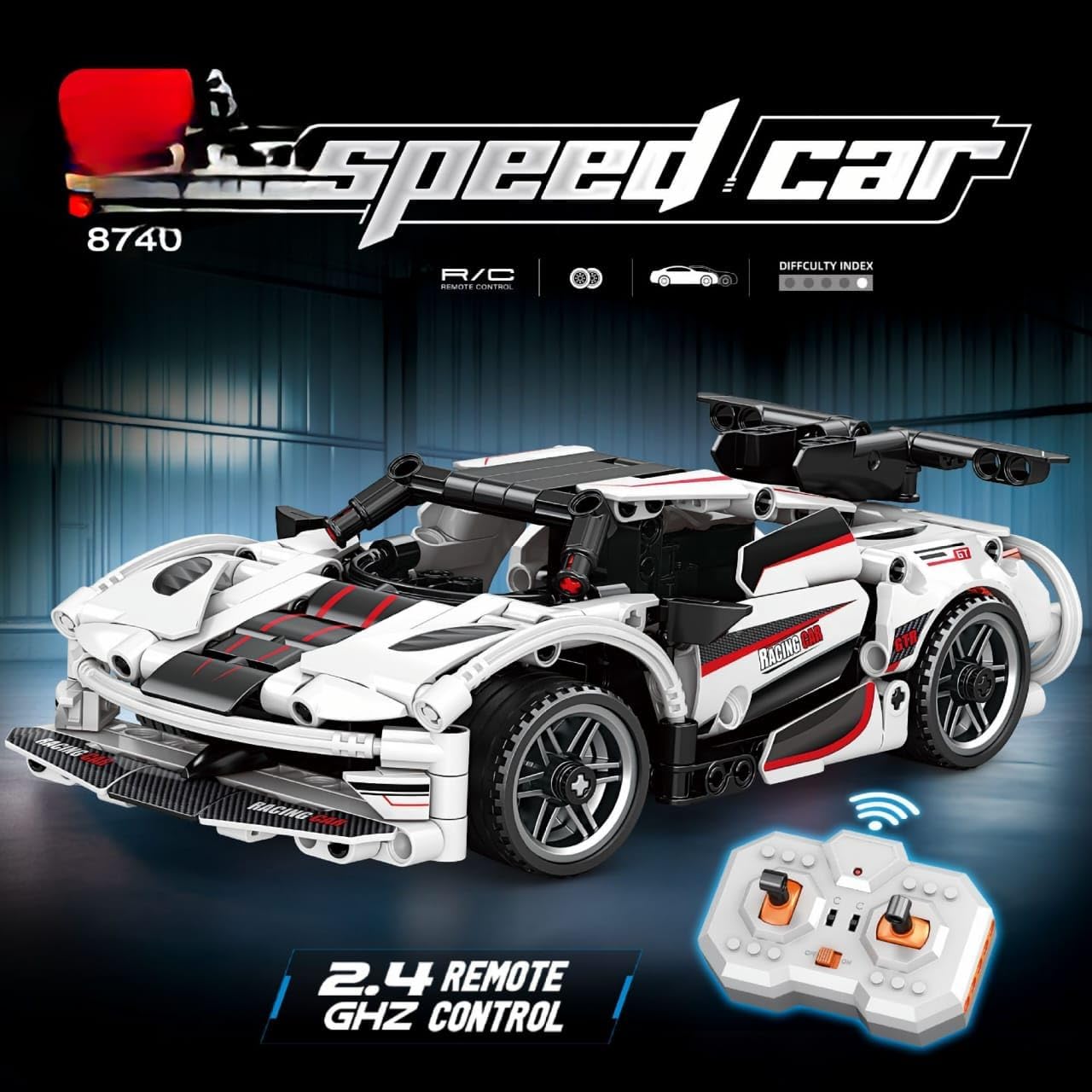
Figure 5.1: Racing Car Model 8740 and its remote control.
6. Maintenance
Proper maintenance ensures the longevity and optimal performance of your Racing Car Model 8740.
- Cleaning: Use a soft, dry cloth to wipe down the model and remote control. Avoid using water or chemical cleaners, as these can damage electronic components or the plastic finish.
- Storage: Store the model and remote control in a cool, dry place away from direct sunlight and extreme temperatures.
- Battery Removal: If the model or remote control will not be used for an extended period, remove the batteries to prevent leakage and corrosion.
- Inspection: Periodically inspect the model for any loose parts or damage. Re-secure any loose connections.
7. Troubleshooting
If you encounter issues with your Racing Car Model 8740, refer to the following common solutions:
| Problem | Possible Cause | Solution |
|---|---|---|
| Car does not respond to remote control. |
|
|
| Car moves erratically or slowly. |
|
|
| Parts detach during play. |
|
|
8. Specifications
| Model Number | 8740 |
| Brand | Generic |
| Product Dimensions | 20 x 8.5 x 6.5 cm |
| Weight | 350 g |
| Scale | 1:24 Scale |
| Material | Metal, Plastic |
| Colour | White And Black With Red Accents |
| Power Source | Battery-powered for RC functions (batteries not included) |
| Batteries Required | Yes (for remote control and car's RC functions, not included) |
| Recommended Age | 5 years and up |
| Special Features | Aerodynamic Body, Decorative Racing Stripes, Detailed Sports Car Design, Display Stand Compatible, Realistic Wheel Design, 2.4 GHz Remote Control |
9. Warranty and Support
Information regarding specific warranty terms or customer support contacts for the Generic Racing Car Model 8740 is not provided in the product details. Please refer to your point of purchase or the manufacturer's general support channels for assistance.


