
1. Introduction
Thank you for purchasing the Datewink ZQ02375 Mini Moving Head Light. This compact and versatile stage light is designed to create dynamic lighting effects for various events, including DJ parties, home gatherings, and small venues. Featuring RGBW LEDs, a green laser, and multiple control modes, this fixture offers both performance and ease of use. Please read this manual thoroughly before operation to ensure safe and optimal performance.
2. Safety Instructions
- Electrical Safety: Always connect the fixture to a grounded power outlet. Ensure the voltage matches the product's specifications (AC100V-240V 50/60Hz). Disconnect power before cleaning or servicing.
- Placement: Install the fixture in a well-ventilated area, away from heat sources and flammable materials. Maintain a minimum distance of 0.20m from flammable surfaces. The maximum temperature of the external surface is 120°C.
- Handling: Avoid direct eye exposure to the light source. Do not open the housing; there are no user-serviceable parts inside.
- Environment: This product is designed for indoor use only (IP20 protection level). Do not expose it to rain, moisture, or extreme temperatures outside the -20°C to 40°C working environment.
- Mounting: When mounting overhead, always use a safety cable. Ensure the mounting surface or structure can support the weight of the fixture.
3. Package Contents
Verify that all items listed below are included in your package:
- Mini Moving Head Light (1 unit)
- Power Cable (1 unit)
- Light Hook Bracket (1 unit)
- Mounting Screws (2 units)
- Remote Control (1 unit)
- Instruction Manual (1 unit)

Figure 3.1: Contents included in the Datewink ZQ02375 package.
4. Product Overview
Key Features:
- Ultra-Compact & Lightweight Design: Easy to transport and install in various small venues.
- Stunning Multi-Effect Lighting: Equipped with 3 x 10W RGBW LEDs, 12 x 0.2W RGB LEDs, and a green laser for vibrant beams, starry sky effects, and colored halos.
- High-Performance & Energy-Efficient Optics: Acrylic lenses and premium LEDs ensure stable, vivid light output with excellent color rendition. Optimal projection distance: 3-5 meters.
- Versatile Control Options: Supports Auto-run, Sound activation, Master-slave, DMX512, and Remote Control modes.
- Durable Construction: Crafted from robust ABS material for longevity.
Components:
The Datewink ZQ02375 Mini Moving Head Light features a robust design with intuitive controls and versatile connectivity.

Figure 4.1: Front view of the Datewink ZQ02375 Mini Moving Head Light.

Figure 4.2: Multiple Datewink ZQ02375 lights creating dynamic beam effects.

Figure 4.3: Examples of versatile multi-effect lighting, including monochromatic and color mixing modes.

Figure 4.4: Close-up of the 4-digit digital display and control buttons (Menu, Up, Down, Enter) on the base of the light.
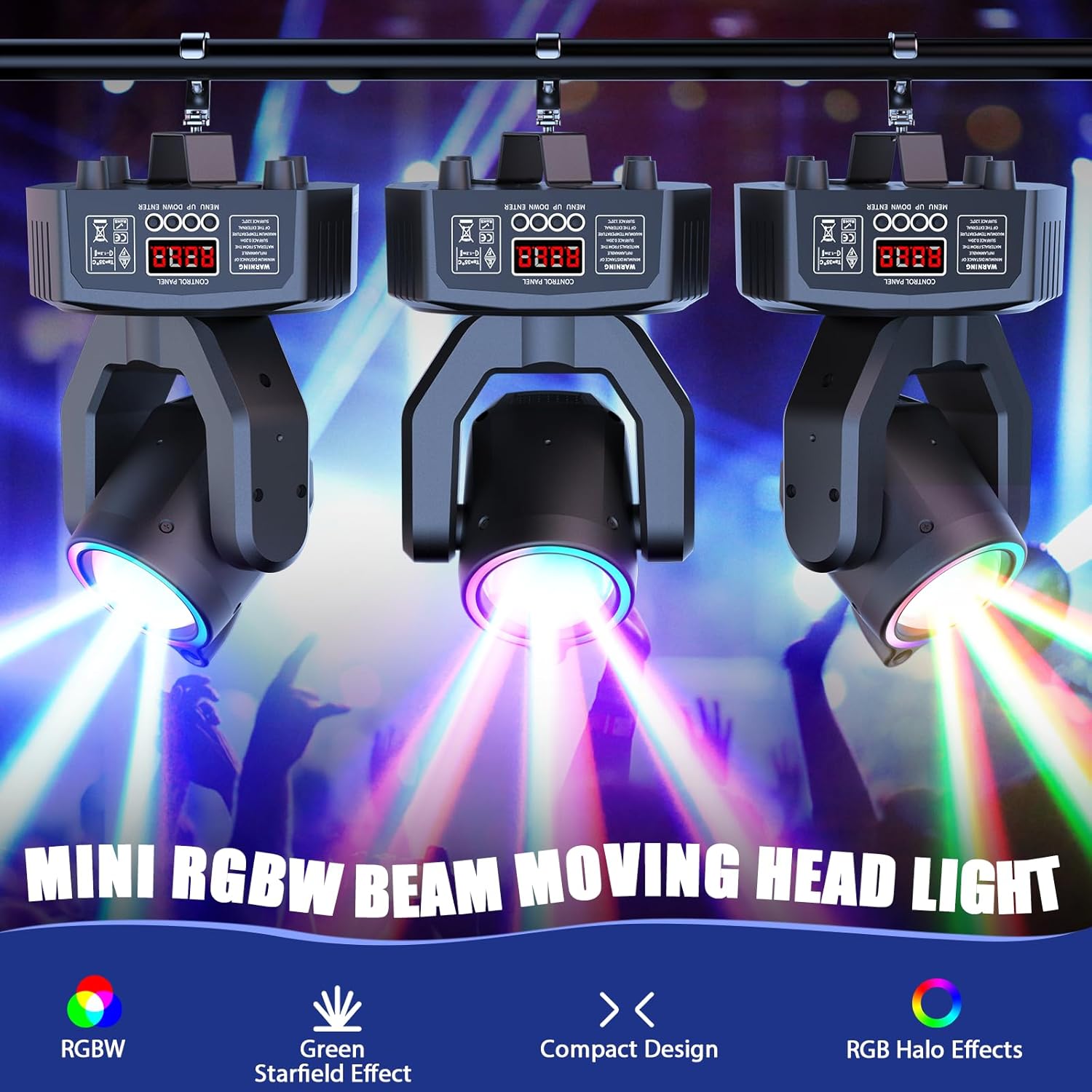
Figure 4.5: Rear view showing DMX IN, DMX OUT (3-pin XLR), and Power Connection.

Figure 4.6: Product dimensions: 5.63"L x 5.43"W x 8.11"H (14.3cm x 13.8cm x 20.6cm). X-Axis rotation: 450°, Y-Axis rotation: 180°.
Product Video:
Video 4.1: Demonstration of the Datewink Moving Head Light's features and effects. This video showcases various lighting modes, movement capabilities, and the overall performance of the fixture.
5. Setup
5.1 Mounting the Fixture
The Mini Moving Head Light can be placed on a flat surface or mounted to a truss or ceiling using the included hook bracket and screws. Ensure the mounting location is stable and can safely support the fixture's weight (0.85kg / 1.87lb).
- Surface Placement: Place the fixture on a stable, level surface. The rubber feet on the base provide stability.
- Overhead Mounting: Attach the hook bracket to the bottom of the fixture using the provided screws. Securely fasten the bracket to a truss or mounting bar. Always use a safety cable (not included) as a secondary attachment to prevent accidental falls.
5.2 Power Connection
Connect the included power cable to the power input on the rear of the fixture and then to a suitable AC100V-240V 50/60Hz power outlet.
5.3 DMX Connection (Optional)
For DMX control, connect a 3-pin XLR cable from your DMX controller's output to the DMX IN port of the first fixture. For multiple fixtures, daisy-chain them by connecting the DMX OUT of the first fixture to the DMX IN of the next, and so on. Ensure the last fixture in the chain has a DMX terminator (not included) for stable signal transmission.
6. Operating Modes
The fixture offers several operating modes, selectable via the control panel or remote control.

Figure 6.1: Overview of the five customizable control modes: DMX (13CH), Master/Slave, Sound-activated, Remote Control, and Auto.
6.1 Control Panel Operation
Use the 4-digit digital display and the MENU, UP, DOWN, ENTER buttons on the base of the fixture to navigate and select modes.
- MENU: Cycles through main menu options.
- UP/DOWN: Navigates through sub-options or adjusts values.
- ENTER: Confirms selection or saves settings.
6.2 Remote Control Operation
The included remote control provides convenient access to various functions and modes.

Figure 6.2: Layout of the remote control with button functions.
- ON/OFF: Turns the light on or off.
- DMX Mode: Activates DMX control.
- AUTO: Cycles through built-in automatic programs.
- SPEED +/-: Adjusts the speed of automatic programs.
- VOICE: Activates sound-activated mode.
- MIC +/-: Adjusts sound sensitivity in VOICE mode.
- Number Buttons (1-9, 0): Selects specific pre-programmed effects or DMX channels (refer to DMX chart for details).
6.3 Master-Slave Mode
To synchronize multiple fixtures without a DMX controller, set one unit as the Master and others as Slaves. Connect the DMX OUT of the Master unit to the DMX IN of the first Slave unit, and continue daisy-chaining. Ensure all units are set to the correct Master/Slave mode via their control panels.
7. DMX Channel Chart (13 Channels)
This fixture utilizes 13 DMX channels for comprehensive control. Below is a typical channel assignment. Specific values may vary; refer to the on-screen display for exact settings.
| Channel | Function | Value Range | Description |
|---|---|---|---|
| 1 | Pan Movement | 0-255 | Horizontal movement (0-450°) |
| 2 | Pan Fine | 0-255 | Fine adjustment for Pan |
| 3 | Tilt Movement | 0-255 | Vertical movement (0-180°) |
| 4 | Tilt Fine | 0-255 | Fine adjustment for Tilt |
| 5 | Speed | 0-255 | Movement speed (slow to fast) |
| 6 | Dimmer | 0-255 | Overall brightness (0-100% linear) |
| 7 | Strobe | 0-255 | Strobe effect (1-20Hz) |
| 8 | Red LED | 0-255 | Red intensity (0-100%) |
| 9 | Green LED | 0-255 | Green intensity (0-100%) |
| 10 | Blue LED | 0-255 | Blue intensity (0-100%) |
| 11 | White LED | 0-255 | White intensity (0-100%) |
| 12 | Green Laser | 0-255 | Green laser effect (on/off, patterns) |
| 13 | Function/Mode | 0-255 | Internal programs, sound active, etc. |
8. Maintenance
- Cleaning: Regularly clean the lens and housing with a soft, lint-free cloth. Do not use abrasive cleaners or solvents. Ensure the fixture is powered off and cooled down before cleaning.
- Inspection: Periodically check power cables, DMX cables, and mounting hardware for any signs of wear or damage. Replace any damaged components immediately.
- Storage: When not in use, store the fixture in a dry, dust-free environment, preferably in its original packaging or a protective case.
9. Troubleshooting
| Problem | Possible Cause | Solution |
|---|---|---|
| No power | Power cable disconnected; no power from outlet; blown fuse. | Check power cable connection; test outlet with another device; replace fuse if necessary. |
| No light output | Dimmer channel at 0; fixture in blackout mode; LED failure. | Check DMX dimmer channel or remote settings; ensure fixture is not in blackout; contact support if LEDs are faulty. |
| No DMX control | Incorrect DMX address; faulty DMX cable; DMX terminator missing. | Verify DMX address setting; check DMX cable connections; use a DMX terminator on the last fixture. |
| Remote control not working | Battery depleted; remote not pointed at sensor; interference. | Replace remote battery; ensure clear line of sight to the fixture's IR sensor; reduce interference. |
10. Specifications
| Parameter | Value |
|---|---|
| Input Voltage | AC100V-240V 50/60Hz |
| Control Protocol | 433MHz (for remote) |
| Effective Control Distance | 1-8 meters |
| Light Source | 3x 10W RGBW LED + 12x 0.2W RGB LEDs + 1x Green Beam Light |
| Optimal Projection Distance | 3-5 meters |
| Average LED Life | 10,000 hours |
| Dimming Curve | 0-100% Linear Dimming |
| Strobe Rate | 1-20Hz |
| RGBW Beam Effect | Yes |
| Green Star Effect | Yes |
| Colorful Light Strip Horse Racing Effect | Yes |
| Operation Angle (X-Axis) | 450° |
| Operation Angle (Y-Axis) | 180° |
| Operation Modes | Auto, Voice Control, Master/Slave, D-M-X, Remote Control |
| Control Channel | 13CH |
| Protocol | Standard D-M-X512 Protocol |
| Data Connection | Three-core XLR Input/Output |
| Display | 4-digit Digital Display |
| Protection Level | IP20 |
| Working Environment | -20°C ~ 40°C |
| Material | Aluminum alloy structure/plastic shell |
| Product Size (L x W x H) | 14.3cm x 13.8cm x 20.6cm (5.6in x 5.4in x 8.1in) |
| Net Weight | 0.85kg (1.87lb) |
11. Warranty and Support
This Datewink product is covered by a 180-day manufacturer's warranty from the date of purchase. This warranty covers defects in materials and workmanship under normal use.
For technical support, warranty claims, or any questions regarding your product, please contact our customer service team:
- Email: support@datewink.com (example)
- Website: Datewink Official Store
Please have your model number (ZQ02375) and purchase information ready when contacting support.