
1. Product Overview
The ZDEER LED Red Light Therapy Facial Care Device is a versatile tool designed for enhancing your skincare routine. It combines advanced red light therapy, gentle heat, and micro-vibration massage to support skin firmness, sculpting, and relaxation. Its ergonomic design allows for comfortable use on the face, neck, and shoulders.

Image: The ZDEER 5-in-1 Facial Care Device in use, highlighting its multiple benefits.
Key Features:
- Advanced Red Light System: Features 8 evenly spaced red light beads (620–640nm) for consistent and gentle illumination, promoting a smoother, radiant appearance.
- Smart Heat & Gentle Vibration Massage: Offers three adjustable heat levels (95°F–122°F / 35–50°C) and three levels of gentle vibration for a customizable facial massage, aiding in relaxation and a smoother-looking complexion.
- Relaxing Home SPA Experience: Enhances the absorption of serums, facial oils, or creams, making skincare ingredients more effective.
- Ergonomic Contoured Design: Shaped with curved edges to fit facial, neck, and shoulder contours for smooth gliding and comfortable grip.
- Long-Lasting & Travel-Friendly: Compact and lightweight (174g) with an 800mAh rechargeable battery, providing up to 1.5 hours of continuous use on a 1.5-hour charge.
2. Components and Controls
Familiarize yourself with the device's components and control buttons for optimal use.
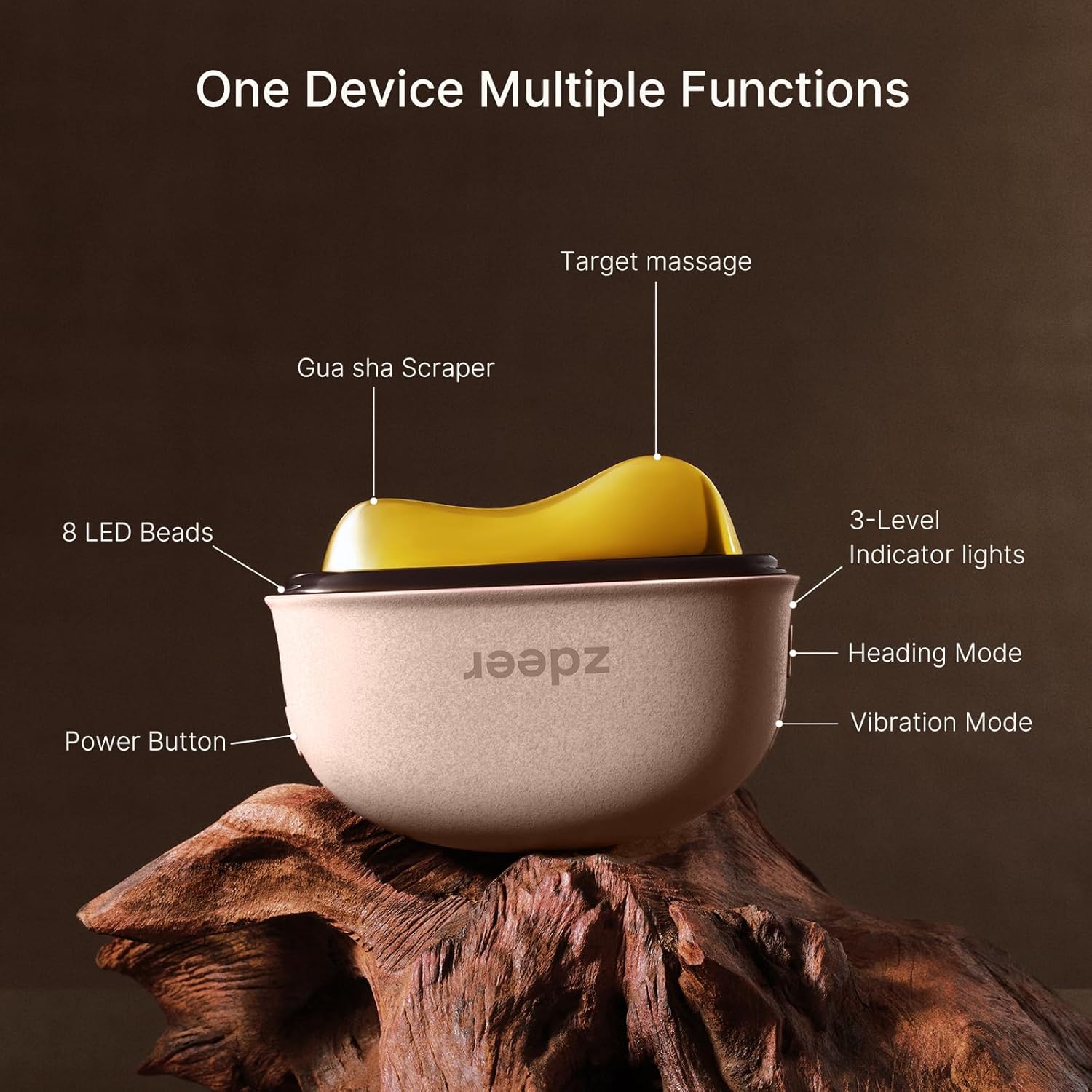
Image: Detailed diagram of the device's multiple functions and controls.
Control Buttons:
- Power Button: Located on the side, press and hold to turn the device on/off.
- Heating Mode Button: Adjusts between three heat levels.
- Vibration Mode Button: Adjusts between three vibration levels.
Heat and Vibration Levels:
| Setting | Heat Level | Vibration Mode |
|---|---|---|
| Level 1 | 95°F–104°F (Mild heat) | Gentle vibration for daily care |
| Level 2 | 104°F–113°F (Warm) | Moderate vibration for deeper relaxation |
| Level 3 | 113°F–122°F (Slightly hot) | Stronger vibration intensity for intensive revitalization |
3. Setup
Charging the Device:
Before first use, fully charge the device. A full charge takes approximately 1.5 hours and provides up to 1.5 hours of continuous use. Actual battery life may vary based on heat and vibration settings.
- Connect the provided Type-C charging cable to the charging port on the device.
- Plug the other end of the cable into a compatible USB power adapter (not included).
- The indicator lights will show charging status and turn off when fully charged.

Image: Device charging via Type-C port.
4. Operating Instructions
Preparation:
- Cleanse your skin thoroughly before use.
- Apply a small amount of your favorite serum, facial oil, or cream to the target area. This helps the device glide smoothly and enhances product absorption.

Image: How to Use - Simple steps for comfortable results.
Usage Steps:
- Power On: Press and hold the Power Button for a few seconds until the device turns on.
- Select Mode: Press the Heating Mode button to cycle through heat levels (Level 1, 2, 3). Press the Vibration Mode button to cycle through vibration intensities (Level 1, 2, 3). For first-time users, it is recommended to start with Level 1 for both heat and vibration.
- Glide & Focus: Gently glide the device along the face and neck in slow, upward lifting strokes, following the natural contours of the skin. Avoid the eye area and do not apply excessive pressure.
- Face: Glide gently upward from the under-eye toward the temple.
- Jawline: Glide along the jawline toward the ear, then continue downward along the neck.
- Neck: Sweep gently along the neck or collarbone from the center outward.
- Finish: After your session, wipe the device clean and apply any remaining skincare products.

Image: Visual guide for facial massage techniques.
Video: Demonstrating the ZDEER Facial Care Device in daily life, showing various application techniques.
5. Maintenance
- Wipe the device with a clean damp cloth after each use.
- For hygiene, occasional wiping with 75% alcohol is acceptable.
- Do not immerse the device in water or use chemical solvents.
- Store the device in a cool, dry place away from direct sunlight and heat sources.
6. Safety Precautions
- This device has a heated surface. Always check temperature settings before use to avoid burns. Not suitable for individuals with reduced sensitivity to heat.
- Avoid direct exposure of red light to the eyes.
- Handle with care. Avoid dropping or strong impacts.
- If you have a serious medical condition, implanted devices, are pregnant, or under physician care, please consult your doctor before use.
- Not recommended for individuals with open wounds, skin infections, bleeding disorders, or those taking anticoagulant medications.
- Keep out of reach of children. For adult use only.
- This product is not recommended for sensitive skin.
7. Troubleshooting
If you encounter any issues with your ZDEER Facial Care Device, please refer to the following common solutions:
- Device not turning on: Ensure the device is fully charged. Connect it to the charger and wait for the indicator lights to confirm charging.
- No heat or vibration: Check that the device is powered on and that the respective mode buttons have been pressed to activate heat and/or vibration. Cycle through the levels to ensure they are engaged.
- Device feels too hot: If the device feels uncomfortably hot, immediately turn it off. Reduce the heat setting or discontinue use if discomfort persists. This device provides gentle heat, and sensation may vary by individual skin sensitivity and room temperature.
- Poor gliding: Ensure sufficient serum, facial oil, or cream is applied to the skin to allow for smooth movement of the device.
- Unexpected behavior: Turn off the device, wait a few seconds, and then turn it back on. If the issue persists, contact customer support.
8. Specifications
| Feature | Detail |
|---|---|
| Model Number | B0FX7WH9DJ |
| Dimensions | 6.73 x 5.51 x 2.05 inches |
| Item Weight | 174 Grams (6.14 ounces) |
| Color | Pink |
| Material Type | Acrylonitrile Butadiene Styrene, Brass |
| Power Source | Battery Powered (1 Nonstandard Battery included) |
| Charging Time | 1.5 Hours |
| Battery Average Life | 1.5 Hours (continuous use) |
| Red Light Wavelength | 620–640nm |
| Heat Levels | 3 (95°F–122°F / 35–50°C) |
| Vibration Levels | 3 |
| Target Use Body Part | Face, Neck, Shoulders |
| Specific Uses For Product | Skincare & Relaxation |
9. Warranty and Support
Manufacturer Warranty:
ZDEER offers a 3-year free replacement service support for this product. If any quality issue arises during this period, please contact us, and we will address it promptly.
Customer Support:
If you experience any issues after receiving the product or have questions, please contact us through Amazon. Our support team will respond promptly and assist you.


