
Product Overview
The generic Dish Remote 60.0 is a simplified voice remote designed to enhance your TV viewing experience. It features larger buttons for ease of use and integrates voice control capabilities. This remote is compatible with various DISH receiver models.
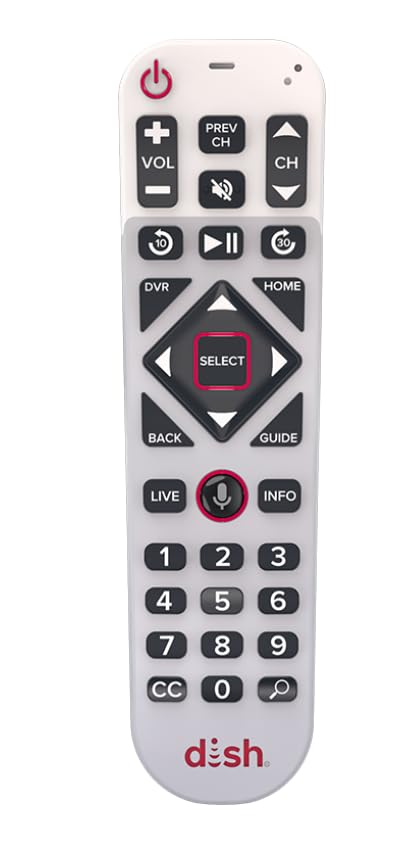
Image: The generic Dish Remote 60.0, showcasing its ergonomic design and button layout.
Key Features:
- Flat back design for comfortable handling.
- Premium feel with soft-touch materials.
- Voice control functionality for convenient command input.
- Backlit buttons for visibility in low-light conditions.
- Ample space between buttons to ensure usability.
- Easy-open battery door with a battery eject button.
- High contrast design to boost readability.
Setup and Pairing
Pairing the Remote to Your Receiver:
When using a new remote, it must be paired with your DISH receiver to enable full functionality.
- Press the SYS INFO button on your receiver.
- Press the microphone button on your remote.
- Listen for 3 beeps. Once you hear the beeps, your remote is successfully paired.
Pairing the Remote to Your TV (Power and Volume Control):
The process for setting up your DISH remote to control your TV's power and volume varies by receiver model.
- For Hopper 3, Hopper with Sling, Hopper, Hopper Duo, Joey 1, Joey 2, Joey 3, 4K Joey, Super Joey, Wally, or Wireless Joey:
- Press Home twice.
- Select Remote Control.
- Select TV, then follow the on-screen steps in the TV pairing wizard.
- For Hopper Plus, Joey 4, or Wireless Joey 4:
- Press Home.
- Select the settings gear icon.
- Select DISH settings.
- Select Remote control.
- Select TV, then select TV Pairing Wizard to complete pairing.
Operating Instructions
Using Voice Commands:
The Dish Remote 60.0 features voice control for convenient operation. An active internet connection is required for voice functionality.
- Press and hold the microphone button on your remote.
- Speak your command clearly into the remote. Examples include:
- "Show free movies"
- "What's the weather?"
- "Go to CNN"
Locating Your Remote:
If you misplace your remote, you can use your receiver to locate it.
- Press the Locate Remote button or the remote-shaped button on your DISH receiver.
- Listen for the remote to emit a series of beeps, guiding you to its location.
Maintenance
Battery Replacement:
The remote uses Alkaline batteries. Replace them when the remote's performance degrades or the backlight dims significantly.
- Locate the easy-open battery door on the back of the remote.
- Press the battery eject button (if present) or slide the door open.
- Remove the old batteries and insert new Alkaline batteries, ensuring correct polarity (+/-).
- Close the battery door securely.
Cleaning:
To clean the remote, use a soft, dry cloth. Avoid using liquid cleaners or abrasive materials, as these can damage the remote's finish or internal components.
Troubleshooting
- Remote not responding:
Check battery levels and replace if necessary. Ensure the remote is properly paired with your receiver. Re-pair the remote if issues persist.
- Voice commands not working:
Verify that your DISH receiver has an active internet connection. Speak clearly and hold the microphone button while speaking. Ensure there are no obstructions between you and the remote's microphone.
- Backlight not staying on long enough:
The backlight duration is a fixed setting and cannot be adjusted by the user. This is by design to conserve battery life.
- Remote not controlling TV power/volume:
Ensure the remote is correctly paired to your TV using the TV pairing wizard specific to your receiver model (refer to "Pairing the Remote to Your TV" section).
Specifications
| Brand | generic |
| Model Name | 60.0 Remote |
| Model Number | DN018897 |
| Special Feature | Remote Finder, Voice Control, Backlit Buttons |
| Color | White |
| Max Number of Supported Devices | 1 (Television) |
| Connectivity Technology | Infrared |
| Maximum Range | 30 Feet |
| Battery Type | Alkaline |
| Item Weight | 5 Ounces |
Warranty Information
This generic Dish Remote 60.0 comes with a 3-month warranty from the date of purchase. Please retain your proof of purchase for any warranty claims. The warranty covers manufacturing defects under normal use. It does not cover damage caused by misuse, accidents, unauthorized modifications, or normal wear and tear.
Customer Support
For further assistance or inquiries regarding your generic Dish Remote 60.0, please refer to the support resources provided by your DISH service provider. For product-specific issues not covered in this manual, contact the retailer or manufacturer directly.