
1. Introduction
This manual provides detailed instructions for the assembly, operation, and maintenance of your AreShark MC05-001 Ergonomic Office Chair. Please read this manual thoroughly before assembly and use to ensure proper function and longevity of your chair.
2. Safety Information
- Please follow all assembly instructions carefully.
- Do not exceed the maximum weight recommendation of 300 pounds (136 kg).
- Ensure all screws and bolts are securely tightened before use. Periodically check and re-tighten as necessary.
- Keep hands and fingers clear of moving parts during adjustment.
- Use the chair on a flat, stable surface.
3. Package Contents
Before beginning assembly, verify that all components are present and undamaged. If any parts are missing or damaged, please contact customer support.
- Chair Backrest (Mesh)
- Seat Cushion
- Armrests (2)
- Chair Base (Five-point steel)
- Gas Lift Cylinder (SGS certified)
- Casters (5)
- Assembly Hardware (Screws, Allen wrench)
4. Setup and Assembly
The AreShark MC05-001 office chair is designed for straightforward assembly. A video guide and all necessary installation tools are included to assist you. Assembly typically takes approximately 20 minutes.
Assembly Video Guide
This video demonstrates the assembly process and key features of the AreShark Office Chair.
Visual Assembly Steps
- Attach Casters to Base: Insert the five casters into the holes on the chair base until they click securely into place.
- Insert Gas Lift: Place the gas lift cylinder into the center hole of the chair base.
- Attach Armrests to Seat: Secure the armrests to the underside of the seat cushion using the provided screws. Ensure the flip-up mechanism is facing the correct direction.
- Attach Backrest to Seat: Connect the backrest to the seat assembly using the remaining screws.
- Place Seat Assembly on Gas Lift: Carefully place the assembled seat and backrest onto the gas lift cylinder. Press down firmly to ensure a secure connection.
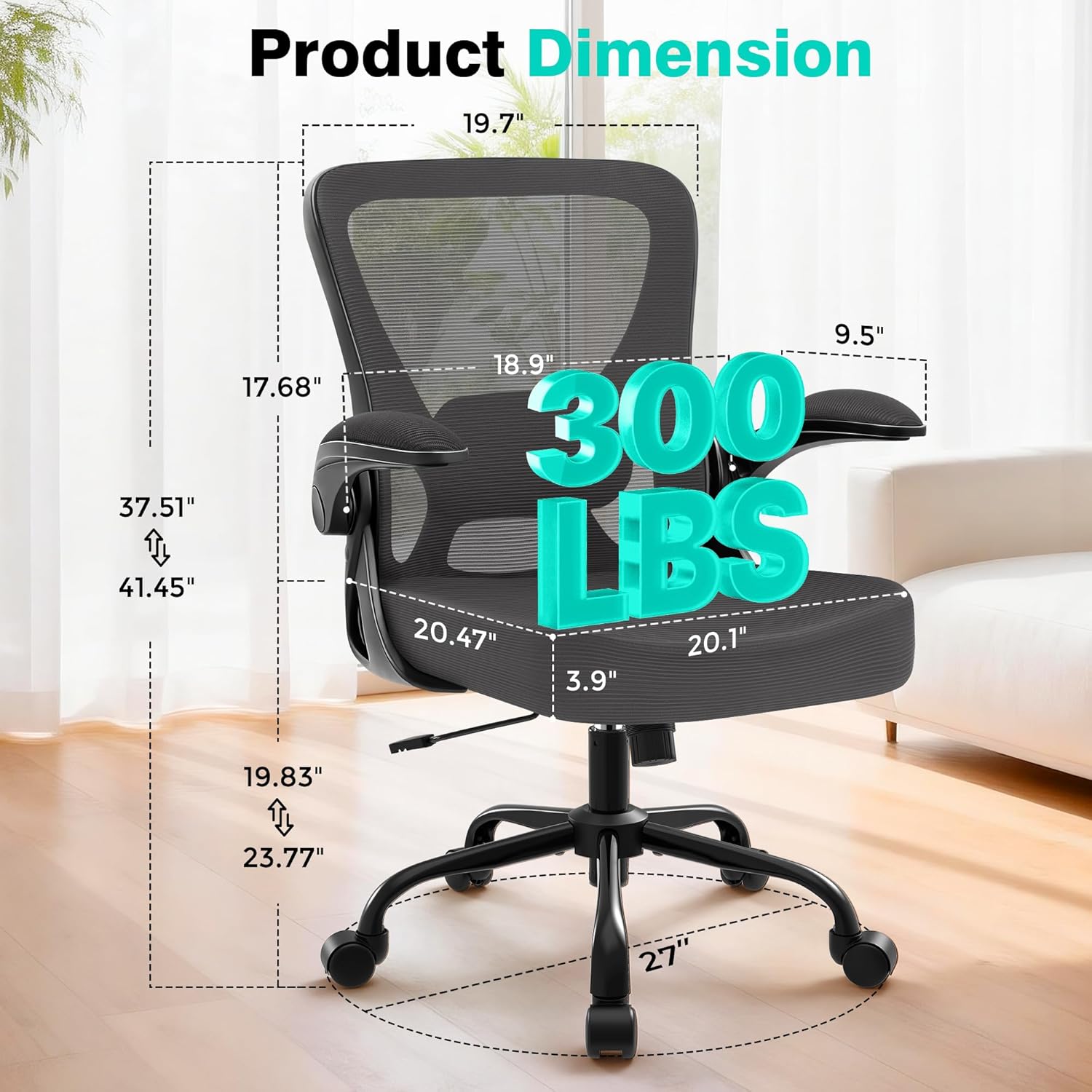
Image: Fully assembled AreShark MC05-001 Ergonomic Office Chair.
5. Operating Instructions
Your AreShark MC05-001 office chair offers several adjustable features to customize your seating experience for optimal comfort and ergonomic support.
5.1. Height Adjustment
To adjust the chair's height, locate the lever on the right side beneath the seat. While seated, pull the lever up to lower the chair. To raise the chair, stand up and pull the lever up. Release the lever at your desired height.

Image: Demonstrates the chair's recline and height adjustment features.
5.2. Lumbar Support Adjustment
The chair features a 2D adjustable lumbar system for tailored spine alignment. The lumbar support can be adjusted both vertically and horizontally.
- Depth Adjustment: Use the knob on the back of the chair to adjust the lumbar support's depth (up to 1.57 inches) to precisely contour to your lower back.
- Vertical Adjustment: Manually slide the lumbar support up or down (up to 1.97 inches) to find the ideal position for your back.
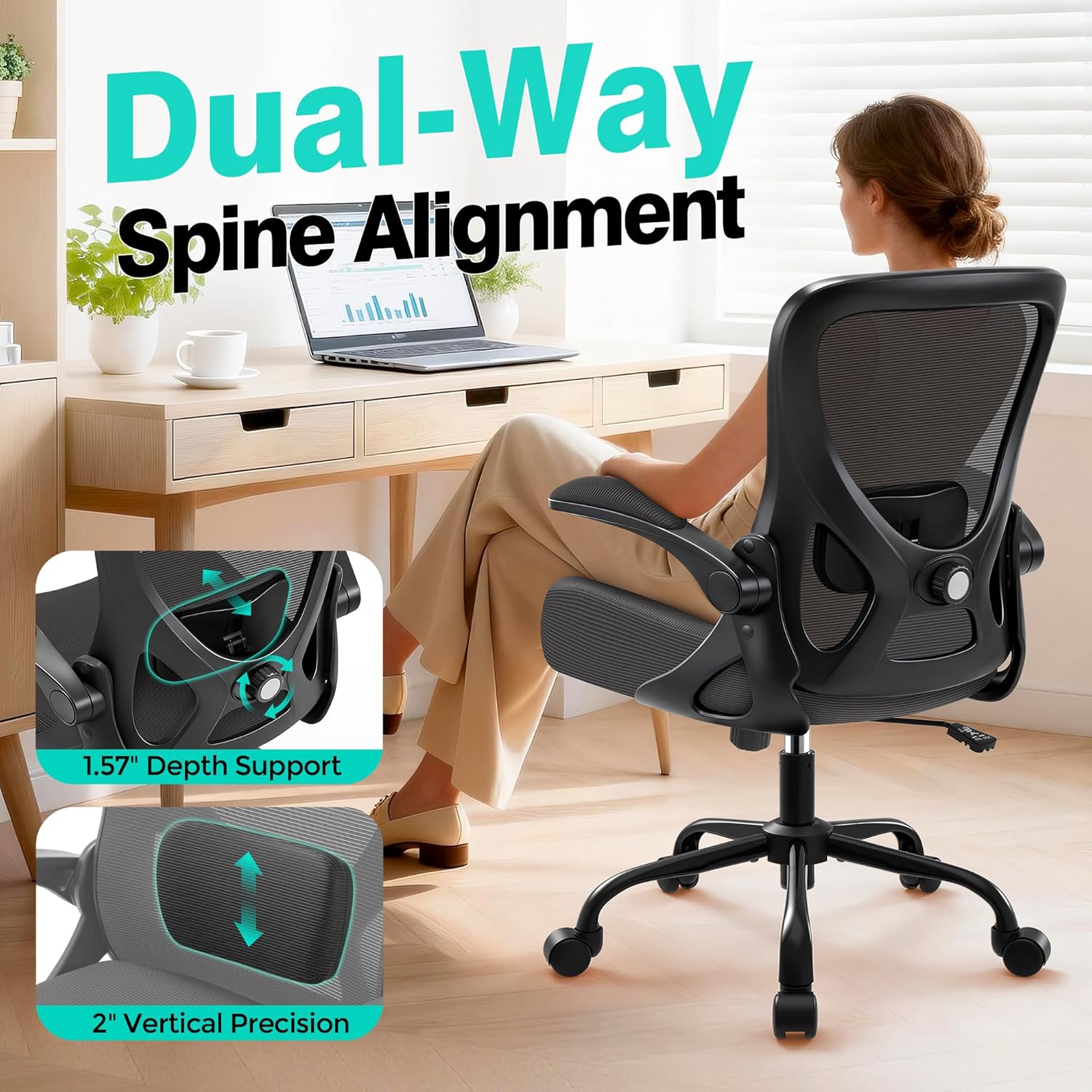
Image: Close-up of the adjustable lumbar support mechanism on the AreShark Office Chair.
5.3. Recline Function
The chair allows for a multi-posture recline, from an upright 90° for focused work to a 120° recline for relaxation.
- To Recline: Pull the height adjustment lever outwards. Lean back to your desired angle.
- To Lock Recline: Push the lever inwards to lock the backrest in an upright position.
5.4. Flip-up Armrests
The armrests can be flipped up 90° vertically to save space or allow the chair to be pushed closer to a desk.
- To Flip Up: Gently lift each armrest upwards until it locks into the vertical position.
- To Lower: Pull each armrest down until it locks into the horizontal position.

Image: The flip-up armrests of the AreShark Office Chair, designed for space-saving.
5.5. Swivel and Rolling
The chair features 360° swivel capability and smooth-rolling casters for easy movement across various floor surfaces without causing damage.
6. Maintenance
Regular maintenance will help preserve the appearance and functionality of your AreShark office chair.
- Cleaning: Wipe clean with a damp cloth. Avoid harsh chemicals or abrasive cleaners that may damage the mesh or fabric.
- Inspection: Periodically check all bolts and screws to ensure they are tight. Re-tighten if necessary.
- Casters: Keep casters free of hair and debris to ensure smooth rolling.
7. Troubleshooting
If you encounter any issues with your AreShark office chair, please refer to the following common solutions:
- Chair not adjusting height: Ensure the gas lift lever is fully engaged or disengaged as required. Check if the gas lift cylinder is properly seated in the base and seat mechanism.
- Chair wobbles: Verify that all assembly screws are securely tightened. Ensure the chair is on a flat, even surface.
- Casters not rolling smoothly: Check casters for trapped debris (hair, lint) and clean them. Ensure they are fully inserted into the chair base.
- Backrest not reclining: Ensure the recline lock mechanism (part of the height adjustment lever) is disengaged.
For persistent issues, please contact AreShark customer support.
8. Specifications
| Feature | Specification |
|---|---|
| Brand | AreShark |
| Model Name | MC05-001 |
| Color | Dark Gray |
| Material | Mesh (Backrest), Sponge (Seat) |
| Product Dimensions (D x W x H) | 24"D x 25.98"W x 41.9"H |
| Item Weight | 18 Pounds |
| Maximum Weight Recommendation | 300 Pounds |
| Adjustable Height | Yes (approx. 4 inches travel) |
| Lumbar Support | Adjustable (1.57" depth, 1.97" vertical) |
| Arm Style | Flip-up Armrests |
| Reclining Position Count | 2 (90° and 120°) |
| Assembly Required | Yes |

Image: Illustration of the chair's durable components including the SGS gas lift and five-point steel base.
9. Warranty and Support
Your AreShark MC05-001 Ergonomic Office Chair comes with a 3-year service warranty. AreShark is committed to providing dedicated customer care and a responsive support team ready to assist with any questions or concerns you may have regarding your office chair.
For warranty claims or support inquiries, please refer to the contact information provided with your purchase or visit the official AreShark website.