
Introduction
This manual provides essential information for the safe operation, maintenance, and troubleshooting of your SEESII 24" 40V Cordless Hedge Trimmer. Please read this manual thoroughly before using the product to ensure proper handling and to maximize the lifespan of your tool.
Important Safety Instructions
Always observe basic safety precautions to reduce the risk of fire, electric shock, and personal injury. Keep this manual for future reference.
- Read All Instructions: Familiarize yourself with the controls and proper use of the hedge trimmer.
- Wear Appropriate Personal Protective Equipment (PPE): Always wear safety glasses or goggles, gloves, and sturdy footwear. Hearing protection is recommended.
- Keep Work Area Clear: Ensure the area is free of debris, children, and pets.
- Inspect Before Use: Check the trimmer for any damage, loose parts, or dull blades before each operation.
- Secure Grip: Always hold the hedge trimmer firmly with both hands during operation.
- Avoid Accidental Starting: The tool features a dual safety lock system. Ensure both switches are engaged simultaneously to start the trimmer.
- Battery Safety: Use only the specified batteries and chargers. Do not expose batteries to extreme temperatures or moisture.
- Maintenance: Disconnect the battery before performing any maintenance, cleaning, or blade changes.
Package Contents
Verify that all items are present in the package:
- 1 x SEESII 24" 40V Hedge Trimmer
- 2 x 4000mAh Rechargeable Battery
- 2 x Fast Charger
- 1 x Safety Blade Cover
- 1 x User Manual (this document)
Setup
1. Battery Charging and Installation
Before first use, fully charge both 4000mAh batteries using the provided fast chargers.
- Connect the charger to a standard power outlet.
- Insert the battery into the charger. The indicator light on the charger will show charging status (e.g., red for charging, green for fully charged).
- Once charged, remove the battery from the charger.
- To install batteries into the hedge trimmer, align the battery with the battery slot on the tool and slide it in until it clicks securely into place. Ensure both batteries are installed for operation.
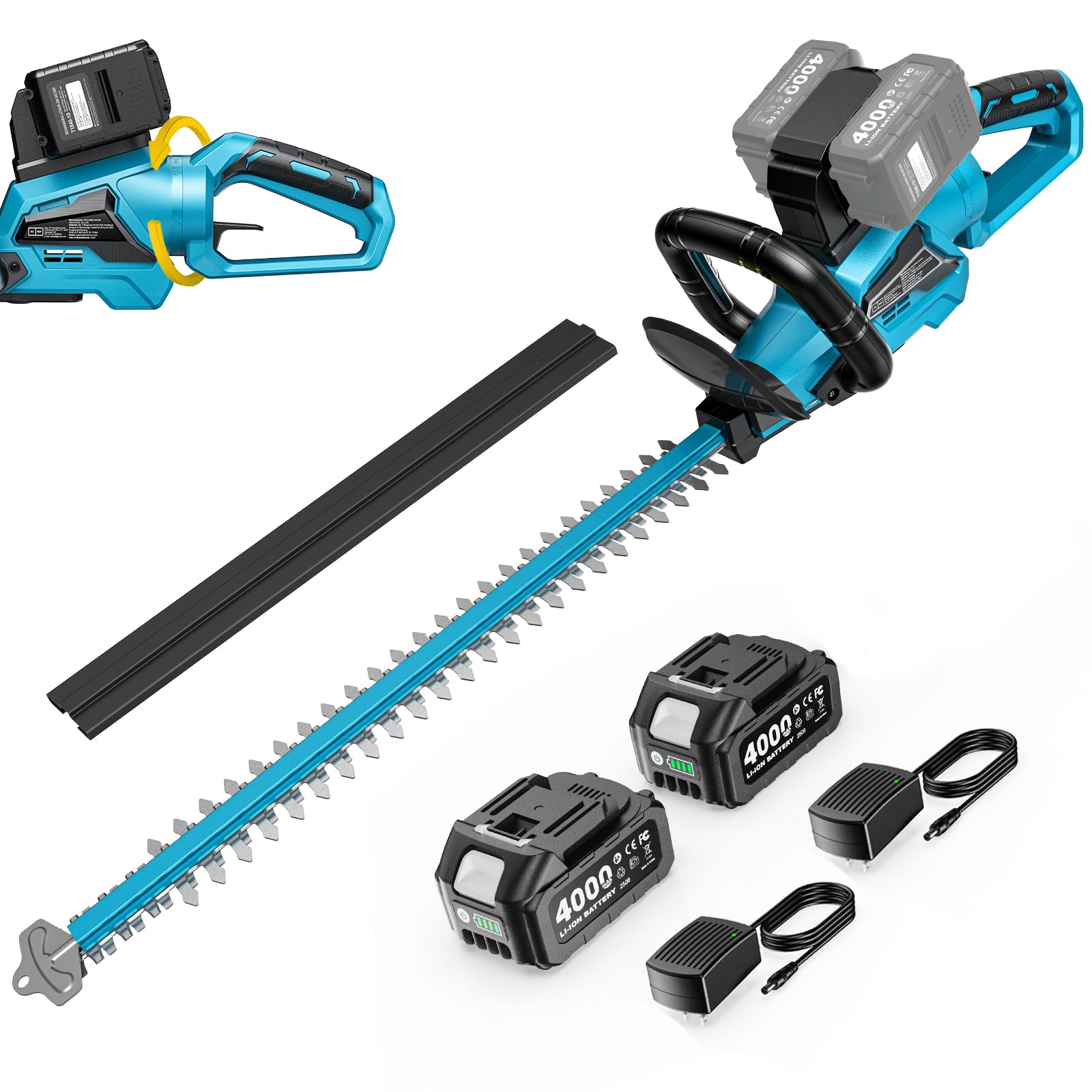
Image: The SEESII 40V Cordless Hedge Trimmer with two 4000mAh batteries inserted into their respective slots on top of the tool, ready for use.
2. Blade Cover Removal
Remove the safety blade cover before operating the hedge trimmer. Always reattach the blade cover when the tool is not in use or during storage.

Image: The SEESII hedge trimmer with its black safety blade cover securely in place, indicating safe storage or transport.
Operating Instructions
1. Starting and Stopping the Trimmer
The SEESII hedge trimmer features a dual safety lock system to prevent accidental activation.
- To Start: Hold the front handle firmly. Simultaneously press the safety switch on the front handle and squeeze the trigger on the rear handle. The blades will begin to move.
- To Stop: Release either the safety switch or the trigger. The blades will stop.

Image: A user demonstrating the dual safety switch operation, pressing both the front handle safety and the rear trigger to activate the hedge trimmer.
2. Using the 180° Rotating Handle
The 180° rotating handle allows for comfortable trimming at various angles.
- To rotate the handle, press the button located near the base of the rear handle.
- Rotate the handle to the desired position (e.g., 90 degrees left or right for vertical trimming).
- Release the button to lock the handle in place. Ensure the handle is securely locked before operating.
Video: Instructions for Rotating Handle. This video demonstrates how to press the button and rotate the hedge trimmer's handle 90 degrees left or right for versatile trimming.

Image: A man using the SEESII hedge trimmer to trim a hedge, showcasing the ergonomic design and the benefit of the 180° rotating handle for comfortable operation.
3. Trimming Techniques
For optimal results and safety, follow these trimming guidelines:
- General Trimming: Use a sweeping motion, moving the trimmer along the hedge.
- Vertical Trimming: Hold the trimmer with the blade vertical and move it along the side of the hedge. The rotating handle is particularly useful for this.
- Horizontal Trimming: Hold the trimmer with the blade horizontal and move it across the top of the hedge.
- Cutting Capacity: The 24" dual-action blade with 1" cutting capacity is designed for hedges, shrubs, and thicker branches up to 1 inch in diameter. Do not force the trimmer through branches thicker than its rated capacity.

Image: A man actively trimming a hedge with the SEESII hedge trimmer, demonstrating the tool's effectiveness in shaping foliage.
Video: Cutting Diameter Display. This video illustrates the hedge trimmer's cutting capacity, showing it effortlessly cutting through branches.
Maintenance
Regular maintenance ensures the longevity and optimal performance of your hedge trimmer.
1. Blade Care
- Cleaning: After each use, disconnect the battery and clean the blades with a stiff brush to remove sap and debris. Use a resin solvent if necessary.
- Lubrication: Apply a light machine oil or blade lubricant to the blades after cleaning to prevent rust and ensure smooth operation.
- Sharpening: If blades become dull, they can be sharpened by a qualified service technician or using a fine-toothed file, following proper safety procedures.
Video: How to Replace the Blade. This video provides a step-by-step guide on safely replacing the hedge trimmer blade.
2. Battery Care
- Store batteries in a cool, dry place away from direct sunlight and extreme temperatures.
- Do not store batteries in a discharged state for extended periods. Charge them periodically if not in use.
- Avoid dropping or damaging batteries.
3. General Cleaning and Storage
- Wipe down the tool's housing with a damp cloth. Do not use harsh chemicals.
- Always attach the safety blade cover before storing the trimmer.
- Store the hedge trimmer in a dry, secure location out of reach of children.
Troubleshooting
| Problem | Possible Cause | Solution |
|---|---|---|
| Trimmer does not start | Battery not charged or improperly installed; Safety switch/trigger not engaged; Damaged battery or tool. | Ensure batteries are fully charged and correctly inserted. Confirm both safety switch and trigger are pressed simultaneously. Check for visible damage to batteries or tool. Contact customer support if issues persist. |
| Reduced cutting performance | Dull or dirty blades; Overgrown or too thick material; Low battery charge. | Clean and lubricate blades. Sharpen blades if necessary. Ensure batteries are fully charged. Avoid cutting material exceeding 1 inch in diameter. |
| Excessive vibration or noise | Loose blade bolts; Damaged blade; Internal component issue. | Check and tighten blade bolts (with battery removed). Inspect blades for damage and replace if necessary. If problem persists, discontinue use and contact customer support. |
Specifications
| Feature | Detail |
|---|---|
| Brand | Seesii |
| Model Number | SF8A613-1 |
| Power Source | Battery Powered (40V) |
| Battery Type | 2 x 4000mAh Lithium-ion |
| Blade Length | 24 inches |
| Cutting Capacity | 1 inch |
| Strokes Per Minute (SPM) | 3100 SPM |
| Motor Type | Brushless |
| Handle Rotation | 180 degrees |
| Item Weight | 12.8 pounds |
| Material | Acrylonitrile Butadiene Styrene, Alloy Steel (Blade: High Carbon Steel) |
Warranty and Support
For warranty information, technical support, or to order replacement parts, please refer to the contact information provided with your product packaging or visit the official Seesii website. Keep your purchase receipt as proof of purchase for warranty claims.
Manufacturer: Seesii