
Introduction
Thank you for choosing the abytespark Prebuilt Gaming PC Desktop Computer. This manual provides essential information for setting up, operating, maintaining, and troubleshooting your new computer. Please read this manual thoroughly before using the product to ensure optimal performance and longevity.

Image: The abytespark Prebuilt Gaming PC Desktop Computer, showcasing its transparent side panel and vibrant RGB cooling fans.
Safety Information
Observe the following safety precautions to prevent damage to your computer and ensure personal safety:
- Power Supply: Use only the power adapter provided with your computer. Ensure the power outlet is properly grounded.
- Ventilation: Do not block ventilation openings. Maintain adequate space around the computer for airflow to prevent overheating.
- Liquid and Moisture: Keep the computer away from liquids and excessive moisture. Do not operate with wet hands.
- Cleaning: Disconnect the power cord before cleaning. Use a soft, dry cloth. Avoid liquid cleaners.
- Servicing: Do not attempt to service the computer yourself. Refer all servicing to qualified personnel.
- Placement: Place the computer on a stable, flat surface. Avoid placing it near heat sources or in direct sunlight.
What's in the Box
Your abytespark Prebuilt Gaming PC package should contain the following items:
- abytespark Prebuilt Gaming PC Desktop Computer
- Power Cable
- Gaming Keyboard
- Gaming Mouse
- Mouse Pad
- RGB Case Lighting (pre-installed)
- RGB Fan x5 (pre-installed)
Setup Guide
1. Unpacking and Placement
- Carefully remove the computer and all accessories from the packaging.
- Place the computer on a flat, stable surface with adequate ventilation around all sides.
2. Connecting Peripherals
Connect your monitor, keyboard, mouse, and other devices to the appropriate ports on the back of the computer.
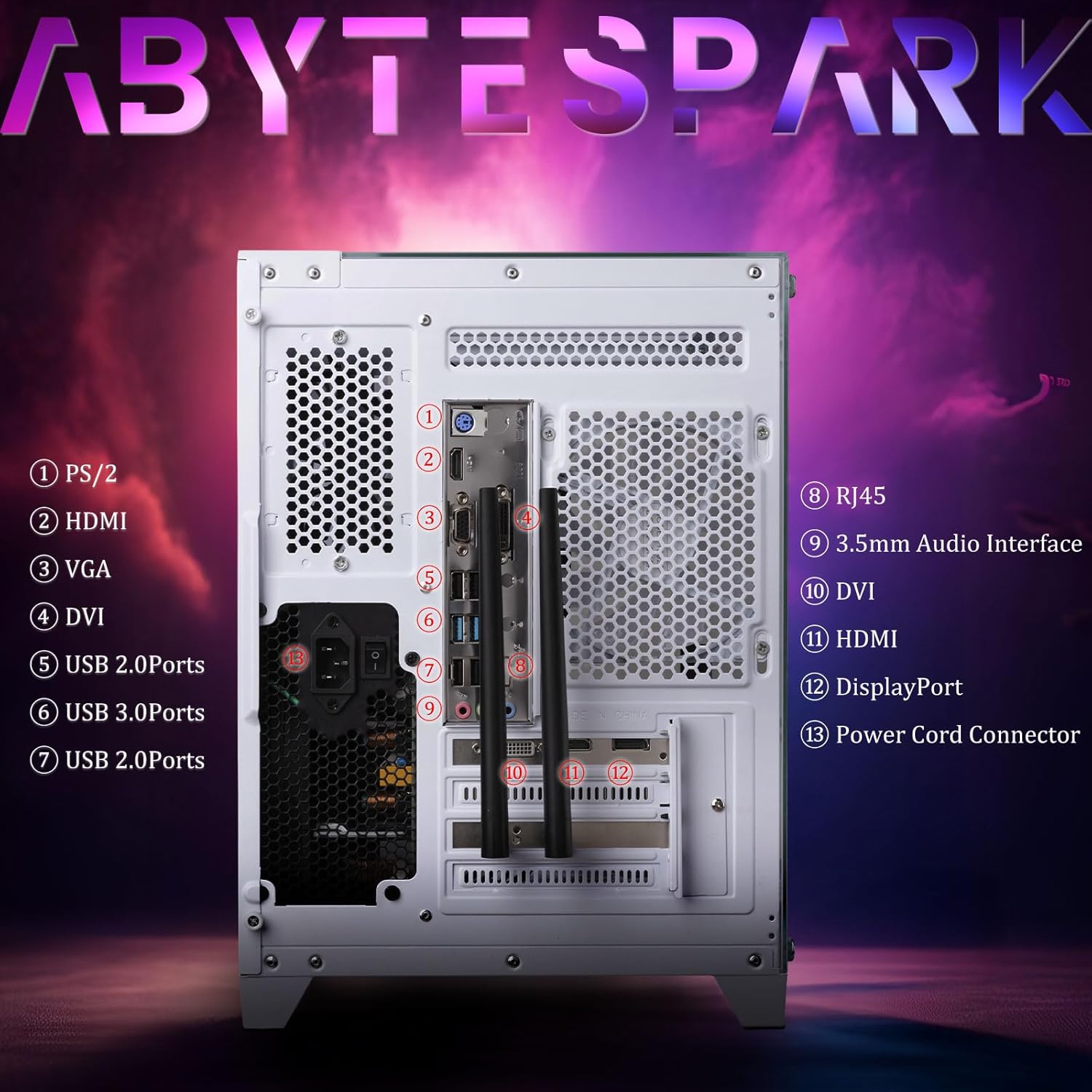
Image: Rear panel of the abytespark PC, illustrating the available ports for connectivity.
- Monitor: Connect your monitor to the graphics card's HDMI, DisplayPort, or DVI output. Ensure you connect to the dedicated graphics card ports, not the motherboard's integrated graphics ports.
- Keyboard & Mouse: Connect the gaming keyboard and mouse to any available USB ports.
- Power: Connect the power cable to the power supply unit (PSU) at the back of the computer, then plug it into a wall outlet.
- Network: For wired internet, connect an Ethernet cable to the RJ-45 port. For wireless internet, ensure the Wi-Fi antennas are securely attached (if external).
3. Initial Boot-Up
- Press the power button located on the front or top of the computer case.
- The computer will boot into Windows 11 Home. Follow the on-screen instructions to complete the initial Windows setup, including language, region, and user account creation.
Operating Instructions
Turning On/Off
- To Turn On: Press the power button once.
- To Shut Down: Click the Start button in Windows, then select Power > Shut down. Avoid forced shutdowns by holding the power button unless absolutely necessary.
- To Restart: Click the Start button, then select Power > Restart.
Windows 11 Home
Your computer comes with Windows 11 Home 64-Bit pre-installed. This operating system provides a user-friendly interface for all your computing needs, from gaming to productivity.
Gaming and Performance
This system is equipped with an Intel Core i5 processor, 16GB RAM, a 512GB NVME SSD, and an AMD Radeon RX 550 4GB graphics card, providing a solid foundation for gaming and various demanding applications.
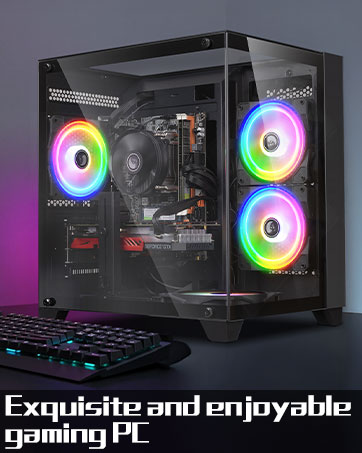
Image: Visual representation of the PC's versatility across e-sports gaming, livestreaming, rendering design, and business office applications.
- Game Installation: Install games from platforms like Steam, Epic Games Store, or other digital storefronts.
- Driver Updates: Ensure your graphics drivers are up-to-date for optimal gaming performance. Visit the AMD website for the latest RX 550 drivers.
- Storage: The 512GB NVME SSD offers fast load times for your operating system and frequently played games.
Connectivity
The computer offers a range of connectivity options:
- USB Ports: Multiple USB 2.0 and USB 3.0 ports for peripherals and external storage.
- Video Outputs: HDMI, DisplayPort, and DVI for connecting various monitors.
- Audio: 3.5mm audio jacks for headphones, microphones, and speakers.
- Wireless: Integrated Wi-Fi 5.0 for wireless network access.
Maintenance
Cleaning
- Exterior: Use a soft, dry, lint-free cloth to wipe down the exterior of the case.
- Dust: Periodically use compressed air to clear dust from ventilation grilles and internal components (with the PC powered off and unplugged). Avoid spraying directly onto fans or sensitive components.
- Display: For monitors, use a specialized screen cleaner and a microfiber cloth.
Software Updates
- Windows Updates: Regularly check for and install Windows updates to ensure security and performance. Go to Settings > Windows Update.
- Driver Updates: Keep your graphics card drivers (AMD Radeon RX 550) and other component drivers updated for optimal performance and compatibility.
Data Backup
Regularly back up important data to an external drive or cloud storage to prevent data loss.
Troubleshooting
If you encounter issues with your abytespark PC, refer to the following common solutions:
No Power
- Ensure the power cable is securely connected to both the PC and the wall outlet.
- Check if the power switch on the PSU (at the back of the PC) is in the 'On' position.
- Test the wall outlet with another device to confirm it has power.
No Display on Monitor
- Verify that the monitor is powered on and the video cable (HDMI, DisplayPort, or DVI) is securely connected to both the graphics card on the PC and the monitor.
- Ensure the monitor's input source is correctly selected (e.g., HDMI 1, DisplayPort).
- Try connecting the monitor to a different video output port on the graphics card, if available.
Slow Performance
- Check for background applications consuming excessive resources using Task Manager (Ctrl+Shift+Esc).
- Ensure Windows and graphics drivers are up-to-date.
- Run a disk cleanup and defragmentation (for HDDs, not necessary for SSDs).
- Scan for malware or viruses.
Network Connectivity Issues
- Wired: Ensure the Ethernet cable is properly connected to both the PC and the router/modem. Check router status.
- Wireless: Verify Wi-Fi is enabled in Windows settings. Ensure Wi-Fi antennas are securely attached. Restart your router/modem.
For further assistance, please refer to the Support section or contact technical support.
Specifications
Detailed technical specifications for your abytespark Prebuilt Gaming PC Desktop Computer:
| Feature | Detail |
|---|---|
| Model Number | i5/16G/512GB/RX550 4G |
| Processor | Intel Core i5 (up to 3.6GHz) |
| Graphics Card | AMD Radeon RX 550 with 4GB GDDR5 Video Memory |
| RAM | 16GB DDR3 |
| Storage | 512GB NVME SSD |
| Operating System | Windows 11 Home 64-Bit |
| Wireless Connectivity | Wi-Fi 5.0 (5 GHz Radio Frequency) |
| USB Ports | 2x USB 3.0, 6x USB 2.0 |
| Video Outputs | 1x HDMI, 1x DisplayPort, 1x DVI |
| Audio Ports | 3.5mm Audio Interface |
| Ethernet | 1x RJ-45 |
| Dimensions (LxWxH) | 12.8 x 10.6 x 11.8 inches |
| Weight | 13.2 pounds |

Image: Diagram illustrating the physical dimensions of the abytespark PC case.
Warranty and Support
Warranty Information
Your abytespark Prebuilt Gaming PC comes with a standard manufacturer's warranty covering defects in materials and workmanship. Please retain your proof of purchase for warranty claims. Specific warranty terms and duration may vary; refer to the documentation included with your purchase or contact customer support for details.
Technical Support
abytespark offers lifetime free technical support for this product. If you encounter any issues not covered in the troubleshooting section or require further assistance, please contact our support team.
- Support Website: [Insert Manufacturer Support Website Here]
- Email Support: [Insert Manufacturer Support Email Here]
- Phone Support: [Insert Manufacturer Support Phone Number Here]
When contacting support, please have your product model number (i5/16G/512GB/RX550 4G) and purchase details ready.


