
Introduction
This manual provides essential information for the safe and efficient use of your Generic AV Media Stand Cabinet, Model A-1. Please read these instructions carefully before assembly and operation. Keep this manual for future reference.
Product Features
- Durable Construction: Crafted from strong, textured board with a waterproof and wear-resistant surface, supported by a sturdy metal frame for high load capacity and stability.
- Adjustable Shelves: Features adjustable height shelves with pre-drilled mounting holes, allowing for 6.4cm (2.5 inches) spacing adjustments to accommodate various audio-visual equipment.
- Portable Design: Equipped with 360-degree swivel casters for easy mobility and repositioning, designed to protect floor surfaces.
- Space Optimization: Multi-layer design effectively maximizes vertical storage space for media devices.
- Versatile Use: Suitable for organizing TV accessories, CD changers, receivers, woofers, DVD players, game consoles, amplifiers, speakers, and record players in various settings.
Package Contents
Before assembly, ensure all components are present and undamaged. If any parts are missing or damaged, contact customer support.
- 1 x Stereo Cabinet Frame (Metal)
- Multiple Shelf Boards (Quantity depends on tier model: 3, 4, or 5)
- 4 x Universal Wheels (Casters)
- Assembly Hardware (Screws, Allen wrench, etc.)
- Instruction Manual
Assembly Instructions
Follow these steps for proper assembly. It is recommended to assemble the unit on a soft, clean surface to prevent scratches.
- Unpack Components: Carefully remove all parts from the packaging and lay them out. Verify against the package contents list.
- Attach Wheels: Securely attach the four universal wheels to the base frame using the provided screws. Ensure they are tightened for stability.
- Assemble Frame: Connect the vertical metal frame pieces according to the diagrams. Ensure all connections are firm.
- Install Shelves: Insert the shelf boards into the desired height positions on the frame. The shelves can be adjusted in 6.4cm (2.5 inches) increments. Secure each shelf with the appropriate hardware.
- Final Check: Once all shelves are installed, gently shake the unit to ensure all connections are secure and the stand is stable. Lock the wheels if the unit is to remain stationary.

Image: Dimensions of the AV Media Stand Cabinet. This image illustrates the height and width measurements for the 3-tier (69cm/27.1in height), 4-tier (89cm/35in height), and 5-tier (109cm/42.9in height) models, all sharing a base of 50cm/19.7in by 40cm/15.7in.
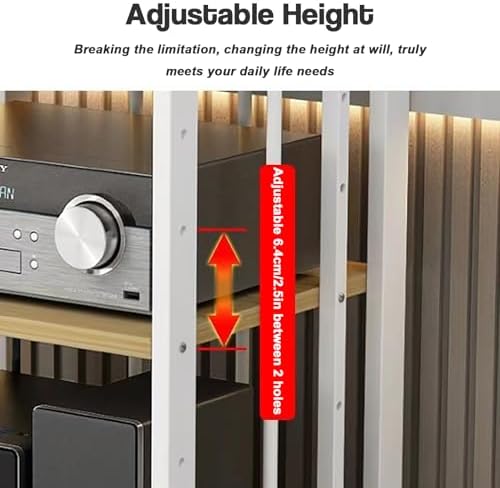
Image: Adjustable Height Feature. This image highlights the adjustable height mechanism, showing how shelves can be repositioned by 6.4cm (2.5 inches) between two holes on the vertical frame.
Operating Instructions
Your AV Media Stand Cabinet is designed for flexible use and organization of your electronic components.
- Placement: Position the stand in your desired location. Ensure it is on a level surface to prevent tipping.
- Loading Equipment: Place your audio-visual components on the shelves. Distribute weight evenly to maintain stability. The open design promotes airflow for cooling.
- Adjusting Shelf Height: To adjust a shelf, remove any equipment, unfasten the securing hardware, reposition the shelf to the desired height (in 6.4cm/2.5 inch increments), and re-secure the hardware firmly.
- Mobility: To move the stand, unlock the universal wheels. Carefully push or pull the stand to its new location. Once in place, lock the wheels to prevent accidental movement.
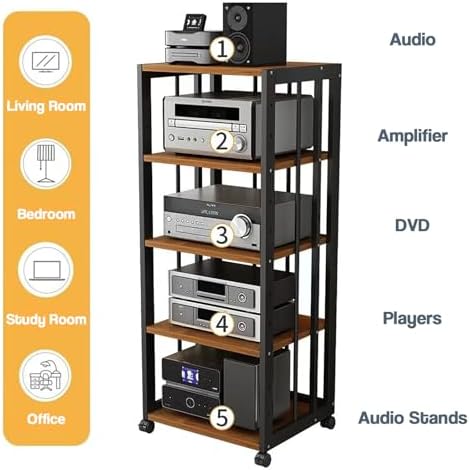
Image: Component Organization. This image displays a 5-tier stand with various audio components, illustrating how different devices like audio receivers, amplifiers, DVD players, and speakers can be organized on the shelves.
Maintenance
Proper maintenance ensures the longevity and appearance of your media stand.
- Cleaning: Wipe the surfaces with a soft, damp cloth. Avoid abrasive cleaners or harsh chemicals that may damage the finish.
- Spills: Immediately wipe up any spills to prevent staining or damage to the board material.
- Hardware Check: Periodically check all screws and connections to ensure they remain tight. Retighten if necessary to maintain stability.
- Weight Capacity: Do not exceed the maximum load capacity of 50kg (110.2lbs) per shelf to prevent damage or instability.
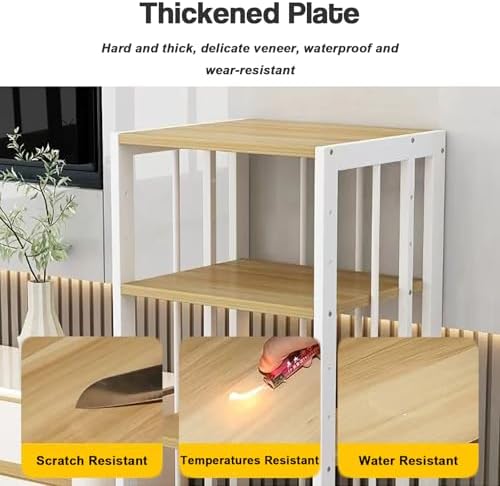
Image: Thickened Plate Durability. This image illustrates the durability of the thickened plate material, highlighting its resistance to scratches, high temperatures, and water.
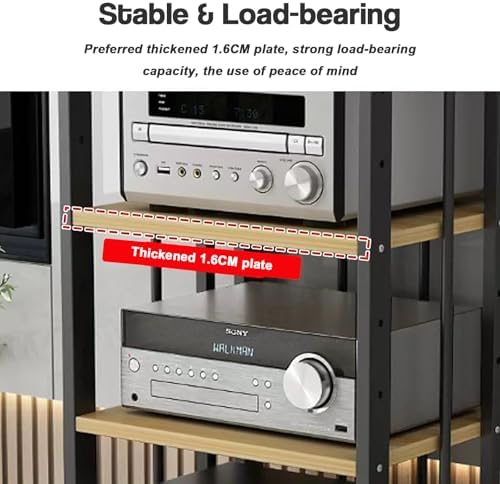
Image: Stable & Load-bearing Shelf. This image shows a close-up of a thickened 1.6cm shelf plate supporting audio equipment, emphasizing its strong load-bearing capacity and stability.
Troubleshooting
If you encounter any issues with your AV Media Stand Cabinet, refer to the following common solutions:
- Stand is Wobbly:
- Ensure all screws and bolts are securely tightened.
- Verify the stand is placed on a flat, level surface.
- Check that the wheels are locked if the stand is stationary.
- Difficulty Adjusting Shelves:
- Ensure all equipment is removed from the shelf before attempting to adjust its height.
- Verify that the securing hardware is fully loosened before attempting to move the shelf.
- Wheels Not Rolling Smoothly:
- Check for any debris or obstructions around the wheels.
- Ensure the wheel locks are disengaged.
Specifications
| Brand: | Generic |
| Model Name: | A-1 |
| Model Number: | KM-UwolzX-E-5Tier |
| Material: | Board and Metal Frame |
| Available Tiers: | 3, 4, or 5 tiers |
| Load Capacity per Level: | 50kg (110.2lbs) |
| Height Adjustment: | 6.4cm (2.5 inches) increments |
| Shelf Type: | Tiered Shelf |
| Shape: | Trapezoid |
| Number of Items: | 1 |
Warranty and Support
This product comes with a standard manufacturer's warranty against defects in materials and workmanship. For specific warranty details, please refer to the documentation included with your purchase or contact the retailer.
For technical support, missing parts, or any inquiries, please contact your point of purchase or the manufacturer's customer service department. Please have your model number (A-1) and purchase date available when contacting support.