Introduction
Thank you for choosing the Tosuny RGB Vibrating Alarm Clock. This device is designed to provide a reliable and versatile alarm experience, especially for heavy sleepers and individuals with hearing impairments. It features a 7.4-inch LED display, dual alarms, a powerful 100dB vibrator, and customizable RGB lighting. Please read this manual carefully to ensure proper setup and operation.
Package Contents
- 1 x RGB Vibrating Alarm Clock
- 1 x Vibrator
- 1 x USB Power Cable
- 1 x Instruction Manual

Image: The Tosuny RGB Vibrating Alarm Clock, vibrator, and USB power cable included in the package.
Setup
1. Power Connection
- Connect the USB power cable to the alarm clock's power input port.
- Plug the other end of the USB cable into a standard USB power adapter (not included) or a powered USB port.
2. Battery Installation (for Power Failure Memory)
The alarm clock requires 2 AAA batteries (not included) to maintain time and alarm settings during a power outage. These batteries do not power the main display or alarm functions.
- Locate the battery compartment on the back or bottom of the alarm clock.
- Insert 2 AAA batteries, ensuring correct polarity (+/-).
- Close the battery compartment cover securely.
3. Vibrator Connection
- Plug the vibrator cable into the designated vibrator port on the alarm clock.
- Place the vibrator under your pillow, mattress, or fitted sheet for optimal vibration during an alarm.

Image: The alarm clock connected via USB power cable, showing the battery compartment for AAA batteries.
Operating Instructions
1. Time Setting
Refer to the specific buttons on your device (usually labeled 'Time Set' or similar) to adjust the hour and minute. The clock supports both 12-hour and 24-hour formats.
2. Alarm Setting (Dual Alarms)
The alarm clock features two independent alarms. Use the 'Alarm 1' and 'Alarm 2' buttons to set your desired wake-up times.
- Press the 'Alarm 1' or 'Alarm 2' button to activate and set the respective alarm time.
- Use the '+' and '-' buttons to adjust the hour and minute.
- Confirm the setting by pressing the alarm button again or waiting for a few seconds.
3. Wake-up Modes
Choose from three wake-up modes:
- Vibration Only: Ideal for silent wake-ups or for individuals with hearing impairments.
- Ringing Only: Standard audible alarm.
- Ringing + Vibration: Combines both for a powerful wake-up experience.
Select your preferred mode using the dedicated mode button or by cycling through options during alarm setup.

Image: Illustration of the three available wake-up modes: Vibration Only, Ringing Only, and a combination of Ringing and Vibration.

Image: The dual alarm feature showing Alarm 1 set for 7:00 AM and Alarm 2 for 7:30 AM, with adjustable volume levels from 85dB to 100dB.
4. Snooze Function
When an alarm sounds, press the large 'Snooze' button to temporarily pause the alarm for 9 minutes. The alarm will sound again after the snooze period.

Image: A person reaching to tap the large snooze button on the alarm clock for a 9-minute snooze.
5. Brightness Adjustment
The display brightness is adjustable from 0% to 100%. Use the dedicated brightness control buttons (often labeled with a sun icon) to set your preferred display intensity.

Image: The alarm clock displaying a dimmable feature, allowing users to adjust screen brightness for comfortable sleep without blinding light.
6. RGB Light Settings
The alarm clock features RGB lighting with 9 color options. Use the 'Color' or 'Light' button to cycle through the available colors or to turn the light feature on/off. This also functions as a night light.
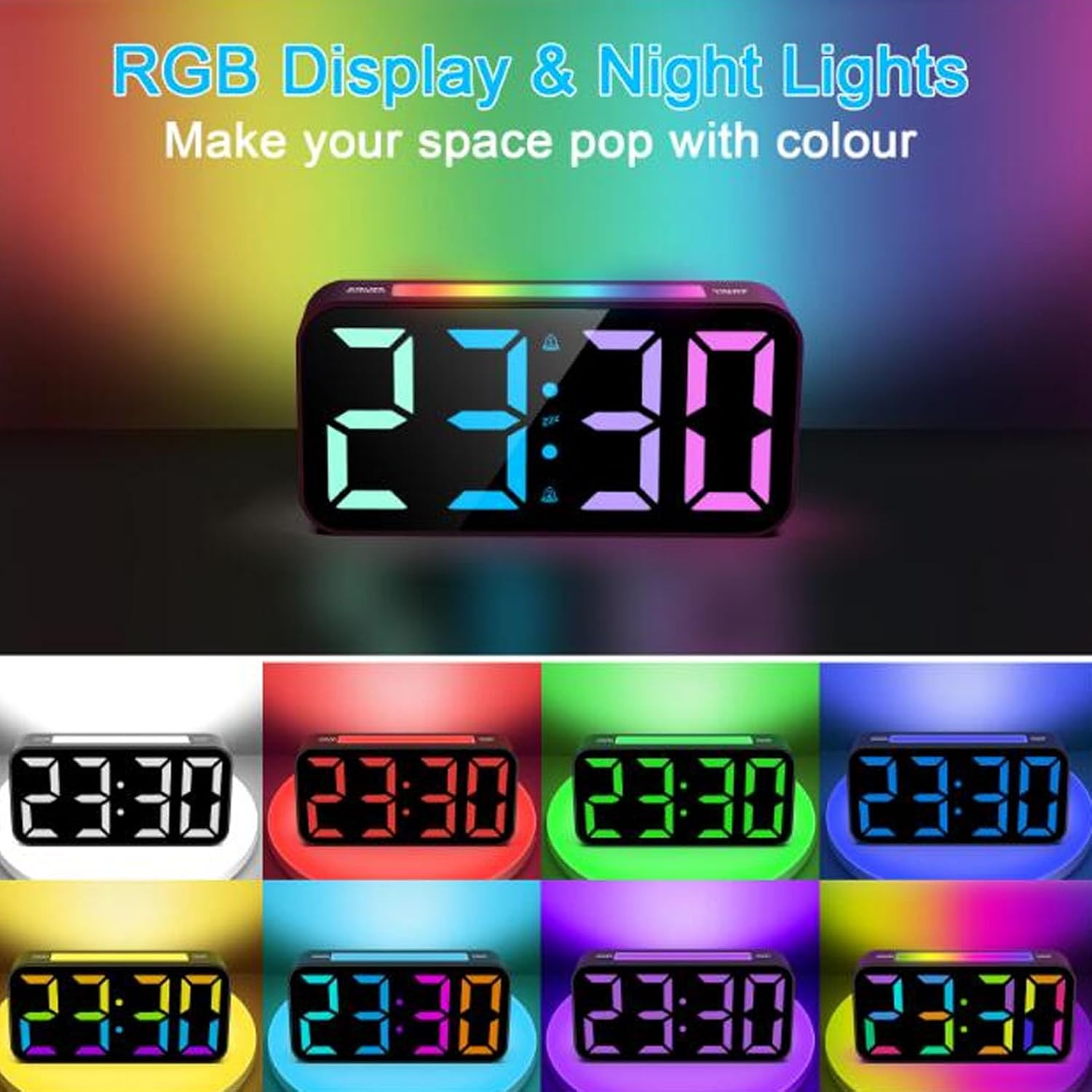
Image: The alarm clock showcasing its RGB display and night light capabilities, with multiple color options for the time display and ambient lighting.
Maintenance
Cleaning
To clean the alarm clock, gently wipe the surface with a soft, dry cloth. Do not use abrasive cleaners or solvents, as these may damage the finish or display.
Battery Replacement
If the clock loses time or alarm settings during a power outage, the AAA backup batteries may need to be replaced. Follow the battery installation steps in the 'Setup' section.
Troubleshooting
- Display is blank: Ensure the USB power cable is securely connected to both the clock and a working power source. Check if the power adapter is functioning.
- Alarm does not sound/vibrate: Verify that the alarm is set correctly and activated. Check the selected wake-up mode (Ringing Only, Vibration Only, or both). Ensure the vibrator is properly connected.
- Time/settings reset after power outage: Replace the 2 AAA backup batteries in the battery compartment.
- Buttons are unresponsive: Disconnect the power for a few minutes, then reconnect to perform a soft reset.
Specifications
| Item Type | RGB Vibrating Alarm Clock |
| Material | ABS |
| Screen Size | 7.4 inches |
| Lighting | RGB Light (9 colors) |
| Alarm Features | Dual Alarm, 3 Alarm Modes (Ringing, Vibration, Both), Snooze Function |
| Alarm Volume | Up to 100 dB |
| Brightness | Adjustable |
| Time Format | 12-hour / 24-hour |
| Battery Requirement | 2 x AAA batteries (for power failure memory, not included) |
| Product Dimensions | 9 x 3.81 x 5 cm (approximately 3.54 x 1.5 x 1.97 inches) |
| Product Weight | 328 grams (approximately 0.72 lbs) |


