
1. Introduction
Thank you for choosing the DHBY T26 Multi-Functional Table Lamp. This device combines a modern LED desk lamp with a digital display, wireless fast charging, and an alarm clock. This manual provides detailed instructions for setup, operation, and maintenance to ensure optimal performance and longevity of your product.
2. Safety Information
- Do not expose the lamp to water or excessive humidity.
- Avoid disassembling or modifying the device.
- Use only the provided power adapter or a compatible one with the correct voltage.
- Keep the lamp away from heat sources and direct sunlight.
- Ensure the lamp is placed on a stable, flat surface.
- Unplug the lamp during lightning storms or when unused for extended periods.
3. Package Contents
Please check the package for the following items:
- DHBY T26 Multi-Functional Table Lamp
- Power Adapter
- User Manual
4. Product Overview
The DHBY T26 lamp features a sleek design with multiple functionalities. Familiarize yourself with its components:
- Lamp Head: Contains the LED light source.
- Lamp Arm: Adjustable for various lighting angles.
- Digital Display: Shows time, date, and temperature.
- Control Panel: Touch-sensitive buttons for power, brightness, color mode, and settings.
- Wireless Charging Pad: Located on the base for compatible devices.
- USB Charging Port: Located at the back of the base for wired charging.
- Power Input Port: For connecting the power adapter.

Figure 4.1: Sensitive touch controls on the lamp base for easy operation.

Figure 4.2: High-definition digital display showing time, temperature, date, and alarm status.

Figure 4.3: The lamp features a multidirectional adjustment with three movable parts: arm, head, and base, allowing for flexible positioning.
5. Setup
- Unpack: Carefully remove all components from the packaging.
- Placement: Place the lamp on a stable, flat surface.
- Connect Power: Insert the power adapter into the power input port on the back of the lamp base, then plug the adapter into a wall outlet.
- Initial Power On: The digital display will illuminate, and the lamp is ready for use.
6. Operating Instructions
6.1. Power On/Off
- Touch the Power button (U symbol) on the base to turn the lamp on or off.
6.2. Adjusting Brightness and Color Modes

Figure 6.1: The lamp offers 3 distinct color modes and 5 adjustable brightness levels.
- Brightness Adjustment: With the lamp on, touch the Brightness button (V symbol) repeatedly to cycle through 5 brightness levels.
- Color Mode Selection: Touch the Mode button (M symbol) to switch between 3 color temperature modes (e.g., warm, natural, cool light).
6.3. Setting Clock, Calendar, and Alarm
The digital display shows time, date, and temperature. Use the setting buttons (usually located near the display or on the base, refer to specific button labels if available) to adjust these features.
- Time/Date Setting: Press and hold the 'Set' button (often labeled 'S' or a gear icon) to enter setting mode. Use the 'Up' and 'Down' buttons (often labeled '+' and '-') to adjust values. Press 'Set' again to confirm and move to the next setting.
- Alarm Setting: Press the 'Alarm' button (often labeled 'A' or a bell icon) to view alarm time. Press and hold to enter alarm setting mode. Adjust the alarm time and activate/deactivate the alarm using the 'Up'/'Down' buttons.
6.4. Wireless Fast Charging

Figure 6.2: A smartphone being charged wirelessly on the lamp's 10W wireless charging pad.

Figure 6.3: The lamp supports 10W high-speed wireless charging for compatible devices.
- Place your Qi-compatible smartphone or device directly onto the wireless charging pad on the lamp base.
- Ensure the device is centered on the pad for optimal charging. A charging indicator (if available) on your device or the lamp will confirm charging has begun.
6.5. USB Charging
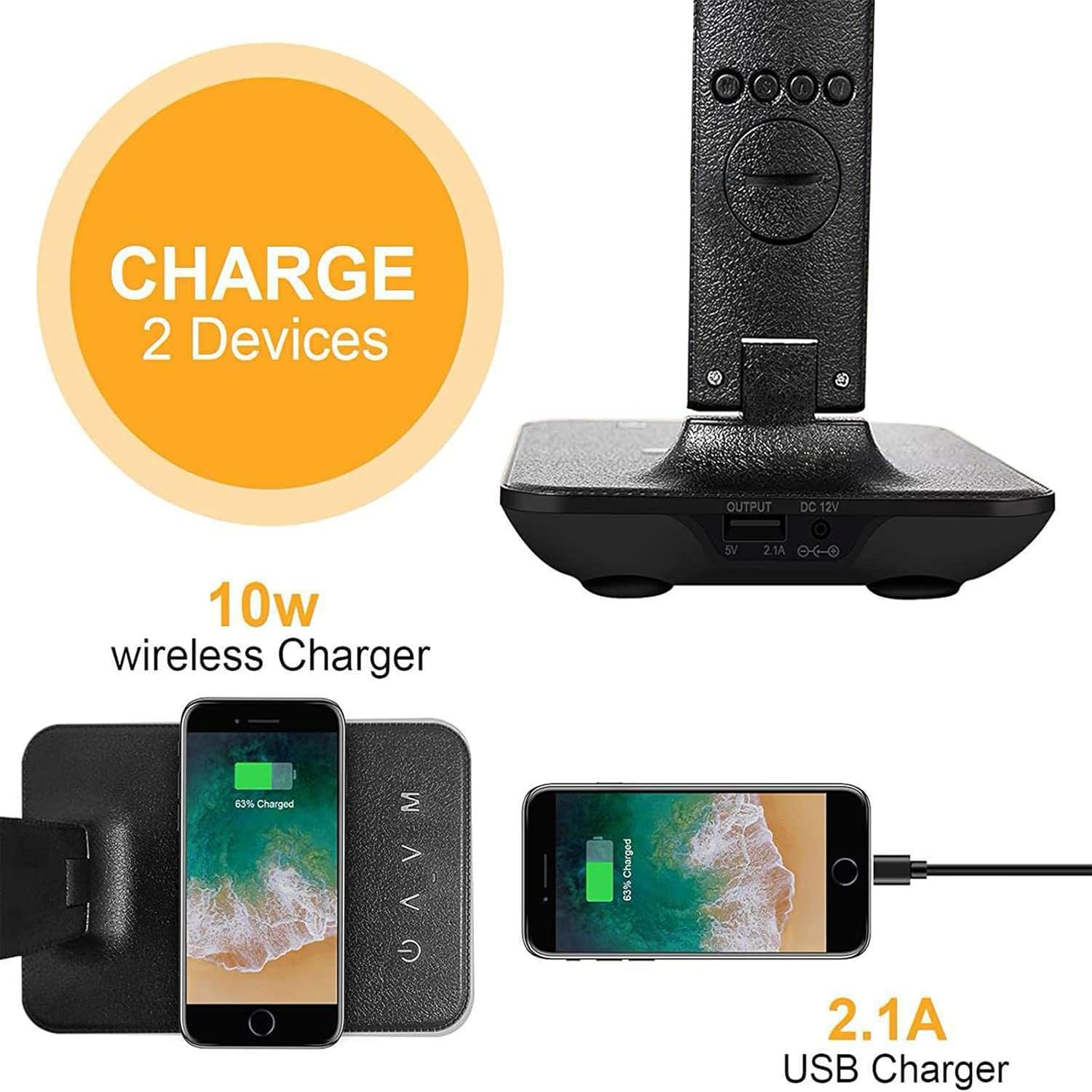
Figure 6.4: The lamp allows for simultaneous charging of two devices: one wirelessly and one via the 2.1A USB port.

Figure 6.5: The lamp supports both 5V 2.1A USB charging and 10W high-speed wireless charging simultaneously.
- Connect your device's USB charging cable to the USB port on the back of the lamp base.
- Connect the other end of the cable to your device to begin charging.
6.6. Adjusting Lamp Angle
- Gently adjust the lamp arm and head to your desired angle. The lamp is designed for multidirectional adjustment to suit various lighting needs.
6.7. Phone Stand Function

Figure 6.6: The integrated stand design allows for convenient placement of your phone for media viewing.
- The lamp base includes a designated area that functions as a phone stand, allowing you to prop up your smartphone for hands-free viewing while charging or working.
Video 6.1: Demonstration of the DHBY T26 Multi-Functional Wireless Charging Desk Lamp's features, including touch controls and wireless charging.
7. Maintenance
- Cleaning: Disconnect the power before cleaning. Use a soft, dry cloth to wipe the lamp. Do not use abrasive cleaners or solvents.
- Storage: If storing the lamp for an extended period, ensure it is clean, dry, and stored in a cool, dry place.
8. Troubleshooting
| Problem | Possible Cause | Solution |
|---|---|---|
| Lamp does not turn on. | No power connection. | Check if the power adapter is securely plugged into the lamp and the wall outlet. |
| Wireless charging not working. | Device not Qi-compatible or not properly aligned. | Ensure your device supports Qi wireless charging. Reposition the device on the charging pad to ensure proper alignment. Remove any thick phone cases. |
| Digital display is blank or incorrect. | Power interruption or incorrect settings. | Check power connection. Reset time/date settings as per Section 6.3. |
| Lamp flickers or light is unstable. | Power supply issue. | Ensure the power adapter is functioning correctly and the power source is stable. Try a different outlet. |
9. Specifications

Figure 9.1: Detailed dimensions of the DHBY T26 Multi-Functional Table Lamp.
| Feature | Detail |
|---|---|
| Model | DHBY T26 |
| Dimensions (L x W x H) | 12.9"D x 2.2"W x 4.9"H (approx. 32.7cm D x 5.6cm W x 12.4cm H) |
| Material | Plastic |
| Light Source Type | LED |
| Brightness Levels | 5 |
| Color Modes | 3 |
| Wireless Charging Output | 10W |
| USB Charging Output | 5V 2.1A |
| Display Features | Clock, Calendar, Temperature, Alarm |
| Power Source | Corded Electric |
| Item Weight | 1.3 pounds (approx. 0.59 kg) |
10. Warranty and Support
For warranty information or technical support, please refer to the contact details provided with your purchase or visit the official DHBY website. Keep your purchase receipt for warranty claims.