
Product Overview
This manual provides instructions for the ADORNEVE Twin Over Full Bunk Bed with Desk. This versatile furniture piece combines a twin-size upper bunk, a full-size lower bunk, an integrated desk with a charging station, LED lights, and various storage options, including fabric drawers and open shelves. It is designed to optimize space and provide functional living and sleeping areas.

Image: The ADORNEVE Twin Over Full Bunk Bed with Desk, featuring a white frame, a twin bed on top, a full bed on the bottom, a desk with shelves, and a ladder. The room has pink walls and a window.
Video: A visual overview of the ADORNEVE Bunk Bed with Desk, showcasing its features such as the desk, storage, charging station, and overall design in different room settings.
Safety Information
Adherence to all safety guidelines is crucial for preventing injuries. Please read and understand all instructions before assembly and use.
General Safety Guidelines:
- Upper Bunk Safety: The upper bunk is equipped with a 13.4-inch high guardrail. Ensure the guardrail is always securely in place to prevent falls.
- Mattress Requirements: For the upper bunk, use a mattress with dimensions 75" x 38" and a thickness of 4" to 6". For the lower bunk, use a mattress with dimensions 75" x 53" and a thickness of 6" to 12". Ensure the mattress does not exceed the height of the guardrail.
- Anti-Tipping Device: Securely fasten the bunk bed to the wall using the provided anti-tipping device to enhance stability and prevent accidental tipping.
- Ladder Safety: The ladder rungs are wrapped with soft foam pads for comfortable and safe climbing. Always use the ladder when accessing the upper bunk.
- Weight Capacity: Do not exceed the recommended weight capacity for each bunk. Consult the product specifications for details.
- Assembly: Assembly should be performed by at least two adults. Ensure all hardware is tightened securely before use.

Image: Detail showing the 13.4-inch high safety guardrail on the upper bunk and recommended mattress dimensions for both bunks.

Image: Illustration of the anti-tipping device, showing how it attaches the bunk bed to the wall for added stability.

Image: Detail of the bunk bed ladder, highlighting the soft foam pads on each rung for improved comfort and safety during climbing.
Package Contents
Before beginning assembly, verify that all components listed below are present and undamaged. If any parts are missing or damaged, contact customer support.
- 1 x Bunk Bed Frame (Twin over Full)
- 1 x Integrated Desk
- 4 x Fabric Drawers
- 1 x Charging Station (pre-installed in desk)
- 1 x LED Light Strips
- 2 x Storage Shelves (integrated with desk)
- 1 x Installation Manual
- Easy Assemble Tools (e.g., Allen wrench, screws)
Assembly Instructions
Assembly of the ADORNEVE Twin Over Full Bunk Bed with Desk typically requires two adults and can take approximately 3-4 hours. Please follow the detailed step-by-step instructions provided in the included Installation Manual for precise assembly.
Key Assembly Considerations:
- Unpack Carefully: Lay out all components on a soft, clean surface to prevent scratches.
- Identify Parts: Each part is labeled. Match them with the diagrams in the manual.
- Hardware: Use the correct hardware for each step. Do not overtighten screws until instructed.
- Embedded Slats: The bed features an embedded slat design for mattress support. Ensure slats are properly seated.
- Anti-Tipping Device: Install the anti-tipping device as directed to secure the bed to the wall.
- Electrical Components: Carefully connect the charging station and LED light strips according to the manual.
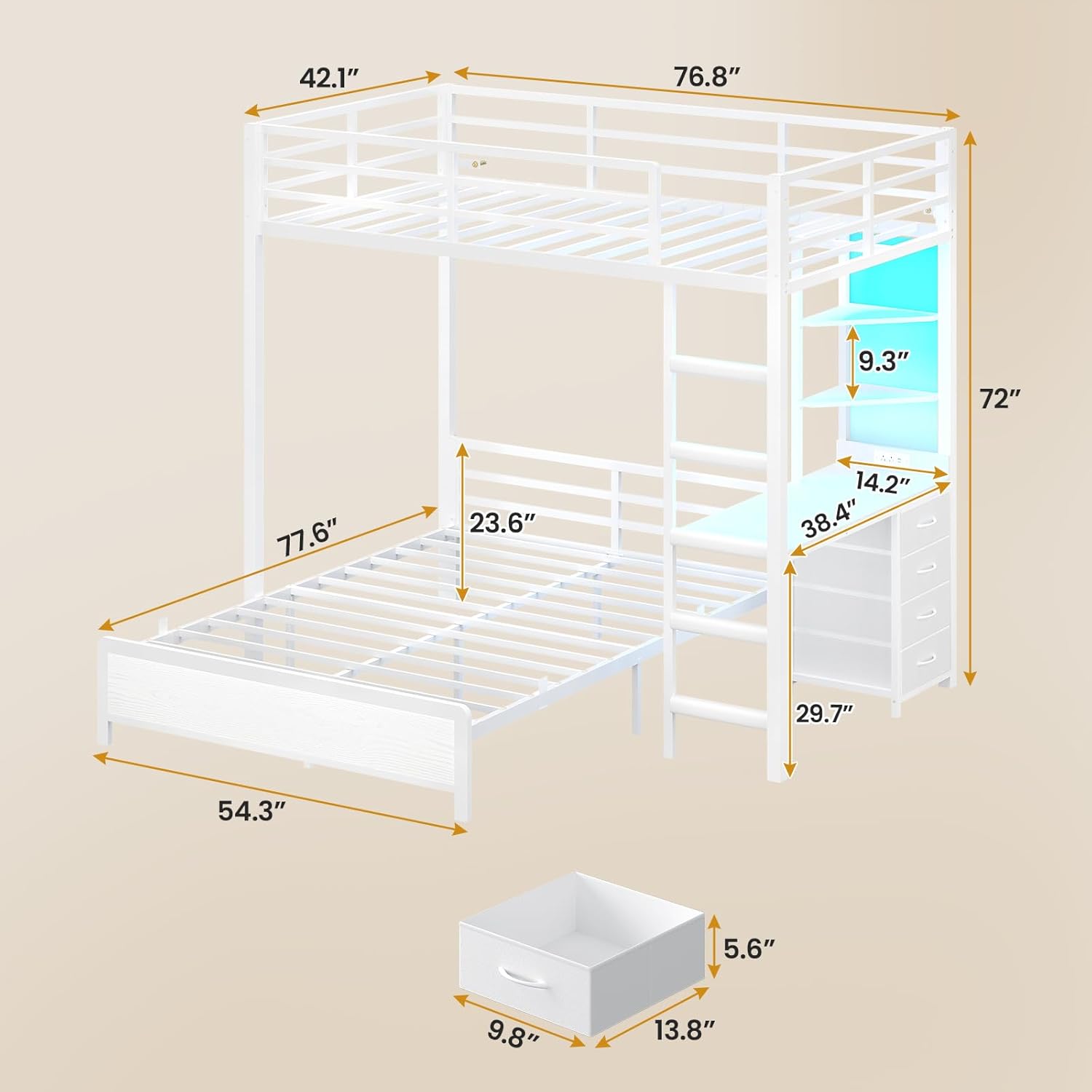
Image: A diagram illustrating the overall dimensions and key measurements of the bunk bed, desk, and storage components.
Operating Instructions
Charging Station:
The integrated desk includes a charging station for convenient power access. It features:
- 2 AC Outlets (125V / 12A)
- 1 USB Port (5V / 2A)
- 1 Fast-Charging Type-C Port (5V / 3A)
Simply plug your devices into the appropriate ports. Ensure the bunk bed is connected to a power source for the charging station to function.

Image: A detailed view of the built-in charging station, showing the two AC outlets, one USB port, and one USB-C port, with devices charging.
LED Lights:
The bunk bed is equipped with RGB LED lights that can be customized to your preference. Control options include:
- APP Control: Download the designated application to your smartphone for full control over colors, modes, and settings.
- Remote Control: Use the included remote control to adjust settings.
- Color Options: Over 60,000 colors available.
- Blinking Modes: 29 distinct blinking modes.
- Music Synchronization: Built-in microphone with adjustable sensitivity allows LED lights to change color according to sound and music rhythm.
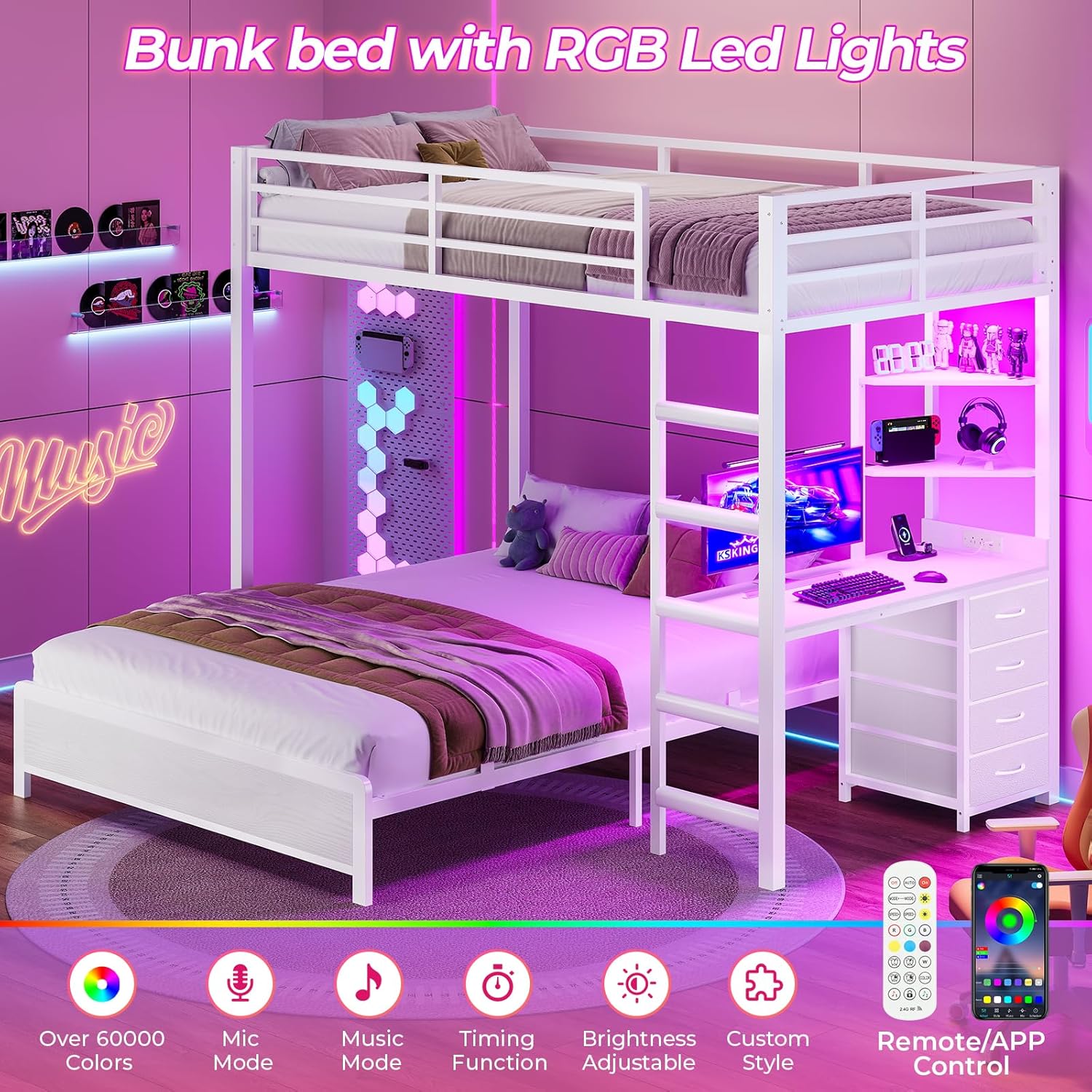
Image: The bunk bed illuminated with purple RGB LED lights, demonstrating the various control features such as brightness adjustment, music mode, and app/remote control.
Storage Features:
The bunk bed integrates multiple storage solutions to maximize space:
- 4 Fabric Drawers: Located beneath the desk, these drawers provide ample space for clothes, books, or other personal items.
- 2 Open Shelves: Positioned above the desk, these shelves are suitable for displaying decorative items, books, or keeping frequently used items within reach.

Image: A close-up view of the four fabric drawers and the two-tier open storage shelves, demonstrating their capacity for organization.

Image: A detailed view of the desk surface, highlighting its dimensions (38.4" wide, 14.2" deep) and showing it in use with a laptop and charging devices.
Maintenance
Regular maintenance helps ensure the longevity and safety of your bunk bed.
- Cleaning: Wipe down the frame and desk surfaces with a soft, damp cloth. Avoid harsh chemicals that may damage the finish.
- Hardware Check: Periodically inspect all bolts and screws to ensure they remain tight. Retighten as necessary.
- Slat Inspection: Check bed slats for any signs of damage or displacement. Ensure they are securely in place.
- Electrical Components: Ensure the charging station and LED light connections are secure and free from damage.
Troubleshooting
If you encounter any issues with your bunk bed, refer to the following common solutions:
Bed Wobbles:
- Ensure all assembly bolts and screws are fully tightened.
- Verify that the anti-tipping device is correctly installed and secured to the wall.
- Check that the bed is placed on a level surface.
Charging Station Not Working:
- Confirm the bunk bed's power cord is securely plugged into a functional wall outlet.
- Check the connections of the charging station within the desk.
- Test the wall outlet with another device to ensure it is supplying power.
LED Lights Not Functioning:
- Ensure the LED light strips are properly connected to their power source.
- Check the remote control battery or ensure the mobile app is correctly paired and functioning.
- Verify that the main power supply to the bed is active.
Specifications
| Feature | Detail |
|---|---|
| Size | Twin over Full |
| Product Dimensions | 76.8"L x 77.6"W x 72"H |
| Color | White |
| Upper Bunk Mattress (Recommended) | 75" x 38", Thickness: 4"-6" |
| Lower Bunk Mattress (Recommended) | 75" x 53", Thickness: 6"-12" |
| Safety Guardrail Height | 13.4" |
| Charging Station | 2 AC Outlets (125V/12A), 1 USB Port (5V/2A), 1 Type-C Port (5V/3A) |
| LED Lights | RGB, APP/Remote Control, 60,000+ Colors, 29 Blinking Modes, Music Sync |
| Storage | 4 Fabric Drawers, 2 Open Shelves |
| Assembly Required | Yes |
Warranty and Support
For specific warranty information, please refer to the documentation included with your product or contact the retailer from whom you purchased the ADORNEVE Twin Over Full Bunk Bed with Desk. Warranty terms typically cover manufacturing defects and material flaws for a specified period from the date of purchase.
If you require technical support, have questions about assembly, or need replacement parts, please contact ADORNEVE customer service through their official website or the contact information provided in your purchase documentation. When contacting support, please have your product model number (Twin Over Full Bunk Bed with Desk) and proof of purchase readily available.


