
1. Introduction
Thank you for choosing the WERHY H1 Electric Scooter. This manual provides essential information for the safe operation, assembly, maintenance, and troubleshooting of your scooter. Please read this manual thoroughly before your first ride to ensure proper usage and to maximize your riding experience.

Image: The WERHY H1 Electric Scooter, highlighting its seat and rear basket, designed for commuting, fitness, and shopping.
The WERHY H1 is designed for urban commuting and recreational riding, featuring a powerful 500W motor, a long-lasting battery, and a comfortable ride with dual suspension and a seat. Its foldable design enhances portability, and integrated safety features ensure a secure journey.
2. Safety Guidelines
WARNING: Always wear a helmet and appropriate safety gear when riding the electric scooter. Adhere to local laws and regulations regarding electric scooter usage.
- Pre-Ride Check: Before each ride, inspect the brakes, tires, lights, and ensure all quick releases and fasteners are secure.
- Rider Age and Weight: This scooter is intended for adults. The maximum weight limit is 265 pounds (120 kg).
- Road Conditions: Avoid riding in wet conditions, on slippery surfaces, or over large obstacles. The scooter is designed for urban commuting and recreational riding on paved surfaces.
- Traffic Laws: Obey all local traffic laws, signals, and signs. Ride defensively and be aware of your surroundings.
- Visibility: Utilize the front headlight and rear taillight, especially during low-light conditions. The scooter also features turn signals for enhanced visibility.
- Braking: Familiarize yourself with both the electronic and rear mechanical brakes. Practice braking in a safe, open area before riding in traffic.
- No Stunts: Do not attempt stunts, jumps, or aggressive riding, as this can lead to injury and damage the scooter.
3. Package Contents
Upon opening the package, please verify that all components are present and undamaged. If any items are missing or damaged, contact customer support immediately.
- WERHY H1 Electric Scooter (main unit)
- Adjustable Seat
- Rear Storage Basket
- Charging Adapter
- User Manual (this document)
- Assembly Tools (if required)
- Phone Holder (as indicated in reviews)
- Lock (as indicated in reviews)
4. Assembly Instructions
The WERHY H1 Electric Scooter comes partially assembled. Follow these steps to complete the assembly:
- Unfold the Scooter: Carefully lift the handlebar stem until it locks into place. Ensure the folding mechanism is securely latched.
- Attach the Handlebar: If the handlebar is separate, align it with the stem and secure it using the provided screws and tools. Ensure all cables are not pinched.
- Install the Seat: Insert the seat post into the designated slot at the rear of the scooter. Adjust the seat height to a comfortable position and tighten the quick-release lever or bolt.
- Attach the Rear Basket: Secure the rear storage basket to the frame using the provided hardware. Ensure it is firmly attached and does not wobble.
- Check Tire Pressure: The 14-inch pneumatic tires may require inflation before first use. Refer to the tire sidewall for recommended pressure.
- Initial Charge: Fully charge the scooter's battery before its first use. Refer to the "Charging the Battery" section for details.

Image: Diagram showing the dimensions of the WERHY H1 Electric Scooter, including overall length (47 inches), adjustable handlebar height (33-40 inches), and adjustable seat height (25-36 inches). Recommended rider height is 4.7-6.2 feet (145-190 cm).

Image: Illustration of the scooter's wide pedal (21 inches long, 9 inches wide) and the removable rear storage basket (11x8x4.3 inches), demonstrating ample space for rider and belongings.
5. Operating Your Scooter
5.1 Power On/Off
Press and hold the power button on the digital display to turn the scooter on or off. The display will illuminate, showing battery level, speed, and other indicators.
5.2 Digital Display and Controls

Image: Close-up of the handlebar-mounted LCD display and a smartphone screen showing the companion app. The display indicates 3 speed modes, battery management, speed display, and lock/unlock functions.
The LCD display provides real-time information:
- Speed Display: Shows current riding speed.
- Battery Level: Indicates remaining battery charge.
- Speed Mode: Toggle between 3 available speed modes (e.g., Eco, Standard, Sport) using the mode button.
- Lights Indicator: Shows if headlights and taillights are active.
5.3 Riding the Scooter
- Kick-Start: For safety, the scooter typically requires a kick-start. Push off with your foot to gain a small amount of momentum (around 2-3 mph).
- Accelerate: Once moving, gently press the throttle lever to engage the motor and accelerate.
- Braking: Use the brake levers on the handlebars to slow down or stop. The scooter is equipped with both electronic and rear mechanical brakes for effective stopping power.
- Lights and Turn Signals: Activate the front headlight and rear taillight for visibility. Use the integrated turn signals when changing direction.
- Cruise Control: If available, activate cruise control by maintaining a consistent speed for a few seconds. Deactivate by pressing the brake or throttle.
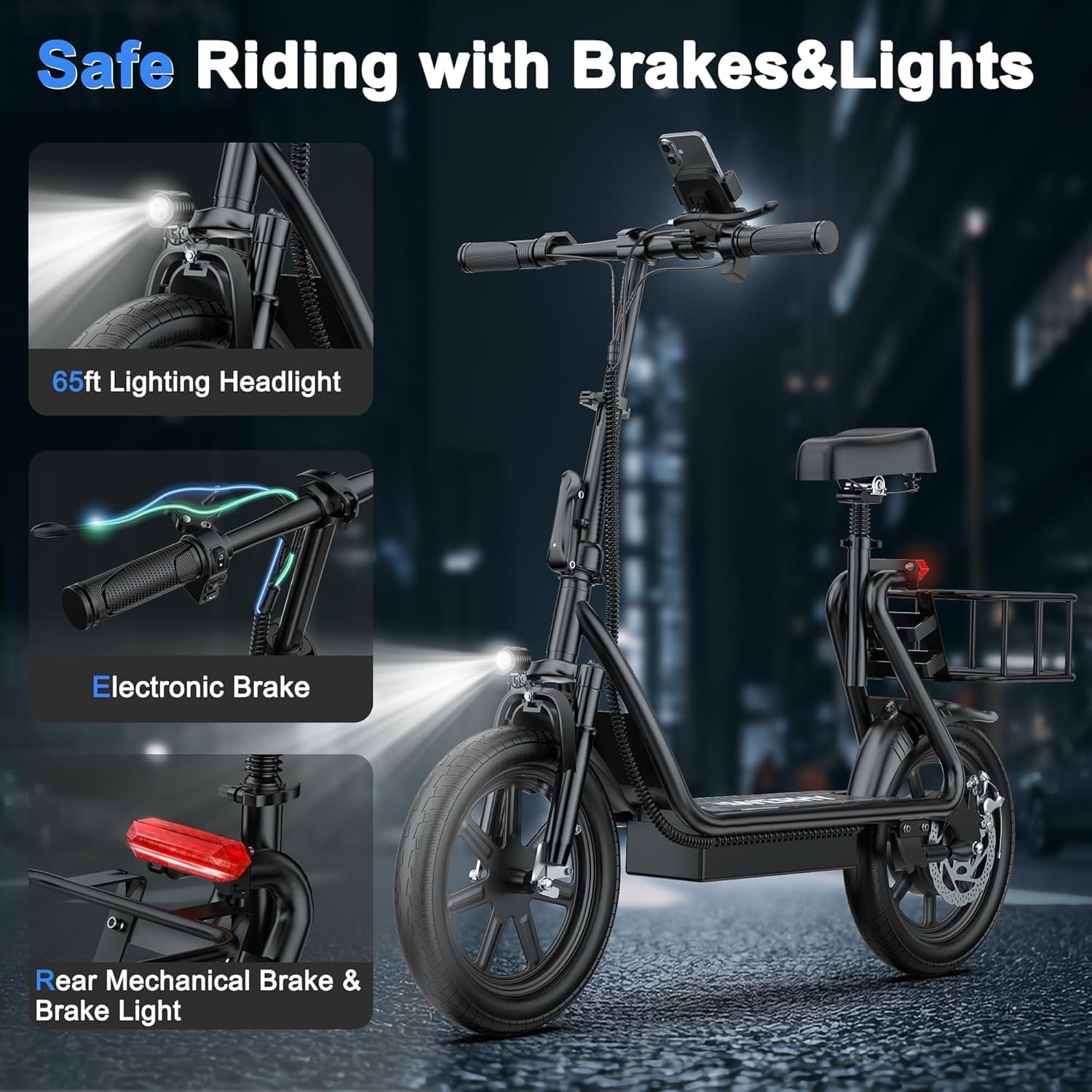
Image: Detailed view of the scooter's safety features, including a 65ft lighting headlight, electronic brake, and rear mechanical brake with integrated brake light and turn signals.
5.4 Folding and Portability
To fold the scooter for storage or transport:
- Ensure the scooter is powered off.
- Locate the folding mechanism at the base of the handlebar stem.
- Follow the instructions for your specific folding latch to release and fold the stem downwards until it clicks into its folded position.
- The scooter folds in approximately 3 seconds to a compact size of 47x23 inches.

Image: A person demonstrating how the WERHY H1 Electric Scooter folds compactly, allowing it to be easily stored in a car trunk or carried.
6. Smart App Connectivity
Enhance your riding experience by connecting your WERHY H1 Electric Scooter to the dedicated smartphone application.
- Download the App: Search for the official WERHY app on your smartphone's app store.
- Pairing: Follow the in-app instructions to pair your scooter via Bluetooth.
- App Features:
- Real-Time Battery & Ride Tracking: Monitor your battery status and track ride statistics.
- 3-Speed Smart Control: Adjust speed modes directly from your phone.
- Lock/Unlock Scooter: Secure your scooter remotely.
- Smart Diagnostics: Receive diagnostic information about your scooter's status.

Image: A person interacting with the WERHY Smart App on a smartphone, showcasing features like real-time battery and ride tracking, 3-speed smart control, lock/unlock functionality, and smart diagnostics.
7. Maintenance and Care
Regular maintenance ensures the longevity and optimal performance of your WERHY H1 Electric Scooter.
7.1 Battery Care

Image: Illustration of the scooter's 48V 10.4Ah high-energy lithium battery, emphasizing its 27-mile max range and 4-hour fast charging capability.
- Charging: Use only the original charging adapter. Connect the charger to the scooter's charging port, then plug it into a power outlet. The charging indicator will show charging status. A full charge takes approximately 4 hours.
- Storage: If storing the scooter for an extended period, charge the battery to about 50-70% and store it in a cool, dry place. Recharge every 1-2 months to prevent deep discharge.
- Avoid Overcharging/Over-discharging: The Smart Battery Management System (BMS) helps protect the battery, but it's best practice to avoid leaving it plugged in indefinitely after a full charge or completely draining it before recharging.
7.2 Tires and Brakes
- Tire Pressure: Regularly check and maintain the correct tire pressure for the 14-inch pneumatic tires. Proper inflation improves ride quality and extends tire life.
- Brake Inspection: Periodically inspect brake pads and cables for wear. Adjust brakes as needed to ensure responsive stopping power.
7.3 General Cleaning and Storage
- Cleaning: Wipe down the scooter with a damp cloth. Do not use high-pressure water jets or immerse the scooter in water.
- Storage: Store the scooter in a dry, indoor environment away from direct sunlight and extreme temperatures.
8. Troubleshooting
This section addresses common issues you might encounter with your WERHY H1 Electric Scooter.
| Problem | Possible Cause | Solution |
|---|---|---|
| Scooter does not power on. | Low battery; loose battery connection; power button malfunction. | Charge the battery fully. Check battery connections. If issue persists, contact support. |
| Motor not engaging/no acceleration. | Scooter not kick-started; throttle issue; motor error. | Ensure you kick-start the scooter to at least 2-3 mph before engaging the throttle. Check app for error codes. |
| Reduced range or speed. | Low tire pressure; heavy load; riding uphill frequently; cold weather; battery degradation. | Check tire pressure. Reduce load. Charge battery fully. Battery performance can be affected by temperature. |
| Brakes feel weak or too tight. | Brake cable adjustment needed; worn brake pads. | Adjust brake cable tension. Inspect and replace worn brake pads if necessary. |
| Charging port inaccessible (as per a review). | Manufacturing defect or incorrect assembly. | If the charging port is physically blocked, do not force it. Contact WERHY customer support for assistance or replacement. |
For issues not listed here or if solutions do not resolve the problem, please contact WERHY customer support.
9. Specifications

Image: Overview of key features including 500W powerful motor, 499.2WH long battery life, Smart APP control, 14-inch pneumatic tire, dual suspension, and 265LBS max load.
| Feature | Detail |
|---|---|
| Model Name | H1 |
| Motor Power | 500W Brushless Motor |
| Max Speed | 22 mph (35 km/h) |
| Max Range | Up to 27 miles (43 km) |
| Battery Capacity | 48V 10.4Ah (499.2Wh) Lithium Battery |
| Charging Time | Approximately 4 hours |
| Tire Size | 14 Inches (Pneumatic) |
| Suspension | Dual Suspension (Front and Seat Shock Absorber) |
| Brake System | Electronic Brake, Rear Mechanical Brake |
| Max Load | 265 Pounds (120 kg) |
| Folded Dimensions | Approx. 47 x 23 inches |
| Frame Material | Aluminum |
| Special Features | Adjustable Seat, Rear Basket, Digital Display, Smart App Control, Cruise Control, Front Headlight, Rear Taillight, Turn Signals |
10. Warranty and Support
WERHY is committed to providing high-quality products. Your WERHY H1 Electric Scooter comes with a limited warranty.
- Warranty Period: WERHY provides a 12-month or 180-day warranty for different parts. Please refer to your purchase documentation or contact customer support for specific details regarding component coverage.
- Warranty Claims: To initiate a warranty claim, please contact WERHY customer support with your proof of purchase and a detailed description of the issue.
- Exclusions: The warranty typically does not cover damage caused by misuse, accidents, unauthorized modifications, normal wear and tear, or failure to follow the instructions in this manual.
Customer Support
If you have any questions, require technical assistance, or need to report an issue, please contact WERHY customer support through the retailer where you purchased the scooter or visit the official WERHY website for contact information.
Manufacturer: Huizhou Dinghan Technology Co.,Ltd