
Furider T5
Furider T5 14-inch Folding Electric Bike User Manual
Model: T5 | Brand: Furider
1. Introduction and Safety Guidelines
Welcome to the Furider T5 14-inch Folding Electric Bike user manual. This guide contains essential information for the safe and efficient operation of your new electric bike. Please read this manual thoroughly before your first ride and retain it for future reference.
1.1 Important Safety Information
- Always wear a helmet and appropriate safety gear when riding.
- Familiarize yourself with local traffic laws and regulations.
- Perform a pre-ride inspection before each use, checking brakes, tires, and battery.
- Do not ride under the influence of alcohol or drugs.
- Avoid riding in adverse weather conditions or on slippery surfaces.
- Ensure the battery is securely locked in place before riding.
- The Furider T5 is UL 2849 Certified, indicating compliance with electrical system safety standards for e-bikes.
2. Package Contents
Upon opening the package, verify that all components are present and undamaged. If any items are missing or damaged, please contact customer support.
- Furider T5 Folding Electric Bike (main unit)
- 48V 10Ah Removable Lithium Battery
- Battery Charger
- User Manual
- Assembly Tools (wrenches, hex keys)
- Pedals
- Basket (if included with specific model variant)
- Phone Holder (if included with specific model variant)

Figure 2.1: Furider T5 Folding Electric Bike with included accessories like a basket and phone holder.
3. Setup and Assembly
The Furider T5 electric bike comes mostly pre-assembled. Follow these steps to complete the setup:
3.1 Unboxing and Initial Inspection
Carefully remove the bike and all components from the packaging. Remove any protective wrapping.
Video 3.1: Step-by-step assembly and setup guide for the Furider T5 electric bike.
3.2 Handlebar Installation and Adjustment
- Insert the handlebar stem into the main frame tube.
- Adjust the handlebar height to a comfortable position.
- Secure the folding buckle firmly to lock the handlebar stem in place.
- Ensure the quick release lever is tightened to prevent movement.
Figure 3.2: Detail of the handlebar stem and folding mechanism, showing how to secure it.
3.3 Pedal Installation
Identify the left (L) and right (R) pedals. Thread them into the crank arms by hand, then tighten securely with a wrench. Note that the left pedal has a reverse thread.

Figure 3.3: Close-up of a pedal, illustrating the installation process onto the crank arm.
3.4 Seat Adjustment
Adjust the seat post height to ensure a comfortable and safe riding position. The seat height should allow your feet to touch the ground when stopped. Secure the quick release lever on the seat post clamp.
Figure 3.4: The adjustable seat post, showing the quick release mechanism for height adjustment.
3.5 Battery Installation and Charging
- Insert the 48V 10Ah battery into its compartment on the bike frame.
- Turn the key to the right to lock the battery securely in place.
- Connect the power plug firmly.
- For initial use, fully charge the battery (3-5 hours). The charger indicator light will change from red to green when fully charged.
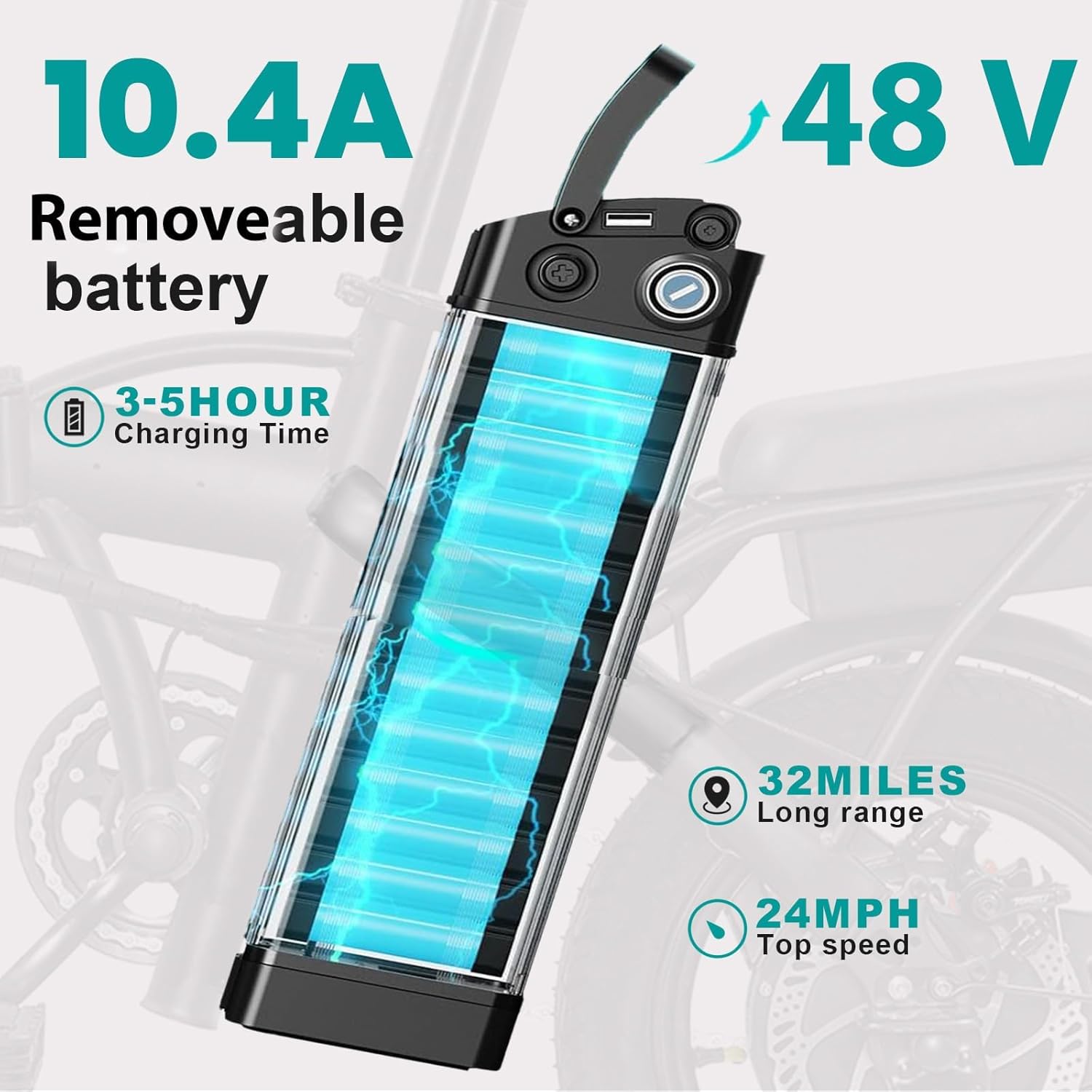
Figure 3.5: The removable 48V 10Ah battery, highlighting its location and locking mechanism.
3.6 Folding and Unfolding the Bike
The Furider T5 features a compact folding design for easy storage and transport.
- To fold: Unlock the frame hinge and handlebar stem hinge. Carefully fold the bike in half and lower the handlebar.
- To unfold: Reverse the folding process, ensuring all hinges and quick releases are securely locked before riding.
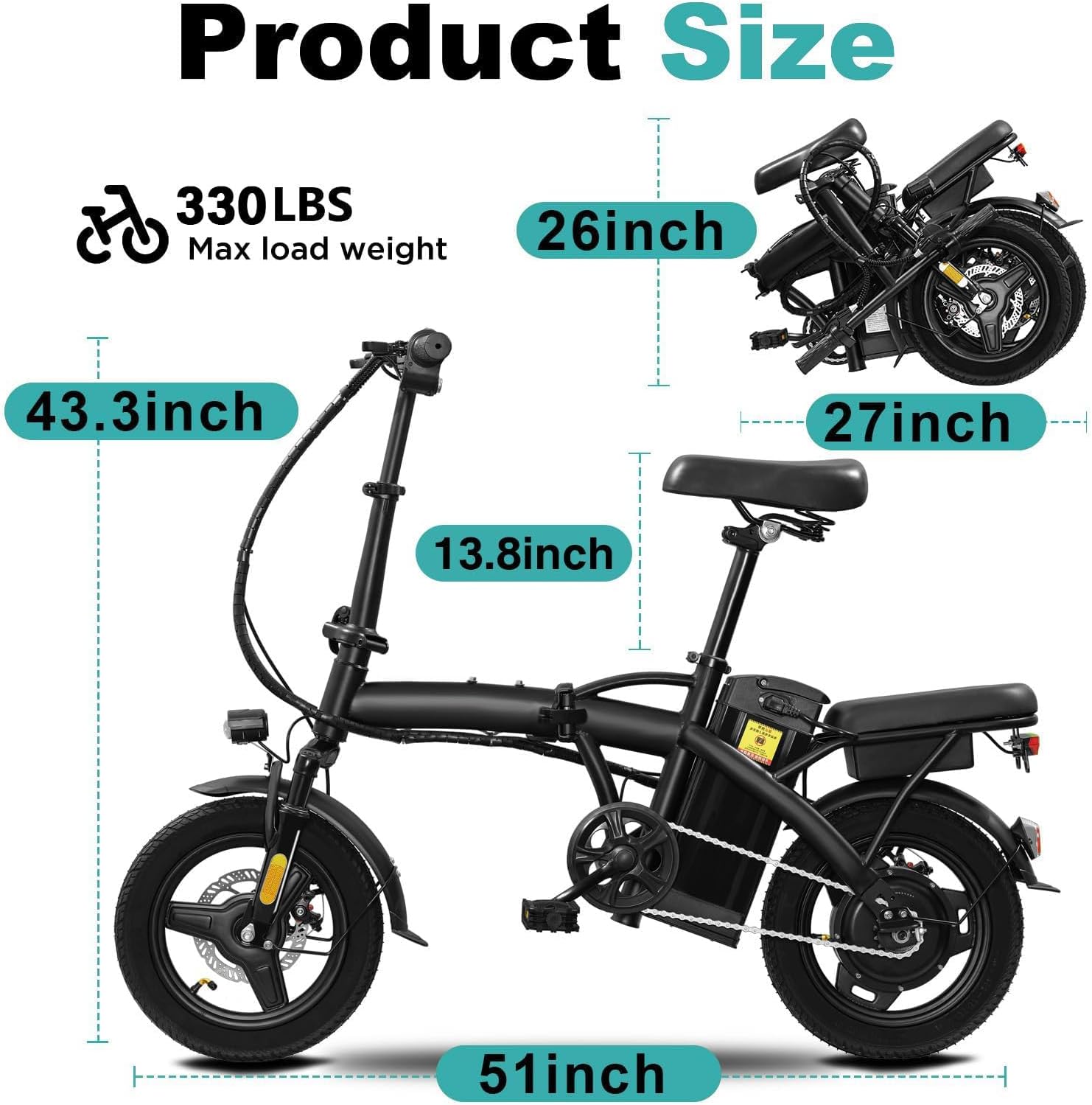
Figure 3.6: The Furider T5 electric bike shown in both its unfolded and folded configurations, illustrating its compact design.
4. Operating Instructions
4.1 Powering On and Off
To power on the bike, turn the key in the battery compartment to the 'ON' position and press the power button on the display. To power off, reverse the process.
4.2 Pedal Assist System (PAS)
The Furider T5 features a 3-level pedal assist system. Use the control panel on the handlebars to select your desired assist level:
- Level 1: Minimal assistance, ideal for light exercise or extending range.
- Level 2: Moderate assistance for balanced power and effort.
- Level 3: Maximum assistance for easier climbing and higher speeds.
The bike also supports full electric mode via the throttle and manual cycling without any assist.
4.3 Throttle Operation
The twist throttle provides instant power without pedaling. Twist the throttle gently to accelerate. Release the throttle to decelerate. Always use the throttle responsibly and be aware of your surroundings.
4.4 Braking System
The Furider T5 is equipped with front and rear dual disc brakes for reliable stopping power. Apply both brake levers simultaneously for effective and controlled braking. Avoid sudden, hard braking, especially at high speeds.

Figure 4.1: Close-up view of the front and rear disc brakes, emphasizing their dual functionality for enhanced safety.
4.5 Lights and Horn
The bike includes a front headlight and rear warning lights for visibility. Use the controls on the handlebars to turn the lights on/off and activate the horn as needed for safety.

Figure 4.2: The integrated headlight and rear warning light, crucial for visibility during low-light conditions.
5. Maintenance
Regular maintenance ensures the longevity and safe operation of your Furider T5 electric bike.
5.1 Battery Care
- Charge the battery regularly, even if not in use, to maintain its health.
- Avoid completely draining the battery.
- Store the battery in a cool, dry place away from direct sunlight and extreme temperatures.
- Use only the provided charger.
5.2 Tire Pressure
Check tire pressure before each ride. Maintain the recommended PSI (pounds per square inch) as indicated on the tire sidewall for optimal performance and safety.

Figure 5.1: The 14-inch inflatable tires, designed for stability and adaptability across different riding surfaces.
5.3 Brake Inspection
Regularly inspect brake pads and rotors for wear. Ensure brake levers engage smoothly and provide adequate stopping power. Adjust or replace components as necessary.
5.4 Cleaning and Storage
Clean the bike with a damp cloth and mild detergent. Avoid high-pressure washing directly on electrical components. Store the bike in a dry, secure location, especially when folded.
6. Troubleshooting
This section addresses common issues you might encounter with your Furider T5 electric bike.
| Problem | Possible Cause | Solution |
|---|---|---|
| Bike does not power on | Battery not charged, battery not locked, power cable loose, power button not pressed. | Charge battery, ensure battery is locked and power cable is firm, press power button. |
| Motor not assisting | Low battery, PAS level set to 0, brake levers engaged. | Check battery level, increase PAS level, ensure brake levers are fully released. |
| Brakes feel weak | Worn brake pads, loose brake cable, air in hydraulic system (if applicable). | Inspect and replace brake pads, adjust brake cable tension, consult a professional for hydraulic brake issues. |
| Unusual noises during ride | Loose components, chain issues, motor or wheel bearing problems. | Check all bolts and fasteners, lubricate chain, if noise persists, seek professional inspection. |
For issues not listed here or if solutions do not resolve the problem, please contact Furider customer support.
7. Product Specifications
| Feature | Detail |
|---|---|
| Model Name | T5 |
| Bike Type | Folding Electric Bike |
| Motor | 560W Peak Brushless Motor |
| Max Speed | 24 MPH |
| Battery | 48V 10Ah Removable Lithium Battery |
| Range | Up to 32 Miles (Pedal-Assist Mode) |
| Charging Time | 3-5 Hours |
| Pedal Assist Levels | 3 Levels |
| Wheel Size | 14 Inches |
| Brake Style | Dual Disc Brakes (Front & Rear) |
| Suspension Type | Front Fork Suspension |
| Frame Material | Carbon Steel |
| Max Load Weight | 330 LBS |
| Certifications | UL 2849 Certified |
| Item Weight | 50 Pounds |
8. Warranty and Support
8.1 Limited Warranty
The Furider T5 electric bike comes with a limited warranty. Please refer to the warranty card included with your purchase or contact Furider customer support for specific terms and conditions regarding coverage and duration.
8.2 Customer Support
For technical assistance, parts, or warranty claims, please contact Furider customer support. Contact information can typically be found on your purchase documentation or the official Furider website.
Related Documents - T5
 |
LELEKUAI Electric Bike Overview: Features and Specifications Discover the key features of the LELEKUAI Electric Bike, including its 560W motor, 24MPH top speed, foldable design, and 48V 10Ah removable battery, ideal for urban commuting. |
 |
Cyrusher Sonder User's Manual: Lightweight Foldable Electric Bicycle Guide Comprehensive user manual for the Cyrusher Sonder electric bicycle, covering safety, assembly, operation, charging, meter functions, fault codes, sales certificate, and warranty information. |
 |
Electric Bike User Manual - M10/M12 Models Comprehensive user manual for the Electric Bike M10 and M12 models, covering assembly, safety, operation, maintenance, troubleshooting, and specifications. Learn how to safely operate and care for your electric bicycle. |
 |
Wooken Fat Tire Electric Mountain Bike User Manual Comprehensive user manual for the Wooken Fat Tire Electric Mountain Bike, covering safety, package contents, product overview, installation, battery charging, riding modes, LCD display, specifications, maintenance, and warranty. |
 |
HITWAY Li-ion Ebike Battery User Manual - Charging, Maintenance & Safety Guide Comprehensive user manual for HITWAY Li-ion ebike batteries. Learn how to charge, use, maintain, and safely store your battery for optimal performance and longevity. Includes warnings and troubleshooting tips. |
 |
ZEFIORA Electric Bike User Manual - Z10, Z12 Models Comprehensive user manual for ZEFIORA electric bikes (models Z10, Z12) covering assembly, operation, safety, maintenance, and troubleshooting. Features 48V battery, disc brakes, and LCD display. |
Ask a question about this manual
Ask about setup, troubleshooting, compatibility, parts, safety, or missing instructions. Manuals+ will review the question and use this page’s manual context to help answer it.