1. Introduction
This manual provides essential instructions for the safe and efficient operation of the JBD BMS LFP 4S 200A (ZP04S016) Battery Management System. This device is designed to manage and protect 4-series (4S) Lithium Iron Phosphate (LiFePO4) battery packs, ensuring their longevity and safe performance. Please read this manual thoroughly before installation and use.
2. Safety Information
Warning: Improper installation or use can lead to serious injury, damage to the BMS, or damage to the battery pack.
- Always disconnect the battery pack before performing any maintenance or installation.
- Ensure all connections are correct and secure to prevent short circuits.
- Wear appropriate personal protective equipment (PPE), including insulated gloves and eye protection.
- Do not expose the BMS to water, excessive heat, or corrosive environments.
- This BMS is designed for LiFePO4 batteries only. Do not use with other battery chemistries.
- Installation should be performed by qualified personnel familiar with battery systems.
3. Product Overview
The JBD BMS LFP 4S 200A (ZP04S016) is a robust Battery Management System designed for 4-series LiFePO4 battery packs. It provides comprehensive protection and management features to optimize battery performance and lifespan.
3.1 Key Features
- Comprehensive Protection: Safeguards against overcharge, over-discharge, overcurrent, short-circuit, and temperature anomalies.
- Efficient Cell Balancing: Incorporates a balancing current of approximately 250mA to maintain uniform cell voltages.
- Versatile Communication: Supports UART and Bluetooth interfaces for real-time monitoring and integration.
- User-Friendly Configuration: Intuitive interface for parameter adjustment and diagnostic information access.
- High Current Capability: Rated for up to 200A continuous discharge.
3.2 Components Included
- JBD BMS LFP 4S 200A (ZP04S016) unit
- BMS cable (balance wires)
3.3 Product Views
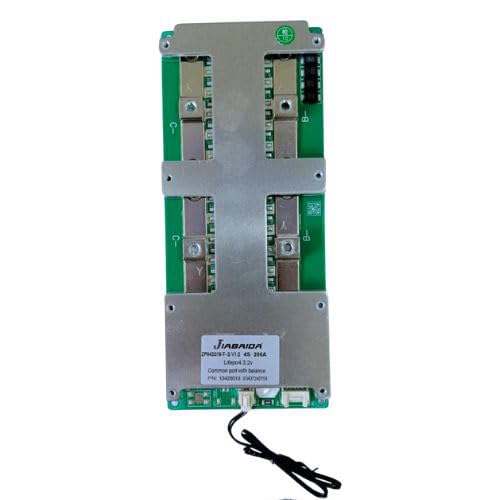
Figure 1: Top view of the JBD BMS LFP 4S 200A (ZP04S016) unit. This image displays the main power terminals, the central heat sink, and the JBD branding label. The balance port connector is visible at the bottom.
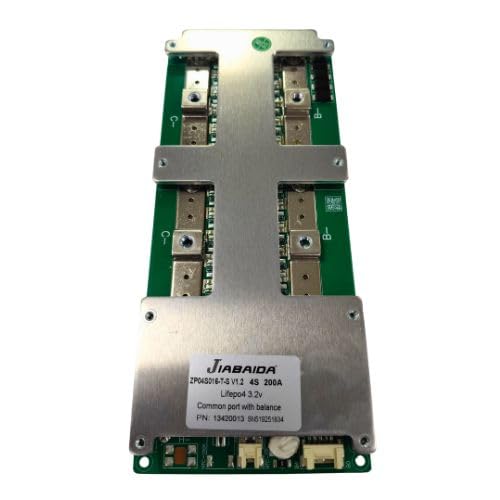
Figure 2: Angled view of the JBD BMS LFP 4S 200A (ZP04S016). This perspective highlights the robust construction and the various connection points for battery cells and communication interfaces.
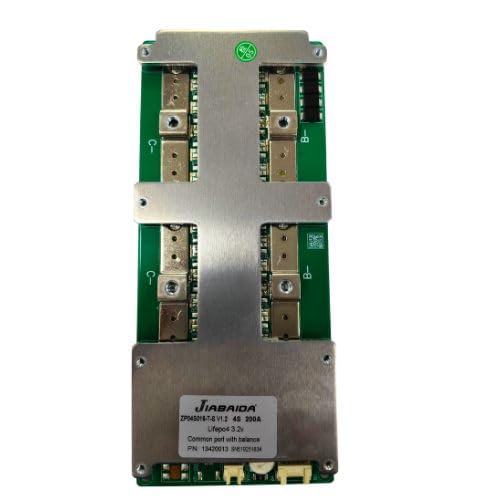
Figure 3: Alternate angled view of the JBD BMS LFP 4S 200A (ZP04S016). This image provides a closer look at the circuit board components and the layout of the power and signal connections.
4. Setup and Installation
Follow these steps carefully for proper installation of the BMS. Incorrect wiring can damage the BMS, battery, or connected equipment.
- Prepare Battery Pack: Ensure your LiFePO4 battery cells are balanced and at a similar state of charge before connecting the BMS. This BMS is for 4S (4-series) configurations.
- Connect Balance Wires:
- Connect the thinnest black wire (B-) of the balance cable to the negative terminal of the first cell (Cell 1-).
- Connect the next wire (B1) to the positive terminal of Cell 1 (and negative of Cell 2).
- Continue connecting subsequent wires (B2, B3) to the positive terminals of Cell 2 and Cell 3, respectively.
- Connect the thickest red wire (B4 or B+) to the positive terminal of the fourth cell (Cell 4+).
- Ensure the balance cable is securely plugged into the corresponding port on the BMS.
- Connect Main Power Wires:
- Connect the main negative terminal of the battery pack (B-) to the B- terminal on the BMS.
- Connect the main positive terminal of the battery pack (P+) to the P+ terminal on the BMS.
- Connect the load/charger negative terminal (C-) to the C- terminal on the BMS.
- Note: The P+ terminal on the BMS is typically connected directly to the battery pack's positive terminal. The C- terminal is for the common charge/discharge negative.
- Verify Connections: Double-check all wiring for correctness and polarity before applying power.
- Initial Power-Up: Once all connections are verified, connect the battery pack to the BMS. The BMS should power on.
- Communication Setup (Optional):
- For UART communication, connect the UART module to the designated port on the BMS and to your monitoring device.
- For Bluetooth communication, enable Bluetooth on your smartphone or device and search for the BMS. Pair with the device using the provided application.
5. Operating Instructions
Once installed, the JBD BMS operates automatically to protect and manage your battery pack.
- Automatic Protection: The BMS continuously monitors cell voltage, current, and temperature. It will automatically disconnect the load or charger if any parameter exceeds safe limits (e.g., overcharge, over-discharge, overcurrent, short circuit, over-temperature).
- Cell Balancing: The integrated passive balancing function activates when cell voltages reach a certain threshold, typically during charging, to equalize cell voltages and improve pack longevity.
- Monitoring (via UART/Bluetooth): Use the dedicated JBD application or software to monitor real-time battery parameters such as:
- Total pack voltage
- Individual cell voltages
- Charge/discharge current
- Battery temperature
- State of Charge (SOC)
- Protection status and error codes
- Parameter Configuration: The application also allows for adjustment of various protection parameters (e.g., overcharge voltage, over-discharge voltage, overcurrent limits) to suit specific application requirements. Refer to the application's user guide for detailed instructions on parameter configuration.
6. Maintenance
The JBD BMS is designed for minimal maintenance. However, periodic checks are recommended.
- Visual Inspection: Periodically inspect the BMS and its connections for any signs of damage, corrosion, or loose wiring.
- Cleanliness: Keep the BMS free from dust and debris. Use a dry, soft cloth for cleaning. Do not use liquids or solvents.
- Firmware Updates: Check the manufacturer's website or application for any available firmware updates to ensure optimal performance and access to new features.
7. Troubleshooting
If you encounter issues with your JBD BMS, refer to the following common problems and solutions.
| Problem | Possible Cause | Solution |
|---|---|---|
| BMS not powering on | Incorrect main power wiring; battery voltage too low; damaged BMS. | Verify main power connections (B-, P+). Check battery voltage. Contact support if BMS is damaged. |
| No charge/discharge output | BMS in protection mode (e.g., over-discharge, overcurrent); incorrect C- wiring. | Check BMS status via app for protection triggers. Verify C- connection. Recharge battery if over-discharged. |
| Cell voltage imbalance | Initial cell imbalance; prolonged use without full charge cycles. | Allow BMS to balance cells during charging. Ensure battery is fully charged periodically. |
| Bluetooth connection issues | BMS not powered; incorrect app settings; interference. | Ensure BMS is powered. Restart app and device. Try connecting in a different location. |
| Over-temperature protection | High ambient temperature; excessive current draw; poor ventilation. | Reduce load. Improve ventilation around the BMS and battery. Operate within specified temperature range. |
For issues not listed here or if troubleshooting steps do not resolve the problem, please contact customer support.
8. Specifications
| Feature | Detail |
|---|---|
| Model | ZP04S016 |
| Battery Type | LiFePO4 (Lithium Iron Phosphate) |
| Series Configuration | 4S (4-series) |
| Continuous Discharge Current | 200A |
| Balancing Current | Approx. 250mA |
| Communication Interfaces | UART, Bluetooth |
| Protection Features | Overcharge, Over-discharge, Overcurrent, Short-circuit, Temperature |
| Product Dimensions | 16 x 9 x 2.5 cm |
| Item Weight | 200 g |
| Manufacturer | JBD |
| Country of Origin | China |
9. Warranty and Support
For warranty information, technical support, or service inquiries, please contact the seller or manufacturer directly. Keep your purchase receipt as proof of purchase.
Manufacturer contact information (as per product details):
Manufacturer: JBD
Importer/Packer: onlineshopway / contact@onlineshopway.com