
xijia EFP-4000W
Xijia 4000W Hybrid Inverter with 140A MPPT Solar Charger (Model EFP-4000W) - Instruction Manual
Model: EFP-4000W | Brand: Xijia
1. Introduction
This manual provides essential information for the safe and efficient operation of your Xijia 4000W Hybrid Inverter. Please read it thoroughly before installation and use, and retain it for future reference.
2. Important Safety Information
Failure to follow these instructions may result in serious injury or damage to the inverter. Always observe local electrical codes and regulations.
- Qualified Personnel: Installation and maintenance must be performed by qualified personnel.
- Ventilation: Ensure adequate ventilation around the inverter to prevent overheating.
- Water Exposure: Do not expose the inverter to rain, snow, spray, or any liquids.
- Flammable Materials: Do not install the inverter near flammable materials.
- Battery Safety: Always connect the battery with correct polarity. Disconnect battery connections last when powering down.
- Grounding: The inverter must be properly grounded.
- Emergency Shutdown: Familiarize yourself with emergency shutdown procedures.
3. Product Overview and Features
The Xijia 4000W Hybrid Inverter is designed for reliable power conversion and management in various applications, including off-grid systems, backup power, and hybrid setups. It features a robust design with advanced functionalities.
Key Features:
- Clear Tempered Glass Display: Features a 6.25-inch tempered glass LCD screen with sensitive touch buttons for easy monitoring of inverter status, power output, and battery information, day or night.
- 4000W Pure Sine Wave Output: Delivers 4000W continuous AC power with an 8000W peak output (up to 5 seconds), ensuring stable and clean power for sensitive electronics and inductive devices.
- 140A MPPT Solar Charger: Integrated 140A MPPT solar controller supports up to 5600W (350VDC) solar input with up to 98% efficiency.
- Stable Operation & Battery-Free Option: Produces clean power without electromagnetic interference. Can operate directly from solar panels during the day without batteries.
- Battery Compatibility: Supports 24V LiFePO4, lithium-ion, AGM, gel, or lead-acid batteries.
- Efficient Cooling & Multiple Protection Features: Equipped with three intelligent cooling fans and comprehensive protection against overload, overheat, overcurrent, and short circuit. Supports automatic voltage recognition and one-touch restore.
- Smart Hybrid Power Management: Allows flexible configuration of power priority between solar, battery, and grid input for consistent energy supply.
Product Views:
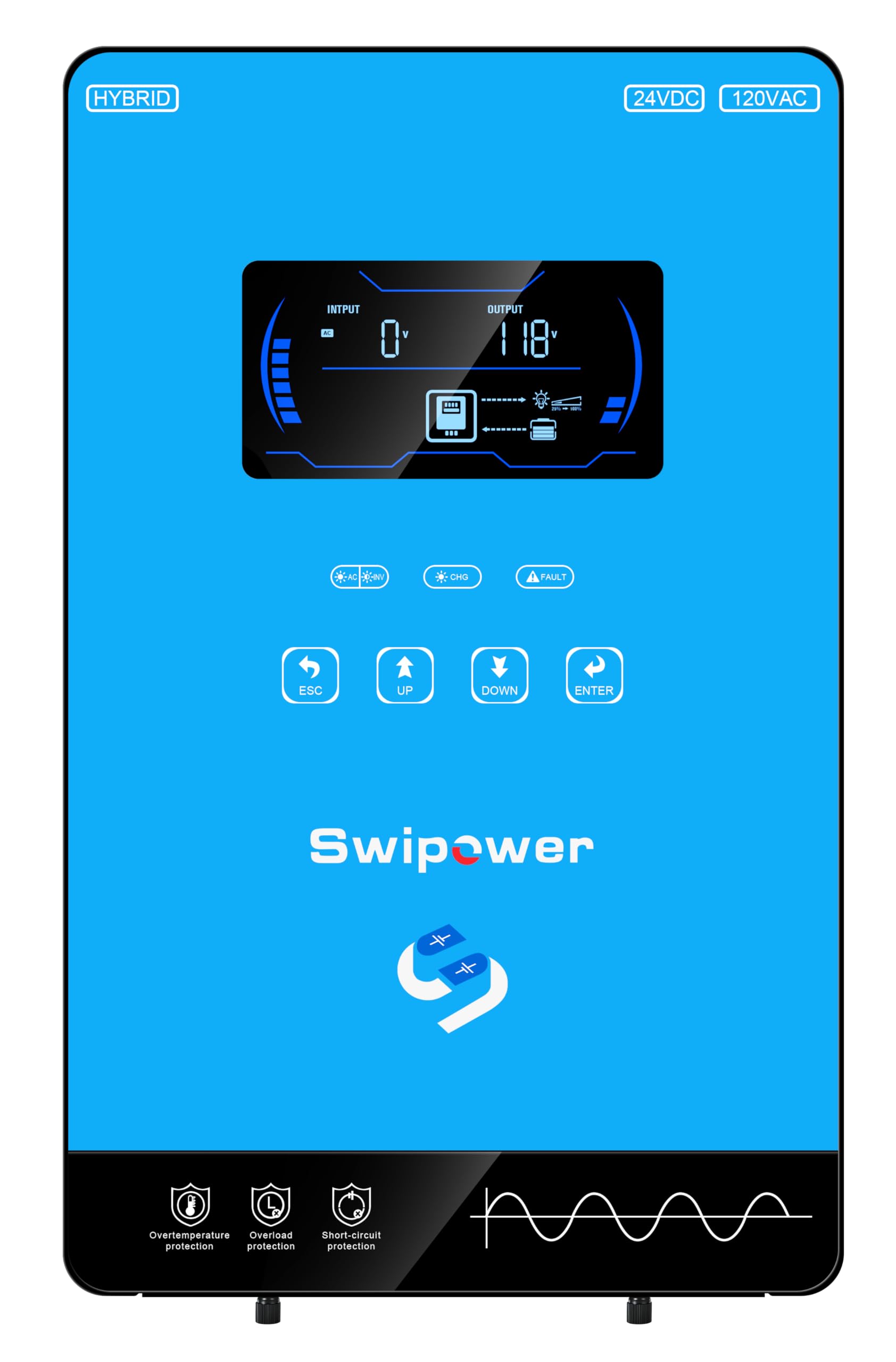
Figure 3.1: Front view of the Xijia 4000W Hybrid Inverter, showing the LCD display and control buttons.

Figure 3.2: Rear view of the Xijia 4000W Hybrid Inverter, highlighting the PV, Input, Output, Communication, and Battery terminals.

Figure 3.3: Graphic illustrating the 4000W AC output, 8000W peak power, 140A max charge current, 6.25-inch LCD, 5600W Max PV, and 99.90% MPPT efficiency.
4. Setup and Installation
Proper installation is crucial for the safe and optimal performance of your hybrid inverter. Refer to the following guidelines and video resources.
4.1 Wiring Connections
Ensure all wiring is correctly sized and securely connected. Always disconnect all power sources (solar, battery, grid) before making any connections.
- Battery Connection: Connect the battery cables to the designated BATTERY terminals (+ and -). Ensure correct polarity.
- PV Input: Connect solar panel strings to the PV terminals (+ and -). Observe maximum voltage and current ratings.
- AC Input (Grid/Generator): Connect the utility grid or generator AC input to the AC INPUT terminals (L and N).
- AC Output (Load): Connect your AC loads to the AC OUTPUT terminals (L and N).
- Grounding: Connect the inverter to an appropriate earth ground.
- Communication: Use the COMM port for communication with external devices like a BMS, if applicable.
4.2 Installation Diagram

Figure 4.1: Multi-scenario adaptation diagram showing connections for residential PV energy storage, small commercial power supply, off-grid/weak-grid areas, and emergency backup power. This diagram illustrates the connections for live wire/positive wire, neutral wire/negative wire, and earth (wire) for generator, mains power, solar panels, battery, and various appliances.
4.3 Video Guides for Wiring
Video 4.1: This video demonstrates how to wire a 3.6KVA inverter, providing a visual guide for similar wiring procedures applicable to the 4000W model. It covers battery, AC input, AC output, and PV connections.
Video 4.2: This video illustrates the wiring process for a 4200W AC230V to DC12V/24V dual voltage inverter, offering additional visual guidance for connecting your Xijia inverter.
5. Operation
Once installed, the inverter can be configured and operated via its LCD display and touch buttons. The display provides real-time information on system status.
5.1 Initial Power-Up
- Ensure all wiring connections are secure and correct.
- Turn on the battery breaker first.
- Turn on the inverter's main power switch (usually located on the side or bottom).
- The LCD display will illuminate, showing system status.
- If using grid or solar input, activate their respective breakers.
5.2 LCD Display and Controls
The 6.25-inch LCD display provides critical operational data. Use the ESC, UP, DOWN, and ENTER buttons to navigate menus and adjust settings.
- ESC: Exit current menu or setting.
- UP/DOWN: Navigate through menu options or adjust values.
- ENTER: Confirm selection or enter a submenu.
- Status Indicators: LEDs typically indicate AC output, charging status, and fault conditions.

Figure 5.1: Close-up of the inverter's LCD display, showing input voltage, output power, and battery status. The display provides a visual representation of power flow and system health.
5.3 Power Priority Settings
The inverter allows configuration of power source priority (Solar, Battery, Utility). Consult the detailed user manual for specific menu navigation to adjust these settings based on your energy management strategy.
5.4 Operational Demonstrations
Video 5.1: This video demonstrates the operation of a 6500W solar inverter, including its display and power flow, which can provide insights into the Xijia inverter's functionality.
Video 5.2: This video shows the operation of a 2400W solar inverter, demonstrating how power is managed and displayed, which is relevant for understanding your Xijia inverter.
Video 5.3: This video provides a continuous shot of product details, offering a comprehensive visual overview of the inverter's features and potential operational aspects.
6. Maintenance
Regular maintenance ensures the longevity and optimal performance of your inverter.
- Cleaning: Periodically clean the exterior of the inverter with a dry cloth. Ensure ventilation openings are free from dust and debris.
- Connections: Annually inspect all electrical connections for tightness and signs of corrosion.
- Battery Inspection: If using lead-acid batteries, check electrolyte levels and terminal cleanliness as per battery manufacturer guidelines.
- Environmental Check: Ensure the installation environment remains within specified temperature and humidity ranges.
7. Troubleshooting
This section provides solutions to common issues. For complex problems, contact qualified service personnel.
| Problem | Possible Cause | Solution |
|---|---|---|
| Inverter not turning on | No battery power; main switch off; loose connections. | Check battery voltage; ensure main switch is ON; verify all connections. |
| No AC output | Overload; short circuit; inverter fault; AC output breaker off. | Reduce load; check for short circuits; check fault codes on display; turn on AC output breaker. |
| Overheat warning | Insufficient ventilation; excessive ambient temperature; blocked fans. | Ensure clear airflow around inverter; reduce ambient temperature; clean fan vents. |
| Solar panels not charging | Low solar input; PV connections loose/incorrect; PV breaker off. | Check solar panel output; verify PV wiring and polarity; turn on PV breaker. |
8. Specifications
Detailed technical specifications for the Xijia EFP-4000W Hybrid Inverter.
| Feature | Detail |
|---|---|
| Model Name | EFP-4000W |
| Wattage | 4000 watts |
| Power Source | Solar, Mains, and Battery Powered |
| Recommended Uses | Farm, Home, Off-grid Cabin, RVs, Workshop |
| Product Dimensions | 18.5 x 12.7 x 6.7 inches |
| Item Weight | 19.11 pounds |
| Manufacturer | XIJIA |
| MPPT Solar Charger | 140A, up to 5600W (350VDC) solar input |
| Output Type | Pure Sine Wave |
| Battery Compatibility | 24V LiFePO4, lithium-ion, AGM, gel, or lead-acid batteries |

Figure 8.1: Detailed parameter table for the MPS-4000VA-US model, providing comprehensive electrical and physical specifications.
9. Warranty and Support
For warranty information, technical support, or service inquiries, please contact the manufacturer, XIJIA, or your authorized dealer. Refer to your purchase documentation for specific warranty terms and contact details.
What's in the Box: The product package includes the Xijia 4000W Hybrid Inverter and this Instruction Manual.
Ask a question about this manual
Ask about setup, troubleshooting, compatibility, parts, safety, or missing instructions. Manuals+ will review the question and use this page’s manual context to help answer it.