
1. Introduction
This manual provides essential information for the safe and efficient operation of your Generic Pure Sine Wave Power Inverter. This device converts 24V DC battery power into 220V AC household electricity, suitable for various applications including RVs, solar power systems, and emergency backup. Please read these instructions thoroughly before installation and use.
2. Safety Instructions
Always observe the following safety precautions to prevent injury or damage to the inverter and connected devices:
- Ensure the inverter is turned OFF before making any connections.
- Connect the inverter only to a 24V DC battery system. Connecting to an incorrect voltage will damage the unit.
- Verify correct polarity when connecting battery cables: positive (+) to positive, negative (-) to negative. Incorrect polarity will cause severe damage.
- Do not expose the inverter to water, rain, snow, or spray.
- Operate the inverter in a well-ventilated area. Avoid covering ventilation openings.
- Do not open the inverter casing. There are no user-serviceable parts inside. Refer servicing to qualified personnel.
- Keep children away from the inverter and connected electrical devices.
- Ensure the total power consumption of connected AC devices does not exceed the inverter's rated output (4500W peak, 2300W continuous for this model).
This inverter features multiple built-in protections:
- Overload Protection: Shuts down if connected load exceeds capacity.
- Overheat Protection: Shuts down if internal temperature becomes too high.
- High and Low Voltage Protection: Protects against battery overcharge or deep discharge.
- Short Circuit Protection: Prevents damage from shorted output.
- Overcurrent Protection: Guards against excessive current draw.
- Reverse Polarity Protection: Helps prevent damage from incorrect battery connection.

Figure 2.1: Inverter Protection Features
3. Product Features
- Pure Sine Wave Output: Provides clean and stable AC power, suitable for sensitive electronics.
- High Efficiency: Designed for optimal power conversion.
- Durable Construction: Crafted from aluminum alloy for longevity.
- Smart LCD Display: Shows input voltage, output voltage, battery status, and error codes for easy monitoring.
- Multiple AC Outlets: Equipped with two universal charging sockets for connecting various appliances.
- Wide Application: Ideal for RVs, solar systems, emergency power, camping, and home use.

Figure 3.1: Inverter Front Panel and LCD Display
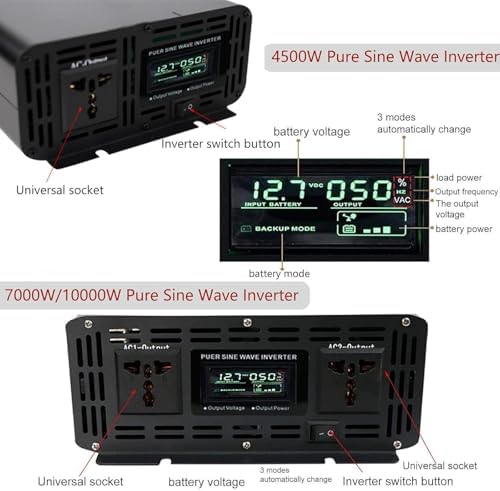
Figure 3.2: Inverter Working Principle
4. Setup
Follow these steps to properly set up your Pure Sine Wave Power Inverter:
- Prepare the Inverter: Ensure the inverter's power switch is in the OFF position before making any connections.
- Connect Positive Cable: Connect the positive (+) terminal of the inverter to the positive (+) terminal of your 24V DC battery using the provided connection cable.
- Connect Negative Cable: Connect the negative (-) terminal of the inverter to the negative (-) terminal of your 24V DC battery.
- Secure Connections: Ensure all battery terminal connections are tight and secure to prevent arcing or poor performance.
- Connect AC Devices: Plug your AC appliances into the universal sockets on the inverter's front panel. Ensure the total wattage does not exceed the inverter's continuous power rating.
- Power On: Once all connections are secure and verified, turn the inverter switch to the ON position. The LCD display will illuminate, showing input and output voltages.

Figure 4.1: Inverter Connection Diagram
5. Operating Instructions
After successful setup, operating the inverter is straightforward:
- Monitoring: The LCD screen displays real-time input voltage (from battery), output voltage (AC), and battery status. Monitor these readings to ensure stable operation.
- Load Management: Avoid overloading the inverter. If an overload occurs, the inverter's protection system will activate, and it may shut down. Reduce the load and restart the inverter if this happens.
- Battery Voltage: Pay attention to the input voltage display. If the battery voltage drops too low, the inverter will shut down to protect the battery from deep discharge. Recharge your battery promptly.
- Cooling: Ensure the inverter has adequate airflow around its cooling fins. The internal fan will activate automatically when needed to maintain optimal operating temperature.
- Shutting Down: To turn off the inverter, first disconnect all AC appliances, then switch the inverter to the OFF position.
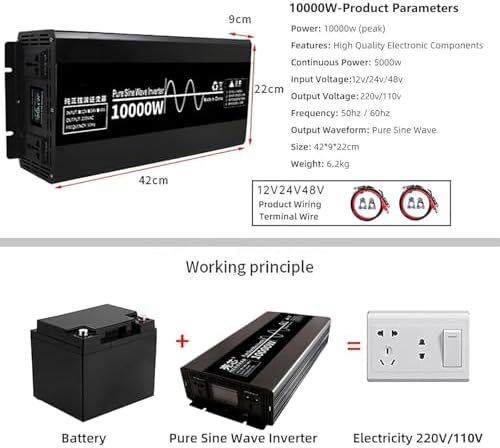
Figure 5.1: Inverter Overview with Parameters
6. Maintenance
Regular maintenance ensures the longevity and reliable performance of your inverter:
- Cleanliness: Keep the inverter clean and free from dust and debris. Use a dry, soft cloth for cleaning. Do not use liquid cleaners.
- Ventilation: Periodically check that the ventilation openings are not blocked. Clear any obstructions to ensure proper airflow.
- Connections: Regularly inspect battery and AC connections for tightness and corrosion. Tighten any loose connections and clean corroded terminals.
- Storage: If storing the inverter for an extended period, ensure it is clean, dry, and stored in a cool, well-ventilated area. Disconnect it from the battery.
7. Troubleshooting
If you encounter issues with your inverter, refer to the following common problems and solutions:
| Problem | Possible Cause | Solution |
|---|---|---|
| Inverter does not turn on. | No battery connection, low battery voltage, incorrect polarity, faulty fuse. | Check battery connections, ensure battery is charged (24V minimum), verify polarity, check internal fuse (if accessible and user-serviceable, otherwise contact support). |
| No AC output. | Overload, overheat, low battery voltage, faulty AC device. | Reduce connected load, allow inverter to cool, charge battery, test AC device with another power source. |
| Inverter shuts down frequently. | Overload, insufficient ventilation, low battery voltage. | Reduce load, ensure clear ventilation, charge battery. |
| Alarm sounds. | Low battery voltage, overload, overheat. | Check LCD display for error code. Address the specific issue (charge battery, reduce load, allow cooling). |
8. Specifications
| Feature | Specification (Model: 4500W 24V DC to 220V AC) |
|---|---|
| Brand | Generic |
| Model Name | LS |
| Input Voltage | 24V DC |
| Output Voltage | 220V AC |
| Peak Power | 4500W |
| Continuous Power | 2300W (Estimated based on typical 50% peak rating for this class) |
| Output Waveform | Pure Sine Wave |
| Frequency | 50Hz / 60Hz (Auto-sensing or selectable, refer to unit display) |
| Material | Aluminum Alloy |
| Protection Features | Overload, Overheat, High/Low Voltage, Short Circuit, Overcurrent, Reverse Polarity |
Note: Specifications are subject to change without notice. Please refer to the product label for the most accurate information.
9. Warranty and Support
For warranty information, please refer to the documentation provided at the time of purchase or contact your retailer. If you require technical assistance or have questions not covered in this manual, please contact the seller or manufacturer directly. Keep your purchase receipt for warranty claims.