
Introduction
Thank you for choosing the JUOVI 65W 20000mAh Portable Charger. This high-capacity power bank is designed to provide reliable and fast charging for a wide range of devices, including laptops, tablets, and smartphones. Please read this manual carefully to ensure proper use and optimal performance of your device.
Package Contents
- 1 × JUOVI 65W 20000mAh Power Bank
- 1 × USB-C to USB-C Cable (1 ft)
- 1 × User Manual
Product Overview
Familiarize yourself with the components of your JUOVI Power Bank:

Figure 1: JUOVI Power Bank with USB-C and USB-A ports, and digital display.
- USB-C Ports (C1 IN/OUT, C2 IN/OUT): Two ports supporting 65W PD 3.0 fast charging for both input and output.
- USB-A Ports (USB1 OUT, USB2 OUT): Two ports supporting 30W fast charging output.
- Digital Display: Shows real-time battery percentage and charging status.
- Power Button: Activates the display and controls charging modes.
Key Features
65W High-Speed Laptop Charging & PD 3.0 Fast Charging
The power bank features dual USB-C ports capable of delivering 65W PD 3.0 fast charging. This allows for rapid recharging of compatible laptops, such as a 14-inch MacBook Pro to 50% in approximately 40 minutes, and an iPhone to 60% in just 30 minutes. It provides efficient power for laptops, tablets, and phones during travel or daily use.
Massive 20000mAh Capacity & Charge 4 Devices Simultaneously
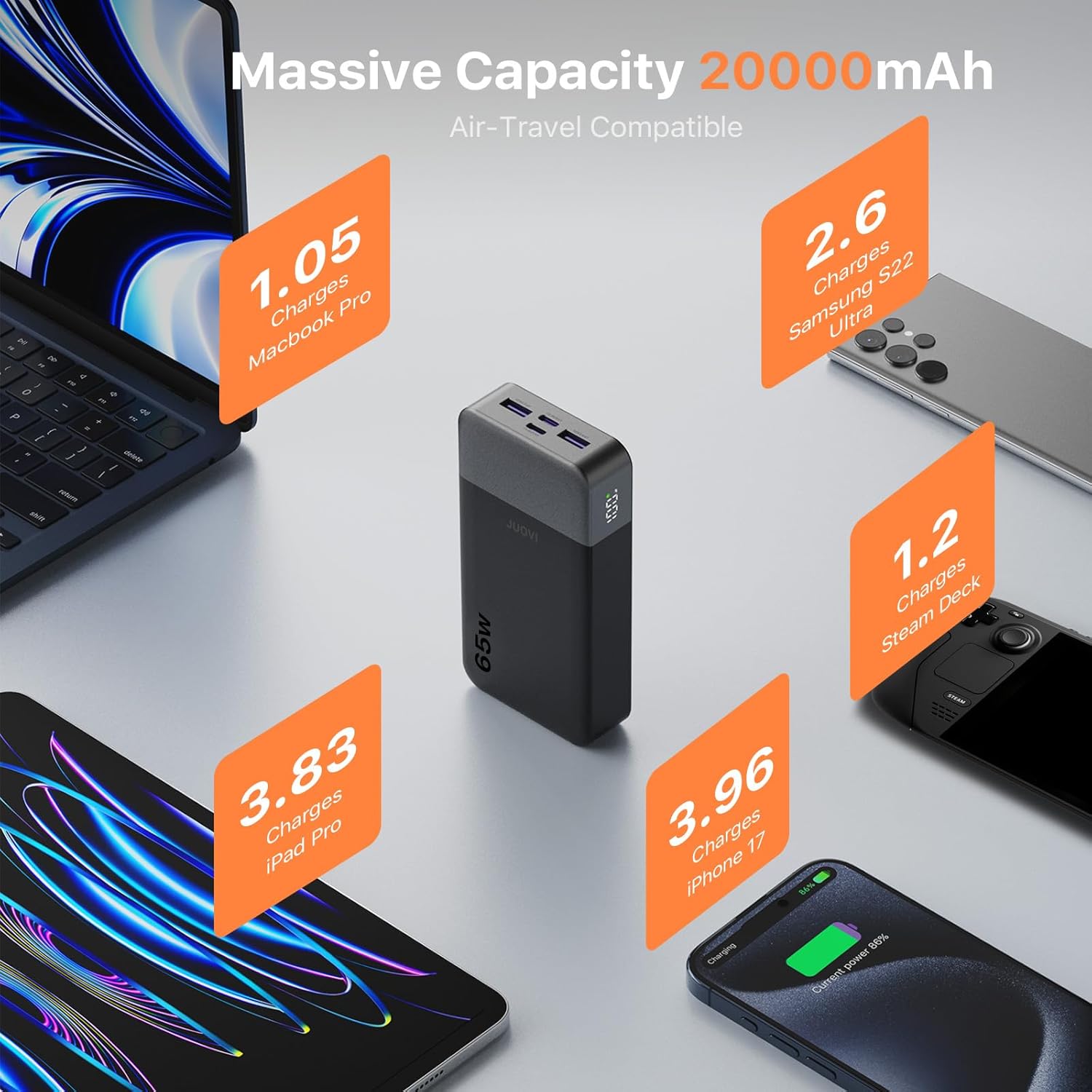
Figure 2: High capacity of JUOVI Power Bank for multiple devices.
With a 20000mAh battery, this power bank offers extended power. It includes 2 USB-C (65W) and 2 USB-A (30W) ports, enabling simultaneous charging of up to four devices, such as a laptop, tablet, phone, and earbuds. It is designed for travel, camping, flights, and daily commutes.

Figure 3: Charging multiple devices with the JUOVI Power Bank.
Dual-Mode Charging for All Devices & Trickle Mode
This charger supports a default high-power mode for laptops and tablets. For delicate devices like AirPods, Bluetooth headphones, and smartwatches, a simple double-press of the power button activates Low-Current Mode (Trickle Mode), providing safe and gentle charging to preserve battery health.
Smart Digital Display & Real-Time Power Monitoring
The integrated digital display provides real-time visibility of the remaining battery percentage and current charging status. This feature helps users accurately monitor power levels and plan usage without unexpected shutdowns.
Safety Protection

Figure 4: JUOVI Power Bank's 6-way safety protection features.
The power bank is engineered with a multi-protection system that guards against overcharging, overheating, short-circuit, and overcurrent. An intelligent chip monitors voltage and current in real-time, adjusting output for safe operation.
Setup
Charging the Power Bank
- Connect the provided USB-C to USB-C cable to one of the power bank's USB-C (IN/OUT) ports.
- Connect the other end of the cable to a compatible USB-C wall charger (not included) with a minimum output of 45W for optimal charging speed.
- The digital display will show the battery percentage increasing, indicating that the power bank is charging.
- Once the display shows 100%, the power bank is fully charged.
Operating Instructions
Charging Your Devices
- Check Battery Level: Press the power button once to view the current battery percentage on the digital display.
- Connect Device:
- For laptops and fast-charging devices, use a USB-C to USB-C cable and connect to either USB-C (IN/OUT) port.
- For other devices, use a compatible USB-A cable and connect to either USB-A (OUT) port.
- Initiate Charging: The power bank will automatically begin charging your device. The digital display will show the charging status.
- Optimal Charging: For maximum charging speed, it is recommended to charge one device at a time, especially high-power devices like laptops. Charging multiple devices simultaneously may reduce power per port.
Activating Trickle Mode (Low-Current Mode)
Trickle Mode is ideal for charging low-power devices such as wireless earbuds, smartwatches, or Bluetooth headphones, preventing overcharging and preserving their battery life.
- Connect your low-power device to any available output port on the power bank.
- Double-press the power button. The digital display will show a small icon (e.g., "L" or a specific symbol) indicating that Trickle Mode is active.
- To exit Trickle Mode and return to standard charging, double-press the power button again.
Specifications
| Model Number | J2931 |
| Battery Capacity | 20000mAh |
| Max Output Power | 65W |
| USB-C Ports | 2 (C1 IN/OUT, C2 IN/OUT) - up to 65W PD 3.0 |
| USB-A Ports | 2 (USB1 OUT, USB2 OUT) - up to 30W |
| Product Dimensions | 5.39 x 2.76 x 1.04 inches |
| Item Weight | 14.1 ounces |
| Special Features | Auto Shut-Off, Digital Display, Fast Charging, Over Charging Protection, Short Circuit Protection |
Troubleshooting
- Device not charging:
- Ensure the power bank has sufficient charge.
- Verify that the charging cable is securely connected to both the power bank and your device.
- Try a different charging cable or port.
- Confirm your device is compatible with the power bank's output specifications.
- Slow charging:
- Ensure you are using a fast-charging compatible cable and your device supports fast charging.
- If multiple devices are connected, disconnect some to allow higher power output to a single device.
- Check if Trickle Mode is accidentally activated (double-press power button to toggle).
- Power bank not charging:
- Ensure the USB-C cable is connected to an IN/OUT port and to a functional wall adapter.
- Try a different wall adapter or power outlet.
- Use the provided USB-C to USB-C cable for optimal input charging.
Maintenance
- Keep the power bank away from extreme temperatures, direct sunlight, and liquids.
- Store in a cool, dry place when not in use.
- Avoid dropping or subjecting the device to strong impacts.
- Clean the surface with a soft, dry cloth. Do not use harsh chemicals or abrasive materials.
- Charge the power bank at least once every three months to maintain battery health if stored for long periods.
Warranty and Support
For warranty information or technical support, please refer to the contact details provided on the product packaging or visit the official JUOVI website. Keep your purchase receipt as proof of purchase for warranty claims.