
Introduction
Thank you for choosing Nakamichi Wireless Earphones, Model My Music Hue. These earphones are designed to provide a superior audio experience with advanced features such as Bluetooth 5.4 connectivity, multiple EQ modes, clear hands-free calling, and an immersive 360° spatial game mode. This manual will guide you through the setup, operation, and maintenance of your new earphones to ensure optimal performance and enjoyment.
Package Contents
- Nakamichi Wireless Earbuds (Left & Right)
- Charging Case
- Eartips (S, M, L sizes)
- USB Charging Cable
- User Manual
Product Overview

Image: Nakamichi Wireless Earbuds and their charging case.
The Nakamichi Wireless Earphones consist of two earbuds and a portable charging case. Each earbud features a touch control area, a microphone, and charging contacts. The charging case has a USB-C port for charging and LED indicators for battery status.
Setup
1. Charging the Earphones

Image: Earbuds placed inside the charging case, illustrating battery life.
- Initial Charge: Before first use, fully charge both the earbuds and the charging case.
- Charging Earbuds: Place the earbuds into the charging case. Ensure the charging contacts align. The earbuds will automatically begin charging.
- Charging Case: Connect the USB charging cable to the charging case's USB-C port and a power source. The LED indicators on the case will show the charging status.
A single full charge provides up to 5 hours of playback for the earbuds. The charging case extends the total playback time to approximately 28 hours.
2. Bluetooth Pairing

Image: Diagram illustrating Bluetooth 5.4 connectivity with various devices like smartphones, tablets, and PCs.
- Power On: Open the charging case. The earbuds will automatically power on and enter pairing mode (indicated by flashing LED lights on the earbuds).
- Enable Bluetooth: On your device (smartphone, tablet, PC), enable Bluetooth.
- Select Earphones: In your device's Bluetooth settings, search for 'Nakamichi My Music Hue' (or similar) and select it to pair.
- Confirmation: Once paired, the earbud LEDs will stop flashing, and you will hear an audible confirmation.
The earphones utilize Bluetooth 5.4 technology for a stable, high-speed, and uninterrupted connection.
Operating Instructions
1. Wearing the Earbuds
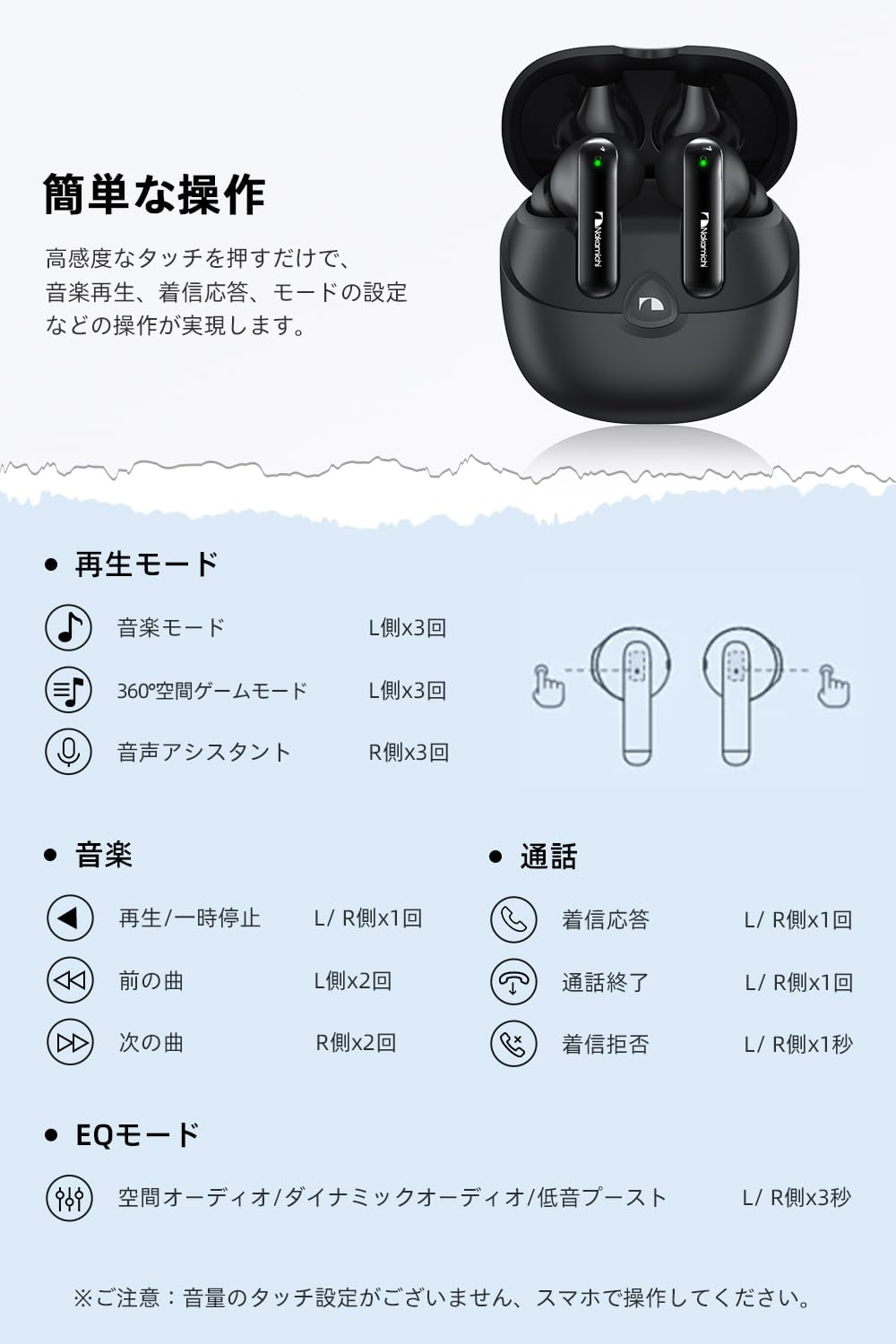
Image: Diagram showing the ergonomic fit of the earbud in an ear, along with different sized eartips (S, M, L).
Choose the eartip size (S, M, L) that provides the most comfortable and secure fit for your ears. A proper fit is crucial for optimal sound quality and comfort during extended use. Insert the earbuds gently into your ear canal and twist slightly to secure them.
2. Touch Controls

Image: Visual guide to touch controls on the earbuds for various functions.
| Function | Action | Earbud |
|---|---|---|
| Play/Pause Music | Single Tap | L/R |
| Next Track | Double Tap | R |
| Previous Track | Double Tap | L |
| Answer/End Call | Single Tap | L/R |
| Reject Call | Long Press (1 sec) | L/R |
| Switch EQ Mode | Long Press (3 sec) | L/R |
| Activate 360° Spatial Game Mode | Triple Tap | L |
| Activate Voice Assistant | Triple Tap | R |
Note: Volume control is managed exclusively via your connected smartphone or device.
3. EQ Modes

Image: Visual representation of the three EQ modes: Spatial Audio, Dynamic Audio, and Bass Boost.
Your earphones feature three distinct EQ modes to optimize your listening experience:
- Spatial Audio: Provides an immersive 360-degree sound experience, ideal for movies and games where a sense of space is desired.
- Dynamic Audio: Offers a balanced sound profile, adjusting the overall sound balance for clear and natural reproduction across a wide frequency range.
- Bass Boost: Emphasizes powerful low frequencies, perfect for genres like electronic, rock, and hip-hop.
Switch between these modes by long-pressing either the left or right earbud for 3 seconds.
4. Hands-Free Calling

Image: A woman using the Nakamichi wireless earbuds for a hands-free call.
Each earbud is equipped with a built-in microphone that actively suppresses ambient noise, ensuring your voice is transmitted clearly to the other party. This feature is highly beneficial for calls, online meetings, and voice chats during gaming.
- Stereo/Mono Mode: The earphones support both stereo (using both earbuds) and mono (using a single earbud) playback.
- Single Earbud Use: You can use one earbud for calls while the other is charging in the case.
5. 360° Spatial Game Mode

Image: A smartphone displaying a game, with the Nakamichi earbuds and charging case nearby, illustrating the gaming experience.
Activate the 360° Spatial Game Mode by triple-tapping the left earbud. This mode provides a deeply immersive gaming experience by rendering in-game environmental and effect sounds with greater realism. The lightweight design (3.6g per earbud) ensures comfort for extended gaming sessions without ear fatigue.
Maintenance
1. Cleaning
- Regularly clean the earbuds, especially the eartips and charging contacts, with a soft, dry, lint-free cloth.
- Do not use abrasive cleaners, alcohol, or chemical solvents.
- Ensure no moisture enters the earbud openings.
2. Storage
- When not in use, always store the earbuds in their charging case to protect them and keep them charged.
- Store the charging case and earbuds in a cool, dry place, away from extreme temperatures and direct sunlight.
Troubleshooting
| Problem | Possible Solution |
|---|---|
| Earbuds do not power on. | Ensure earbuds are charged. Place them in the charging case and close the lid, then open it again. |
| Cannot pair with device. | Make sure Bluetooth is enabled on your device. Ensure earbuds are in pairing mode. Forget the device in your Bluetooth settings and try pairing again. |
| No sound or low volume. | Check volume levels on both your device and the earbuds (via your device). Ensure earbuds are properly connected. Clean any debris from the earbud speakers. |
| Intermittent connection. | Ensure no obstacles are between the earbuds and your device. Move closer to your device. Avoid environments with strong Wi-Fi or other wireless interference. |
| Charging case not charging. | Check the USB cable and power adapter. Ensure the charging cable is securely connected to both the case and the power source. |
Specifications
| Feature | Detail |
|---|---|
| Model Number | My Music Hue |
| Bluetooth Version | 5.4 |
| Ear Placement | In-Ear |
| Headphone Style | In-Ear |
| Driver Size | 10mm Dynamic |
| Frequency Response | 20Hz - 20kHz (Inferred from 20KHz upper limit) |
| Sensitivity | 102 dB |
| Impedance | 32 Ohm |
| Earbud Weight (each) | 3.6g (Inferred from feature bullets) |
| Product Dimensions | 6 x 5.4 x 3 cm |
| Total Product Weight | 40g |
| Playback Time (Earbuds) | Up to 5 hours |
| Total Playback Time (with Case) | Up to 28 hours |
| Control Type | Touch Control |
| Included Components | Eartips, USB Charging Cable, User Manual |
| Compatible Devices | Game Consoles, Tablets, Desktop PCs, Laptops, Smartphones |
Warranty and Support
Nakamichi Wireless Earphones, Model My Music Hue, come with a 1-year manufacturer's warranty from the date of purchase. This warranty covers defects in materials and workmanship under normal use.
For any product-related inquiries, technical support, or warranty claims, please contact Nakamichi customer service through the retailer where you purchased the product or visit our official website for support options.
Please retain your proof of purchase for warranty validation.