
1. Introduction
Thank you for choosing the AOC ACD3501 Wireless Bluetooth Earphones. These earphones are designed for active individuals, offering a secure fit, clear audio, and convenient wireless connectivity. Featuring an Environmental Noise Cancellation (ENC) ear clip and an integrated microphone, they are suitable for both music listening and hands-free communication during workouts or daily activities. This manual provides detailed instructions for setup, operation, maintenance, and troubleshooting to ensure optimal performance and longevity of your device.
2. Safety Information
- Hearing Protection: Avoid listening at high volume levels for extended periods to prevent hearing damage.
- Driving Safety: Do not use earphones while driving or cycling in situations where it could distract you from your surroundings.
- Water Resistance: The earphones are water-resistant, not waterproof. Do not submerge them in water. Avoid exposure to extreme moisture or liquids.
- Cleaning: Use a soft, dry cloth for cleaning. Do not use harsh chemicals or abrasive materials.
- Temperature: Store and operate the earphones within recommended temperature ranges (0°C to 45°C).
- Disposal: Dispose of the product and its battery responsibly according to local regulations. Do not dispose of with household waste.
3. Package Contents
Please check the package for the following items:
- AOC ACD3501 Wireless Bluetooth Earphones
- Charging Cable (USB-C)
- User Manual
4. Product Overview
Familiarize yourself with the components of your AOC ACD3501 earphones.
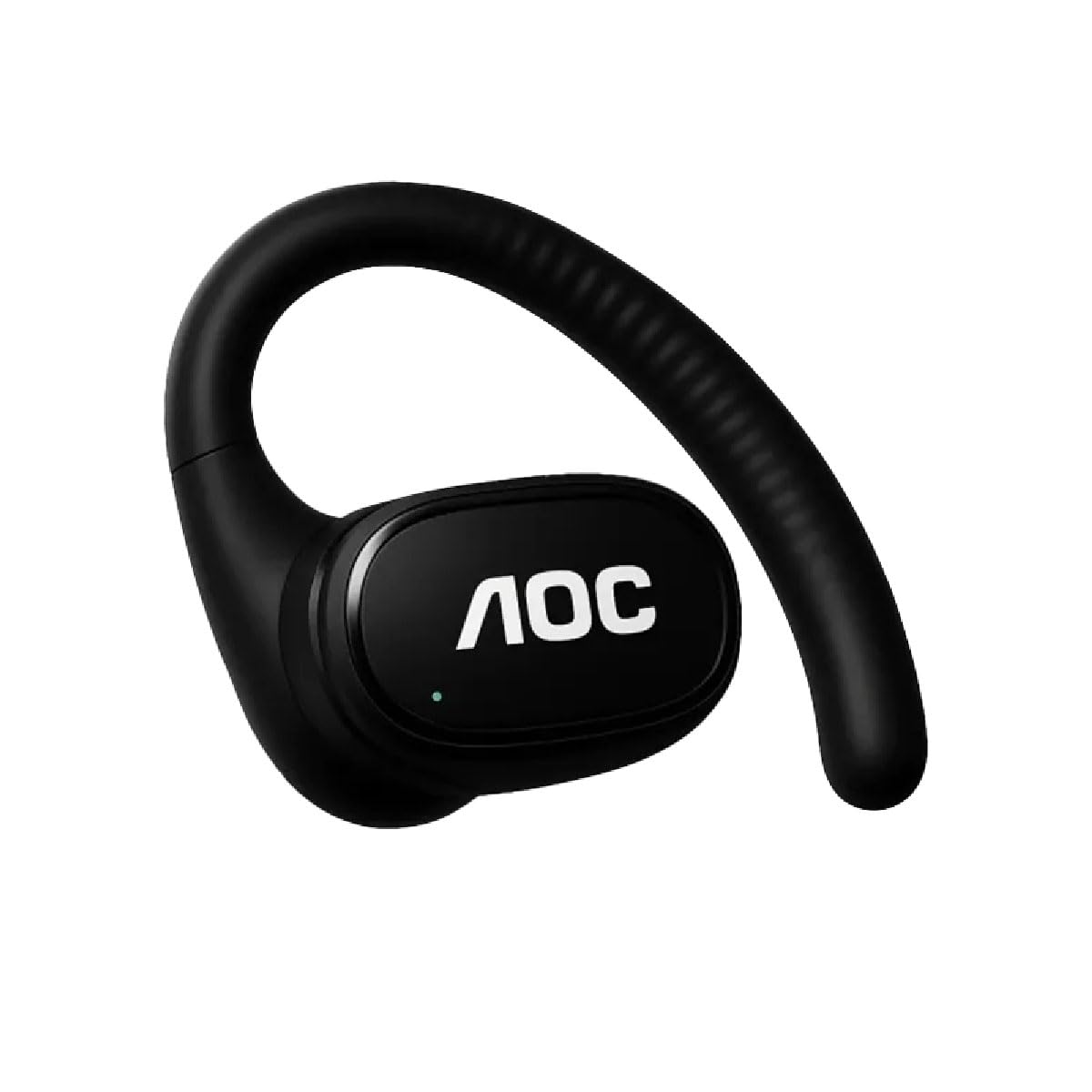
Figure 1: AOC ACD3501 Earphones in their transparent charging case.

Figure 2: Side view of a single earphone, highlighting the ear clip design and AOC logo.

Figure 3: Earphone with approximate dimensions (4cm earphone length, 5.5cm case width).
Key Components:
- Ear Clip: Provides a secure and comfortable fit, especially during physical activity.
- Control Buttons: Located on the earphone for managing playback and calls.
- Microphone: Integrated for clear hands-free communication with Environmental Noise Cancellation (ENC).
- LED Indicator: Displays power, pairing, and charging status.
- Charging Contacts: For charging the earphones within the case.
5. Setup
5.1 Charging the Earphones
- Place the earphones into their charging case. Ensure the charging contacts align.
- Connect the USB-C charging cable to the charging port on the case and plug the other end into a USB power adapter (not included) or a computer's USB port.
- The LED indicator on the earphones and/or case will show the charging status. A full charge typically takes approximately 1-2 hours.
- Once fully charged, disconnect the charging cable.
5.2 Bluetooth Pairing
To connect your earphones to a device for the first time:
- Power On: Take the earphones out of the charging case. They will automatically power on and enter pairing mode. The LED indicator will flash, usually blue and red, indicating they are ready to pair.
- Activate Bluetooth: On your smartphone, tablet, or other Bluetooth-enabled device, go to the Bluetooth settings and ensure Bluetooth is turned on.
- Select Device: In the list of available devices, look for "AOC ACD3501" and select it.
- Confirm Connection: Once connected, the LED indicator on the earphones will typically stop flashing and glow solid blue for a few seconds, or turn off. You will also hear an audible confirmation.
- Reconnect: After the initial pairing, the earphones will automatically connect to the last paired device when powered on and within range.
6. Operating Instructions
6.1 Power On/Off
- Power On: Remove earphones from the charging case. They will power on automatically. Alternatively, press and hold the multi-function button on each earphone for approximately 3 seconds until the LED indicator lights up.
- Power Off: Place earphones back into the charging case. They will power off automatically. Alternatively, press and hold the multi-function button on each earphone for approximately 5 seconds until the LED indicator turns off.
6.2 Music Playback
- Play/Pause: Single press the multi-function button on either earphone.
- Next Track: Double press the multi-function button on the right earphone.
- Previous Track: Double press the multi-function button on the left earphone.
- Volume Up: Triple press the multi-function button on the right earphone.
- Volume Down: Triple press the multi-function button on the left earphone.
6.3 Call Management
- Answer/End Call: Single press the multi-function button on either earphone.
- Reject Call: Press and hold the multi-function button on either earphone for 2 seconds.
- Voice Assistant: Press and hold the multi-function button on either earphone for 2 seconds (when not on a call) to activate your device's voice assistant (e.g., Siri, Google Assistant).
6.4 LED Indicator Guide
- Flashing Blue/Red: Pairing mode.
- Solid Blue (briefly): Connected/Paired.
- Solid Red: Charging.
- LED Off: Fully charged or powered off.
7. Maintenance
7.1 Cleaning
- Gently wipe the earphones and charging case with a soft, dry, lint-free cloth.
- Do not use abrasive cleaners, solvents, or aerosol sprays.
- Ensure charging contacts are clean and dry to maintain proper charging.
7.2 Storage
- When not in use, store the earphones in their charging case to protect them and keep them charged.
- Store in a cool, dry place away from direct sunlight and extreme temperatures.
8. Troubleshooting
| Problem | Possible Solution |
|---|---|
| Earphones do not power on. | Ensure earphones are charged. Place them in the charging case for a few minutes, then try again. |
| Cannot pair with device. | Make sure Bluetooth is enabled on your device. Ensure earphones are in pairing mode (flashing blue/red). Turn off and on Bluetooth on your device. Forget the device from your Bluetooth list and try pairing again. |
| No sound or intermittent sound. | Check volume levels on both earphones and your connected device. Ensure earphones are within Bluetooth range. Try reconnecting the earphones. |
| Earphones not charging. | Check if the charging cable is securely connected. Ensure the charging contacts on the earphones and case are clean. Try a different USB port or power adapter. |
| Microphone not working. | Ensure the earphones are properly connected to your device. Check microphone permissions in your device's settings for the app you are using. |
9. Specifications
- Model: ACD3501
- Brand: AOC
- Connectivity: Bluetooth
- Form Factor: On-Ear (Ear Clip)
- Color: Black
- Microphone: Built-in with Environmental Noise Cancellation (ENC)
- Water Resistance: Yes (designed for active use, e.g., sweat and light rain)
- Country of Origin: China
10. Warranty and Support
The AOC ACD3501 Wireless Bluetooth Earphones come with a 6-month warranty from the date of purchase. This warranty covers manufacturing defects under normal use.
For warranty claims, technical support, or further assistance, please contact your retailer or the official AOC customer support channel. Please retain your proof of purchase for warranty service.


