
Introduction
This manual provides detailed instructions for setting up, operating, and maintaining your JOOKACE Hidden Camera Clock. This device integrates a 4K Ultra HD wireless camera into a functional alarm clock, offering discreet home security with features like night vision, smart motion detection, and remote live streaming.
Key features include:
- 4K Ultra HD Resolution: Captures sharp details and vibrant colors for clear monitoring.
- Dual-Band Wi-Fi Connectivity: Supports both 2.4G and 5G Wi-Fi for stable, real-time streaming.
- Smart Motion Detection & Alerts: Sends instant notifications to your phone upon detecting movement.
- Flexible Dual Storage: Supports local recording to a microSD card (up to 256GB, not included) and optional cloud backup.
- 3-in-1 Design: Functions as a camera, alarm clock, and includes a built-in thermometer/hygrometer.
- Night Vision: Equipped with 5 IR LEDs for clear visibility up to 20 feet in low-light conditions.
What's in the Box
Please check the package contents to ensure all items are present:
- Camera Clock
- Charging Cable
- Instruction Manual
- Power Adapter

Image: The package contents including the camera clock, charging cable, instruction manual, and power adapter.
Setup
Follow these steps to set up your JOOKACE Hidden Camera Clock:
- Insert a MicroSD Card (Optional but Recommended):
Locate the microSD card slot on the device. Gently insert a microSD card (up to 256GB, not included) into the slot until it clicks into place. This enables local recording.

Image: A close-up view of the hidden camera clock showing the microSD card slot and a card being inserted.
- Connect to Power Source:
Connect the charging cable to the camera clock and then plug the power adapter into a standard electrical outlet. The device will power on automatically.
- Download and Install the App:
Scan the QR code provided in the included instruction manual or search for the recommended app (e.g., "Tuya Smart" or similar, as indicated in the product details) on your smartphone's app store (iOS or Android).
- Add the Device to the App:
Open the app, sign in or create an account. Follow the in-app instructions to add your new camera device. This typically involves selecting "Add Device," choosing the camera type, and connecting it to your home's 2.4GHz or 5GHz Wi-Fi network.

Image: A smartphone screen displaying the app interface for adding a new camera device, next to the hidden camera clock.
Video: An official seller video demonstrating the security camera features integrated into the digital clock.
Operating Instructions
Live View and Remote Monitoring
Once connected to the app, you can access the live video feed from anywhere using your smartphone. The camera supports both 2.4G and 5G Wi-Fi for a stable connection.

Image: A person viewing the live stream from the hidden camera clock on a smartphone, showing the camera's perspective of a living room.
Motion Detection and Alerts
The camera features smart motion detection. When motion is detected, the camera will automatically record and send an instant alert notification to your connected smartphone. You can adjust sensitivity settings within the app.
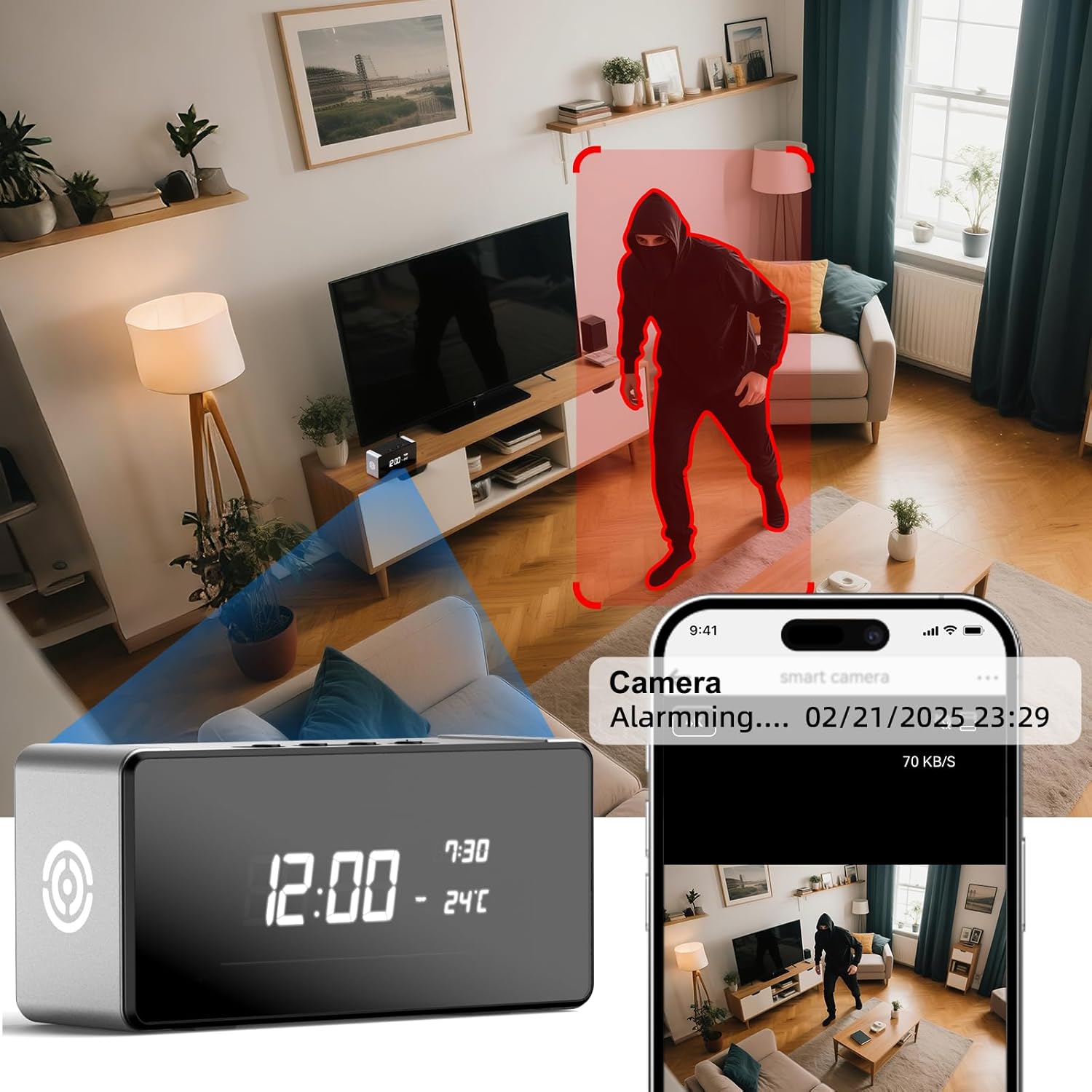
Image: An illustration showing the hidden camera clock detecting motion (a person) and sending an alert to a smartphone.
Night Vision
The integrated night vision allows for clear recording and monitoring even in low-light or dark conditions, with a range of up to 20 feet.

Image: A split image demonstrating the difference between day mode and night mode viewing from the camera, highlighting its night vision feature.
Recording and Storage
The camera supports continuous recording to a microSD card. When the card is full, the system will automatically overwrite the oldest footage (loop recording). Cloud storage options may also be available through the app for additional backup.

Image: An illustration depicting the loop recording function, showing older footage being overwritten as new recordings are made.
Alarm Clock and Environmental Monitoring
Beyond its camera functions, the device operates as a fully functional digital alarm clock. It also includes a built-in thermometer and hygrometer to display room temperature and humidity.

Image: The hidden camera clock displayed on a desk next to a laptop, highlighting its multiple functions as an alarm clock, thermometer, and security camera.
Maintenance
Proper maintenance ensures the longevity and optimal performance of your camera clock:
- Cleaning: Use a soft, dry cloth to clean the device. Avoid abrasive cleaners or solvents that could damage the surface or lens.
- Placement: Place the device in a stable location, away from direct sunlight, excessive heat, moisture, and strong magnetic fields.
- Software Updates: Periodically check the companion app for firmware updates to ensure the camera operates with the latest features and security enhancements.
- MicroSD Card Management: If using a microSD card, consider formatting it periodically through the app to maintain optimal recording performance and prevent data corruption.
Troubleshooting
If you encounter issues with your JOOKACE Hidden Camera Clock, refer to the following common solutions:
| Problem | Possible Cause / Solution |
|---|---|
| Cannot connect to Wi-Fi / App connection fails. |
|
| Video footage is unclear or blurry. |
|
| MicroSD card not recording or recordings are too short. |
|
| No motion detection alerts. |
|
Specifications
| Feature | Detail |
|---|---|
| Brand | JOOKACE |
| Model | B0FWK552H1 |
| Connectivity Technology | Wireless (2.4G & 5G Wi-Fi) |
| Video Capture Resolution | 4K Ultra HD |
| Frame Rate | 30 frames per second |
| Viewing Angle | 150 Degrees |
| Night Vision Range | 20 Feet |
| Number of IR LEDs | 5 |
| Storage Options | MicroSD Card (up to 256GB), Cloud Storage (optional) |
| Motion Detection | Yes, with Smart Alerts |
| Indoor/Outdoor Usage | Indoor |
| Power Source | Battery Powered (Rechargeable) / AC Adapter |
| Compatible Devices | Smartphone (iOS, Android), Desktop, Laptop |
| Control Method | App |
| Material | Polyacrylate |
| Dimensions (Approx.) | 4.2 inches (Length) x 1.9 inches (Height) (Based on image PT07) |
Image: The hidden camera clock with approximate dimensions indicated: 4.2 inches length and 1.9 inches height.
Warranty and Support
For warranty information and technical support, please refer to the contact details provided in your product packaging or visit the official JOOKACE website. Keep your purchase receipt for warranty claims.
Manufacturer: Dongguan Beishun Technology Co., Ltd