
1. Introduction
Thank you for choosing the VANNECT Walking Pad Treadmill Model AA. This manual provides essential information for the safe and efficient use of your new fitness equipment. Please read it thoroughly before first use and keep it for future reference.
The VANNECT Walking Pad Treadmill is designed for home use, offering a versatile workout experience with features like adjustable incline, a wide speed range, and smart connectivity.
2. Important Safety Instructions
To reduce the risk of serious injury, read all important precautions and instructions in this manual before using the treadmill. VANNECT assumes no responsibility for personal injury or property damage sustained by or through the use of this product.
- Always consult with a physician before beginning any exercise program.
- Keep children and pets away from the treadmill at all times.
- Place the treadmill on a level surface with at least 0.6 meters (2 feet) of clear space around it.
- Wear appropriate exercise clothing and athletic shoes.
- Do not operate the treadmill if it has a damaged power cord or plug, or if it is not working properly.
- Do not use the treadmill outdoors or in areas of high humidity.
- The maximum user weight capacity for this treadmill is 180 kg (396 lbs).
- Always use the safety key during operation.
3. Setup and Initial Use
The VANNECT Walking Pad Treadmill is designed for minimal assembly, allowing for quick setup.
3.1 Unpacking and Placement
- Carefully remove the treadmill from its packaging. Due to its weight (approximately 34 kg), it is recommended to have assistance during unpacking and placement.
- Place the treadmill on a firm, level surface. Ensure there is adequate space around the unit for safe operation and movement.
3.2 Folding and Unfolding
The treadmill features a foldable design for easy storage.
- To Unfold: Gently lift the running deck until it locks into the upright position. Ensure the handrails are securely in place.
- To Fold: Release the locking mechanism (if present, typically a lever or knob) and carefully lower the running deck until it is flat. The handrails can also be folded down.

Figure 3.2.1: The treadmill can be easily folded and stored under furniture, demonstrating its space-saving design. Transport wheels at the base facilitate movement.
3.3 Power Connection
- Connect the power cord to a grounded electrical outlet.
- Ensure the power switch on the treadmill is in the "ON" position.
4. Operating Instructions
4.1 Control Panel and Remote Control
The treadmill can be operated via its integrated LED display and the included remote control.

Figure 4.1.1: Overview of the treadmill's display, remote control, and incline capability. The remote control allows for convenient speed adjustments and stopping.
- LED Display: Shows real-time data such as distance, time, calories, speed, and pulse.
- Remote Control: Use the remote to adjust speed, start/stop the treadmill, and pause your workout. The remote has a magnetic back for secure attachment to the treadmill when not in use.
- Pause Function: Press the pause button on the remote to temporarily stop your workout without losing your progress data.
4.2 Speed Adjustment and Modes
The treadmill offers a speed range of 1-14 km/h, suitable for various activities.

Figure 4.2.1: The treadmill supports various modes from working (1-3 km/h) to running (10-14 km/h), including an incline mode.
- Working Mode: 1-3 km/h, ideal for light activity while working.
- Walking Mode: 4-6 km/h, suitable for brisk walking.
- Jogging Mode: 7-9 km/h, for a moderate jog.
- Running Mode: 10-14 km/h, for higher intensity running.
4.3 Incline Feature
The treadmill features a 12% incline capability to simulate more realistic climbing scenarios and increase calorie burn.
- To activate the incline, adjust the support pivot located at the center of the treadmill to ensure it adheres firmly to the ground. This provides a more stable workout experience.
4.4 App Connectivity (Kinomap & Zwift)
Enhance your workout experience by connecting the treadmill to fitness apps via Bluetooth.

Figure 4.4.1: The treadmill supports virtual training and challenges through Kinomap and Zwift apps, displayed on a large screen for an immersive experience.
- Download the Kinomap or Zwift app on your smartphone or tablet.
- Enable Bluetooth on your device and pair it with the treadmill.
- Use the app to access virtual training, running routes, and challenges.
- The app or LCD monitor will display real-time data including distance, time, calories, and pulse, helping you track your progress.
4.5 Bluetooth Speaker
The treadmill includes an integrated surround sound Bluetooth speaker.
- Pair your smartphone or tablet with the treadmill's Bluetooth speaker.
- Enjoy music or videos through the speaker during your workout.
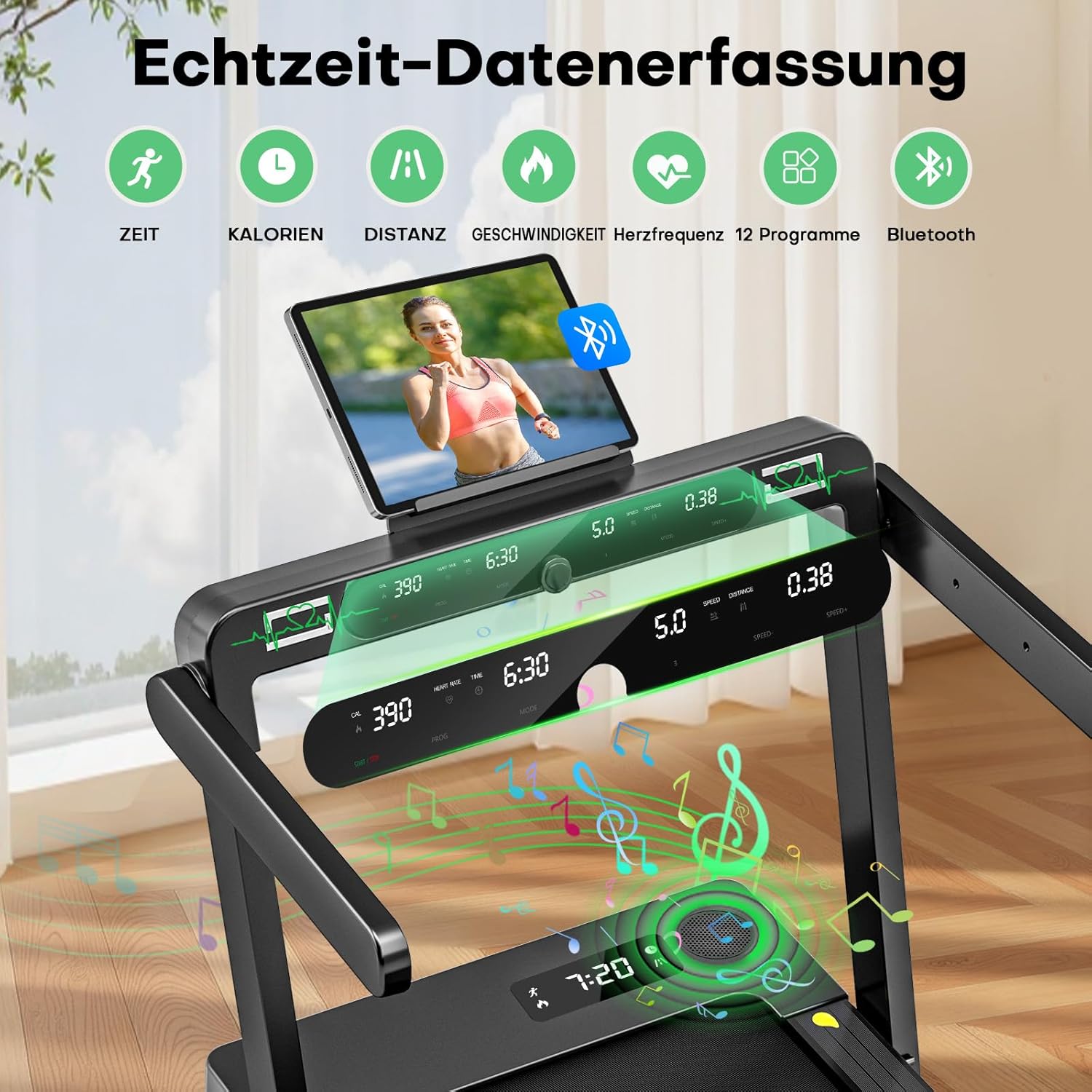
Figure 4.5.1: The control panel features a tablet holder and displays workout data. The integrated Bluetooth speaker allows for audio playback during exercise.
5. Maintenance
Regular maintenance ensures the longevity and optimal performance of your treadmill.
5.1 Cleaning
- Wipe down the treadmill after each use with a damp cloth to remove sweat and dust.
- Do not use abrasive cleaners or solvents.
5.2 Belt Lubrication
The running belt requires periodic lubrication to reduce friction and extend its lifespan. A small bottle of silicone oil is included for this purpose.
- Refer to the specific instructions provided with the silicone oil for proper application.
- Typically, lubrication is recommended every few months, depending on usage frequency.
5.3 Belt Adjustment
- If the running belt becomes off-center or slips, it may need adjustment. Use the included Allen key to make small adjustments to the rear rollers.
- Consult the troubleshooting section or contact customer support if you are unsure how to perform this adjustment.
6. Troubleshooting
This section addresses common issues you might encounter with your treadmill.
| Problem | Possible Cause | Solution |
|---|---|---|
| Treadmill does not power on. | Power cord not connected, power switch off, circuit breaker tripped. | Ensure power cord is securely plugged in. Check power switch. Reset circuit breaker if necessary. |
| Running belt slips or is off-center. | Belt tension too loose, belt alignment incorrect. | Adjust belt tension and alignment using the rear roller bolts and the included Allen key. Make small, incremental adjustments. |
| Unusual noise during operation. | Lack of lubrication, loose components, foreign object. | Lubricate the running belt. Check for any loose screws or components. Inspect for foreign objects under the belt. |
| Display surface is loose or detached. | Manufacturing defect or damage during transport. | Contact VANNECT customer support for assistance. Do not attempt to reattach with adhesives as this may void warranty. |
| Bluetooth speaker not connecting. | Bluetooth on device is off, treadmill not in pairing mode, interference. | Ensure Bluetooth is enabled on your device. Restart both the treadmill and your device. Move closer to the treadmill. |
7. Product Specifications
Detailed specifications for the VANNECT Walking Pad Treadmill Model AA.
| Feature | Detail |
|---|---|
| Model Number | AA |
| Dimensions (Product) | 120 x 50 x 60 cm (47.2 x 19.7 x 23.6 inches) |
| Running Surface | 106.9 x 42 cm (42.1 x 16.5 inches) |
| Weight (Item) | 34 kg (75 lbs) |
| Material | Aluminum frame, 5-layer anti-slip belt |
| Motor Power | 3.0 HP (Peak) / 2.75 HP (Continuous) |
| Speed Range | 1-14 km/h (0.6-8.7 mph) |
| Incline | Up to 12% (manual adjustment) |
| Max User Weight | 180 kg (396 lbs) |
| Noise Level | Below 25dB (whisper quiet operation) |
| Shock Absorption | Dual system with 10 silicone shock absorbers and rubber pads |
| Connectivity | Bluetooth for app connection (Kinomap, Zwift) and integrated speaker |
| Display | LED display for real-time data (distance, time, calories, pulse) |
| Included Components | Remote control, safety key, silicone oil, Allen key |

Figure 7.1.1: The treadmill supports a maximum user weight of 180 kg and has compact dimensions when folded for storage.

Figure 7.1.2: The treadmill features advanced shock absorption with a multi-layered running belt and multiple shock absorbers for joint protection.

Figure 7.1.3: Built with an industrial carbon steel frame, the treadmill ensures stability for users up to 180 kg and operates with a super quiet motor, generating less than 25dB of noise.

Figure 7.1.4: Comparison illustrating the superior performance of the VANNECT 3.0 HP motor, offering higher efficiency, longer continuous operation, and significantly quieter performance compared to conventional motors.
8. Warranty and Customer Support
VANNECT is committed to providing high-quality products and excellent customer service.
- Warranty: VANNECT offers a 5-year free replacement service for all parts of the treadmill.
- Customer Support: If you have any questions, require assistance, or encounter issues with your treadmill, please contact VANNECT customer support. Professional video support is available from our specialized staff.
- Refer to your purchase documentation or the VANNECT official website for contact details.