
1. Introduction
This manual provides essential information for the safe and efficient operation of your Denver DIR-200 Internet Radio. Please read it thoroughly before using the device and keep it for future reference.
2. Safety Information
- Do not expose the device to rain or moisture.
- Do not disassemble the device. Refer all servicing to qualified personnel.
- Avoid extreme temperatures and direct sunlight.
- Use only the specified power adapter or batteries.
- Keep away from strong magnetic fields.
3. Package Contents
Ensure all items are present:
- Denver DIR-200 Internet Radio
- Power Adapter (USB-C)
- User Manual (this document)
4. Product Overview
The Denver DIR-200 is a versatile radio offering Internet Radio, DAB+, and FM reception. It features Bluetooth 5.0 for wireless streaming, a UPnP network player, a 2.4-inch color LCD, and dual alarm functions. It can be powered via USB-C or AA batteries for portable use.

Image 1: Front view of the Denver DIR-200 Internet Radio, displaying the main screen with the 'Internet radio' selection. The controls for power, menu, alarm, favorites, volume/select, and navigation are visible below the screen.

Image 2: Front view of the Denver DIR-200 Internet Radio, showing the screen tuned to 'Radio ABC'. This illustrates the modern display for easy navigation and station information.

Image 3: Rear view of the Denver DIR-200 Internet Radio, highlighting the DC 5V (USB-C) power input, AUX IN port, headphone jack, and the telescopic antenna.
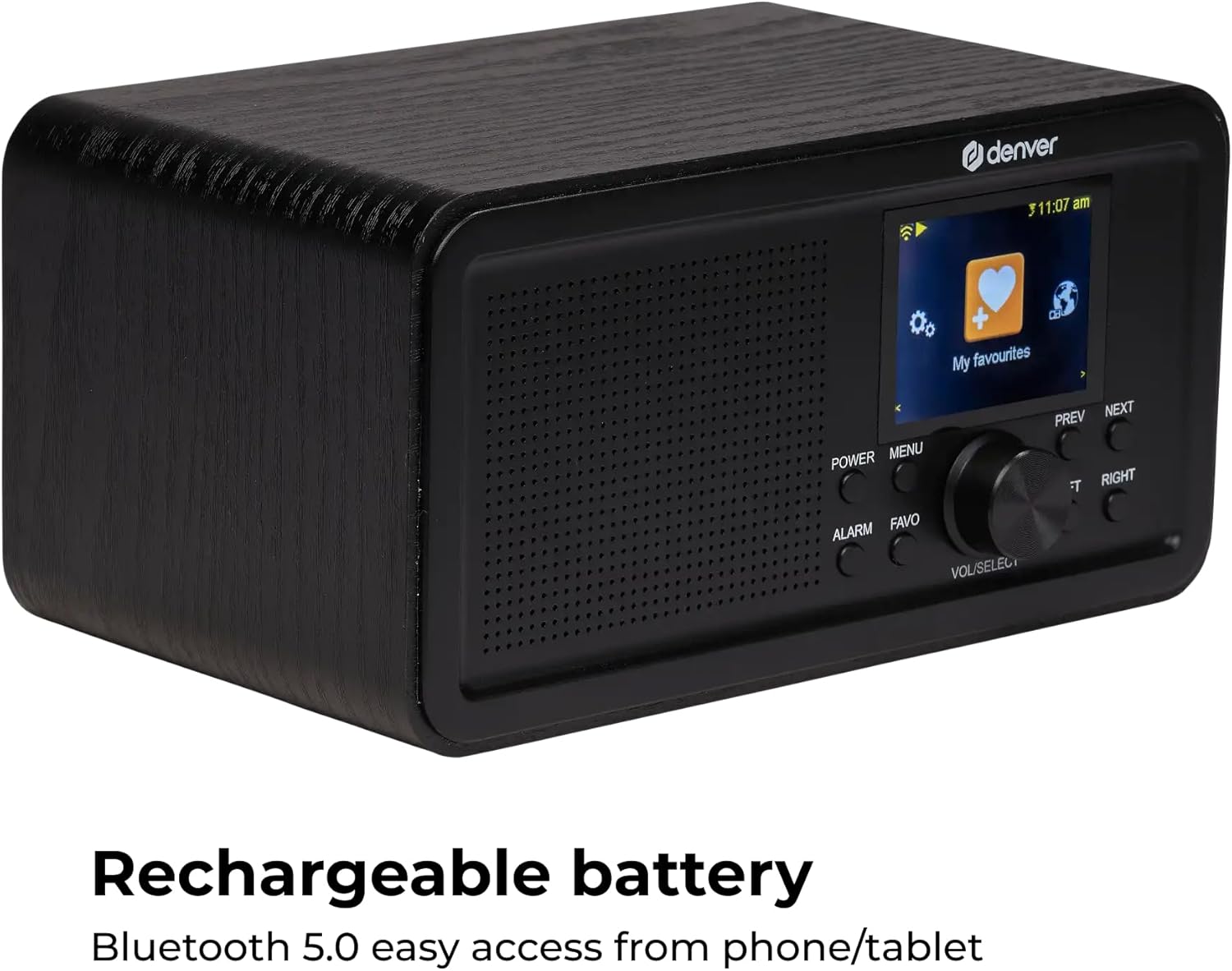
Image 4: Angled front view of the Denver DIR-200 Internet Radio, with the screen displaying the 'My favourites' menu. This image also emphasizes the compact design and control layout.
5. Setup
5.1 Powering On
- AC Power: Connect the supplied USB-C cable to the DC 5V port on the back of the radio and plug the adapter into a wall outlet.
- Battery Power: Open the battery compartment on the back and insert 4 x AA batteries (not included), ensuring correct polarity.
- Press the POWER button to turn on the radio.
5.2 Initial Setup (First Use)
- Upon first power-on, the radio will guide you through initial setup.
- Language Selection: Use the VOL/SELECT knob to scroll and select your preferred language, then press the knob to confirm.
- Network Setup: The radio will scan for available Wi-Fi networks. Select your network from the list.
- Enter Password: Use the VOL/SELECT knob to enter your Wi-Fi password. Press the knob to confirm each character and to finalize the entry.
- Once connected, the radio will display the main menu.
6. Operating Instructions
6.1 Basic Navigation
- POWER: Turns the radio on/off.
- MENU: Accesses the main menu or goes back to the previous screen.
- VOL/SELECT Knob: Rotate to adjust volume or scroll through menus. Press to confirm a selection.
- PREV/NEXT: Navigates through tracks or stations.
- LEFT/RIGHT: Navigates through menu options or settings.
- ALARM: Sets or manages alarms.
- FAVO: Accesses or saves favorite stations.
6.2 Internet Radio
- From the main menu, select Internet Radio.
- You can browse stations by location, genre, or search.
- Use the VOL/SELECT knob to navigate and select a station.
- To save a station as a favorite, press the FAVO button while listening.
6.3 DAB+ Radio
- From the main menu, select DAB+ Radio.
- The radio will perform a scan for available DAB+ stations.
- Use the VOL/SELECT knob to select a station from the list.
- To save a station as a favorite, press the FAVO button while listening.
6.4 FM Radio
- From the main menu, select FM Radio.
- Use the PREV/NEXT buttons to manually tune or press and hold to auto-scan for the next available station.
- To save a station as a favorite, press the FAVO button while listening.
6.5 Bluetooth Streaming
- From the main menu, select Bluetooth.
- The radio will enter pairing mode.
- On your smartphone or tablet, enable Bluetooth and search for "DIR-200".
- Select "DIR-200" to pair. Once connected, you can stream audio from your device to the radio.
6.6 UPnP Network Player
- Ensure your radio and media server (e.g., PC with media sharing enabled) are on the same Wi-Fi network.
- From the main menu, select UPnP or Network Player.
- The radio will scan for available media servers. Select your server and browse your music library.
6.7 Alarm Clock and Sleep Timer
- Setting Alarms: Press the ALARM button. Use the VOL/SELECT knob to set alarm time, source (buzzer, internet radio, DAB+, FM), and frequency.
- Snooze Function: When an alarm sounds, press any button (except Power) to activate snooze.
- Sleep Timer: Access the Sleep Timer option in the main menu or settings. Set a duration after which the radio will automatically turn off.
6.8 Sound Adjustment (Equalizer)
- Navigate to the Settings menu.
- Select Equalizer or Sound Settings.
- Adjust Bass and Treble levels using the VOL/SELECT knob to customize your audio experience.
7. Maintenance
- Cleaning: Use a soft, dry cloth to clean the radio's surface. Do not use liquid cleaners or abrasive materials.
- Storage: If storing for an extended period, remove the batteries to prevent leakage.
- Antenna: Handle the telescopic antenna carefully to avoid damage.
8. Troubleshooting
| Problem | Possible Cause | Solution |
|---|---|---|
| No power | Power adapter not connected; Batteries depleted or incorrectly inserted. | Check power connection; Replace batteries or ensure correct polarity. |
| Cannot connect to Wi-Fi | Incorrect password; Router too far; Network issues. | Re-enter password carefully; Move radio closer to router; Restart router. |
| Poor radio reception (DAB+/FM) | Antenna not extended; Weak signal area. | Fully extend the telescopic antenna; Reposition the radio. |
| Bluetooth pairing fails | Device not in pairing mode; Radio too far from source device. | Ensure radio is in Bluetooth pairing mode; Move devices closer; Restart Bluetooth on both devices. |
9. Specifications
- Model: DIR-200
- Tuner: Internet Radio (WLAN), DAB+, FM-RDS
- Bluetooth: Version 5.0
- Network Player: UPnP compatible
- Display: 2.4-inch Color LCD with backlight
- Favorite Presets: 20 per mode (DAB, FM, Internet)
- Speaker Output: 2 Watt RMS
- Antenna: Telescopic
- Alarm Functions: Dual alarm, Snooze, Sleep Timer
- Connectivity: Headphone Jack, AUX Input
- Power Supply: DC 5V (USB-C) or 4 x 1.5V AA batteries
- Dimensions: Approx. 20 x 10.2 x 13.7 cm (Length x Width x Height)
- Weight: 1000 grams
10. Warranty and Support
For warranty information and technical support, please refer to the warranty card included with your product or visit the official Denver website. Keep your proof of purchase for any warranty claims.
Manufacturer: Denver
Model Number: DIR-200


