
Magshion MAG-A02-GC-RS-001
Magshion Ergonomic Video Gaming Chair Instruction Manual
Model: MAG-A02-GC-RS-001
Introduction
This manual provides detailed instructions for the assembly, operation, and maintenance of your Magshion Ergonomic Video Gaming Chair. Please read this manual thoroughly before assembly and use to ensure proper function and longevity of your product.
Safety Information
- Ensure all parts are present and undamaged before assembly. Do not use if any parts are missing or defective.
- Follow assembly instructions carefully. Incorrect assembly may lead to instability or injury.
- Do not stand on the chair.
- Do not use the chair as a step stool.
- Do not exceed the maximum weight capacity of 350 pounds.
- Keep children and pets away from the assembly area.
- Periodically check all bolts and connections to ensure they remain tight.
Setup and Assembly
Assembly typically takes 15-20 minutes. All necessary tools are included. For a visual guide, please refer to the assembly video below.
Parts List
Before starting, verify that all components are present:
- Chair Backrest
- Seat Cushion with Mechanism
- Armrests (2)
- Five-Star Base
- Gas Lift Cylinder
- Gas Lift Cover
- Casters (5)
- Headrest Pillow
- Lumbar Support Pillow
- Footrest Assembly
- Hardware Kit (bolts, washers, Allen wrench)
Assembly Steps
- Attach Casters to Base: Insert each of the five casters into the holes at the end of the five-star base until they click securely into place.
- Install Gas Lift: Place the gas lift cylinder into the center hole of the five-star base. Cover it with the gas lift cover.
- Attach Seat to Gas Lift: Carefully place the seat cushion assembly onto the top of the gas lift cylinder, ensuring it is centered and stable.
- Secure Backrest: Align the backrest with the seat mechanism. Use the provided bolts and Allen wrench to securely fasten the backrest to the seat.
- Install Armrests: Attach the armrests to the sides of the seat and backrest using the provided bolts and lock washers. Ensure they are tightened securely. Place the plastic caps over the bolt holes for a finished look.
- Attach Headrest and Lumbar Pillows: Secure the headrest pillow and lumbar support pillow to the chair backrest using their integrated straps. Adjust their positions for optimal comfort.
- Install Footrest: Slide the footrest assembly into the designated slots under the seat cushion.

Figure 1: Product Dimensions and Weight Capacity. This diagram illustrates the chair's various measurements and its maximum supported weight.

Figure 2: Durable Construction. This image shows the robust internal iron frame and the wear-resistant PU leather material of the chair.
Assembly Video
Video 1: Magshion Computer Gaming Chair Assembly. This video demonstrates the step-by-step assembly process for the gaming chair, including attaching the base, seat, backrest, and armrests.
Operating Instructions
Height Adjustment
To adjust the seat height, locate the "LIFT" lever on the right side under the seat. Pull the lever upwards while applying or releasing weight from the seat to move it up or down. Release the lever to lock the height.
Backrest Recline
The backrest can be reclined from 90° to 120°. Locate the "LOCK" lever on the left side under the seat. Pull the lever upwards to unlock the recline, lean back to your desired angle, and then push the lever downwards to lock the backrest in position. The linkage armrests will automatically adjust with the recline.
Footrest Operation
To extend the footrest, pull it out from underneath the seat cushion. Flip the padded section over to create a comfortable leg rest. To retract, simply push it back under the seat.
Lumbar and Headrest Pillow Adjustment
The headrest and lumbar support pillows are adjustable. Slide them up or down along the straps on the backrest to find your preferred support position.
360° Swivel and Mobility
The chair features a 360° swivel function and smooth-rolling casters for easy movement across various floor surfaces without scratching.

Figure 3: Multi-Function Adjustments. This image highlights the various adjustable features of the chair for personalized comfort.
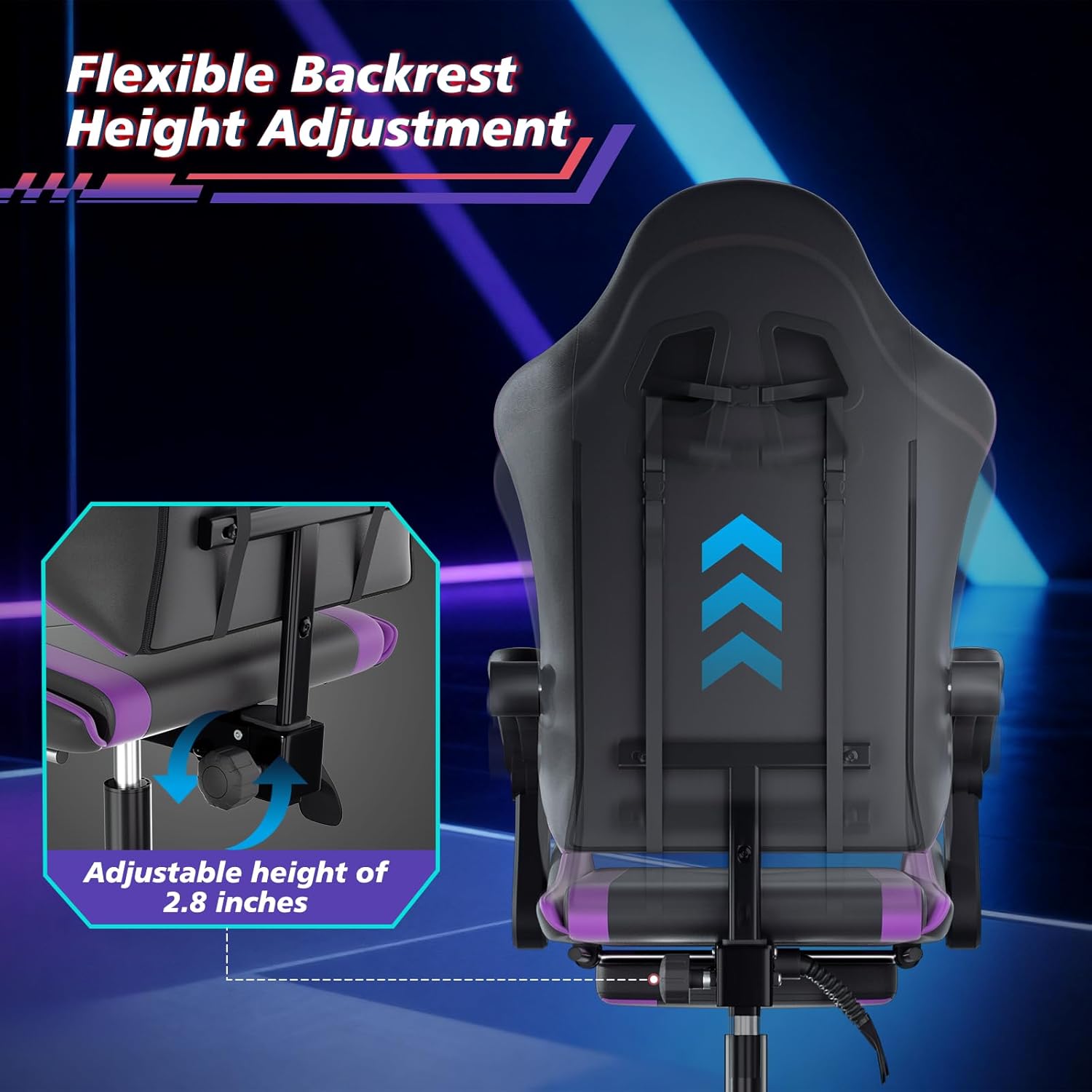
Figure 4: Flexible Backrest Height Adjustment. This image details how to adjust the backrest height for optimal spinal alignment.

Figure 5: Stable Support and Smooth Movement. This image showcases the robust base components ensuring stability and easy maneuverability.
Maintenance
Cleaning
The chair is made with wear-resistant PU leather. For general cleaning, wipe down the surface with a damp cloth and mild soap. Avoid harsh chemicals or abrasive cleaners. Dry thoroughly after cleaning.
General Care
- Regularly check and tighten all bolts and screws to maintain stability.
- Avoid prolonged exposure to direct sunlight to prevent material degradation.
- Do not place sharp objects on the chair to prevent punctures or tears.
Troubleshooting
| Problem | Possible Cause | Solution |
|---|---|---|
| Chair is wobbly/unstable. | Loose bolts or improper assembly. | Check all assembly bolts and tighten them securely. Ensure casters are fully inserted. |
| Height adjustment not working. | Gas lift lever not engaged or gas lift cylinder issue. | Ensure the "LIFT" lever is fully pulled up. If the issue persists, the gas lift cylinder may need replacement. |
| Backrest not reclining/locking. | Recline lever not engaged or mechanism obstruction. | Ensure the "LOCK" lever is fully engaged or disengaged. Check for any obstructions in the recline mechanism. |
| Casters not rolling smoothly. | Debris in casters or damaged casters. | Clean any hair or debris from the caster wheels. If damaged, casters may need replacement. |
Specifications
- Brand: Magshion
- Model Name: MAG-A02-GC-RS-001
- Product Dimensions: 24.5"D x 22"W x 45.5"H
- Maximum Weight Recommendation: 350 Pounds
- Material: Faux Leather, High-Density Original Sponge (Fill Material)
- Back Style: Open Back
- Arm Style: Linkage Armrest
- Special Features: Adjustable Height, Adjustable Lumbar, Arm Rest, Ergonomic, Head Support, Tilting, Built-in Footrest
- Furniture Base Movement: Swivel
- Recommended Uses: Computer, Gaming, Office, Relaxing, Video Game
- Item Weight: 36.2 pounds
Warranty Information
For specific warranty details and terms, please refer to the documentation included with your purchase or contact Magshion customer support directly. Warranty coverage may vary based on region and retailer.
Customer Support
If you encounter any issues during assembly, operation, or require further assistance, please contact Magshion customer support. Contact information can typically be found on the product packaging or the official Magshion website.