
1. Introduction
Thank you for choosing the ILOUYU H9 Magnetic Wireless Charger. This user manual provides essential information for the safe and efficient operation of your new charging stand. Please read this manual thoroughly before use and retain it for future reference.
2. Package Contents
Ensure all items are present in your package:
- 2 x Magnetic Wireless Charging Stands
- 2 x USB-C to USB-C Cables
- 1 x User Manual

Figure 1: Package Contents
3. Product Overview
The ILOUYU H9 Magnetic Wireless Charger is designed for convenient and fast charging of compatible smartphones and earbuds. Its foldable design allows for versatile use as a charging stand or a flat charging pad, making it ideal for home, office, or travel.
Key Features:
- 15W Fast Wireless Charging: Delivers up to 15W power for rapid charging of compatible devices.
- Strong Magnetic Alignment: Built-in N54 magnets ensure secure and precise alignment for optimal charging.
- Foldable & Adjustable Design: Transforms into a phone stand with adjustable angles for comfortable viewing in both portrait and landscape orientations.
- 2-in-1 Charging: Simultaneously charges a smartphone on the magnetic stand and earbuds on the base.
- Compact and Portable: Easily folds for convenient storage and transport.

Figure 2: Foldable Design for Portability and Stand Functionality

Figure 3: Simultaneous Charging of Phone and Earbuds
4. Setup Instructions
- Connect to Power: Connect one end of the provided USB-C to USB-C cable to the charging port on the back of the ILOUYU H9 charging stand. Connect the other end to a compatible power adapter (a 15W/20W or higher Power Delivery (PD) adapter is recommended for maximum charging speed, not included).
- Placement: Place the charging stand on a stable, flat surface.
- Unfold the Stand: Gently unfold the magnetic charging pad upwards to transform it into a stand. Adjust the angle to your preferred viewing position.

Figure 4: Phone Charging on Magnetic Stand
5. Operating Instructions
Charging a Smartphone:
- Ensure your smartphone is compatible with magnetic wireless charging (e.g., iPhone 12 series and newer) or is equipped with a MagSafe-compatible case. For Samsung devices, a magnetic case is required to achieve the magnetic effect.
- Place your smartphone onto the magnetic charging pad. The strong magnets will automatically align your device for optimal charging.
- The phone can be charged in both portrait and landscape orientations, allowing for hands-free viewing of content or video calls while charging.
Charging Earbuds:
- Ensure your earbuds charging case supports wireless charging (e.g., AirPods 2/3/Pro 2/3).
- Place the earbuds charging case on the flat charging base of the stand. Charging will begin automatically.
6. Compatibility
The ILOUYU H9 Magnetic Wireless Charger is compatible with a wide range of devices:
- iPhone Series: iPhone 17/17 Air/17 Pro/17 Pro Max, iPhone 16/16 Plus/16 Pro/16 Pro Max, iPhone 15/15 Plus/15 Pro/15 Pro Max, iPhone 14/14 Plus/14 Pro/14 Pro Max, iPhone 13/13 Mini/13 Pro/13 Pro Max, iPhone 12/12 Mini/12 Pro/12 Pro Max.
- Earbuds: AirPods 3/2/Pro 2/3 (requires wireless charging case).
- Samsung Galaxy: S25/S25+/S25 Ultra, S24/S24+/S24 Ultra, S23/S23+/S23 Ultra, S22/S22+/S22 Ultra, S21/S21 FE/S21+/S21 Ultra, S20/S20 FE/S20+/S20 Ultra. Note: Samsung devices require a magnetic case for optimal magnetic attachment.
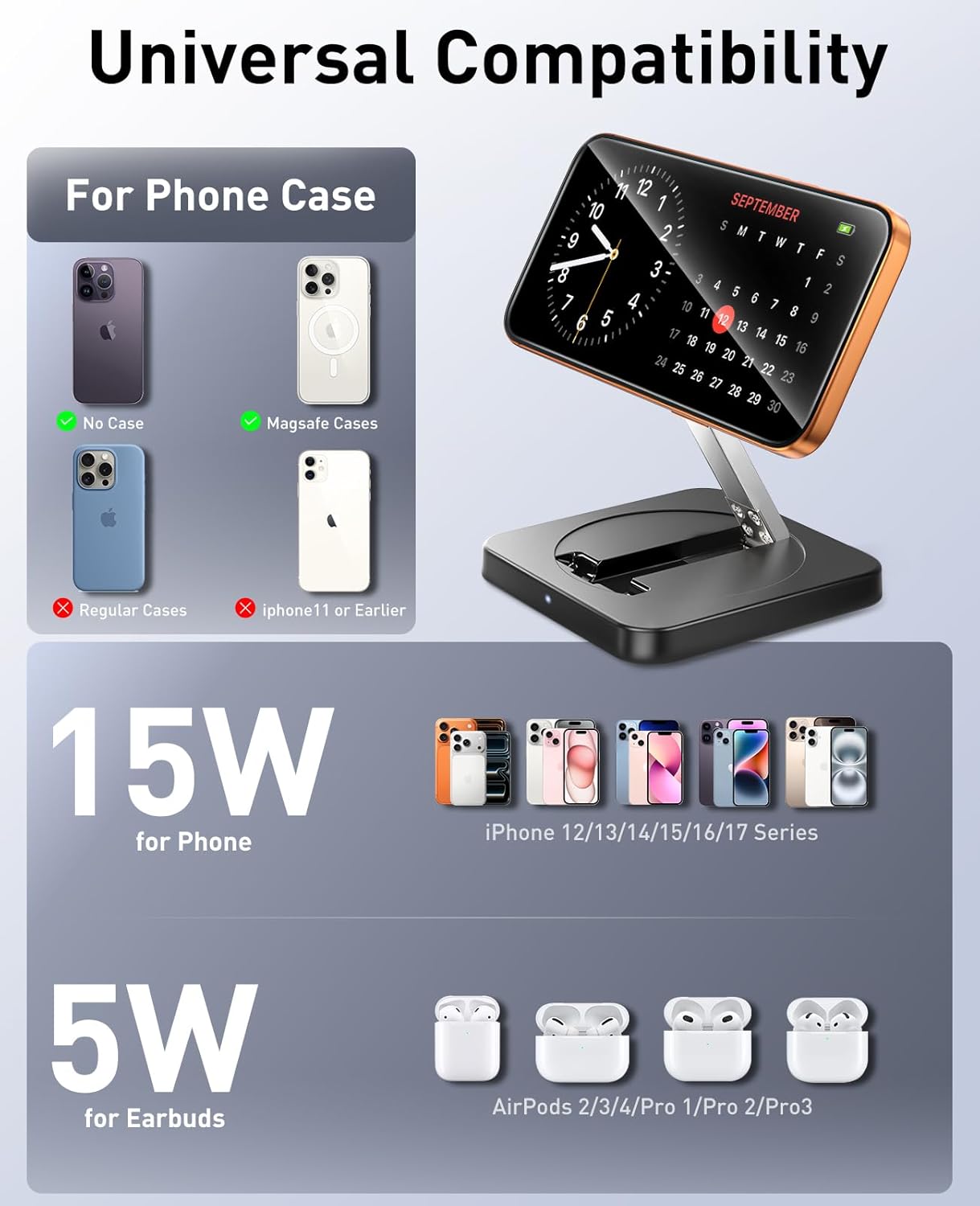
Figure 5: Device and Case Compatibility
7. Specifications
| Model Number | H9 |
| Brand | ILOUYU |
| Package Dimensions | 8.9 x 3.43 x 0.75 inches |
| Item Weight | 8.8 ounces |
| Connector Type | USB Type C |
| Input Voltage | 120 Volts |
| Output Current | 2 Amps |
| Number of Items | 2 |
| Special Features | Fast Charging, Magnetic, MagSafe Compatible, Travel, Wireless Charging |
8. Safety Information
To ensure safe operation and prevent damage to your device or the charger, please observe the following:
- Use only a compatible power adapter (15W/20W PD or higher recommended). Using an adapter below 10W may result in slower charging or overheating.
- Avoid placing metal objects or foreign materials between your device and the charging pad, as this can interfere with charging and cause overheating.
- Do not expose the charger to extreme temperatures, humidity, or liquids.
- Do not disassemble, modify, or attempt to repair the charger.
- Keep the charger away from strong magnetic fields to prevent interference.
- The elevated charging pad design helps protect iPhone cameras from scratches during placement.

Figure 6: Built-in Safety Protections
9. Troubleshooting
- Device not charging:
- Ensure the charger is properly connected to a working power outlet and a compatible power adapter.
- Verify your device is placed correctly on the charging pad and aligned with the magnetic area.
- Remove any thick or non-magnetic cases from your device. For Samsung devices, a magnetic case is essential for proper function.
- Check for any foreign objects between the device and the charger.
- Slow charging:
- Ensure you are using a 15W/20W or higher PD power adapter. Adapters below 10W will result in slower charging.
- Confirm your device supports 15W fast wireless charging.
- Avoid using your device extensively while charging, as this can slow down the charging process.
- Weak magnetic attachment:
- Ensure your phone case is MagSafe-compatible. Non-compatible cases may weaken the magnetic hold.
- For Samsung devices, a magnetic case is required for a strong magnetic connection.
- Charger or device getting hot:
- Some heat generation during wireless charging is normal. However, excessive heat may indicate an issue.
- Ensure there are no foreign objects on the charging pad.
- Disconnect the charger and allow it to cool down. If the issue persists, contact customer support.
10. Maintenance
- Clean the charger regularly with a soft, dry cloth. Do not use harsh chemicals or abrasive materials.
- Store the charger in a cool, dry place when not in use.
- Avoid dropping or subjecting the charger to strong impacts.
11. Warranty and Support
The ILOUYU H9 Magnetic Wireless Charger comes with a 24-month warranty from the date of purchase. This warranty covers manufacturing defects and ensures your product is free from material and workmanship flaws under normal use.
For warranty claims, technical support, or any questions regarding your product, please contact our customer service team through the retailer where you purchased the product. Please have your purchase receipt and product model number (H9) ready when contacting support.