
1. Introduction
Thank you for purchasing the QVUUOU 47-inch Makeup Vanity Desk. This manual provides detailed instructions for assembly, operation, maintenance, and troubleshooting to ensure safe and efficient use of your new vanity desk. Please read this manual thoroughly before assembly and retain it for future reference.
2. Safety Information
Please observe the following safety precautions during assembly and use:
- Keep all small parts and packaging materials away from children and pets to prevent choking hazards.
- Assemble the vanity desk on a soft, clean surface to prevent scratches.
- Ensure all screws and fasteners are securely tightened before use. Periodically check and retighten as necessary.
- Do not overload drawers or shelves. Distribute weight evenly.
- Avoid placing hot items directly on the surface. Use protective pads if necessary.
- Keep electrical components (LED mirror) away from water and moisture.
- Do not attempt to modify or repair the electrical components yourself. Contact qualified personnel for service.
- The vanity desk features rounded corners for safety, but exercise caution to prevent bumps and injuries.
3. Package Contents
Verify that all components are present before beginning assembly. If any parts are missing or damaged, please contact customer support.
- Vanity Desk Top
- LED Mirror Assembly
- Desk Legs (2)
- Side Storage Cabinet with 3 Drawers
- Desk Drawers (2)
- Hardware Pack (screws, bolts, Allen wrench, etc.)
- Instruction Manual
4. Assembly Instructions
Follow these steps carefully for proper assembly. Two people are recommended for certain steps.
- Unpack and Identify Parts: Carefully remove all components from the packaging. Lay them out on a soft, clean surface. Refer to the parts list to identify each piece.
- Attach Desk Legs: Secure the two desk legs to the underside of the main vanity desk top using the provided hardware. Ensure they are firmly attached and stable.
- Install Desk Drawers: Slide the two main desk drawers into their respective slots on the vanity desk top. Ensure they glide smoothly. These drawers feature elegant rattan fronts and metal handles.
- Position Side Storage Cabinet: Place the side storage cabinet next to the main desk. This cabinet includes three additional drawers for ample storage.
- Mount LED Mirror Assembly: Carefully attach the LED mirror assembly to the back of the vanity desk top. Ensure all connections are secure. The mirror unit also includes integrated storage shelves.

Figure 4.1: Fully assembled vanity desk with mirror and side cabinet.
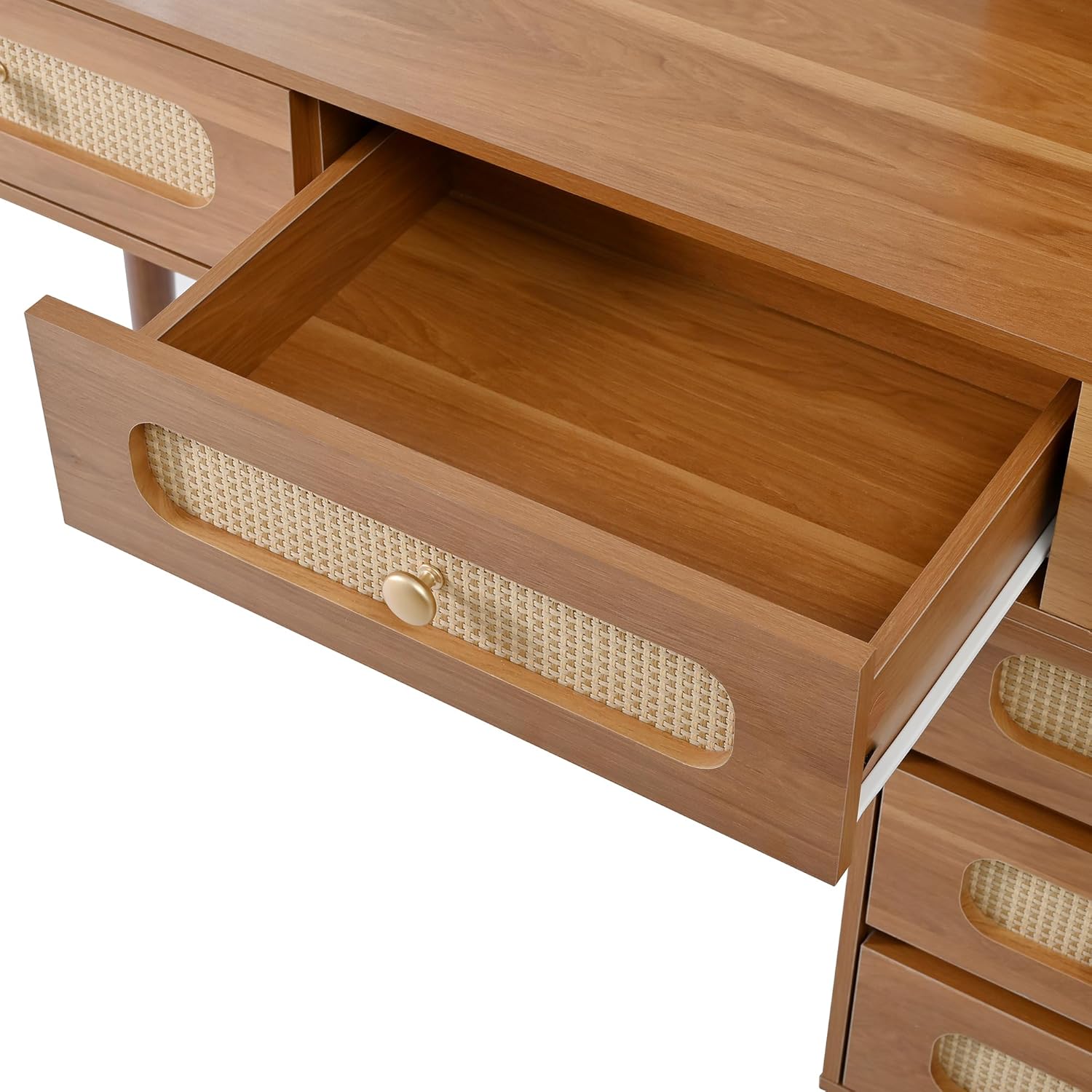
Figure 4.2: Detail of a desk drawer, highlighting the rattan front and handle.

Figure 4.3: The separate side storage cabinet with three drawers, providing additional organization.
5. Operating Instructions
This vanity desk features an integrated LED mirror with adjustable lighting.
5.1 LED Mirror Operation
- Power On/Off and Color Mode Change: Locate the touch sensor on the mirror surface. A single short touch will turn the lights on or off. Subsequent short touches will cycle through the three available light color modes: White, Warm White, and Cool White.
- Adjust Brightness (Dimming): When the mirror lights are on, press and hold the touch sensor. The brightness will smoothly dim or brighten. Release the sensor when the desired brightness level is achieved.

Figure 5.1: Illustration of the LED mirror's 3 color modes (Cold White, Warm White, Warm Yellow) and adjustable brightness feature.
6. Maintenance
Proper care will extend the life and appearance of your vanity desk.
- Cleaning the Wood Surfaces: Wipe wood surfaces with a soft, damp cloth. Avoid harsh chemicals or abrasive cleaners that can damage the finish. Dry immediately with a clean cloth.
- Cleaning the Rattan: Gently dust the rattan drawer fronts with a soft brush or a vacuum cleaner with a brush attachment. For deeper cleaning, wipe with a slightly damp cloth and dry thoroughly.
- Cleaning the Mirror: Use a standard glass cleaner and a lint-free cloth to clean the mirror surface. Spray cleaner onto the cloth, not directly onto the mirror, to prevent liquid from seeping into the electrical components.
- Hardware: Periodically check all screws and fasteners to ensure they remain tight. Retighten as needed.
- Avoid Direct Sunlight: Prolonged exposure to direct sunlight can cause fading or damage to the wood finish.
7. Troubleshooting
If you encounter any issues, refer to the following common problems and solutions:
| Problem | Possible Cause | Solution |
|---|---|---|
| LED mirror lights do not turn on. | Power cable not connected; power outlet issue; touch sensor malfunction. | Ensure the power cable is securely plugged into both the mirror and a working electrical outlet. Try a different outlet. If the issue persists, contact customer support. |
| Lights are stuck on one color or brightness. | Touch sensor not responding correctly. | Ensure your finger is clean and dry when touching the sensor. Try a short press for color change and a long press for dimming. If unresponsive, unplug and replug the mirror to reset. |
| Drawers are difficult to open or close. | Misalignment during assembly; overloaded drawer; debris in tracks. | Check that the drawer slides are properly aligned and free of obstructions. Reduce the weight in the drawer. Ensure all assembly screws are tight. |
| Vanity desk feels unstable. | Loose connections; uneven floor. | Check and tighten all assembly screws, especially those for the legs. If the floor is uneven, use furniture pads or shims under the legs to stabilize. |
8. Specifications
Key technical details for the QVUUOU Makeup Vanity Desk:
| Feature | Detail |
|---|---|
| Model | B0FWB7FYXP |
| Color | Walnut |
| Material | Wood |
| Overall Dimensions (L x W x H) | 47.24" x 13.78" x 47.24" |
| Item Weight | 75.2 Pounds |
| Number of Drawers | 5 |
| LED Mirror Features | 3 Color Modes (White, Warm White, Cool White), Dimmable Brightness |
| Assembly Required | Yes |

Figure 8.1: Detailed product dimensions for the vanity desk.
9. Warranty and Customer Support
For any questions, missing parts, or issues not covered in this manual, please contact QVUUOU customer support. Please have your model number (B0FWB7FYXP) and purchase information ready when contacting support.
Specific warranty details may vary by region and retailer. Please refer to your purchase documentation or contact customer support for warranty information.