
1. Product Overview
The Pawfly CW4324 Aquarium Light is a full-spectrum LED lighting system designed for 30-36 inch fish tanks. It features Bluetooth app control, adjustable brightness, and multiple timer modes to simulate natural day-night cycles. The light is constructed with an aluminum shell for efficient heat dissipation and offers two placement options for versatility.
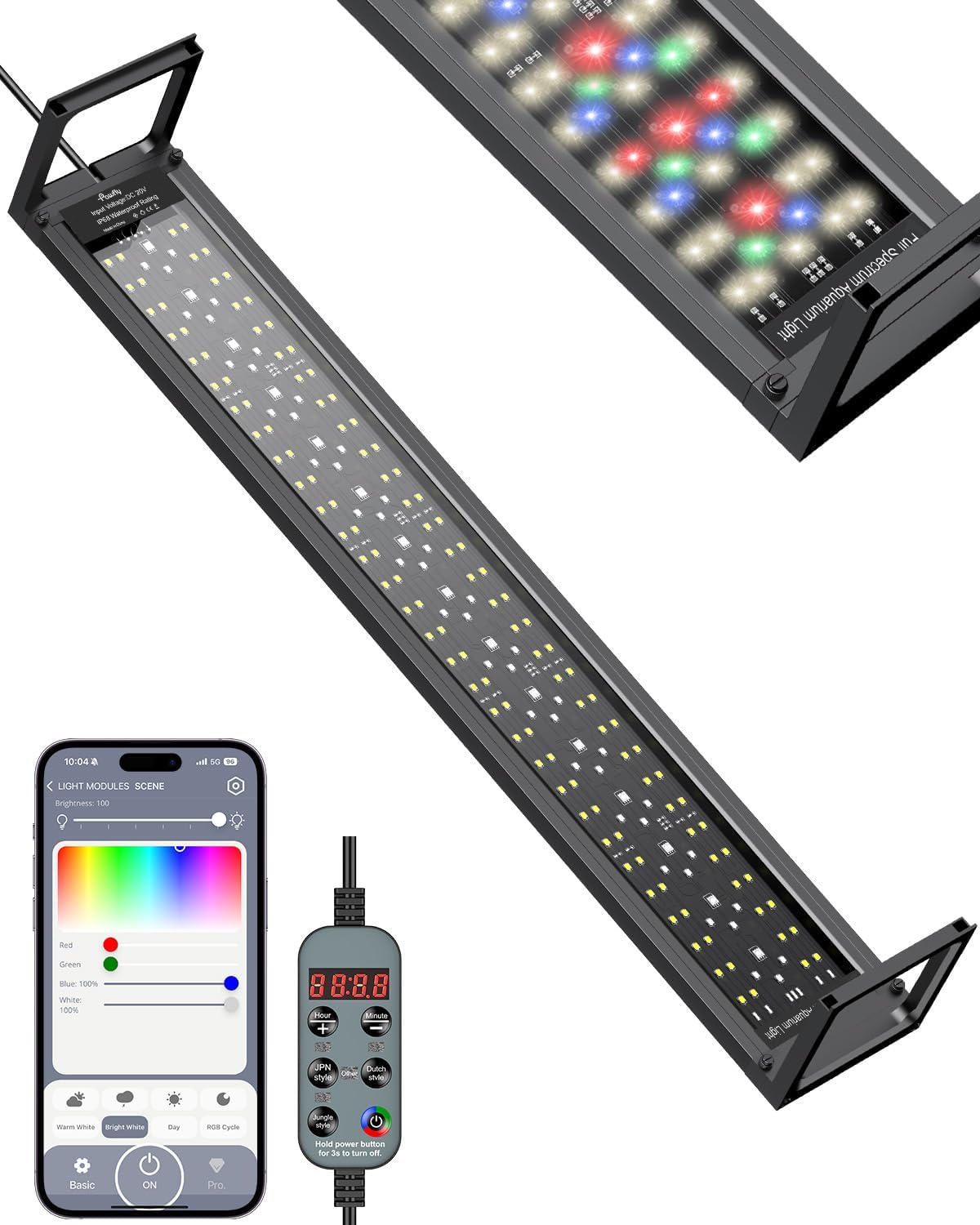
Image: The Pawfly CW4324 Aquarium Light, showcasing its sleek design and extendable brackets.
2. Package Contents
Verify that all components are present in the package:
- 1 x Pawfly CW4324 Aquarium Light Unit
- 1 x Power Adapter
- 2 x Extendable Mounting Brackets
- 1 x Inline Controller
3. Setup and Installation
3.1 Attaching Mounting Brackets
- Carefully unpack the aquarium light and its components.
- Slide the extendable mounting brackets onto each end of the light fixture. Ensure they are securely fitted into the designated slots.
- Adjust the brackets to match the width of your aquarium. The light is designed for tanks between 30 and 36 inches (76.2-91.4 cm).
- Place the light fixture onto the rim of your aquarium. Ensure the light is stable and centered over the tank.

Image: The aquarium light with extendable side brackets installed on a fish tank, illustrating its adjustable length.
3.2 Power Connection
- Connect the power adapter to the light fixture's inline controller.
- Plug the power adapter into a suitable electrical outlet. Ensure the outlet is protected from water splashes.
3.3 App Download and Connection
The Pawfly CW4324 light can be controlled via a Bluetooth app. For optimal performance, ensure your app is updated to the latest version.
- Download the "P-light controller" app from your device's app store (available for iOS and Android).
- Enable Bluetooth on your smartphone or tablet.
- Open the P-light controller app. The app will search for available devices.
- Select the Pawfly light from the list of discovered devices to establish a connection. The default PIN is 12345678.

Image: Screenshot of the P-light controller app interface, showing Bluetooth connectivity and app store download icons.
4. Operating Instructions
4.1 Dual Control: Inline Controller and Bluetooth App
The light can be operated using both the physical inline controller and the Bluetooth app, offering flexibility in managing your aquarium lighting.

Image: Illustration of the dual control options: the physical inline controller and the intuitive Bluetooth app.
4.2 Inline Controller Functions
The inline controller provides quick access to essential light settings:

Image: Detailed view of the light controller, highlighting buttons for brightness, time settings, and timer modes.
- Hour Button: Increase brightness and set the start hour for timers.
- Minute Button: Decrease brightness and set the start minute for timers.
- JPN Style Button: Activates the Japanese Style Timer Mode.
- Dutch Style Button: Activates the Dutch Style Timer Mode.
- Jungle Style Button: Activates the Jungle Style Timer Mode.
- Dynamic Color Mode & On/Off Button: Toggles dynamic color modes and powers the light on/off.
4.3 Bluetooth App Control
The app offers comprehensive control over brightness, colors, and timer settings.
4.3.1 Brightness and Color Adjustment
- Adjustable Brightness: Use the app's slider to set the light intensity from 1% to 100%.
- 100,000+ Color Choices: Access a wide spectrum of colors to customize your aquarium's appearance.
- Independent WRGB Color Adjustment: Fine-tune the intensity of White, Red, Green, and Blue LEDs individually for precise color mixing.

Image: The app's color and brightness adjustment interface, demonstrating the range of customization options.
4.3.2 24/7 Timer Modes
The app allows you to set automatic day-night cycles to mimic natural light patterns.
- Pre-set Modes: Choose from Dutch, Jungle, and Japanese timer modes to automatically turn the LED light on and off, simulating sunrise to night.
- Customizable DIY Timers: Create up to three personalized 24/7 day-night cycles. Note: DIY timers must be set before first use.

Image: A visual representation of the 24/7 natural day-night cycle, showing light intensity changes throughout the day.

Image: The app's timer mode selection screen, illustrating the choice between pre-set and customizable 24/7 cycles.
5. Maintenance
Regular maintenance ensures the longevity and optimal performance of your aquarium light.
- Cleaning: The light fixture is IP68 waterproof, allowing for safe cleaning. Gently wipe the LED surface with a soft, damp cloth to remove any water spots or algae buildup. Ensure the power is disconnected before cleaning.
- Heat Dissipation: The enhanced aluminum shell is designed for quick heat dissipation. Ensure the light's vents are not obstructed to maintain proper airflow.
- Cable Inspection: Periodically check the power cord and connections for any signs of damage or wear. Replace if necessary.

Image: Cross-section view of the light's aluminum shell demonstrating heat dissipation, alongside illustrations of bracket and surface mount options.
6. Troubleshooting
If you encounter issues with your Pawfly CW4324 Aquarium Light, refer to the following common solutions:
- Light Not Turning On:
- Ensure the power adapter is securely plugged into both the light and the electrical outlet.
- Check if the outlet is functional by plugging in another device.
- Verify the inline controller's on/off button is pressed.
- App Connectivity Issues:
- Ensure Bluetooth is enabled on your mobile device.
- Restart the app and try reconnecting.
- Ensure the light is within Bluetooth range.
- Update the app to its latest version.
- If the app is unresponsive, try resetting the light by unplugging it for 30 seconds and then reconnecting.
- LEDs Not Functioning Correctly (e.g., specific colors not lighting up):
- Check app settings for individual color channel adjustments. Ensure no specific color is set to 0% brightness.
- If the issue persists, contact customer support.
- Timer Modes Not Working as Expected:
- Verify that the correct timer mode is selected in the app or via the inline controller.
- For DIY timers, ensure they were set up and saved correctly before first use.
- Check the device's time settings to ensure they are accurate.
- Green Tint in Light Output:
- Adjust the individual green LED intensity via the app to reduce or eliminate any unwanted green tint.
7. Specifications
| Feature | Specification |
|---|---|
| Model Number | CW4324 |
| Power Source | Corded Electric |
| Wattage | 24 Watts |
| Light Source Type | LED (Full Spectrum: 6500 K white, 660 nm red, 525 nm green, 455 nm blue) |
| PAR | 100 |
| LUX | 5500 |
| CRI | 96 |
| Control Method | Bluetooth App, Inline Controller |
| Material | Aluminum |
| Finish Type | Painted |
| Mounting Type | Bracket Mount, Surface Mount |
| Item Dimensions (L x W x H) | 4.72"L x 2.95"W x 29.84"H (for 30-36 inch model) |
| Waterproof Rating | IP68 |
Image: Detailed view of the LED chips, highlighting the full spectrum and high Color Rendering Index (CRI 96) for vibrant colors.
8. Warranty and Support
8.1 Manufacturer Warranty
The Pawfly CW4324 Aquarium Light comes with a 1-year manufacturer warranty from the date of purchase. This warranty covers defects in materials and workmanship under normal use.
The warranty does not cover damage resulting from:
- Improper installation or use.
- Accidental damage, misuse, or abuse.
- Unauthorized repairs or modifications.
- Normal wear and tear.
8.2 Customer Support
For technical assistance, warranty claims, or any questions regarding your Pawfly Aquarium Light, please contact Pawfly customer support through their official channels or the retailer where the product was purchased.
You can often find contact information on the Pawfly brand store page or through the 'Contact Seller' option on the product's purchase platform.
