
Introduction
Thank you for choosing the edx Computer Gaming Chair. This manual provides essential information for the proper assembly, operation, maintenance, and troubleshooting of your new chair. Please read these instructions carefully before use to ensure safe and optimal performance.
Safety Information
- Ensure all components are securely fastened before use.
- Do not stand on the chair.
- Do not use the chair if any parts are damaged or missing.
- Keep children away from moving parts during adjustment.
- Maximum weight recommendation: 250 Pounds (113 kg).
Setup and Assembly
Assembly is required for this chair. Please follow the steps below carefully. It is recommended to assemble the chair on a soft, clean surface to prevent damage.
- Unpack Components: Carefully remove all parts from the packaging and verify against the parts list (not provided in this manual, refer to your product packaging).
- Attach Casters to Base: Insert the five casters into the holes at the end of each leg of the chair base. Push firmly until they click into place.
- Insert Gas Lift: Place the gas lift cylinder into the center hole of the chair base.
- Assemble Seat and Backrest: Attach the backrest to the seat base using the provided screws and tools. Ensure proper alignment.
- Attach Armrests: Secure the armrests to the seat base and backrest using the designated screws.
- Attach Mechanism to Seat: Fasten the control mechanism to the underside of the seat using screws. Ensure the front of the mechanism faces the front of the seat.
- Connect Seat to Gas Lift: Carefully place the assembled seat onto the gas lift cylinder, ensuring it is centered and stable.
- Attach Headrest and Lumbar Pillows: Position the headrest and lumbar support pillows as desired. These are typically adjustable or detachable.
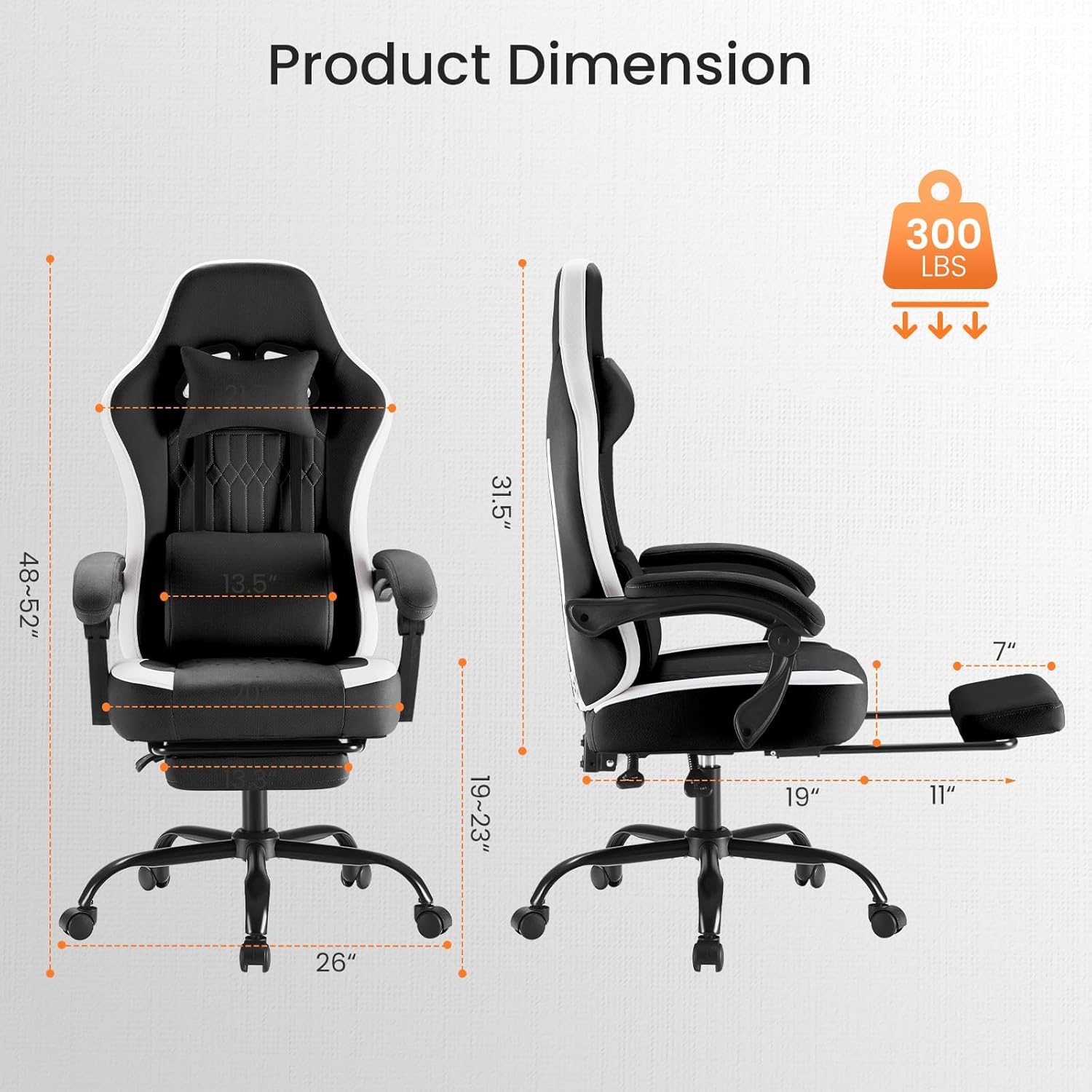
Image: An assembled edx gaming chair, showing its full profile and various components. This image represents the final assembled product.
Operating Instructions
Your edx gaming chair offers several adjustable features to customize your seating experience.
1. Seat Height Adjustment
- To raise the seat: Lift the lever located under the right side of the seat while taking your weight off the chair.
- To lower the seat: Lift the lever while seated on the chair.
- Release the lever to lock the seat at the desired height.

Image: Diagram illustrating the multi-function flexible adjustment features, including the smooth lift lever for height adjustment and the retractable footrest.
2. Backrest Recline Adjustment
- Pull the recline lever (usually on the right side, near the seat).
- Lean back to recline the backrest to your desired angle (90°, 105°, 135°).
- Release the lever to lock the backrest in position.

Image: Visual representation of the chair reclining at different angles (90, 105, 135 degrees), highlighting the backrest tilt adjustment, 360-degree swivel, and seat height adjustment.
3. Retractable Footrest
- To extend the footrest: Pull the footrest handle located under the front of the seat.
- To retract the footrest: Push the footrest back under the seat until it is fully stored.
4. Linkage Armrests
- The armrests are designed to move in sync with the backrest's recline, providing continuous support. They do not require separate adjustment.

Image: Close-up of the linkage armrest mechanism, showing how it provides high-capacity support and adapts during working and breaking times.
5. 360-Degree Swivel
- The chair features a 360-degree swivel base with durable wheels for easy rotation and movement.
Maintenance and Care
Proper maintenance will extend the life and appearance of your edx gaming chair.
- Cleaning: Spot clean with a damp cloth. For tougher stains, use a mild soap solution and wipe gently. Avoid harsh chemicals or abrasive cleaners.
- Inspection: Periodically check all screws and bolts to ensure they are tight. Re-tighten if necessary.
- Caster Care: Keep casters free of hair and debris to ensure smooth rolling.
- Material Care: The chair features leather-like fabric that is durable and scratch-resistant. Wipe spills immediately.
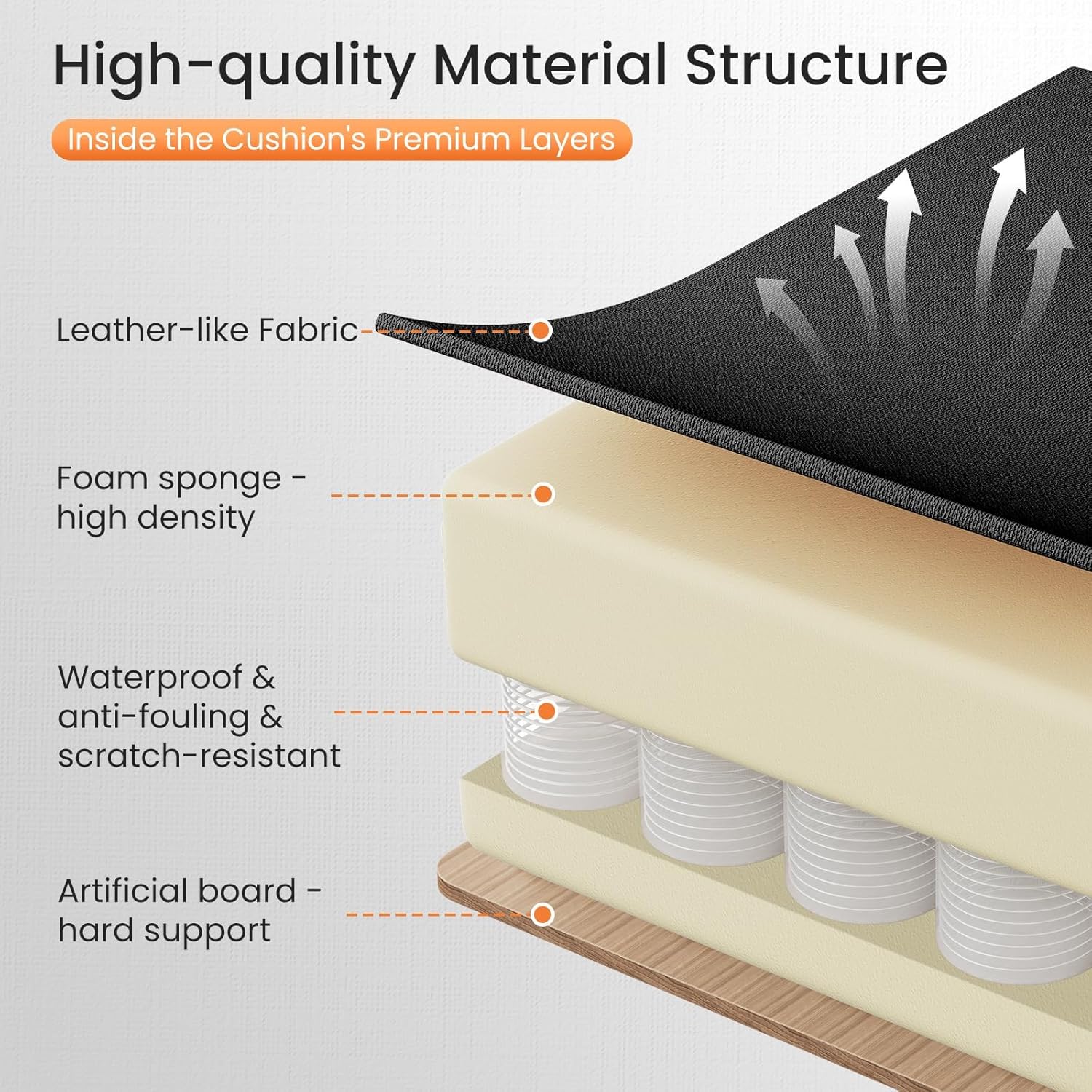
Image: Cross-section diagram showing the high-quality material structure of the cushion, including leather-like fabric, high-density foam sponge, and artificial board for hard support.
Troubleshooting
| Problem | Possible Cause | Solution |
|---|---|---|
| Chair does not adjust height. | Gas lift not engaged or faulty; lever not fully pulled. | Ensure the lever is fully pulled. If the issue persists, contact customer support for a replacement gas lift. |
| Chair wobbles or feels unstable. | Loose screws or bolts; uneven floor. | Check and tighten all assembly screws. Ensure the chair is on a flat, even surface. |
| Casters do not roll smoothly. | Debris caught in casters; damaged casters. | Remove any hair or debris from the caster wheels. If damaged, casters may need replacement. |
| Backrest does not recline or lock. | Recline mechanism jammed or faulty; lever not fully engaged. | Ensure the recline lever is fully pulled or pushed. Check for any obstructions. If faulty, contact customer support. |
Specifications
| Feature | Detail |
|---|---|
| Brand | edx |
| Model Name | Edx-gc01 |
| Color | Black |
| Material | Textile, Foam Padding (Seat), Foam (Fill) |
| Frame Material | Wood |
| Product Dimensions (D x W x H) | 32"D x 28"W x 40"H (81.3 cm D x 71.1 cm W x 101.6 cm H) |
| Item Weight | 65 Pounds (29.5 kg) |
| Maximum Weight Recommendation | 250 Pounds (113 kg) |
| Seat Height | 17.5 Inches (44.5 cm) |
| Seat Depth | 22 Inches (55.9 cm) |
| Seat Length | 20 Inches (50.8 cm) |
| Backrest Width | 22 Inches (55.9 cm) |
| Backrest Interior Height | 24 Inches (61 cm) |
| Arm Height | 24.5 Inches (62.2 cm) |
| Reclining Positions | 3 (90°, 105°, 135°) |
| Swivel | 360 Degree |
| Assembly Required | Yes |
| Care Instructions | Spot Clean |
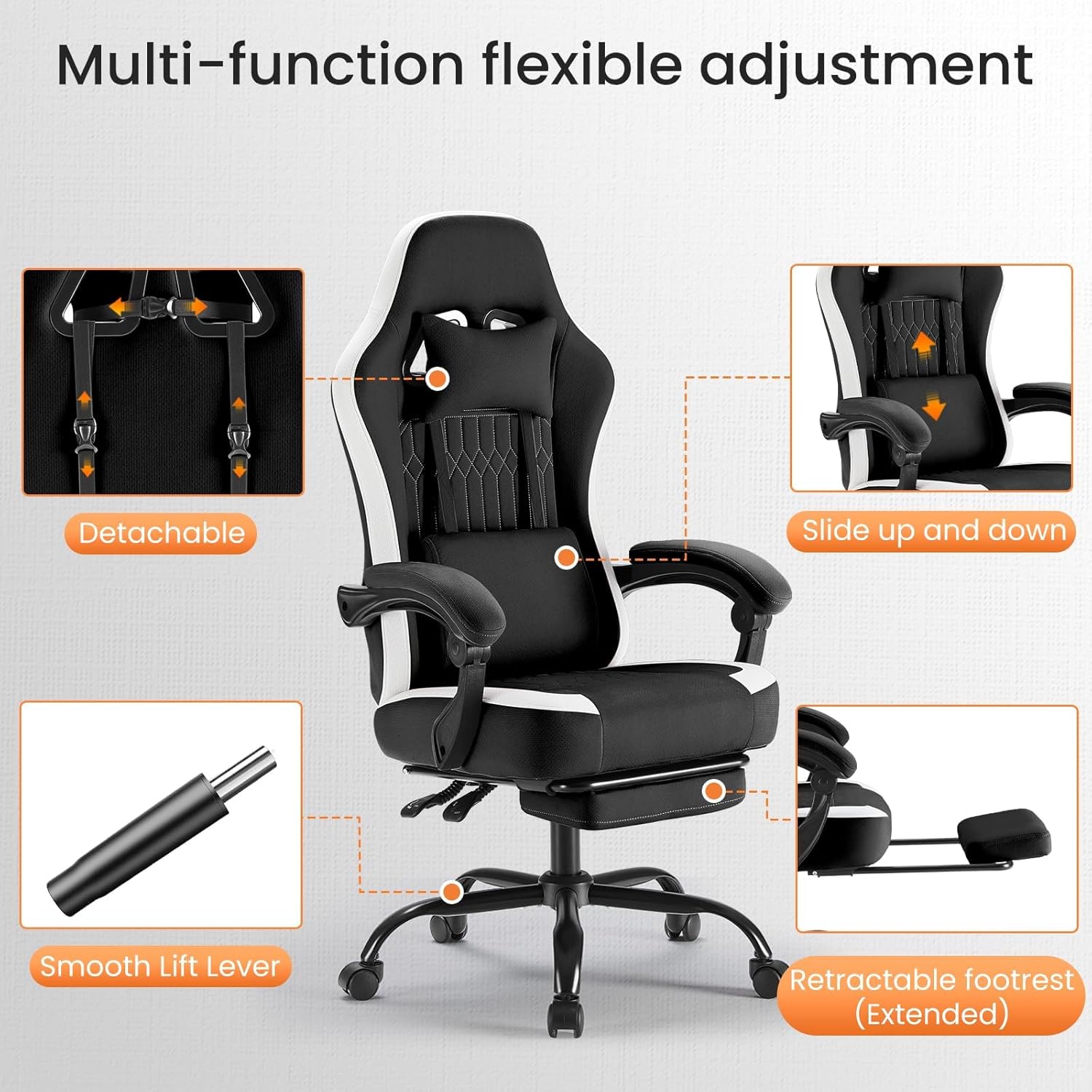
Image: Detailed diagram showing the various dimensions of the edx gaming chair, including height, width, depth, and footrest extension.
Warranty and Support
Specific warranty information for the edx Computer Gaming Chair is typically provided with your purchase documentation. Please refer to the warranty card or contact the retailer where you purchased the product for details regarding warranty coverage and claims.
For technical support or assistance with parts, please contact edx customer service through their official website or the contact information provided in your product packaging.